
Customer support tools like timetoreply, Gorgias, Zoho Desk, and others help businesses manage conversations and respond faster. These tools improve response times by prioritizing conversations/tickets, automating workflows, organizing requests, and ensuring no customer message gets missed.
But why is this important?
Because speed matters in customer service today. Many customers expect near-instant responses when they reach out for help. A recent survey shows that 60% of customers will end a business relationship if the wait times are too long.
As customer expectations grow, so does the pressure on support teams. However, customer support tools can help improve response and resolution times without your teams having to work longer hours.
In this blog post, we’ll look at powerful customer support tools to improve team productivity and customer communication.
Let’s get right into it.
The best customer support tools include email and shared inbox tools, live chat platforms, help desk and ticketing systems, and workflow automation tools, among others.
We evaluated several customer support tools based on their automation features, ticket management, integrations, scalability, and analytics. After comparing platforms, we identified tools that meet different business needs and improve customer satisfaction. Here’s a rundown of the key factors we considered:
In summary, businesses should choose customer support tools that offer automation, simplify support operations, and scale efficiently.
The best customer support tools differ based on what they are designed to do. Some focus on shared inbox and customer service email management, others on ticketing, live chat, automation, call support, or customer feedback. Each tool offers different strengths, features, and pricing models.
| Tool | Best for | Key Features | Unique strength | Pricing (starts at) |
| timetoreply | Email response time tracking & shared inbox management | Email analytics, shared inbox reporting, SLA tracking, performance optimization | Deep visibility into, and optimization of email response times | $38/month |
| Jira | Technical ticketing & issue tracking | Request tracking, chat management | Strong developer and IT support integration | $9.05 per user/month for up to 100 agents |
| EngageBay | Small business CRM + support | Help desk automation, call tracking, canned responses | All-in-one sales + support platform | $14.99 per user/month |
| Gorgias | Ecommerce customer support | AI agents, macros, ecommerce integrations | Strong Shopify and ecommerce integration | $10/month |
| WhatsApp for Business | Instant messaging support | Customer segmentation labels, quick replies, message templates | Fast customer communication on mobile | $0.025 per message |
| Freshdesk | Omnichannel support & automation | Ticketing, AI bots, omnichannel support | Strong automation and support scaling features | $23 per agent/month |
| Tawk.to | Free live chat support | Live chat widget, customer query tags | Completely free real-time chat tool | Free |
| Zoho Desk | Scalable help desk system | Automated ticketing, AI assistant | Strong scalability and Zoho ecosystem | $9 per user/month |
| Nicereply | Customer feedback & CSAT tracking | Customizable survey forms, performance tracking | Simple customer satisfaction tracking | $79/month |
| Crisp | Customer messaging hub | Shared inbox, real-time agent visibility | Unified customer messaging platform | $45 per month per workspace |
| Aircall | Cloud call center support | Call routing, AI voice agent, CRM integration | Easy cloud-based phone support setup | $40 per license |
| SurveyMonkey | Customer feedback collection | Survey templates, advanced text analytics | Advanced survey and data insights | $30 per user per month |
| Zapier | Workflow automation | Multi-channel ticket management, FAQ bots | Connects all tools without coding | $29.99 per month |
In summary, customer support tools vary by core function. The best tools combine speed, scalability, integrations, and strong response time improvement features.
Also Read:
Some of the top customer support tools that help reduce delayed responses include timetoreply, Freshdesk, Gorgias, Aircall, and several others.
Fast customer support depends on two key metrics: response time and resolution time.
Today, we have multiple customer touchpoints like email, social media, mobile phones, and website live chat, which make it easy for customers to reach out to you. For businesses, this means more opportunities to convert sales leads and support their customers. But if these omnichannel platforms are not managed efficiently, customer service resolution times and response times could increase, potentially leading to negative feedback.
Thankfully, there are a host of specialized tools to help you out. Whether you’re a sales agent or a customer service rep, here are some customer service tools that can help you become a customer-centric business:

Image via timetoreply
The timetoreply tool is an email analytics and shared inbox reporting tool that helps support teams respond faster and manage workloads better. It is one of the customer support tools that shows who’s responding quickest, when inbox traffic peaks, and which agents are overloaded or underutilized. This makes it ideal for performance-driven teams.
As part of your customer support tools stack, timetoreply offers two levels of reporting, one for the shared inbox and another for each assigned agent. This enables managers to track individual output, optimize workflows, and meet email SLA goals.
While email remains a core channel for customer support, shared inboxes can become chaotic without visibility. That’s because large customer-facing teams might want to keep all customer emails organized, with all their queries and complaints in one place.
However, with timetoreply’s shared mailbox, all team members can combine forces to answer and resolve customer issues. It also ensures that customer service teams reply to emails professionally and offer the best possible customer experience.
Key features
Pros
Cons
Pricing
Timetoreply has multiple pricing tiers based on your business needs:
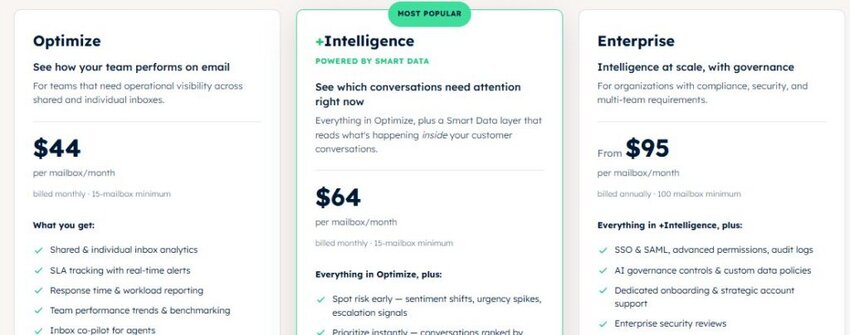
Image via timetoreply
Tool level
Usability
Pro tip: Use individual performance reports to set internal benchmarks and motivate your team to consistently meet standard email response time goals.
Also Read:

Image via Jira
Designed by Atlassian, Jira Service Management is a powerful help desk and issue tracking tool. It’s among the customer support tools built for teams that need speed, structure, and transparency in their customer service operations.
Jira helps support teams assign, prioritize, and resolve tickets without confusion or delays. Its strength lies in customizable workflows and detailed activity logs, ensuring that each ticket is routed to the right agent and resolved efficiently.
Customers can also track their own requests, reducing the need for repeated follow-ups and increasing overall satisfaction. Jira is one of the most reliable customer support tools, especially for technical and IT teams that require robust issue tracking and seamless collaboration.
It integrates seamlessly with development and operations platforms, making it ideal for managing complex support workflows and cross-functional teams. With Jira, businesses can streamline customer service resolution, eliminate redundancy, and provide consistent, professional support.
Key features
Pros
Cons
Pricing
Jira Service Management offers a free plan for up to 10 agents, but the paid plans allow you to add up to 20,000 support agents.

Image via Jira
Tool level
Usability
Pro tip: Use Jira’s automation rules to assign tickets to the right team members and reduce triage times.

Image via EngageBay
EngageBay is a comprehensive CRM and support platform designed for small teams that need powerful features without enterprise pricing. As one of the best customer support tools, it combines call center functionality, live chat, ticketing, and contact management in a single, user-friendly dashboard.
Traditional call centers require extensive infrastructure. But with EngageBay, you don’t need a whole department of people answering phone calls all day. You don’t even need to outsource those calls to somebody else.
How is this even possible? Because of Software as a Service (SaaS). Thanks to cloud computing solutions. Your business can run its entire call center operations through customer relationship management (CRM) software.
All you have to do is:
This makes EngageBay an excellent choice of customer support tools for startups and growing businesses. Whether you’re answering inquiries or following up on leads, EngageBay helps keep everything organized, measurable, and efficient.
Key features
Pros
Cons
Pricing
EngageBay offers a free help desk and live chat, but you can only view two tickets. It also has paid plans.

Image via EngageBay
Tool level
Usability
Pro tip: Integrate EngageBay’s live chat widget with your website to provide real-time support and convert hesitant visitors into loyal buyers.
Also Read:

Image via Gorgias
One essential customer support tool your brand should have on its website is a live chat service like Gorgias. According to a survey by Kayako, 51% of your customers return for a repeat sale if you offer live chat that helps them address their queries instantly.
Additionally, 73% of customers reported high customer satisfaction levels with live chat compared to email and calls.
Live chat solutions are popular because they deliver responses instantly. Plus, you can easily integrate them with email and ticketing systems. This allows you to track, monitor, and resolve customer issues across a variety of channels.
Gorgias is a great option to meet response time expectations via live chat. It’s one of the customer support tools that allows agents to access past conversations, orders, and customer history from a single dashboard. You don’t need to switch between tools.
As part of a comprehensive suite of customer support tools, Gorgias enables real-time support to be faster, more efficient, and personalized.
Key features
Pros
Cons
Pricing
This customer service software offers five paid plans based on the volume of customer tickets your team handles. However, the price increases when you choose beyond 50 customer tickets and AI automation features.

Image via Gorgias
Tool level
Usability
Pro tip: Create macros for common shipping, return, and tracking inquiries to reduce resolution time and boost consistency.

Image via WhatsApp Business
Unlike live chat, instant messaging lets businesses communicate with customers beyond their website. With customer support tools like WhatsApp Business, your support team can reach customers wherever they are. This includes smartphones and tablets, not just on your website.
Instant messaging platforms offer unprecedented convenience for businesses and customers. They combine your social media pages, website CTAs, mobile apps, and other channels into one touchpoint — your business number. Small teams, in particular, benefit from this flexibility, finding it a perfect middle ground between email response management software and live chat options.
You can also use AI-powered chatbots to automate the most common queries. This can include anything from fetching prices for your products or services to offering a menu or providing basic info about your business. Not only do you reduce the support load, but you also eliminate long email exchanges.
As one of the most popular mobile-first customer support tools, WhatsApp Business is a versatile solution for companies across a wide range of industries. It’s especially valuable for local service businesses, allowing them to communicate with customers instantly, build trust, and provide real-time support right from their phones.
Key features
Pros
Cons
Pricing
WhatsApp Business stands out from the list of customer support tools with its per-message pricing. This model charges you when the message is delivered, not sent. Additionally, the rates are based on location, currency, and conversation category, including marketing, utility, authentication, and service.

Image via WhatsApp Business
Tool level
Usability
Pro tip: Use labels to categorize conversations (e.g., leads, support, follow-up) so nothing falls through the cracks.
Also Read:
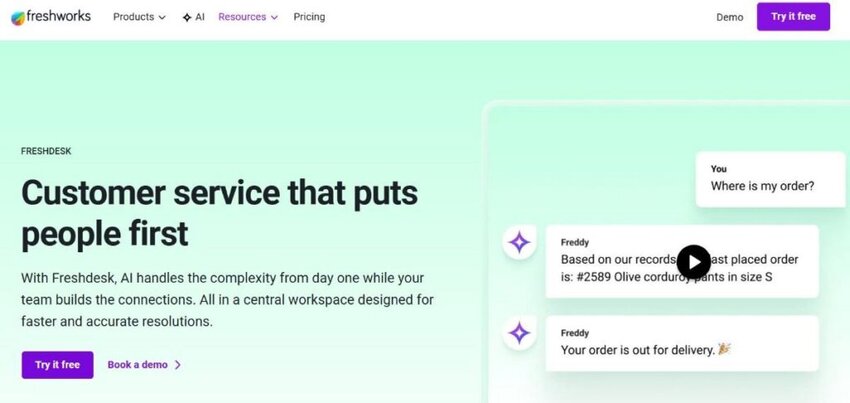
Image via Freshdesk
As a business scales, managing customer inquiries across multiple channels becomes increasingly challenging. Emails get buried, phone calls go unanswered, and social media comments remain unaddressed.
Without a central customer service tool to handle all this communication, things fall through the cracks, and that hurts customer trust. Freshdesk is one of the customer support tools that solves this problem by acting as a centralized support hub.
It’s one of the customer support tools that consolidates messages from email, chat, phone, and social media into a unified inbox. This allows agents to view the full conversation history and respond efficiently.
Its automation features — ticket prioritization and smart assignment — reduce human error and increase response efficiency metrics. With built-in SLA tracking and a self-service portal, Freshdesk empowers both agents and customers to stay informed.
Among the leading customer support tools, Freshdesk is known for its ease of use, comprehensive functionality, and scalable pricing. It’s well-suited for teams looking to streamline operations and deliver timely, personalized support across all touchpoints.
Key features
Pros
Cons
Pricing
Freshdesk is among the customer support tools that offer a free plan. However, you can add only two agents, and it’s available for 6 months. With the paid plans, you’re sure to get more features.

Image via Freshdesk
Tool level
Usability
Pro tip: Use Freshdesk’s Freddy AI to automate ticket management, freeing up agent time for more complex queries.

Image via Tawk.to
Many customers prefer live chat over other communication channels because it’s immediate and conversational. However, small businesses may be hesitant to implement customer support tools with this feature due to cost concerns.
That’s where tools like Tawk.to change the game. This live chat software offers powerful functionality at no cost, making it a standout option among budget customer support tools.
Once installed on your website, Tawk.to enables you to communicate with customers in real-time, answer questions, and resolve concerns before they escalate into issues.
You can assign conversations to specific team members, monitor agent performance, and even track customer behavior on your website. It also includes support for chat triggers, offline ticket creation, and integrations with third-party platforms.
Tawk.to is an ideal customer support tool for businesses that need fast live chat functionality without monthly fees. It’s especially useful for startups and small teams looking to establish trust and close sales through instant, human interaction.
Key features
Pros
Cons
Pricing
Tawk.to is a completely free customer support tool
Tool level
Usability
Pro tip: Add proactive chat triggers based on visitor behavior to start conversations and increase conversions.
Also Read:

Image via Zoho Desk
As your support team expands, handling customer inquiries can become increasingly taxing. Agents need to know who the customer is, what they’ve experienced, and how best to resolve the issue without switching between multiple customer support tools.
Zoho Desk is among the top customer service tools that address these challenges. It features a context-rich help desk system that seamlessly integrates with CRM, sales, and marketing data.
It’s one of the more versatile customer support tools, with features such as multi-department ticketing, workflow customization, and built-in AI via its assistant, “Zia.” It helps categorize tickets and suggest responses. Among most customer support tools, Zoho Desk is praised for its affordability, scalability, and strong customer service analytics features.
Key features
Pros
Cons
Pricing
When it comes to premium customer support tools for small businesses, Zoho Desk raises the bar with its free edition, which supports up to 3 agents. While it offers the basics, you can access advanced features in its paid plans.
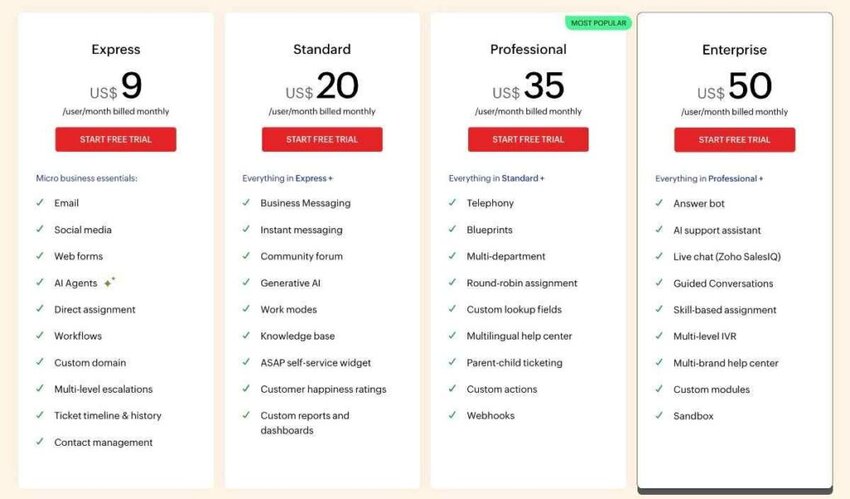
Image via Zoho Desk
Tool level
Usability
Pro tip: Pair Zia with ChatGPT to analyze sentiment and help agents understand a ticket’s emotional and contextual aspects for personalized support.

Image via Nicereply
Nicereply excels among customer support tools for its feedback-focused approach. It specializes in gathering and analyzing customer support metrics, including Customer Satisfaction (CSAT), Net Promoter Score (NPS), and Customer Effort Score (CES).
Most customer support tools center on customer communication. However, Nicereply gives you a clear picture of how well your support team is performing from the customer’s perspective.
It integrates with popular help desks such as Freshdesk, allowing teams to send surveys after ticket closure. If your goal is continuous improvement in service quality, this is the right customer service software to connect data with action.
Key features
Pros
Cons
Pricing
Nicereply has four paid plans with a 14-day free trial and a 30-day money-back guarantee:

Image via Nicereply
Tool level
Usability
Pro tip: Sync agents with Nicereply and set automation rules to follow up with customers who are satisfied or dissatisfied.
Also Read:

Image via Crisp
With live chat, video, and phone support options, Crisp is one of the most versatile customer support tools. You can also build marketing campaigns, set chat triggers, and monitor visitor behavior on your website in real time.
It’s a comprehensive messaging platform where teams can chat with customers, automate responses with bots, and share knowledge articles from a single, sleek dashboard.
Managing customer conversations across email, chat, and social apps is more effective with a unified interface like Crisp. It combines support, sales, and engagement functions into a single platform, enhancing productivity for your team.
It’s one of the versatile customer support tools and a favorite among startups and brands seeking modern, customer-centered experiences. Plus, its intuitive design and affordable pricing make it easy for small teams to get started without sacrificing functionality.
Key features
Pros
Cons
Pricing
Crisp offers a free plan and four paid versions, all of which include a 14-day free trial. It’s among the customer support tools that charge a flat rate per workspace, not agents.

Image via Crisp
Tool level
Usability
Pro tip: Collect data through various Crisp dashboards to evaluate customer service interactions and address shortcomings.

Image via Aircall
Not all support is provided through customer service email or live chat. Sometimes, businesses need customer support tools for voice and phone communication, which is where Aircall helps support and sales teams.
It’s one of the top customer support tools that allows you to set up call routing and interactive voice response (IVR) menus without physical hardware. The customer support software lets you provide 24/7 phone support via its AI voice agent.
It integrates with CRMs and self-service resources to provide contextual customer service. This makes Aircall a powerful addition to your customer support tool stack.
Aircall offers WhatsApp as an add-on for collaborating in shared inboxes and logging conversations to your customer relationship management tool. It’s ideal for support teams that need voice communication but want to manage it as easily as cloud-based email or chat.
Key features
Pros
Cons
Pricing
Aircall is one of the most notable customer support tools with great features, but no free account. You can pay for a minimum of three licenses.

Image via Aircall
Tool level
Usability
Pro tip: Use call-routing software to build workflows that automatically connect customers to the most relevant support team. This can help boost your customer service metrics.
Also Read:

Image via SurveyMonkey
SurveyMonkey is one of the customer support tools businesses use to collect structured customer feedback at key moments. These could be after delivering a product, closing a support ticket, or ending a live chat.
It’s one of the customer support tools that go beyond customer satisfaction scores and provide a deep insight into how customers truly feel.
Unlike most customer support tools on our list, SurveyMonkey doesn’t manage support tickets. Instead, it focuses on enhancing the overall customer experience by collecting valuable feedback and turning it into actionable insights.
You can create CSAT, NPS, or custom surveys, and distribute them via email, website pop-ups, or embedded links. The platform’s powerful analytics help identify trends, pain points, and areas of excellence in your support operation.
Key features
Pros
Cons
Pricing
SurveyMonkey has three pricing categories for teams, individuals, and enterprise plans:
Team

Image via SurveyMonkey
Individual

Image via SurveyMonkey
Tool level
Usability
Pro tip: Send automated follow-up email surveys after support interactions to capture real-time feedback and improve agent performance.

Image via Zapier
Every minute spent on tasks like tagging tickets, updating spreadsheets, or moving data between tools is a minute not spent helping customers. Zapier is one of the most efficient customer support tools, reducing your workload by connecting to over 8,000 apps.
With Zapier, you can automate repetitive tasks like creating tickets from form submissions or adding survey responses to your CRM. Support teams that rely on multiple customer support tools, including email management software, can use Zapier to maximize efficiency and reduce errors in their customer service operations.
For teams juggling multiple platforms, Zapier is one of the most powerful customer support tools available. It helps reduce errors, streamline workflows, and free up your team to focus on delivering better, faster service.
Key features
Pros
Cons
Pricing
Zapier’s AI automation plans are based on the number of tasks you complete monthly. However, it’s one of the few customer support tools that offer a free forever plan.

Image via Zapier
Tool level
Usability
Pro tip: Create a Zap that escalates tickets marked “urgent” to Slack or SMS for immediate attention.
Also Read:
1. What tools are used for customer support?
Customer support tools include help desk software, live chat platforms, email response trackers, call center systems, and feedback tools. Some examples are:
2. What are the best customer support tools?
The best customer support tools depend on your team’s size, channels, and goals. Common top choices include:
3. What are the 4 P’s of customer service?
The 4 P’s of customer service are principles that form the foundation of exceptional customer care. They stand for:
4. What are the top 3 customer support skills?
Customer support skills are essential for building trust and handling high-stress situations effectively. The top three skills every customer support agent should have are:
5. What are the 7 essentials of customer service?
The essentials of customer service ensure consistent, high-quality service that builds loyalty and satisfaction. They include the following:
6. What customer support tools help reduce missed customer messages?
Customer support tools with shared inboxes and ticket assignment features help teams avoid missed conversations. Tools like timetoreply and Freshdesk automatically organize incoming requests. This keeps customer messages visible and accountable.
7. Which customer support tools work best for email-heavy teams?
Teams that handle large email volumes should choose customer support tools with shared inboxes and analytics. For instance, timetoreply helps teams track email response times and workload distribution. Freshdesk supports ticket management and automation. These customer support tools help reduce missed emails and improve accountability across growing support teams.
8. What customer support tools help manage support across multiple channels?
Businesses handling email, chat, WhatsApp, and social media need customer support tools with multichannel support. Tools like Crisp, Gorgias, and Zoho Desk centralize conversations on a single dashboard. This helps agents avoid switching between platforms and gives customers faster, more consistent support experiences.
Also Read:
If you want strong email management and shared inbox visibility, customer support tools like timetoreply, Zoho Desk, and Gorgias work well. For omnichannel ticketing and help desk automation, Freshdesk, Jira, and Tawk.to are strong options that streamline ticket management and customer workflows.
If your focus is instant messaging and live customer engagement, WhatsApp Business, Crisp, and EngageBay help teams respond quickly.
The most effective tools combine features like shared inbox reporting, workflow automation, real-time analytics, and integrations to help teams work more efficiently.
Overall, timetoreply stands out for teams that want to track response speed and improve accountability without adding extra complexity to existing workflows.
Book a demo with us today to see how timetoreply fits into your customer support operations.
Get live inbox alerts and reply quickly to customer emails with timetoreply

Head of Customer Success @ timetoreply
Barry Blassoples is the Head of Customer Success at timetoreply, where he helps customer-facing teams boost revenue and protect brand reputation by providing actionable insights to improve their business email response times. He has over 15 years of leadership experience across customer success, sales, and marketing roles in high-growth tech companies.


Trusted by high-performing inbound sales teams and customer-facing teams globally.
Close more deals and delight more customers with the faster, smarter, deeper email analytics and performance optimization software that works straight from your team’s inbox.