
Learning how logistics teams can reply to emails professionally requires clear communication. You should respond quickly and use simple language to avoid confusing customers and vendors. However, you should also avoid overly casual language.
Issues are common in logistics since it involves multiple processes. You’ll deal with missed deadlines, disrupted supply chains, and unhappy customers.
Exceptional customer service enables quick resolutions. It keeps operations on track and customers satisfied. Logistics teams can reply to emails professionally using templates.
When stakeholders raise concerns, replying professionally helps them view your business positively.
To learn how logistics teams can reply to emails professionally, respond within 24 hours, confirm order or shipment details, explain the next step, and end with a polite sign-off. Use templates for delays, delivery confirmations, and vendor follow-ups to save time and stay consistent.
Logistics companies must build trust through responsive communication systems. This improves customer satisfaction and sustains customer relationships.
Responsive communication drives trust with clients. Every interaction either reassures the client or raises concerns.
Having a strong communication system:
Clear and reliable communication helps build trust. Clients will know that you want their business to succeed in the long term.
In logistics, timing is everything, so quick emails are a must. If you delay a reply, a customer’s shipment gets delayed as well. That could ruin their whole schedule.
Also, when customers don’t receive status updates, they may become frustrated and escalate the issue. Therefore, responding quickly can turn a negative situation into a positive one. Here’s why it matters:
When logistics teams reply to emails professionally, speed and message tone prevent escalation. They also strengthen customer relationships and improve operational efficiency.
Learning how logistics teams can reply to emails professionally requires clarity and speed. You also need to provide direct answers. Best practices include setting customer service SLAs, personalizing emails, and using customizable templates. Here are 14 proven strategies to improve your email communications in logistics.
Prioritizing fast replies to logistics emails shows that you acknowledge the situation and are working on it.
Whether a customer is seeking support for freight handling or has shipping inquiries, respond within an hour. The average logistics company only replies after 12 hours.
To stand out, logistics teams can reply to emails professionally with these samples:
By prioritizing fast logistics emails reply times, you can set your company apart from the competition.
Sounds impossible? Not with email performance software like timetoreply. Cut your email response time to 15 minutes with timetoreply. This tool is specifically designed to empower customer-facing teams handling time-bound communication.
When you reply to logistics emails fast, you show clients that you respect their time.
Also Read:
Email performance software is designed to automate and analyze emails. It can use AI to generate email drafts and offer email analytics. This includes open and click-through rates.
Logistics is a complex business. There are a lot of moving parts to keep track of. The right tools make it easier to reply to logistics emails consistently and professionally.
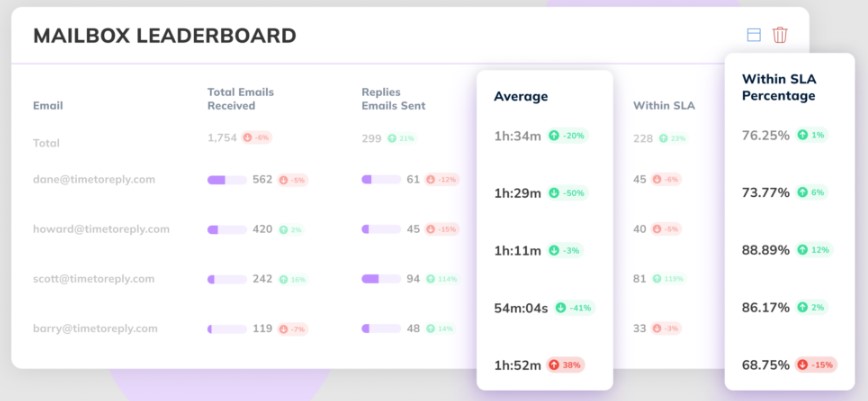
Email performance software can help manage email response times. Monitor this metric and coach your team to improve efficiency.
Set alerts and email SLAs, then sit back and allow the software to do its magic. The timetoreply Extension scans your logistics emails to find the next one your customer-facing team needs to address.
Rest easy knowing you won’t miss a single email and that customers won’t be left waiting. With the right email management software, your team can reply professionally to logistics emails and concerns even during peak seasons or challenging operational periods.
Personalization in logistics emails goes beyond just addressing the customer by name. You should also understand their situation so you can provide additional details. For example, you can reference the specifics of their previous email.
Your customers are real people — treat them like it.
Adding a personal touch is how logistics teams can reply to emails professionally. It’s worth the extra effort to make them feel valued and cared for. This results in long-term loyalty. You can use professional replies like:
To reply to logistics emails professionally, add a personal touch. This creates a human connection in an industry that most people see as transactional. Remember that every interaction is a chance to build trust and strengthen customer relationships.
Also Read:
Using simple language to explain concepts in logistics emails, reducing back and forth.
Logistics is a complex field. Don’t make it more complicated by using technical jargon with customers. Use words that everyone understands.
Make sure to address all the points raised by the customer. If the issue is complex, consider breaking it down using bullet points or a numbered list. Here’s an example:
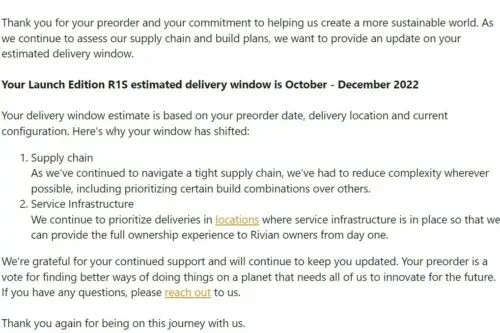
Image via Red Stag Fulfillment
One way that logistics teams can reply to emails professionally is turning complex concepts into accessible information. This way, customers feel more capable to make informed decisions.
Staying in touch with customers means sending updates before they ask. This shows that you’re reliable.
When customers reach out, send them an instant message to let them know you’re there to help. Set expectations on when your support team will get back to them.
Assure them you’re on the case, then roll up your sleeves and tackle their issue or request. Let them know the next steps so they can see your dedication and expertise in action.
Close it off with a check-in to ensure they’re happy — you’ll win their hearts and trust. Consistent follow-up emails demonstrate your commitment to excellence. Each time you reply professionally to logistics emails, you strengthen your reputation. You’re seen as a reliable partner in your customers’ supply chain.
Here are a few ways to respond to follow-up emails:
When something goes wrong with a customer’s order, say what you’re doing to resolve the issue.
Issues are bound to pop up somewhere along the logistics customer journey. How you respond to emails sets you apart.
Quick responses to stakeholders and customers show that you’re focused on creating solutions. You should prioritize first contact resolution. Outline the steps you’re taking to address the problem and provide a clear timeline for resolution to reduce follow-ups.
Here’s a template for responding to order delays:
“Hi [Name], we’re aware of the delay affecting your shipment [Order ID]. Our team has rerouted it through [location], and the revised delivery date is [date]. We’ll send tracking confirmation within 2 hours. We apologize for the disruption this has caused your operations.”
Speed reassures the customer that their issue is being handled with urgency and care. A solution-focused approach is important when replying professionally to logistics emails.
Also Read:
Practicing empathy shows that you understand how the customer feels. It improves the customer experience and trust in your brand.
Logistic challenges can be incredibly stressful for your clients. When an order is late or inventory gets messed up, first acknowledge first how this affects their business. Don’t just jump straight into fixing it. Show them that you care.
Use phrases like:
This validation shows you grasp the real-world implications of logistics problems.
See how Amazon used empathy to reply to logistics emails professionally about issues:
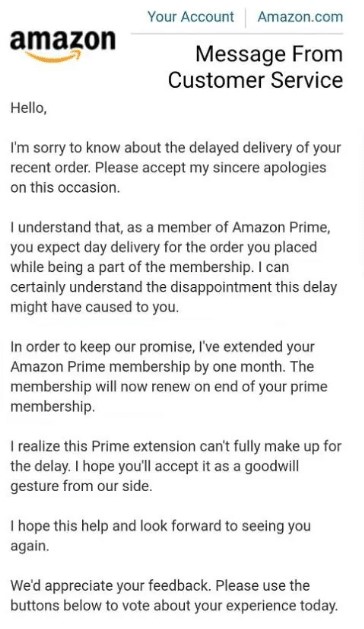
Image via Saufter
A tiered response protocol in logistics classifies emails by urgency and complexity. This way, your customer service team can handle urgent issues fast while managing general inquiries efficiently.
Not all logistics inquiries require the same urgency. Logistics teams can reply to emails professionally using a classification system:
Respond to requests with appropriate urgency. It should be based on business impact rather than treating every message as equally important.
Also Read:
Logistics email templates are pre-written, customizable business email formats. Using well-designed templates ensures both quality and efficiency.
Create a library of customizable email templates for common logistics scenarios. These include shipping delays, customs issues, inventory adjustments, and delivery confirmations.
Include placeholders for personalization and specific details. The goal is to create professional frameworks that can be quickly tailored to individual situations.
Having prepared frameworks is a key aspect of how logistics teams can reply to emails professionally. This is true even during high-volume periods or challenging circumstances.
Here’s what a customizable logistics email template looks like:
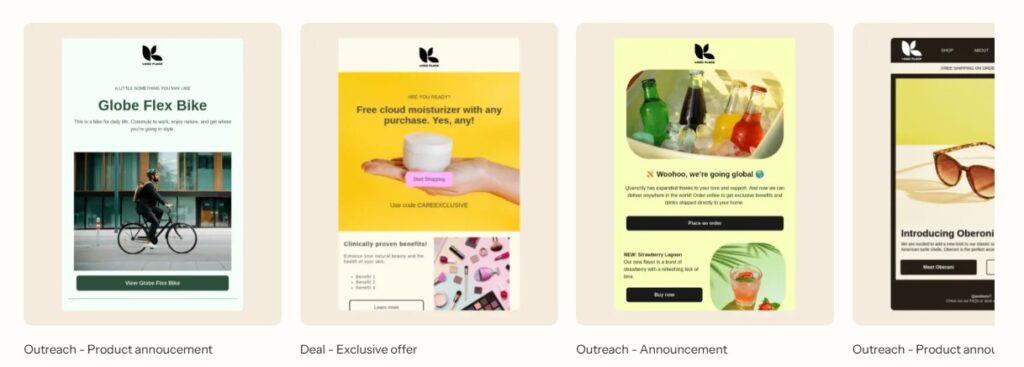
Image via Klaviyo
Leveling up communication means measuring, analyzing, and optimizing email replies. Track metrics like average email response time and customer satisfaction score.
Monitor your customer-facing teams’ performance to identify opportunities for optimization. Continuously improving how you reply to logistics emails professionally drives competitive advantage.
Find bottlenecks and identify trends and areas for continuous improvement with live data and insights. Use these to make changes so your logistics customer-facing team can assist customers at every step.
Regularly assess how logistics teams can reply to emails professionally. This reveals opportunities to enhance both efficiency and customer satisfaction.
Implementing feedback loops means using customer responses to improve future email communication.
Actively improving your logistics email replies shows your commitment to service excellence. Set up systems to collect feedback on your customer service email response, such as short surveys sent after issues are resolved.
Ask customers to rate your response time, clarity, and solution effectiveness. Use this feedback to improve how logistics teams can reply to emails professionally.
Also, share successful email exchanges as examples for team training. Recognize team members who demonstrate excellence in customer communication.
Also Read:
Communication training teaches you how to write faster, more concise, and more professional emails. Team members learn to apply email etiquette and improve their email communication skills.
It ensures logistics teams can reply to emails professionally across all customer touchpoints. Invest in regular training for your team. Cover industry-specific language, common customer concerns, and communication skills.
Regular refresher training ensures everyone remains aligned with company communication standards.
By understanding how logistics teams can reply to emails professionally, you create a cohesive brand experience that builds customer confidence.
Using AI in logistics emails helps teams create accurate and empathetic replies.
Email management platforms now use AI to suggest replies, check grammar, and analyze tone. These tools help logistics teams reply professionally and more efficiently to email inquiries.
However, always ensure a human reviews the email before sending it. This maintains authenticity and accuracy. Finding the right balance helps you reply professionally to logistics questions.
When properly implemented, these tools can help you reply professionally to email logistics inquiries at scale without sacrificing quality.
Multichannel consistency means providing the same information and brand tone across email, SMS, and mobile apps.
You should reply to logistics inquiries professionally, regardless of how customers contact you.
Use integrated customer relationship management systems to maintain conversation history across channels. Replying to logistics emails consistently across platforms creates a seamless customer experience.
Note that multichannel differs from omnichannel. In logistics, multichannel support improves accessibility. Meanwhile, omnichannel systems create a fully connected customer journey.

Image via Nextiva
Also Read:
A good way to reply to logistics emails professionally is to combine speed, personalization, and empathy. Use email performance software to track response times and consistently train your team.
1. What are the most important logistics customer service elements?
The following skills are necessary for logistics teams to reply to emails professionally:
2. What is an example of a professional logistics email response?
Here’s a template you can use:
“Hi [Customer Name], thank you for reaching out. Your shipment is on its way, with an expected delivery date of [date]. Please let me know if you need any further assistance.”
3. What is a good logistics email format?
A good logistics email format includes the following:
4. What is the relationship between customer service and logistics?
Logistics and customer service have to work together to get orders delivered on time. Logistics handles the physical side of things, such as warehousing and shipping. Customer service answers questions, fixes problems, and helps people post-sales. Together, they provide a seamless experience from start to finish.
5. What is customer service in logistics?
Logistics customer service involves answering customer questions and fixing their problems. You also need to send quick updates. This ensures shipments move smoothly between your company and the customer.
Knowing how logistics teams can reply to emails professionally involves a fast response time, clear communication, and a solution-oriented template. A professional logistics email should quickly address the issue and reassure customers that their concerns are being handled.
Pick one thing to change today. Write a template for late orders. Set a response goal for your support team. Teach your staff about email etiquette. Lastly, collect feedback from customers so you can keep improving.
Want to make your inbox even easier to manage? timetoreply helps your team respond faster and smarter without changing how you already work. It takes just a few minutes to set up. Also, it gives you the exact insights you need to improve your team and keep your customers happy.
Get live inbox alerts and reply quickly to customer emails with timetoreply

Head of Customer Success @ timetoreply
Barry Blassoples is the Head of Customer Success at timetoreply, where he helps customer-facing teams boost revenue and protect brand reputation by providing actionable insights to improve their business email response times. He has over 15 years of leadership experience across customer success, sales, and marketing roles in high-growth tech companies.



Trusted by high-performing inbound sales teams and customer-facing teams globally.
Close more deals and delight more customers with the faster, smarter, deeper email analytics and performance optimization software that works straight from your team’s inbox.