
Customer service software lets you manage customer questions, track conversations, and resolve support requests in one central place. Businesses use it to keep support teams organized, speed up response times, and improve the overall customer experience.
When customers wait too long for help, they may feel frustrated, switch to competitors, or leave bad reviews. This can cost you business and taint your reputation.
By using customer service software, you spend less time searching for information and more time solving customer issues.
In this guide, you’ll learn the benefits of customer service software, key features to look for, and the top solutions to consider.
Reliable customer service software helps you send quick replies, unify data, and deliver a consistent customer support experience. It also helps you balance your workload, improve teamwork, reduce errors, track performance, and grow your business.
Most businesses also use customer service software to reduce repetitive work. By automating tasks like ticket routing, follow-ups, and canned responses, you can enhance team productivity and improve response times.
According to a 2026 report by Shep Hyken, 89% of surveyed customers expect fast support responses. Another 79% expect more personalized interactions.
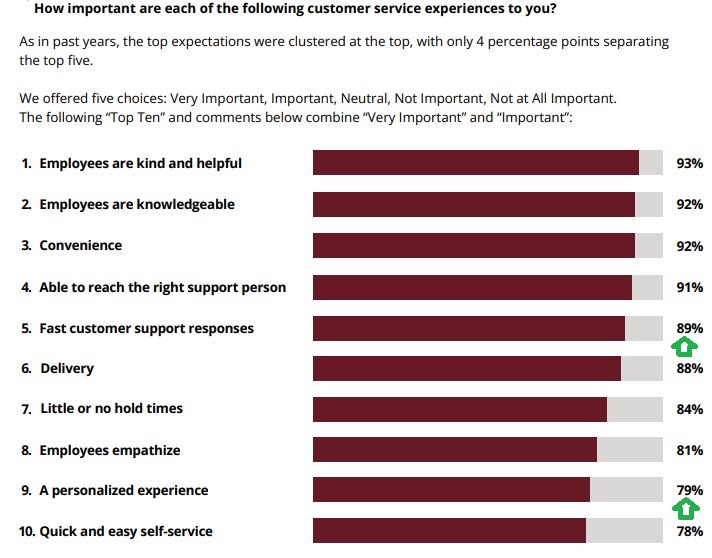
Image via Shep Hyken
You can see how challenging it is to keep customers happy all the time. It’s easy to lose them to your competitors.
So, why should you switch to customer service software solutions? Here are the key benefits.
Customer service software solutions help teams respond faster to customers by centralizing all interactions on a single platform. Agents can instantly access messages, reply from a shared inbox, and use smart tools that prevent delays.
Most of these solutions also alert teams when messages sit unanswered for a certain period.
You can access features like:
These features let your team handle customer inquiries quickly and efficiently. It’s a great way to improve average response times and increase customer satisfaction.
As your business grows, managing an increasing number of customer requests manually becomes unsustainable. Fortunately, customer service software solutions make it possible to improve productivity without losing control.
With the right tools, you can organize and manage more requests without hiring a big customer support team.
Some of these customer service software solutions go as far as supporting multiple users and new agents without starting from scratch. The only thing you may need to do is pay a little extra for the additional slots.
The best customer service software options store all customer interactions in one place. Every chat, email, or call is tracked, so nothing gets lost. This makes it much easier to access everything and see what was said and when.
Additionally, agents can view past messages, purchases, or complaints before addressing recurring issues. The customer doesn’t need to repeat themselves every time they’re assigned a new agent.
This is important since 68% of customers switch brands because they have to repeatedly explain themselves, according to the previously mentioned Hyken report.
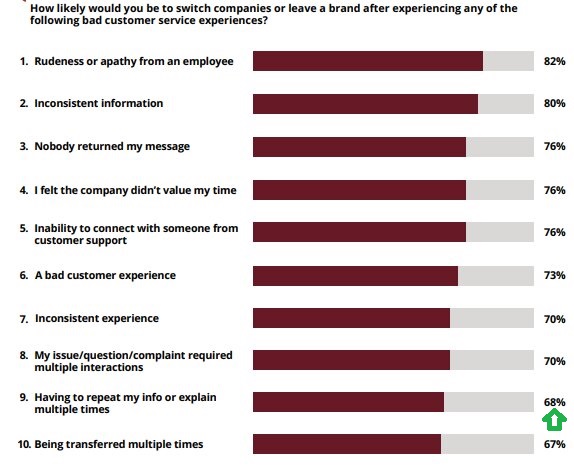
Image via Shep Hyken
The quick responses generated through automated customer service software solutions are good for customer satisfaction. They provide templates you can reuse, shared notes for uniform responses, and standardized replies.
Even new agents don’t have to guess how to answer customers, as they can simply refer to the templates. This creates a consistency that builds customer trust over time and improves retention.
People are prone to mistakes, whether intentional or not, which can harm a brand’s reputation. Customer service software solutions mitigate this risk by providing automatic responses for minor inquiries.
These software solutions also guide human agents on what to respond with when inquiries are assigned to them.
Good customer service software options route tickets to the right agents without delays. This balances workloads so no one gets overwhelmed while another sits idle.
Some advanced alternatives even allow you to assign tasks based on skill, time, or type of request. This keeps the work flowing and ensures customers aren’t put on hold while waiting for a single overloaded person.
Customer service software tools make it easy for teams to work together. Agents can leave private notes, tag teammates, or assign tasks within the same system. This helps teams avoid double replies and confusion.
Everyone knows what’s going on, and issues can be handled as a group if needed. One agent simply picks up from where the last one left off without needing to be briefed beforehand.
Functional customer service software solutions come with analytics dashboards that display the team’s performance. You can see how many tickets are open, how fast they’re being answered, and how satisfied customers are.
These built-in features help you catch issues early and keep your team on track. If something starts to slow down response times, you can identify it quickly and take action before it affects the customer experience.
Customer service software helps you improve response times, centralize interactions, reduce manual errors, and deliver a smoother experience across channels. With the right system in place, you can also enhance team collaboration, scale your business, and monitor performance.
Also Read:
Some customer service software solutions focus on managing tickets and emails. Others help with live chat, customer relationships, phone support, and self-service resources.
Let’s take a look at the main ones:
The first kind of customer service software solution is Help Desk software. Typically, it provides a way for your customers to ask questions, find answers, and solve problems they’re having related to your business.
When a customer asks a question, you’ll get notified, and a ticket is opened. When the issue is solved, you can close the ticket. You’ll be able to see a full overview of what issues are currently open, how quickly they get resolved, and more.
Many help desk tools offer a wide range of functionality and can encompass the other two main kinds we’re going to look at.
Finally, we have live chat software. While live chat can be incorporated as part of help desk software or a CRM, we’ll look at it as a separate customer service solution.
These customer service software options are very popular for internet-based businesses. With them, you can quickly and conversationally engage with customers. They also have a powerful backend to help you keep track of ongoing conversations and customer issues.
The next type of customer service software is CRM software. These can be huge in scope and quite similar to help desk software.
The key difference is that they’re more closely focused on marketing and sales.
If you have long sales cycles and need to engage with leads before they buy from you, a CRM is essential.
Customer service software like timetoreply’s email response time tracking and analytics is a little different.
This type of customer service software solution monitors and optimizes email reply times, unlike CRMs that control marketing-related content on a mass scale.
If you want to improve customer or lead response times or need insights into your team’s email volumes, an email analytics tool is key.
The call center customer service software enables teams to manage phone calls more efficiently. It often includes call routing, automated greetings, call recording, and performance tracking. This makes it easier for customer service reps to handle calls quickly and professionally.
Some call center systems also support call scripting or integrate with CRM systems to display customer information during conversations. This eliminates the hassle of switching between tools and helps them offer better service.
This customer service software provides a self-help center for customers to find answers on their own. It enables you to create and manage articles, FAQs, guides, and troubleshooting steps.
Customers search, click, and find what they need without talking to support. It reduces the number of tickets your team receives and helps people solve minor issues even outside business hours.
This type of customer service software tracks customer issues by converting them into tickets. The tickets move through defined stages, such as Open, In Progress, and Closed.
Each one includes key details like the customer complaint, assigned team member, and any updates made along the way.
It’s a customer service software solution that brings structure to your support process. It ensures every problem has a clear status and is assigned to the right person.
This customer service software collects opinions from your customers through surveys, forms, or review requests. It helps you understand how people feel after using your product or getting support.
You can use it to measure satisfaction and spot areas that need fixing. Some tools also provide ratings, allowing you to gain clear insights into what’s working and what needs improvement.
Various types of customer service software solve different support challenges. The most popular types include help desk, live chat, CRM, ticketing, productivity tracking, knowledge base, and customer feedback tools.
We chose the top customer service software options based on the features you need to deliver fast, reliable, and organized support. We looked at user experience, automation, pricing, scalability, reporting, integrations, data privacy, and supported channels:
We selected the best customer service software based on ease of use, automation, integrations, pricing, scalability, security, and reporting features. We also considered how well each tool supports fast, organized, and reliable customer support across multiple channels.
Choosing the right customer service software becomes easier when you compare features, pricing, and strengths side by side. Here’s a quick comparison of the top options to help you find the perfect fit for your specific business goals:
| Tool | Best for | Unique strength | Pricing |
| timetoreply | Email-heavy sales and customer-facing teams who want to improve response speed | Strong real-time email response tracking and performance optimization | $38/mailbox/month |
| Zendesk | Growing and large support teams | Highly scalable customer service software | $25 per agent/month |
| Freshdesk | Small and mid-sized businesses | Easy setup and beginner-friendly interface | $23 per agent/month |
| LiveAgent | Multichannel support teams support | Fast live chat support | $15 per agent/month, billed annually |
| Intercom | SaaS and online businesses | Conversational customer support and onboarding | $39 per seat/month |
| Salesloft (Formerly Drift) | B2B sales and support teams | Strong sales and support conversations | Custom pricing |
| Zoho Desk | Budget-conscious startups and small businesses | Competitively priced customer service software with strong integrations | $9 per user/month |
| Help Scout | Small customer-centric brands | Simple shared inbox that functions like email | $30 per user/month |
| Front | Teams managing high email volumes | Email collaboration for customer-facing teams | $35 per seat/month |
| Salesforce Agentforce Service (formerly Salesforce Service Cloud) | Large enterprises with complex support needs | Deep CRM integration and enterprise scalability | $25 per user/month |
| HelpCrunch | Digital startups | Combines support and marketing tools | $15 per user/month |
| Talkdesk | Phone-heavysupport teams | Advanced contact center and AI support capabilities. | $85/per user/month |
| Genesys Cloud CX | Large enterprises and contact centers | Enterprise-grade customer experience platform | $85/per user/month, billed annually |
| Podium | Local and service-based businesses | Strong local business communication tools | Custom pricing |
| Hiver | Google Workspace teams | Works directly inside Gmail | $35/per user/month |
| SaneBox | Individuals and small teams | Smart email management and decluttering | $8.99/month |
| Pipedrive | Sales-focused businesses | Combines sales CRM with simple support workflows | $8.99per seat/month |
Also Read:
The best customer service software solutions are timetoreply, Zendesk, Freshdesk, and LiveAgent. They also include Intercom, Salesloft, and Zoho Desk.
Some of these tools focus on live chat, ticketing, and automation, while others specialize in email management and team collaboration.
Here are the top customer service software platforms to consider:
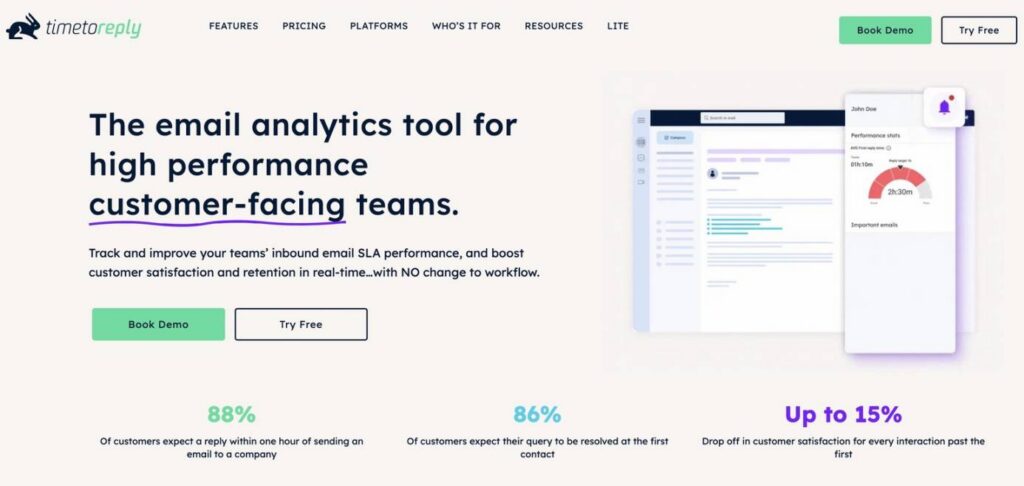
Image via timetoreply
The timetoreply customer service software helps teams manage and respond to emails quickly. It focuses on improving email response times without adding unnecessary features that slow you down.
This high-quality service provides a real-time view of how quickly team members reply, making it easier to meet average email response-time targets. For businesses that communicate with customers daily via email, it provides both visibility and control.
One of the reasons timetoreply works well is that it’s specifically designed for email-based customer service. Unlike live chat tools or ticketing systems, it doesn’t ask you to change how you work.
You just plug it into your existing email setup, and it starts tracking replies. It also supports email tracking on Outlook and Gmail, which most businesses already use.
Additionally, this reliable customer service software option helps you identify performance gaps. You can see who’s responding too slowly or which team member is not replying to customers’ inquiries at all.
As a manager, this helps you hold people accountable and resolve issues before they affect customer satisfaction.
Key features
Pros
Cons
Pricing
The timetoreply customer service software solution comes with three plans:
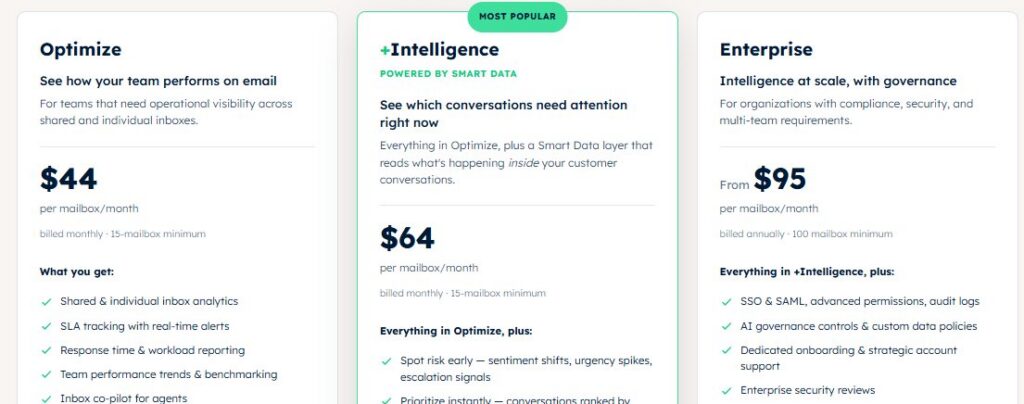
Image via timetoreply
Tool Level
Usability
Pro tip: Set up SLA alerts for different inboxes so you’re always notified before a reply is late. It keeps your sales team sharp and avoids customer frustration

Image via Zendesk
Zendesk is one of the most popular customer service software companies out there, and for good reason. It’s well established and has a range of products and solutions for all types of businesses.
It has products for everything from live chat and integrated customer service tools to knowledge base systems and a CRM.
Additionally, everything is organized in one place, so your team doesn’t have to switch between tools. That makes it easier to respond faster and keep things on track.
Another significant reason people choose Zendesk over its alternatives is its robust ticketing system. The customer service software turns every message, email, or social media DM into a ticket to ensure your team does not miss anything.
Your team can tag, sort, and assign tickets based on priority or topic. This saves time and ensures that each customer receives a reply tailored to their issue.
Zendesk’s customer service software solution also integrates well with other tools. This is helpful if you’re already using tools like Slack, Shopify, or Zoom. You don’t have to change how you work; Zendesk just fits in.
This is the kind of flexibility that enables growing teams to maintain high-quality support without overhauling their entire system.
Lastly, Zendesk also allows you to build a help center. You can create FAQs and how-to guides, allowing customers to often find answers on their own. This reduces the number of support tickets, allowing your team to focus on business productivity.
If you’re already using multiple products and would rather have everything under one roof, then Zendesk is the customer service software option for you.
Key features
Pros
Cons
Pricing
Zendesk comes with four pricing plans:
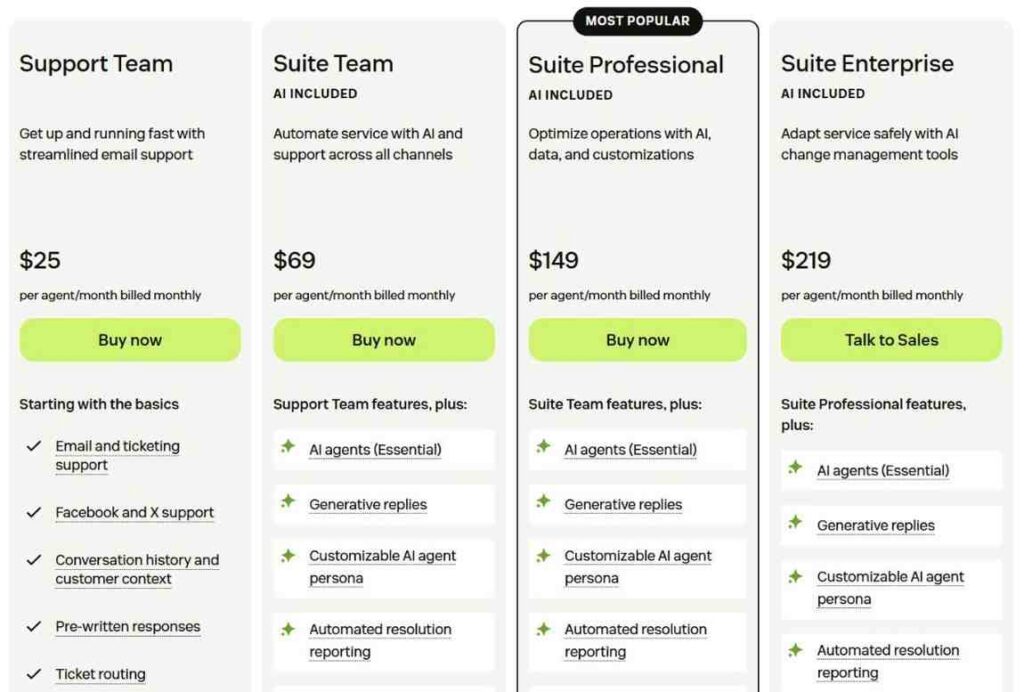
Image via Zendesk
Tool level
Usability
Pro tip: Set up triggers and automations early to handle routine tasks. This will save your team time and keep things running smoothly.
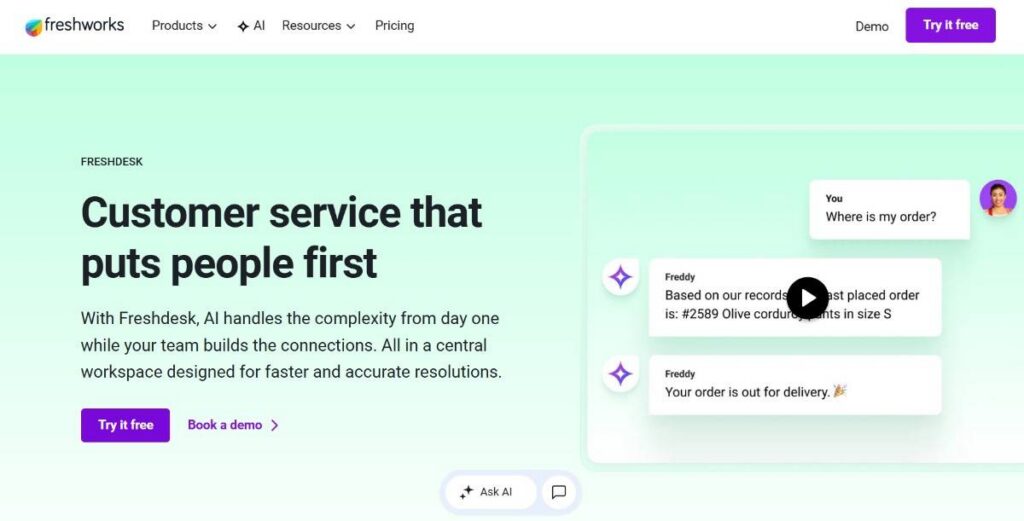
Image via Freshworks
Next up on our list of the best customer service software solutions is Freshdesk. It’s part of the Freshworks ecosystem and has one of the quickest setup processes.
This customer service software has all of the features you would expect from a help desk solution, such as live chat, email, and phone support, but you can even integrate your social media messages into it.
Additionally, you don’t need a big tech team to get started. The layout is clean, and most features are easy to find. Even smaller teams can start offering solid support without extended weeks of training.
Freshdesk also helps your team stay on top of customer requests by turning every message into a ticket. You can set up rules to assign, tag, or sort them automatically based on topic or urgency.
That way, nothing gets buried, and your team doesn’t waste time on manual tasks. You also get an AI feature called Freddy AI, which combines the functionality of AI Agent and AI Copilot to automatically resolve customer queries across channels.
Key features
Pros
Cons
Pricing
You get three pricing options if you choose Freshdesk. They include the following:
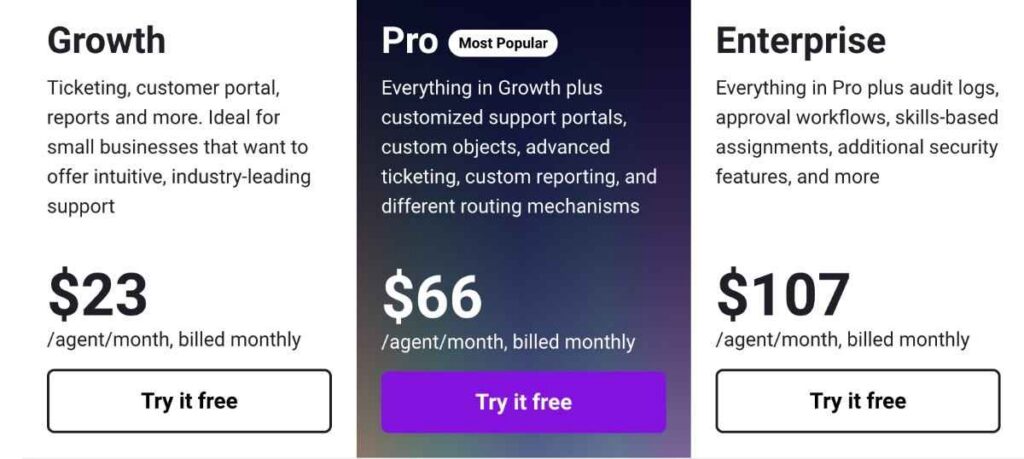
Image via Freshworks
Tool level
Usability
Pro tip: Use canned responses for common questions. It keeps replies consistent and saves your team a lot of time.
Also Read:
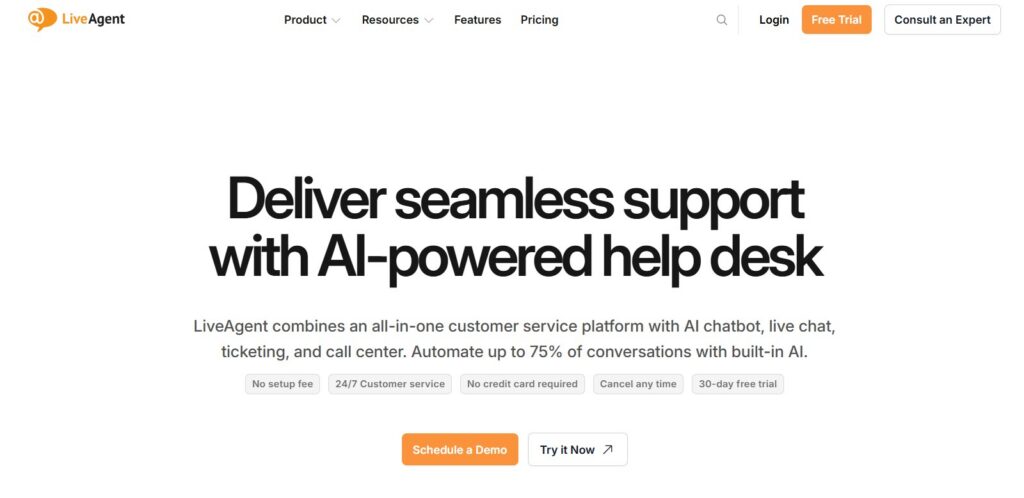
Image via LiveAgent
LiveAgent is an excellent customer service software for businesses handling high volumes of customer messages.
It boasts the fastest chat widget on the market and offers 175+ help desk features and 40+ integrations. All these combine to make sure most of your apps can work with it.
It’s a comprehensive customer service software option designed to consolidate all crucial customer communications in a single dashboard. This includes emails, social messages, and live chats.
Another factor that makes LiveAgent a reliable customer service software solution is its strong emphasis on real-time support.
LiveAgent achieves this through an AI feature called LiveAgent AI Answer Assistant. It generates personalized email responses using ChatGPT. This reduces the need for human customer reps who work 24/7.
Additionally, this customer service software option includes a ticketing system to manage customer communications. Every message is converted into a ticket, which is automatically sorted and tracked.
Your team can assign tags, set priorities, and leave notes on each one. This keeps everyone in sync and avoids double replies or missed tickets.
There’s also ample support for multiple languages, making LiveAgent an ideal choice for businesses that operate across different time zones.
Key features
Pros
Cons
Pricing
LiveAgent is a fairly affordable customer service software option that offers four price plans that include the following:
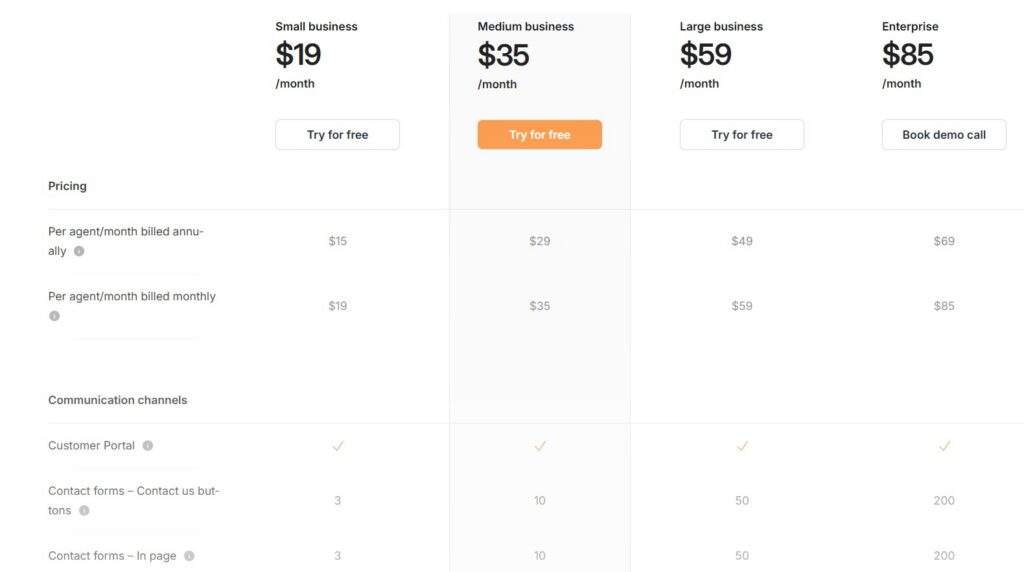
Image via LiveAgent
Tool level
Usability
Pro tip: For the best results, set up chat triggers to initiate conversations with visitors automatically. This is a great way to improve customer engagement without waiting for someone to ask for help.
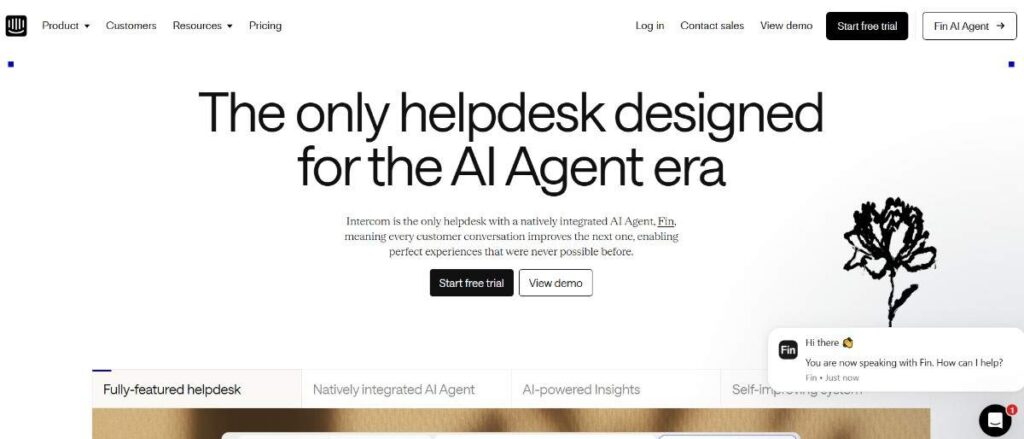
Image via Intercom
Used by many SaaS and tech businesses, Intercom is a customer service software solution that helps you build better customer relationships. It allows you to deliver personalized messaging and guide users through onboarding.
You can link Intercom with your website to send targeted messages depending on the page someone is on. Additionally, you can automate your customer service responses by sending answers to frequently asked questions through it.
The platform’s automated answering bot can resolve up to 33% of commonly asked questions. You can also build your knowledge base in Intercom, which is a big time saver. The customer service software lets you quickly send links to customers with questions that have a published answer.
Moreover, Intercom’s customer service software is built for fast-moving support teams that want to maintain fast response times without being overwhelmed. It’s more than just a help desk, thanks to its interactive Fin AI agent.
Fin AI can maintain human-level conversations and even clarify actual customer questions. It can take actions on behalf of customers across your systems without requiring human intervention.
Key features
Pros
Cons
Pricing
Intercom has four price plans you can choose from:
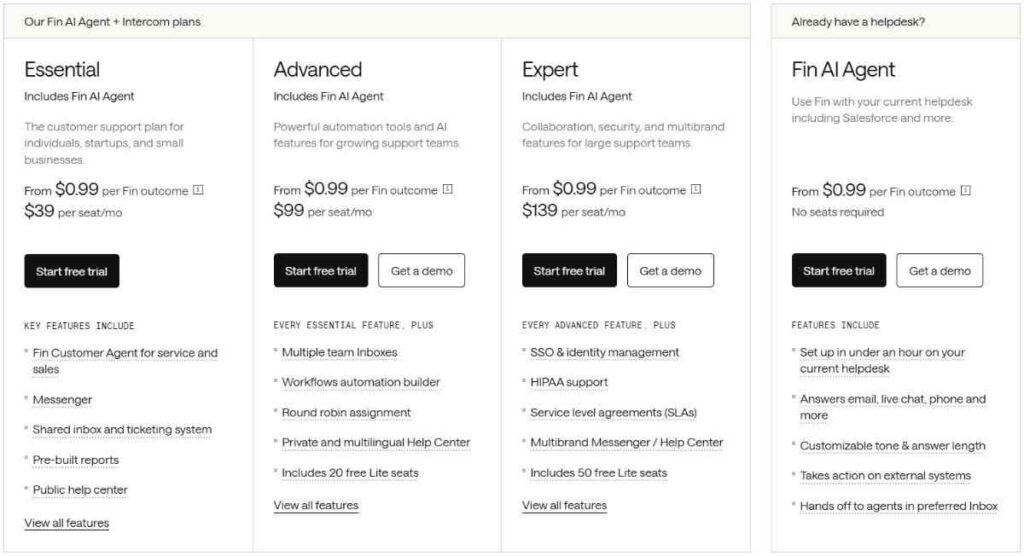
Image via Intercom
Tool level
Usability
Pro tip: Use custom bots to handle basic questions, allowing your team to focus on more complex issues. It saves time without losing that human feel.
Also Read:
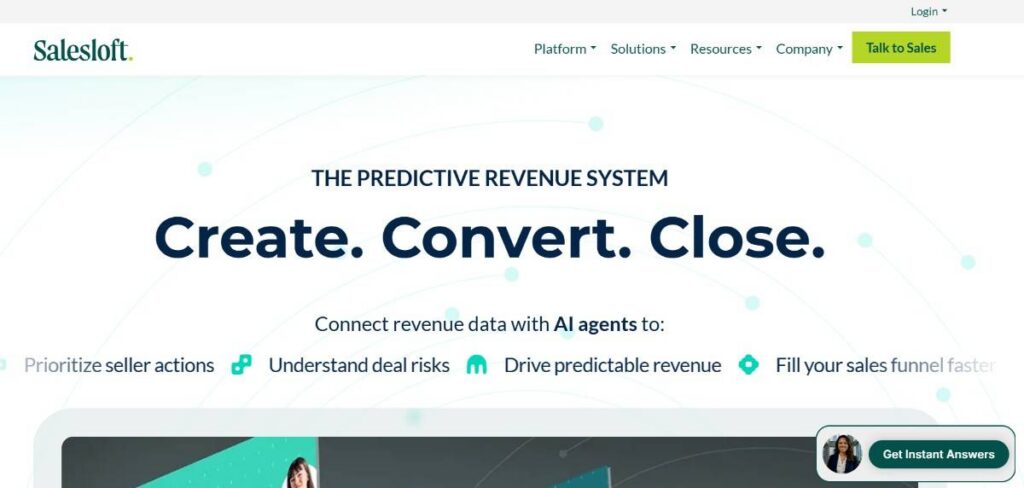
Image via Salesloft
Salesloft is a customer service software solution designed to speed up customer communication. It focuses on real-time chat and automating first contact resolution. Customers don’t have to wait around for resolutions.
It’s especially fitting for businesses that have just expanded and are receiving a flood of inquiries from regular and new customers.
Salesloft’s best-selling point is simplicity. The customer service software handles both live and automated conversations without being clunky. You can set up custom chatbots that respond to leads, qualify them, and book meetings.
The customer service software solution can be integrated with more than 180 apps. You can track email responses on Outlook, Gmail, Zoom, LinkedIn, Slack, and more.
Key features
Pros
Cons
Pricing
Salesloft’s customer service software offers two price plans: Advanced and Elite. However, you have to contact the sales department to get the full price.
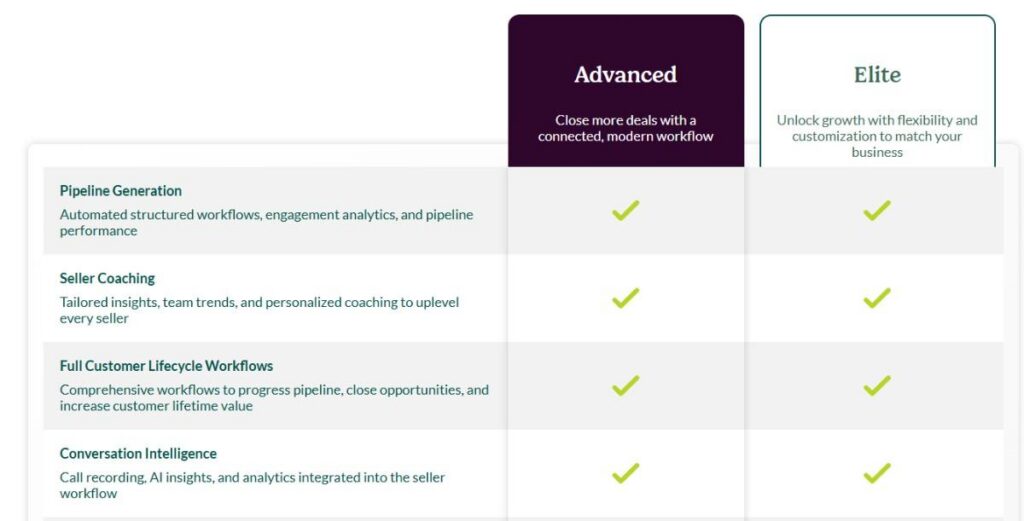
Image via Salesloft
Tool level
Usability
Pro tip: Use Salesloft’s calendar integration to book meetings right in the chat. It saves time and keeps the conversation moving.
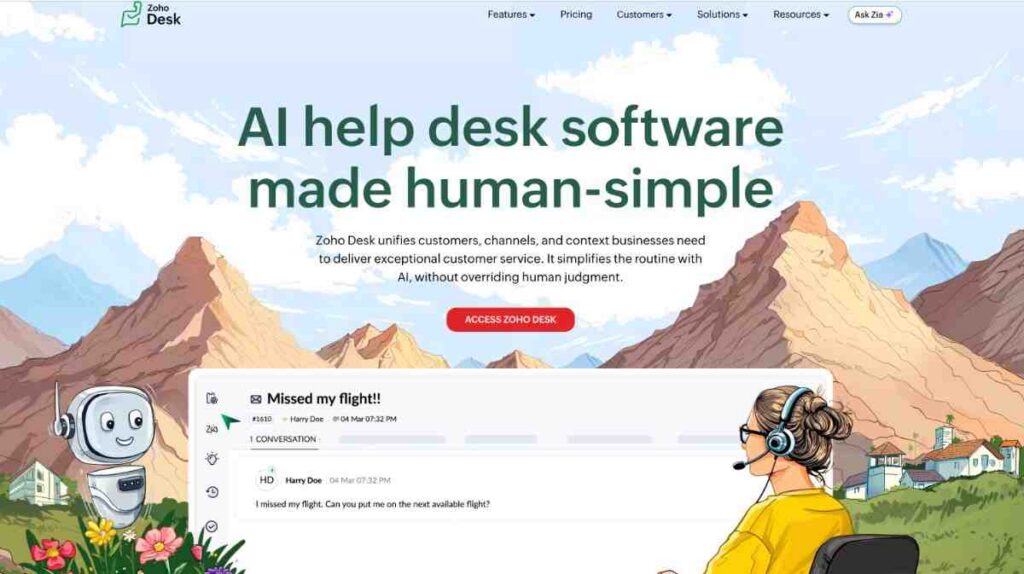
Image via Zoho Desk
Zoho Desk is part of the popular Zoho platform. It’s a customer service software option that helps teams manage high volumes of customer interactions with ease.
It can help you identify and act on trends and patterns in your customer questions and in your team’s replies. It also lets you incorporate response time tracking and reporting features to help you easily see how your team is performing.
You’ll be able to identify areas that you can improve upon or automate to help get the right answers to your customers as quickly as possible.
Zoho Desk also combines customer emails, chat, social media, phone, and web forms on one screen. Its friendly ticketing system organizes messages so agents can reply clearly and quickly.
Another core feature that sets Zoho Desk apart as one of the best customer service software solutions is Zia. It’s a built-in AI assistant that suggests knowledge base articles, auto‑tags tickets, analyzes customer sentiment, and predicts ticket anomalies.
This smart help reduces manual work and the associated errors, freeing your agents to focus on other problems.
Zoho Desk excels in customization and workflow automation. You can automate customer SLA (Service Level Agreement) rules, alerts, and approval paths. It’s a flexible solution that helps you streamline processes and ensure consistent support.
Additionally, this customer service software option supports custom layouts, roles, and multi-brand portals, allowing you to accurately mirror your support process.
Key features
Pros
Cons
Pricing
Zoho Desk is one of the most affordable customer service software alternatives. It offers a free plan and comes with four pricing plans that include the following:
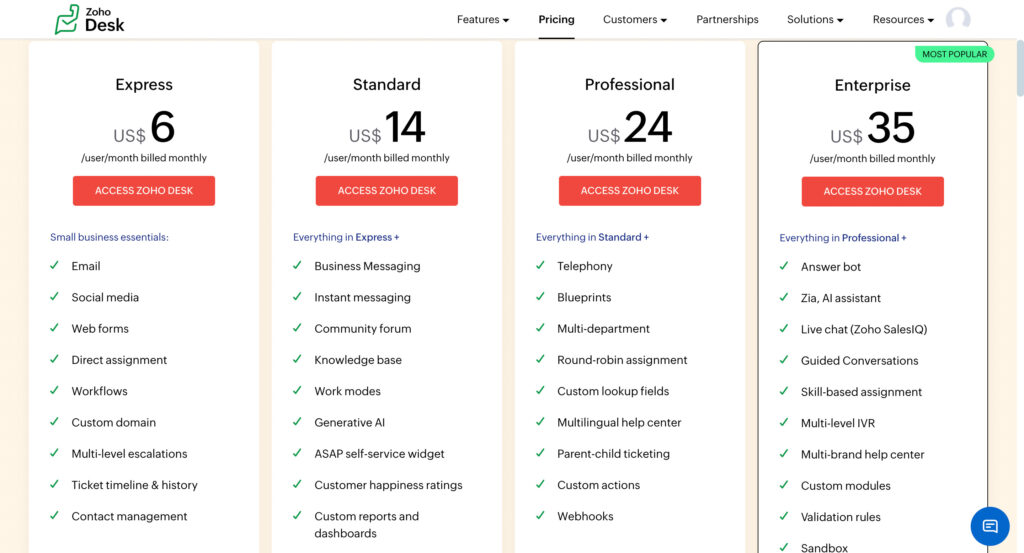
Image via Zoho Desk
Tool level
Usability
Compared to some advanced customer service software options, Zoho Desk is a little easier to navigate for intermediate users.
Pro tip: Take time to set up your SLA rules and Zia workflows early. It cuts delays and keeps tickets flowing to the right agents automatically.
Also Read:
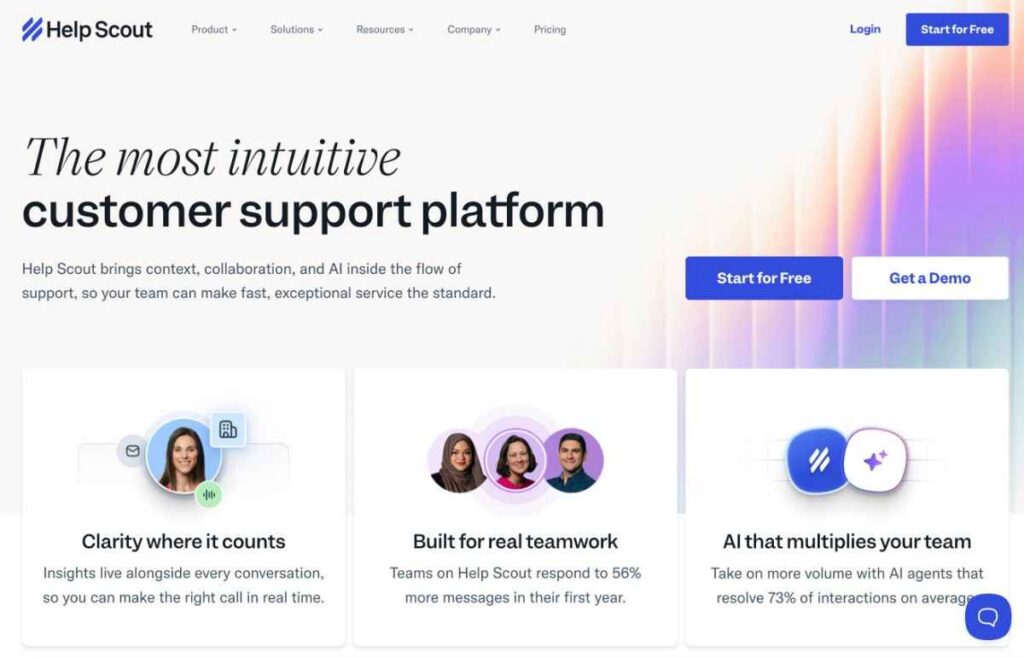
Image via Help Scout
Help Scout is a customer service software solution designed to help companies provide a personalized customer service experience. You can use it to avoid making customers feel like they’re shouting into a void when they need help.
The customer service software has powerful features such as a shared inbox so your team can get an easy view of what other team members are working on and help them as needed, as well as robust reporting features.
Plus, Help Scout integrates with 100+ tools such as Salesforce, Slack, Mailchimp, and Shopify, so no matter what your tech stack looks like, Help Scout will fit in nicely.
This customer service software option also combines automation and personal care, allowing you to use AI setups like Beacon. This feature summarizes threads, polishes drafts, and translates responses for efficiency.
You also get detailed insights into how your support team is doing. It tracks metrics like response time, chat wait time, search success, and customer ratings. This sets up clear paths for improving your customer service software setup.
Key features
Pros
Cons
Pricing
Help Scout offers a free plan, three paid tiers, and an AI Answers add-on as detailed below:
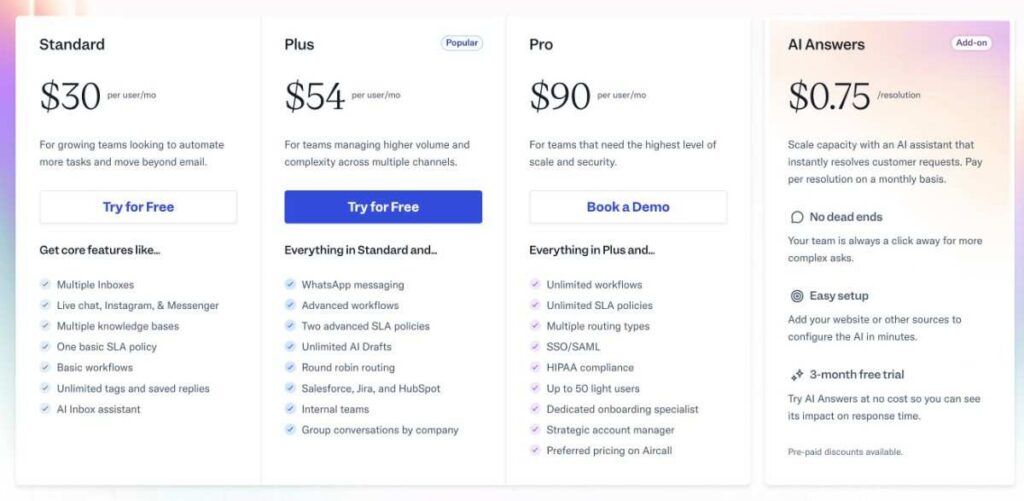
Image via Help Scout
Tool level
Usability
Pro tip: Use workflows and tags to automatically prioritize tickets. It keeps your inbox clear and ensures that urgent requests don’t slip through.
Image via Front
Front is primarily an email app, but it doubles up as a reliable customer service software solution that does more than your average inbox.
It provides a crystal clear picture of your customer service needs and integrates your team’s inboxes into one place.
You can connect your calendar and apps to it, allowing you and your team to schedule meetings or bring your team into the loop as needed.
You’ll even be able to see if another member of your team or a support agent is in the process of replying to a customer to save multiple messages from being sent at once.
Like the majority of the other customer service software alternatives, Front centralizes emails and chat into one inbox. Your team doesn’t have to waste time juggling tools. This works well for businesses that need to keep communication fast and personal.
Front also strikes a good balance between AI and human interaction. You can set up smart rules to route messages, assign tickets, or respond automatically. All of these can be achieved without coming across as robotic to the customer.
Additionally, this reliable customer service software supports genuine teamwork. Multiple agents can collaborate on a message without stepping on each other’s toes. It ensures a smooth internal communication and a unified response to the customer.
This is helpful for brands that need to involve different teams, such as sales, billing, or tech support, while maintaining standard response times.
Another notable feature is the rich integration support. Front fits well with how modern businesses work. This customer service software integrates with your existing tools, such as CRMs, project boards, and analytics dashboards.
Key features
Pros
Cons
Pricing
Front comes with three plans:
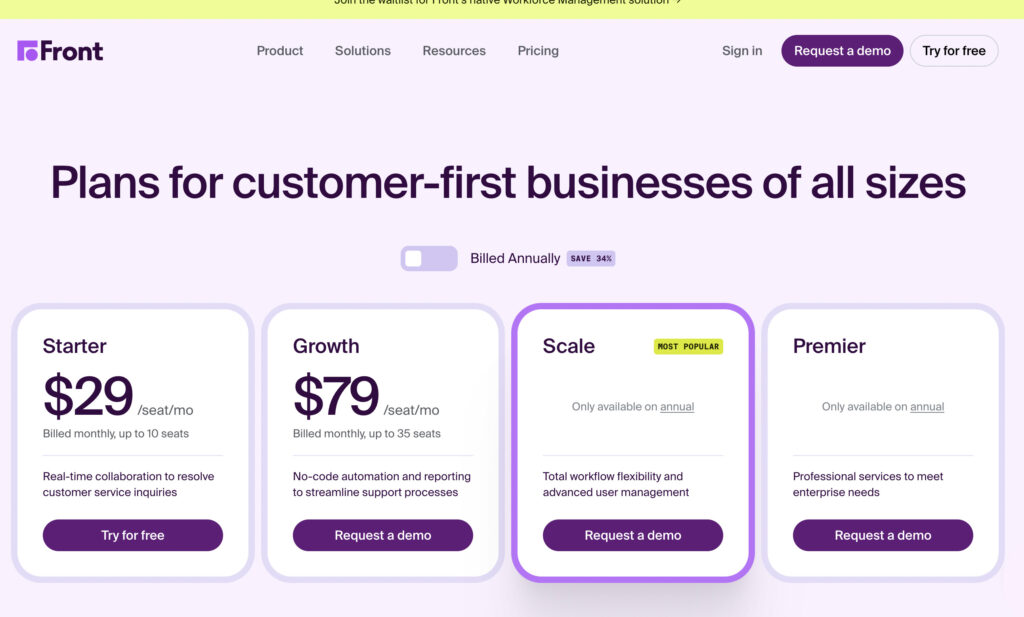
Image via Front
Tool level
Usability
Pro tip: Use Front’s tagging and automated rules together to sort messages by type, priority, or customer tier. This keeps your team focused and reduces response time delays.
Also Read:

Image via Salesforce Agentforce Service
Salesforce Agentforce Service (formerly Salesforce Service Cloud) is designed to manage high volumes of service requests. This makes it an ideal customer service software for large businesses with diverse customer needs.
It unifies communication channels, phone, email, chat, messaging apps, and more into a single platform. This allows agents to work efficiently without jumping between tools.
Agentforce Service combines flexibility with AI-powered efficiency. Its built-in AI assistant helps teams respond faster by suggesting relevant replies and knowledge base articles. This ensures customer inquiries get the most helpful answers.
This customer service software also predicts what customers might ask based on past customer data. This kind of support makes a difference when your team has to handle numerous tickets every day.
Furthermore, Salesforce Agentforce Service is built with both speed and teamwork in mind. Agents can see customer history, open cases, and related data all in one view. They don’t need to ask customers to repeat themselves.
The customer service software solution also supports automation across different areas like routing, workflows, and reporting. You can set rules that route cases to the right person or escalate issues when they’re not resolved in time.
Key features
Pros
Cons
Pricing
Salesforce Agentforce Service comes with five price plans:

Image via Salesforce Agentforce Service
Tool level
Usability
Pro tip: Set up automated case routing based on topic or customer type to get tickets to the right agents faster and reduce wait times.
Image via HelpCrunch
HelpCrunch is a customer service software built for speed. The combination of live chat, email, and automation ensures your business responds to every message on time.
It’s ideal for small to medium teams that want fast, personal support. The simple yet effective features, such as AI chatbots, enable you to handle customer inquiries in real-time.
These smart chatbots answer common questions and collect basic info before passing the chat to a real person.
This customer service software also provides a shared inbox to manage chat, email follow-ups, and chatbot replies. That means your team sees the full picture without switching tabs.
Another valuable feature offered by this customer service software solution is email marketing support that makes it easier to re-engage customers.
You can set up automated campaigns or newsletters directly from the same platform where you handle support. This is useful for brands that want to turn support chats into long-term relationships.
Key features
Pros
Cons
Pricing
HelpCrunch may not be the cheapest customer service software but monthly plans are within the affordable range. It has the following price plans:
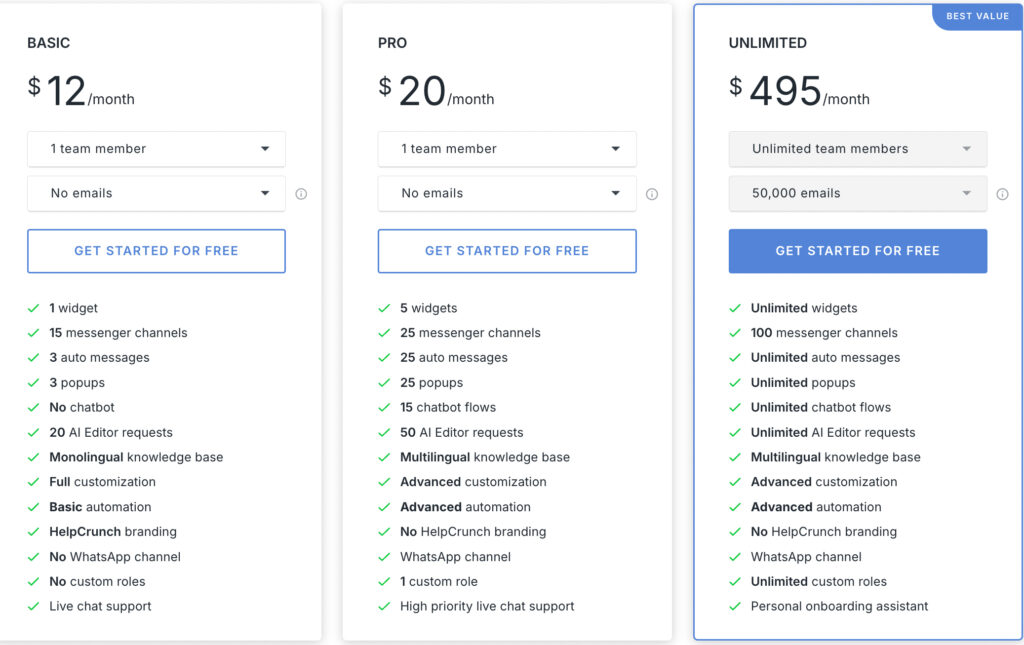
Image via HelpCrunch
Tool level
Usability
Pro tip: Create chatbot flows that collect key information, such as name, issue type, and urgency, upfront. This helps your team respond faster and prioritize tasks better.

Image via Talkdesk
Talkdesk sets itself apart from other customer service software with its in-depth AI capabilities. Nearly every feature is designed to leverage AI, including the Talkdesk Autopilot and Self-Service AI.
These features allow customers to find help on their own without waiting for an agent.
This customer service software also has multi-agent orchestration, an advanced AI capability that enables multiple digital agents to work in sync. Each specializes in specific tasks.
For example, one agent can handle FAQs while another manages returns, creating a smoother, more efficient support experience.
You also receive Agentic engagement tools that enable you to reach out to customers before problems arise. The customer service software achieves this by running surveys, sending follow-up emails, or sending appointment reminders without requiring anyone to do it manually.
This advanced customer service software also integrates with other tools. It works well with CRMs, help desks, and messaging apps, so you don’t need to switch between systems all the time.
With Talkdesk’s AppConnect, you can easily extend its functionality by connecting to a wide range of third-party apps. You also get embedded tools that help you manage calls, messages, and chatbot interactions without needing to open a separate tool.
Key features
Pros
Cons
Pricing
Talkdesk has two-tiered price plans that include the following:
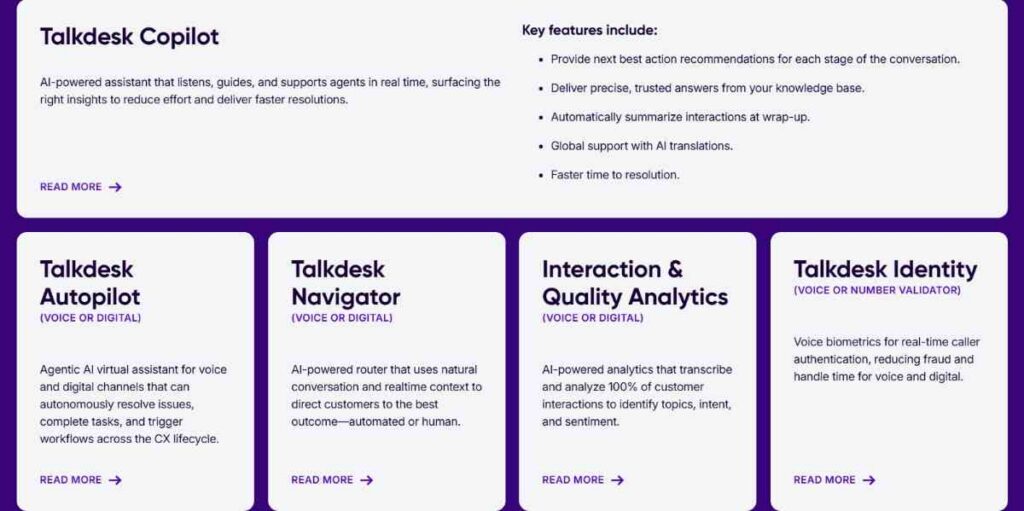
Image via Talkdesk
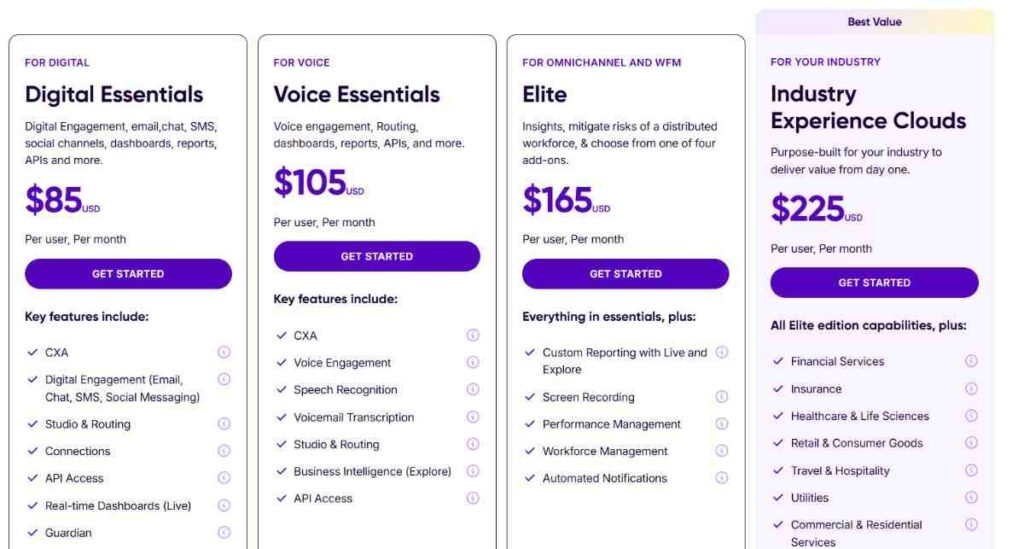
Image via Talkdesk
Tool level
Usability
Talkdesk is pretty advanced, making it unsuitable for beginners who have never handled customer service software solutions before.
Pro tip: Start with automation templates for the most common issues your customers report. This will cut lead response times and help your team focus on tickets that really need a human touch.
Also Read:
Image via Genesys Cloud CX
Genesys Cloud CX is a cloud-native customer service software solution that handles all types of customer communication channels. It uses AI-powered routing and bots to ensure that each customer receives assistance quickly.
This is a detailed email analytics platform with journey tracking built in, allowing you to monitor customer interactions and identify areas for improvement.
Genesys Cloud CX also takes customer security very seriously. Data is encrypted and regularly tested for vulnerabilities, ensuring that all customer communications remain private. Since it’s cloud-based, security updates are prompt.
This customer service software option also uses smart tools such as conversational AI, predictive routing, and Agent Copilot to assist both customers and agents. That means customers can self-serve with chatbots or IVR (interactive voice response).
The platform integrates seamlessly with your existing tech ecosystem. It has open APIs (application programming interfaces) and integrates with common CRMs, knowledge bases, and third-party tools.
You get a unified desktop where everything pops up together, including screen pops, customer context, and team chat.
Key features
Pros
Cons
Pricing
Genesys Cloud CX comes with four price plans that include the following:
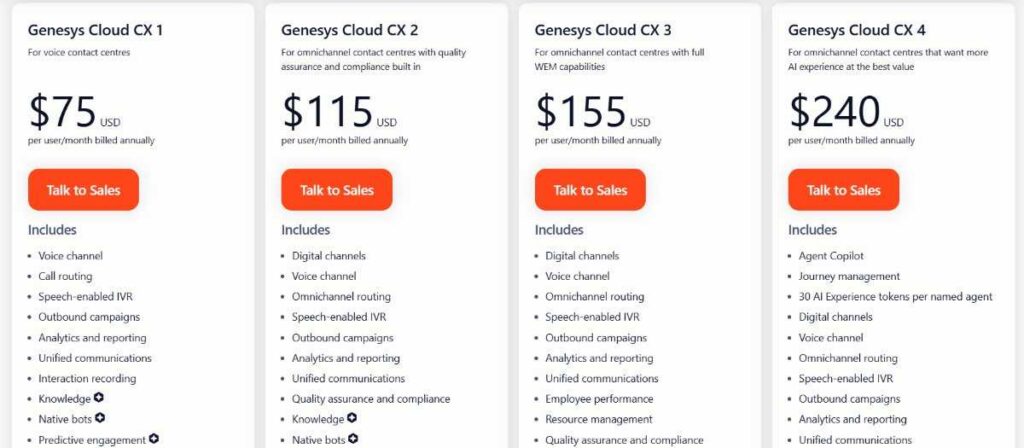
Image via Genesys Cloud CX
Tool level
Usability
Pro tip: Use Pilot AI’s predictive features, like predictive routing or conversational bots, on a common customer issue. This allows you to test the impact, gather insights, and build confidence before rolling them out across all channels.
Also Read:
Image via Podium
Podium is a customer service software solution designed to provide an easy way for customers to engage with and ask questions of local businesses via text messages rather than web-based messaging.
It’s a handy solution that lets you set up automatic responses, send reminders, and even request reviews without having to do it manually each time. This saves time and keeps things running smoothly.
Podium also helps with gathering reviews. For example, it sends review invites after a purchase or service. This makes it easy for customers to leave feedback.
The software also lets you track reviews across sites like Google and Facebook, which helps you stay on top of your public reputation.
Payments are another smart feature available on this customer service software option. Podium allows you to send payment links via text. This makes collecting money quick and convenient.
You can also integrate Podium with other platforms, such as CCC, DealSocket, CDKGlobal, and many more.
Key features
Pros
Cons
Pricing
Podium has three pricing plans: Core, Pro, and Signature. Each offers custom pricing, so you need to contact sales for an exact quote.
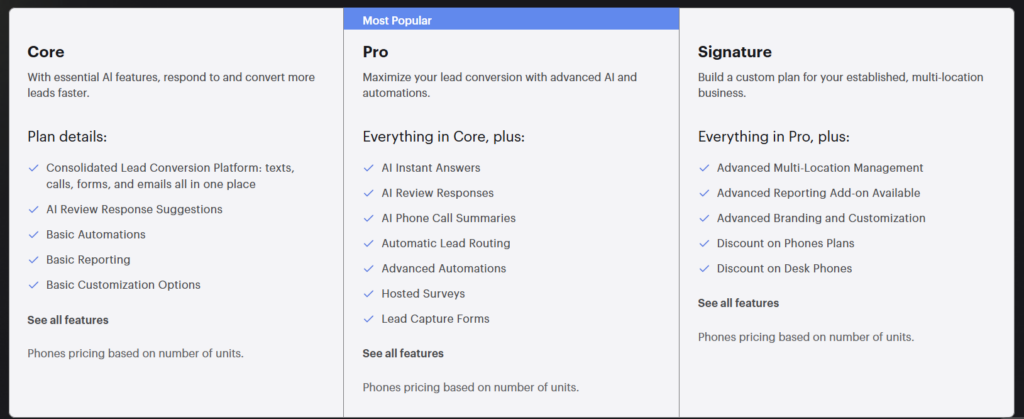
Image via Podium
Tool level
Usability
Pro tip: Set automated review requests immediately after key actions, like purchases or appointments. This improves average response rates without adding more work for your team.
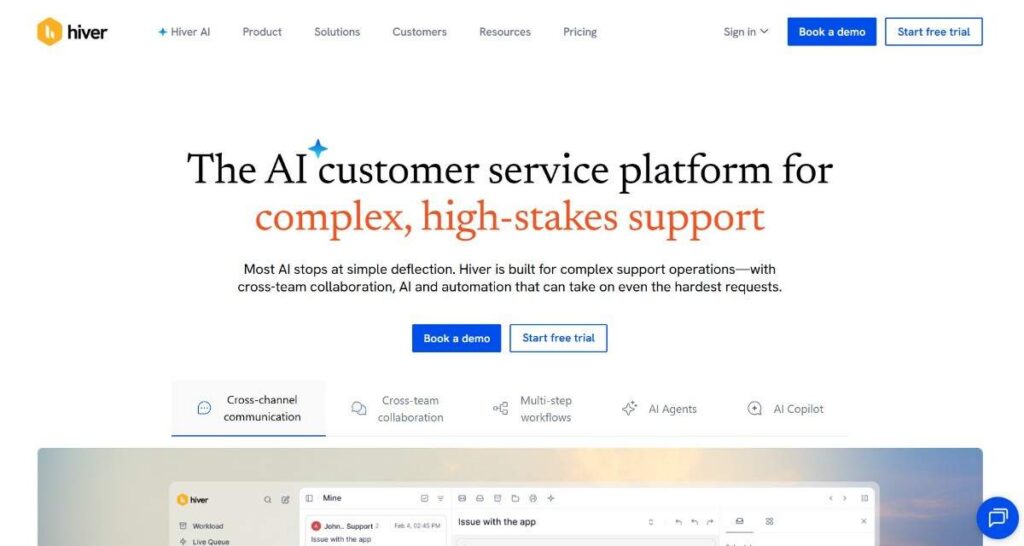
Image via Hiver
Hiver is another customer service software solution built directly into Gmail. This makes it easy for teams to manage customer support emails without switching tools. It’s ideal for businesses that already use Google Workspace.
Hiver allows you to set up automation without needing special skills. You can create rules that assign conversations, send canned replies (pre-written messages), or tag emails based on set conditions.
Hiver also comes with smart AI features that can suggest replies and detect sentiment in customer messages. This helps your team understand what the customer might be feeling and respond the right way.
The AI can also help sort messages and flag ones that need attention. These features help support teams act faster and more accurately while improving customer experience.
Hiver, like the other customer service software alternatives, also includes a shared inbox. This feature makes it easier to track who’s working on what. You can leave notes for teammates, avoid duplicate replies, and assign emails clearly.
The reporting and analytics tools let you check how fast your team is replying, how many conversations are open, and where the bottlenecks are.
Key features
Pros
Cons
Pricing
Hiver comes with a free plan and four pricing plans:

Image via Hiver
Tool level
Usability
Pro tip: Use Hiver’s automation rules to auto-assign emails by category or keyword. This keeps the right tasks with the right people and saves your team from having to sort through the inbox manually.
Also Read:
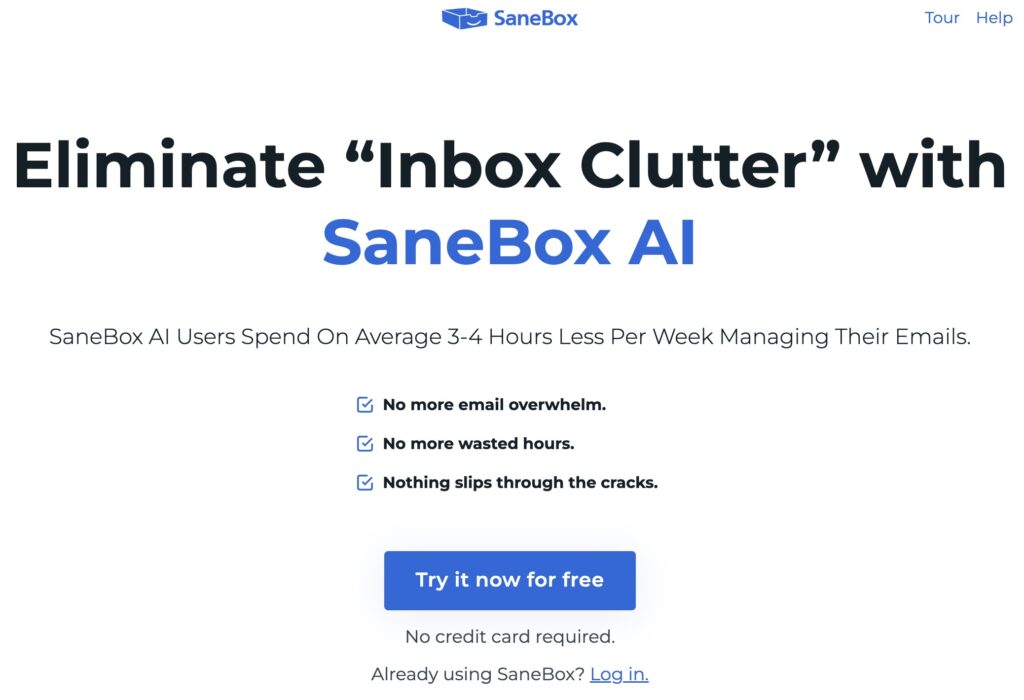
Image via SaneBox
SaneBox is a customer service software solution designed to streamline email communication. It helps businesses automatically sort and manage incoming emails, so teams can focus on what matters.
Instead of replacing your email provider, SaneBox integrates seamlessly with it to reduce clutter and organize conversations more efficiently. It learns from your email habits over time, helping to prioritize your emails and keep your inbox organized.
Sanebox is another worthy customer service software thanks to its intelligent approach to managing email overload. It uses smart filtering to automatically move less important messages out of your primary inbox and into folders like SaneLater or SaneBlackHole.
Another standout feature is automation. You don’t need to build complex rules or manage endless filters — Sanebox handles it all behind the scenes.
It also offers team-wide features like shared training and admin controls. This makes it easier to maintain consistency and streamline communication across departments.
Key features
Pros
Cons
Pricing
SaneBox comes with three price plans that include the following:
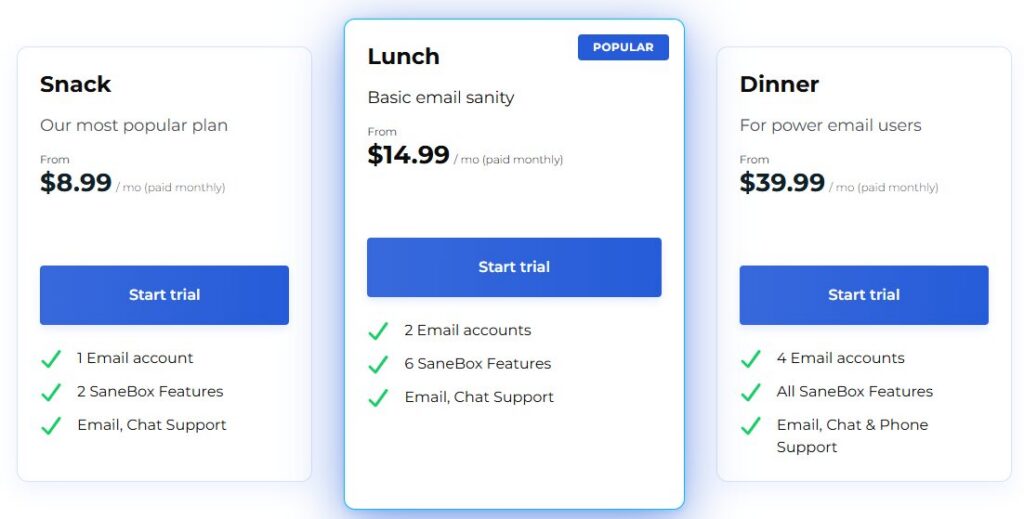
Image via SaneBox
Tool level
Usability
Pro tip: Train your SaneBox filters consistently for the first few days. Move emails between folders manually when needed, and SaneBox will quickly learn how to sort messages your way automatically.
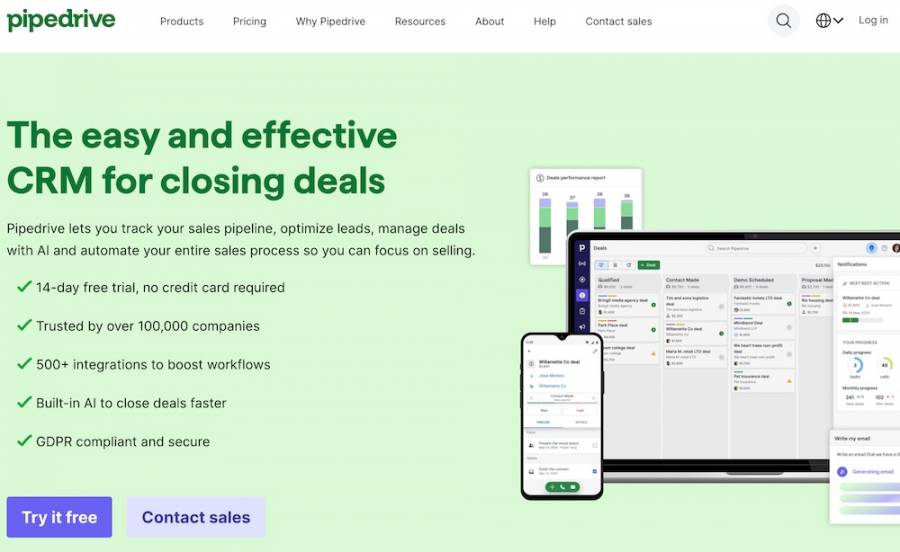
Image via Pipedrive
Last on our list of the top customer service software solutions is Pipedrive. It’s a practical option for businesses looking to manage customer inquiries and email marketing from a single platform.
It’s known for its visual pipeline layout, which lets teams track every deal, conversation, or issue from start to finish. Customer-facing teams can use this to maintain a high level of organization even when handling high-volume messages and emails.
Another feature that makes Pipedrive a good customer service software solution is its advanced automation capabilities.
You can set it to send emails, assign tasks, or update fields automatically based on what’s happening in the pipeline. This saves time and makes sure no customer interaction is forgotten.
You can also send updates, promotions, or check-in emails directly from the platform and track how customers respond. This gives you control over all customer interactions without needing to switch to a separate system.
Pipedrive is also equipped with a built-in AI feature called Pipedrive AI, which handles ticketing on your behalf. The AI prioritizes the most urgent inquiries and forwards those that require human attention to the nearest available agent.
Key features
Pros
Cons
Pricing
Pipdrive offers users four pricing plans that include the following:
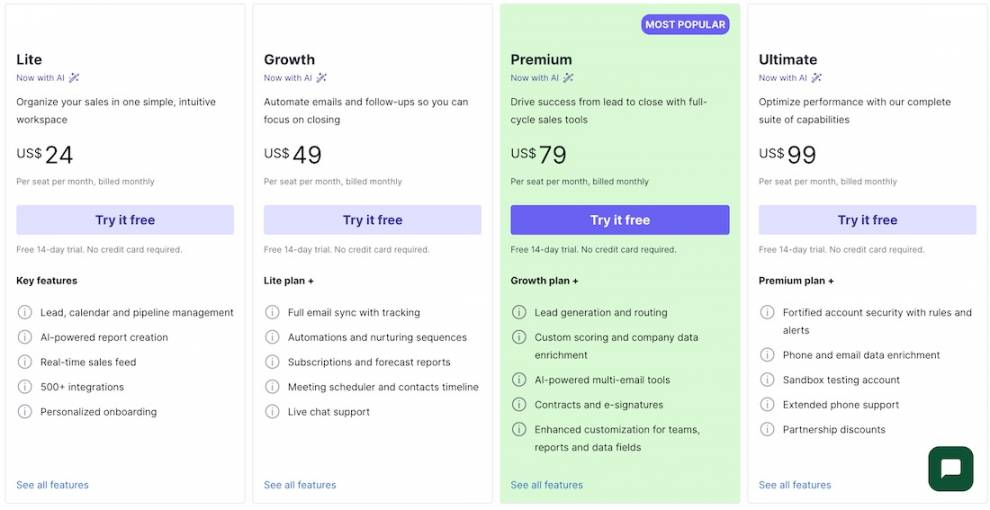
Image via Pipedrive
Tool level
Usability
Pro tip: Use Pipedrive’s automation to handle repetitive customer updates. Set rules to send thank-you emails or status notifications after each stage to maintain good customer relations.
Also Read:
1. What software is used for customer service?
Customer service software includes tools that enable teams to effectively respond to customer messages, manage tickets, and monitor performance. Popular options include timetoreply, Zendesk, Freshdesk, LiveAgent, and Intercom.
2. What is CRM in customer service?
CRM stands for Customer Relationship Management. In customer service, it’s used to keep track of conversations, purchase history, and customer details all in one place. This helps agents provide more personalized and accurate assistance.
3. Is Zendesk a CRM software?
Zendesk is primarily a customer service platform, but it also includes CRM features such as customer history and ticket tracking. Support teams often use this customer service tool to manage email, chat, and help desk tasks.
4. What software is used for customer management?
Customer management software includes platforms like Zoho CRM and Salesforce. These tools help store customer information, follow up on leads, and track communication.
5. What are five examples of customer service?
Examples of customer service include responding to support emails, assisting customers via live chat, resolving issues over the phone, replying to social media messages, and following up after a sale.
6. How does customer service software improve customer support?
Customer service software like timetoreply helps you organize conversations, respond faster, and streamline workflows. Your team can track tickets, automate repetitive tasks, and manage support across multiple channels.
7. Can small businesses use customer service software?
Yes, small businesses can benefit from customer service software. Many platforms, like timetoreply, offer affordable plans designed for smaller teams. Even simple customer service software with basic features can help you stay organized, reduce missed messages, and improve response times.
8. What features should you look for in customer service software?
Good customer service software should include ticket management, automation tools, shared inboxes, reporting features, and multi-channel support. You may also want live chat, knowledge bases, and CRM integrations. Focus on features that help your team save time while making support easier for your customers.
Top-tier customer service software solutions help you improve response times, organize interactions, and deliver personalized support across channels.
The tools we’ve covered in this guide serve different business needs. They handle everything from simple Gmail shared inboxes and live chat to advanced automation and enterprise-grade support workflows.
The right customer service software should match your team size, support volume, budget, and long-term growth goals. You should also prioritize user experience, automation features, reporting tools, scalability, and communication channels.
If your business relies heavily on email support, timetoreply stands out as a strong customer service software option. Book a demo today and start delivering quicker, more organized customer service.
Get live inbox alerts and reply quickly to customer emails with timetoreply

Head of Customer Success @ timetoreply
Barry Blassoples is the Head of Customer Success at timetoreply, where he helps customer-facing teams boost revenue and protect brand reputation by providing actionable insights to improve their business email response times. He has over 15 years of leadership experience across customer success, sales, and marketing roles in high-growth tech companies.



Trusted by high-performing inbound sales teams and customer-facing teams globally.
Close more deals and delight more customers with the faster, smarter, deeper email analytics and performance optimization software that works straight from your team’s inbox.