
Some of the best email management software solutions for organizing your inbox and improving productivity include timetoreply, Front, Hiver, and Missive. These tools help teams manage high email volumes, improve collaboration, and respond to customers more efficiently.
Email continues to consume a significant part of the workday. A recent Work Trend Report shows that the average employee receives over 117 emails daily. Without the right system in place, inboxes can become overwhelming and reduce productivity.
This is where email management software comes in handy. These tools help enhance email communications and keep your inbox under control.
If you’re having problems with email management, this article can help. We’ll delve into exactly what email management software is. We’ll also review some of the top-performing ones in today’s market. By the end, you’ll have a list of new email management tools to try.
The best email management software helps businesses organize inboxes, improve response times, and streamline team communication. Tools like timetoreply, Zendesk, Gmelius, Front, Superhuman, and Hiver offer different features for productivity, analytics, and customer support. The right platform depends on your business size, workflow needs, team collaboration requirements, and email volume.
Some email management software tools are better for shared inbox collaboration and customer support. Others focus on inbox organization, productivity, analytics, automation, or sales communication.
When comparing email management software, we look beyond basic email features and focus on how well the platform supports workflow, collaboration needs, and response efficiency. Here are some factors to consider when choosing an email management software:
Also Read:
The best email management software depends on your workflow needs. Tools like timetoreply, Front, and Zendesk excel at team productivity and customer support. Others like Superhuman, Boomerang, and SaneBox focus on personal email efficiency and inbox organization.
Here’s a quick rundown of how they compare.
| Tool | Best for | Key Features | Unique strength | Pricing (starts at) |
| timetoreply | Improving email productivity | Reply time tracking, SLA alerts, custom dashboards | Advanced email analytics for support and sales teams | $38/month |
| Shift | Managing multiple inboxes | Unified workspace, app integrations, global search | Combines inboxes and apps in one interface | $19.99/year |
| Boomerang | Personal Gmail productivity | Send later, Inbox Pause, AI writing assistant | Smart follow-up and scheduling inside Gmail | $4.98/month |
| Superhuman | Individual email management | AI drafting, Split Inbox, keyboard shortcuts | Lightning-fast workflows for power users | $12/member/month |
| Front | Team collaboration | Shared inboxes, AI summaries, workflow automation | Omnichannel collaboration hub | $25/seat/month |
| Hiver | Team collaboration within Gmail | Shared inboxes, SLA tracking, automation | Native Gmail collaboration for teams | $35/user/month |
| Zendesk | Customer service | Ticketing system, AI agents, automation rules | Enterprise-grade customer support workflows | $25/agent/month |
| Yesware | Sales teams | Email tracking, campaign sequences, Salesforce integration | Sales engagement insights within inboxes | $19/seat/month |
| SaneBox | Email organization | Smart filtering, reminders, one-click unsubscribe | AI-powered inbox decluttering | $3.49/month |
| Microsoft Outlook | Microsoft 365 organizations | Focused Inbox, calendar integration, task management | Deep Microsoft 365 ecosystem integration | $1.99/month |
| Google Workspace | Gmail for business | Custom business email, Gemini AI, collaboration tools | Business-grade Gmail ecosystem | $8.50/user/month |
| Gmelius | Collaborative Gmail workflows | Shared inboxes, Kanban boards, automation rules | Turns Gmail into a collaborative workspace | $19/user/month |
| Missive | Team collaboration for all sizes | Collaborative drafting, task management, omnichannel inbox | Real-time team collaboration inside conversations | $18/user/month |
Whether you prioritize productivity, customer support, sales outreach, or inbox organization, there’s a tool designed to match your needs. Each email management software offers scalable features to help streamline communication and improve response efficiency.
The best email management software includes tools such as timetoreply, Gmelius, Zendesk, Yesware, and Front that help teams manage inboxes more efficiently.

Image via timetoreply
Best for: Improving email productivity
The timetoreply tool offers custom-built email management software solutions designed to enhance the performance of customer service and sales teams. You can track every deal stage, manage critical follow-ups, improve lead response times, and increase sales.
With helpful extensions like timetoreply Extension, you can enhance email efficiency by gathering real-time performance insights. By providing instant feedback, timetoreply supports quicker responses and more productive email communications. It also integrates with Outlook, showing essential email metrics right inside your inbox.
Using this timetoreply email management software is easy. Individual users can add it through Outlook, while teams can deploy it via the Office 365 admin console.
The best part is that timetoreply easily integrates with your existing mail client, with no expected workflow interruption.
Key features
Pros
Cons
Pricing
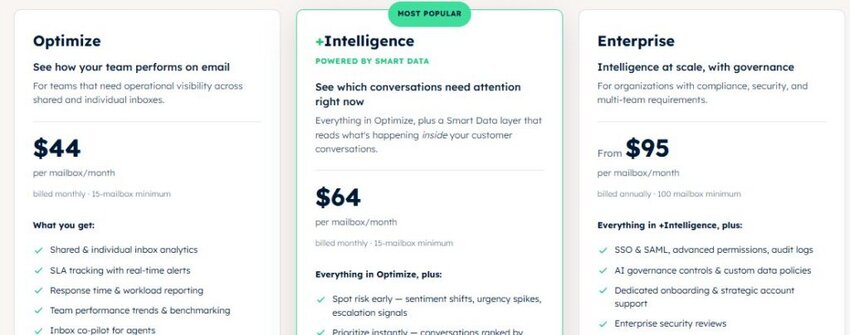
Image via timetoreply
If productivity is your goal on an individual and company-wide level, timetoreply is for you. To get started, schedule a demo to explore its features.
Tool level
Usability
Pro tip: Set up automated alerts when service-level agreements (SLAs) are at risk. This ensures time-sensitive emails never slip through the cracks.

Image via Shift
Best for: Managing multiple inboxes
Shift is a cross-platform desktop or browser-based email management software that centralizes your email accounts, web apps, and browser profiles into one unified workspace.
Whether you use Gmail, Outlook, Office 365, or other services, Shift allows you to access each account in dedicated panes without having to toggle between browsers.
Its intuitive sidebar layout enables instant switching between inboxes, apps like Slack or Trello, and even custom workspaces tailored to projects or clients.
Shift supports over 1,500 app integrations, including email management services, Chrome extensions, and unified search across accounts and apps.
Key features
Pros
Cons
Pricing

Image via Shift
Tool level
Usability
Pro tip: Pin your top tools to the sidebar for one-click access to your most-used apps like Slack, Notion, or Trello.

Image via Boomerang
Best for: Personal email productivity within Gmail
If you’re comfortable using Gmail and prefer not to switch, Boomerang is for you. This email analytics and management software can enhance email productivity for Gmail and Google Workspace accounts.
It gives you scheduling control, enabling you to compose messages and schedule them to reply professionally later.
With its inbox pause feature, you can block distracting new messages during focus periods or after work hours. Plus, the AI writing assistant gives real‑time feedback on your subject lines, tone, and clarity based on several email patterns to boost your average email response time.
Key features
Pros
Cons
Pricing
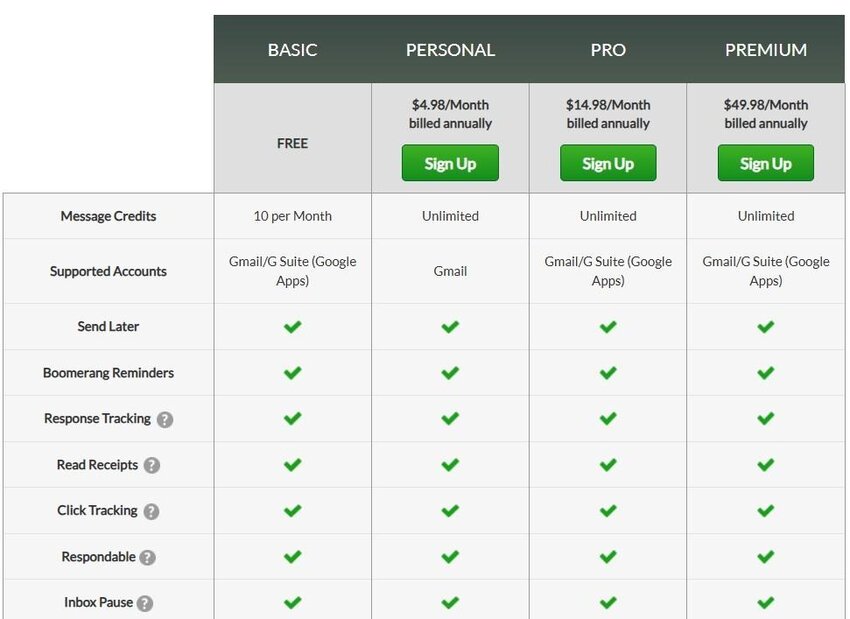
Image via Boomerang
Tool level
Usability
Pro tip: Use the Inbox Pause feature to control when you receive emails and reduce distractions during focused work.
Also Read:

Image via Superhuman
Best for: Individual email management
Superhuman is a powerful email management software for professionals interested in optimizing their email workflow. It has built-in AI tools like instant replies, email triage, automated email drafting, and voice and tone match to improve email productivity.
You’ll also get read statuses, follow‑up reminders, and a split‑inbox view to prioritize what matters.
Additionally, Superhuman integrates your calendar and scheduling tools for effective team communication. This way, you can share drafts, comment on conversations, and send availability links without switching apps.
Key features
Pros
Cons
Pricing
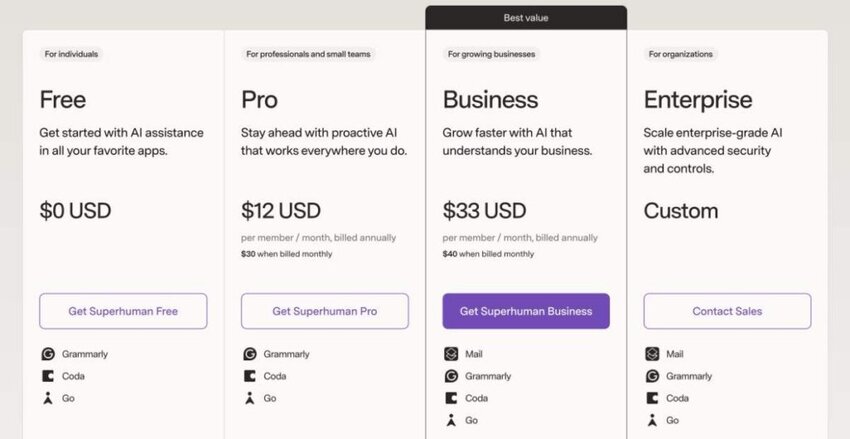
Image via Superhuman
Tool level
Usability
Pro tips: Master Superhuman’s keyboard shortcuts to fly through your inbox and cut down on email processing time.
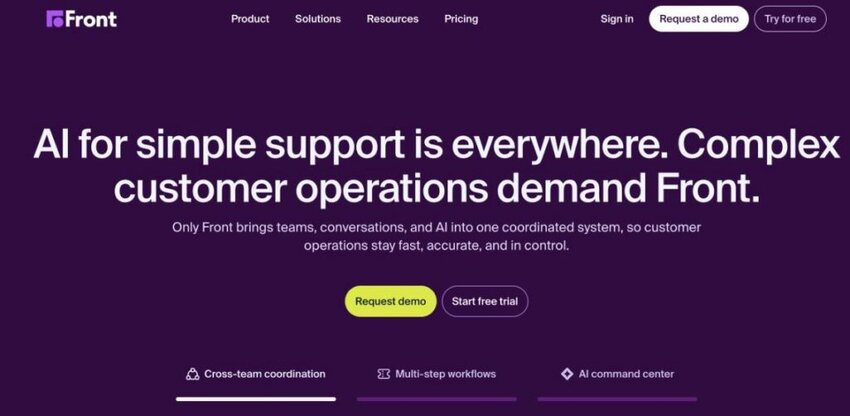
Image via Front
Best for: Team collaboration
Front is a standout email management software built for teams that rely on collaboration over email. It’s excellent for teams sending customer service emails.
It integrates personal and shared inboxes, chat channels, SMS, WhatsApp, and more into a single hub. This consolidation helps keep your team aligned with internal comments and clear ownership markers on every conversation.
Front also offers powerful email analytics with AI-powered scorecards and reporting workload to track response times. This helps teams identify bottlenecks and improve processes. You can use AI to summarize threads and generate response drafts, reducing time spent on routine tasks.
Key features
Pros
Cons
Pricing

Image via Front
Tool level
Usability
Pro tips: Integrate Front with your CRM and helpdesk tools to keep all customer data in one place and reply with greater speed.
Also Read:

Image via Hiver
Best for: Team collaboration within Gmail
If you’re already a G-Suite customer, then Hiver is a great email management software for your team. Hiver is a collaboration and shared inbox tool designed to work within Gmail.
Being one of the best email management software, it helps teams organize group emails within an omnichannel inbox for better visibility and quick responses to customer queries.
Since Hiver connects with various apps, including CRM and marketing tools, you can gather and analyze customer data to easily address issues and resolve concerns. Additionally, you can use its AI features to create workflows that automatically categorize and route emails to appropriate team members.
Key features
Pros
Cons
Pricing

Image via Hiver
Tool level
Usability
Pro tips: Use Hiver’s SLA tracking and analytics to monitor team performance and ensure timely responses to customer queries.

Image via Zendesk
Best for: Customer service
Zendesk is a powerful customer service email management software built around a helpdesk ticketing system. It consolidates communications from email, chat, social media, phone, and other channels into a unified agent workspace.
With its dynamic request forms, agents receive all necessary customer context upfront for faster, personalized responses.
Templated responses (macros) and automation rules on Zendesk help agents reply quickly and consistently. Meanwhile, SLA tracking and smart routing ensure the timely handling of high-priority issues.
Unlike most Zendesk alternatives, this email management software also supports extensive self-service options, including knowledge bases, community forums, and AI-powered bots to reduce ticket volume.
Key features
Pros
Cons
Pricing

Image via Zendesk
Tool level
Usability
Pro tip: Use Zendesk’s automation and AI-powered macros to streamline repetitive responses and maintain consistency in customer interactions.
Also Read:
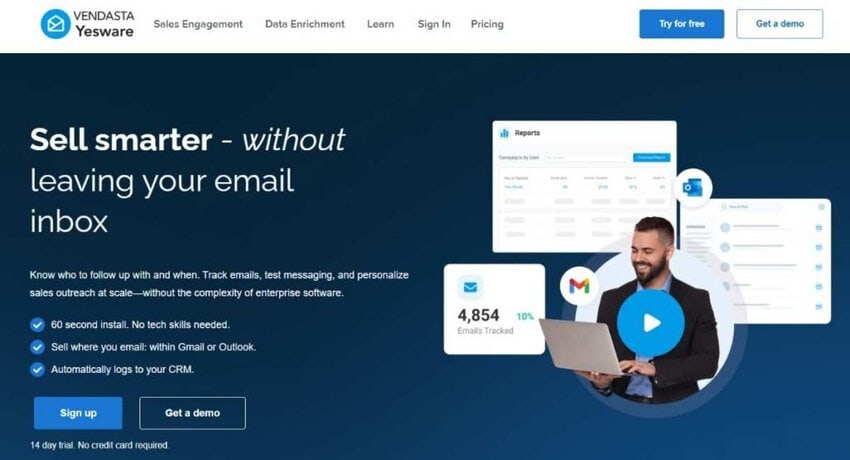
Image via Yesware
Best for: Sales teams
Yesware is a sales-focused email management software built to support sales teams. If you want to build strong relationships with sales leads, this tool can help gather additional insights into your customers’ buying journey.
This email management software enhances outreach with unlimited email open, link, and attachment tracking, so you can see exactly when prospects engage with your content.
When it comes to customer service analytics, Yesware delivers both personal and team-level dashboards, providing insights like reply rates and others.
With Salesforce integration, Yesware automatically logs email and calendar activity, lets you view prospect engagement directly from your inbox, and syncs sequences into Salesforce for visibility and pipeline management.
Key features
Pros
Cons
Pricing

Image via Yesware
Tool level
Usability
Pro tip: Use the email tracking and campaign analytics to identify which leads are most engaged and prioritize follow-ups to improve email marketing efforts.
Image via SaneBox
Best for: Email organization
SaneBox is an AI-powered email management software that helps users organize their inbox easily and prioritize what matters most. By analyzing your email patterns, it automatically moves less important messages into separate folders, leaving your main inbox clear of distractions.
Beyond basic filtering, this email management software offers powerful tools like Snooze, which lets you defer emails until you’re ready to address them, and SaneReminders, which prompts follow-ups on critical conversations. It also includes SaneBlackHole to unsubscribe from unwanted mailing lists with one click.
Key features
Pros
Cons
Pricing

Image via Sanebox
Tool level
Usability
Pro tip: Train SaneBox folders (like SaneLater and SaneBlackHole) by dragging emails in and out to fine-tune how your inbox is prioritized over time.
Also Read:
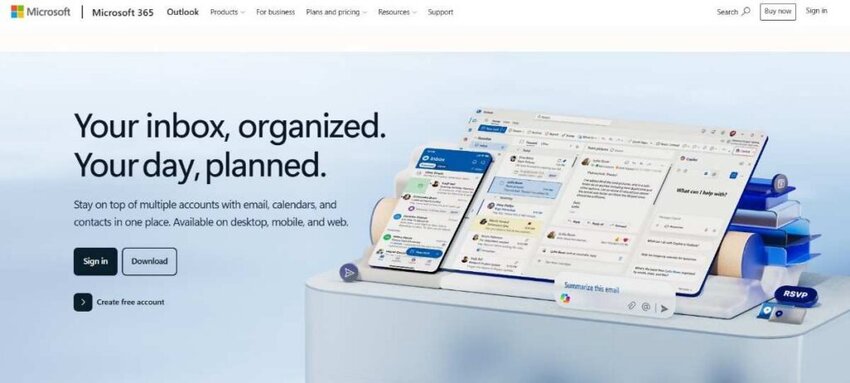
Image via Microsoft Outlook
Best for: Microsoft 365-powered organizations managing emails and tasks
Microsoft Outlook is an all-around email management software that helps users organize emails, calendars, tasks, contacts, and notes. As part of Microsoft 365, it supports multiple account types, including Exchange, Outlook.com, Gmail, Yahoo, IMAP/POP, helping you manage communications from one app.
As an email management software, it offers rich formatting features, message categorization rules, inbox folders, scheduled send, and others to improve email productivity.
File management is simplified as well. It provides direct access to OneDrive and deep integrations with Word, Excel, and PowerPoint. This way, collaboration across documents and communications is more seamless.
Key features
Pros
Cons
Pricing
For Home

Image via Microsoft Outlook
For Business

Image via Microsoft Outlook
Tool level
Usability
Pro tip: Use rules and quick steps to automate repetitive actions like sorting, categorizing, or forwarding emails. This helps you save time and stay organized.

Image via Google Workspace
Best for: Gmail users needing Gmail for business use
If you enjoy using Gmail and are looking to use it professionally, upgrading to Google Workspace is a great option. This is a full business-grade email management software ecosystem. It enables you to use your domain with Gmail while keeping the familiar Gmail interface.
With Workspace, teams can collaborate in real time on documents, spreadsheets, and slides, share calendars, and easily migrate data. It offers integrated scheduling, secure custom domains, and AI-powered features like Smart Compose, Smart Reply, email summaries, and auto-generated drafts via the Gemini assistant.
Key features
Pros
Cons
Pricing
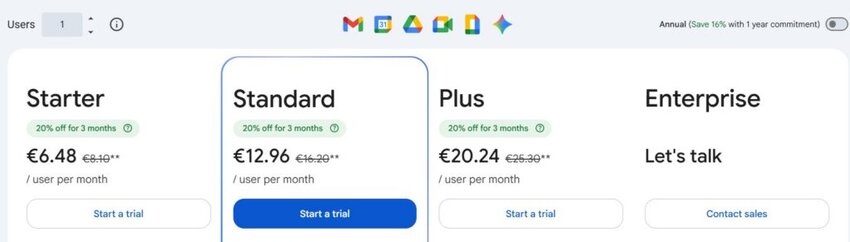
Image via Google Workspace
Tool level
Usability
Pro tip: Use filters and labels to automatically organize incoming emails, and activate keyboard shortcuts in settings to navigate your inbox faster.
Also Read:
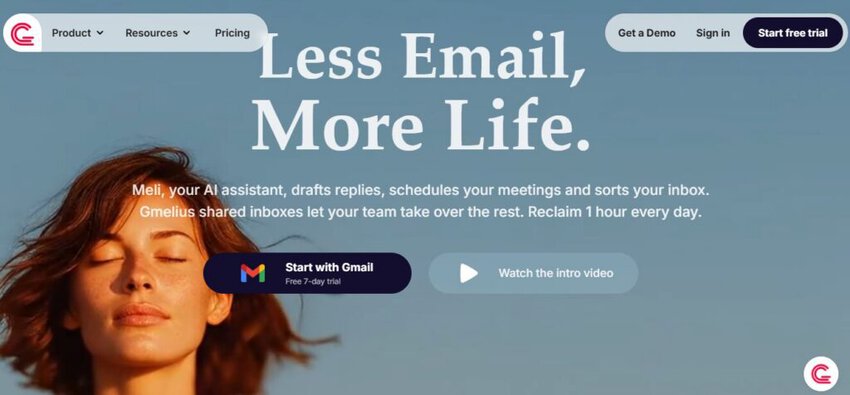
Image via Gmelius
Best for: Collaborative email workflows within Google Workspace
Gmelius is an email management software that transforms Gmail into a shared workspace. This is perfect for teams that need to collaborate directly in their inbox to handle customer emails.
It offers an email collaboration suite along with features like shared labels, custom roles and permission internal notes for effective collaboration among team members.
Beyond collaboration, this email management software also focuses on automation and analytics. It offers advanced tools like email sequences, automation rules and agents, AI reply assistant, email templates, and performance dashboards.
Because of its Gmail integration, there’s little disruption to daily workflows, and teams can continue using their preferred interface.
Key features
Pros
Cons
Pricing
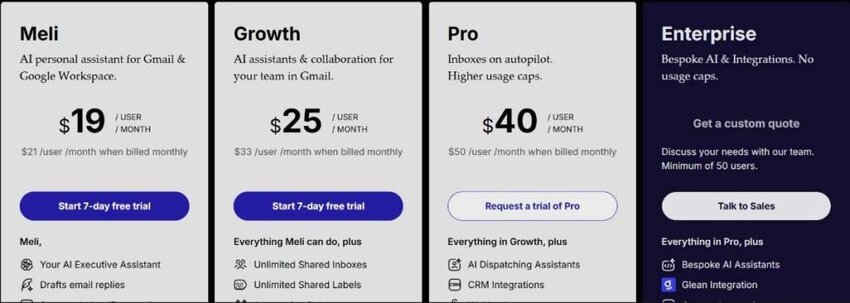
Image via Gmelius
Tool level
Usability
Pro tips: Combine email sequences with shared labels and Kanban boards to create automated pipelines.
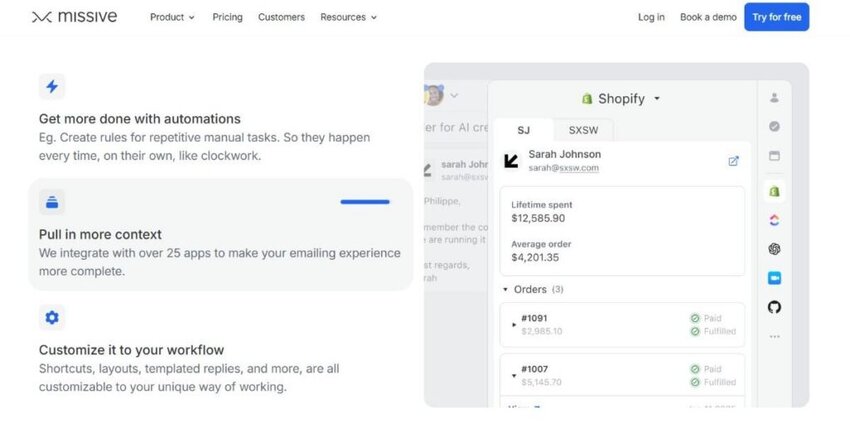
Image via Missive
Best for: Collaboration for teams of all sizes
For professional services teams who want to collaborate on tasks and projects, Missive is a great email management software. One of its standout features is its threaded conversation system.
Team members can comment internally on emails, assign tasks, and share drafts before sending responses. This reduces unnecessary CCs and back-and-forths.
Other features include snoozing, archiving, and custom workflows to help keep inboxes clutter-free. Meanwhile, user roles and permissions maintain structure and accountability.
Missive isn’t just for managing conversations; it also includes task management features. With this email management software, you can turn any email or chat thread into a task, assign it to a teammate, and track everything in one workspace.
Key features
Pros
Cons
Pricing
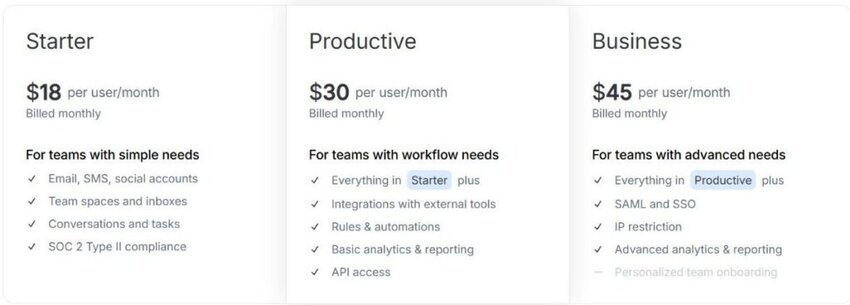
Image via Missive
Tool level:
Usability:
Pro tips: Set up Missive’s rule-based automation to auto-assign conversations, apply labels, or trigger notifications to streamline your team’s workflow.
Also Read:
The best email management software for businesses include:
1. Can I manage multiple email accounts with email management software?
Yes, absolutely. One of the primary benefits of email management software, especially for businesses, is its ability to consolidate multiple email accounts into a unified inbox. This means you can manage emails from different departments, or even entirely separate domains, all from one interface. This helps streamline your communication workflow.
2. What is the best way to organize thousands of emails?
The most effective way to organize a large amount of emails involves a combination of strategies. Here are some key approaches:
3. What’s the difference between an email client and email management software?
An email client (like Outlook or Gmail’s web interface) is primarily designed for individual users to send, receive, and organize their emails. Email management software, on the other hand, is a more comprehensive solution often designed for teams and businesses.
It provides advanced email functions and often includes features like shared inboxes, advanced automation, collaboration tools, reporting, and integrations with other business systems.
4. Is email management software secure for handling sensitive business communication?
Yes, most reputable email management software prioritize security. They’re built with enterprise-grade protections. These often include encryption, two-factor authentication (2FA), access controls, audit logs, and compliance certifications, such as GDPR, HIPAA, or SOC 2.
However, it’s important to review the security features of each email management software to ensure it aligns with your business’s data privacy standards.
5. Can email management software improve customer service response times?
Absolutely. Many email management software platforms include features like response time tracking, SLA monitoring, automatic assignments, and templates for faster replies.
These features help teams respond to inquiries faster and more consistently. As a result, they enhance customer satisfaction and keep communication flowing smoothly even during peak periods.
6. Can email management software integrate with other business tools?
Yes, the best email management software platforms integrate with customer relationship management systems, project management tools, and communication apps. These integrations help teams centralize workflows and access important customer information faster. Businesses can improve efficiency, reduce switching between platforms, and create a more connected communication process.
7. What are the features to look for in email management software?
When choosing email management software, look for features like smart inbox organization and automation that help improve response speed. Collaboration features such as shared inboxes, internal notes, and team assignments are also important. Also consider analytics and reporting, as they help track performance metrics like response times and engagement. Finally, strong integration with tools is needed to ensure the software fits smoothly into your existing workflow.
8. Is email management software safe for sensitive data?
Yes, email management software solutions are safe for sensitive data if they use strong security features like encryption and secure access controls. However, safety also depends on choosing a trusted provider and using good account security practices.
Also Read:
Email management software helps you organize your inbox, reduce clutter, automate repetitive tasks, and improve response times. Each tool covered in this guide is a great option with significant strengths. To make a choice, consider your workflow, team size, and the level of automation or reporting you need.
If your focus is speed and personal productivity, tools like Superhuman or SaneBox work well. For shared inboxes and team collaboration, Front, Hiver, Missive, and Gmelius are stronger options.
If you need customer support or service workflows, Zendesk and timetoreply offer better structure, tracking, and accountability. For sales teams, Yesware and Boomerang help with follow-ups, tracking, and engagement.
Among these options, timetoreply stands out as an easy-to-use email tracking software for managing team emails and gaining valuable insights into customer service metrics and SLAs.
If you’re ready to improve your email productivity, schedule your demo now.
Get live inbox alerts and reply quickly to customer emails with timetoreply

Head of Customer Success @ timetoreply
Barry Blassoples is the Head of Customer Success at timetoreply, where he helps customer-facing teams boost revenue and protect brand reputation by providing actionable insights to improve their business email response times. He has over 15 years of leadership experience across customer success, sales, and marketing roles in high-growth tech companies.



Trusted by high-performing inbound sales teams and customer-facing teams globally.
Close more deals and delight more customers with the faster, smarter, deeper email analytics and performance optimization software that works straight from your team’s inbox.