
Email sentiment analysis shows how a customer feels from the language in their emails. It helps teams spot changes in tone that response-time metrics can’t show.
Most customer-facing teams measure how quickly they reply. Far fewer measure the tone customers use in their replies. Speed is easy to track, while sentiment requires more context.
That gap can hide signs that customers are becoming unhappy. A team can meet every response target and still lose a customer quietly. Email sentiment analysis adds that missing signal to the picture.
This guide explains how email sentiment analysis works on real customer emails. You’ll learn how to score messages and threads, assess accuracy, and use the results.
Email sentiment analysis is automated analysis of customer emails that identifies their tone. Software typically classifies each message as positive, neutral, or negative, often with a strength score.
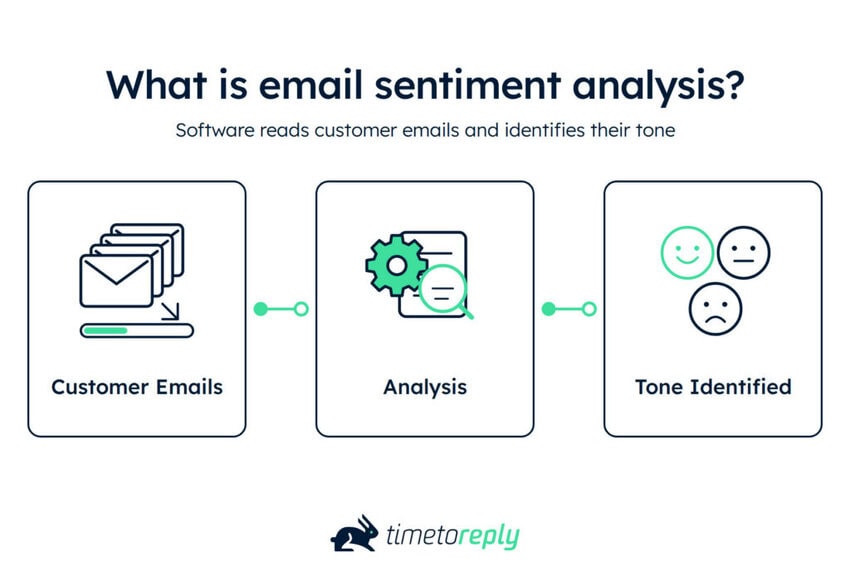
Across a mailbox, it shows which conversations feel healthy and which may be turning negative. It uses the same techniques found in review analysis, but applies them to email.
The method sits within natural language processing. A model reads words, phrasing, and context, then assigns a sentiment label. Older systems matched text against dictionaries, while modern models learn from labeled examples.
Email adds another layer of difficulty. A review is one block of text, while an email is part of an ongoing exchange. Quoted replies, signatures, and other clutter can affect the result.
You can score a single message or the sentiment arc of a thread. The thread usually gives you more useful context than one message alone.
One distinction worth making: customer sentiment and consumer sentiment aren’t the same thing.
Consumer sentiment usually refers to broader measures of household confidence and economic outlook. Customer sentiment describes how customers feel about a company or experience. You can capture it using surveys, reviews, chat, and customer feedback tools.
Now, email sentiment is customer sentiment measured in one channel. Its key advantage is capturing unprompted customer language while an issue is still active, rather than asking for feedback afterward.
Poor experiences carry a real cost. PwC’s 2025 Customer Experience Survey found that 52% of consumers stopped buying from a brand following a bad experience.
Sentiment, intent, and urgency measure different things. Sentiment shows how a customer sounds, intent shows what they want, and urgency shows how quickly they need help.
A calm email can be urgent, while an angry email may not need immediate action. Combining these signals into one score can hide important differences.
| Signal | What it tells you | Where it comes from | What it misses | The decision it should trigger |
| Sentiment | How the customer sounds | Tone and word choice | Whether the issue was solved | Review the thread before replying |
| Intent | What the customer wants | The request and its category | How strongly they feel | Route it to the right team |
| Urgency | How fast they need help | Deadlines and escalation language | How much the account matters | Move it ahead in the queue |
| CSAT / NPS | How customers rate you | Surveys | People who don’t respond | Track trends and outliers |
| Response time | How fast your team replied | Message timestamps | Whether the reply was any good | Fix staffing or coverage gaps |
The bottom two rows show the gap clearly. Surveys depend on responses, while response time measures speed rather than quality.
Email sentiment analysis adds another signal by covering the language customers already send. It helps teams see problems that response-time and survey data can miss.
Email sentiment analysis measures the tone of customer messages and tracks how it changes. Unlike surveys, it works with the language customers already send to identify the emotional signal. Scoring the thread arc, not just a single message, is where the real signal sits.
Also Read:
Email sentiment shows how customers feel about the service they receive. It adds signals about sentiment, intent, and urgency to the operational data teams already track.
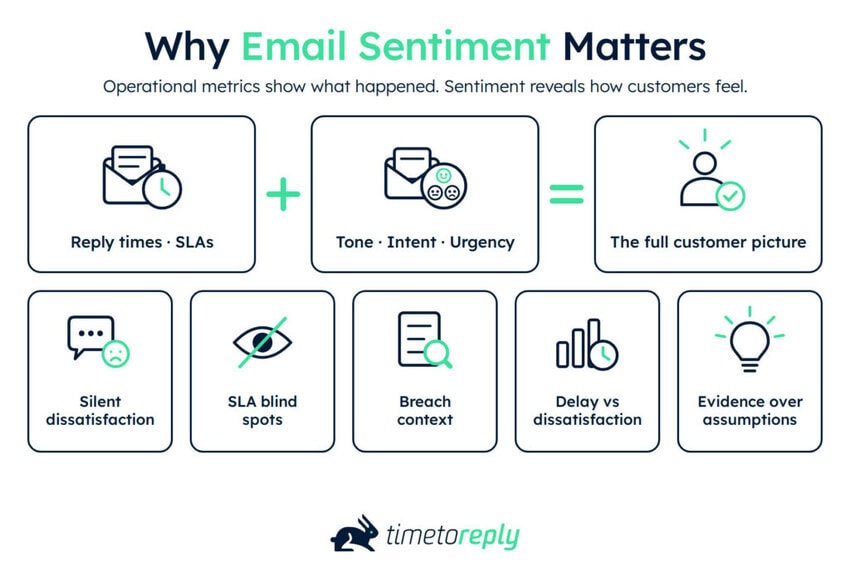
Most customer-facing teams already have data on reply times, SLAs, and workload. What customers actually say in their interactions gets far less attention. Email sentiment analysis fills that gap by showing changes in the language customers use.
It also connects customer experience and customer service. This is critical because operational efficiency and genuine customer experience don’t always move together. A team can hit every SLA target while the tone of its customer emails quietly deteriorates.
Operational metrics can only explain so much. Two teams can hit the same service SLA while their customers respond very differently.
Per Medallia’s 2026 State of CX Report, more than half of consumers want companies to infer satisfaction from behavior, not surveys alone.
Your inbox is one of the richest behavioral signals you already have. Yet, it sits outside many standard customer success metrics.
Silent dissatisfaction can be the most expensive kind. Qualtrics XM Institute found that fewer than one in three consumers give feedback in its 2025 Consumer Experience Trends report.
The rest may simply get quieter, then leave. Email sentiment analysis can pick up those changes because it works with messages customers already send.
A survey asks customers to respond. Email captures their language without another feedback step.
The customers who complain loudest aren’t always the ones most likely to leave.
Reply-time targets eventually plateau. A team gets faster, but customer satisfaction stops improving with it.
Email sentiment analysis shows what response time can’t. It can reveal whether faster replies resolve problems or simply acknowledge them.
Lead Forensics saw its team’s average reply time fall from around four hours to under two. The team set a two-hour benchmark for acknowledging customer emails and showing when queries would be resolved.
Faster replies are useful, but they don’t tell you whether the customer is satisfied. A holding reply can stop the clock without helping the customer.
If sentiment keeps falling after response times improve, speed isn’t the main problem. Pair the trend with email response time tracking to find where the experience breaks down.
An SLA report tells you when a target was missed. It doesn’t tell you whether the customer noticed or cared.
Some breaches pass without comment. Others become the point where an account starts looking elsewhere.
Sentiment helps you see which breaches cause frustration. That lets you focus on the missed targets that need attention, instead of treating them all the same.
Telarus cut response times from seven hours to two in some groups. That’s solid progress, but speed data alone doesn’t show how those interactions felt.
Pairing email sentiment analysis data with customer service SLAs shows both sides of the interaction. It also gives you a stronger basis for SLA prioritization than response metrics can provide on their own.
A slow reply and an unhappy customer can show up as poor performance on a dashboard, but for very different reasons. Slow replies usually come down to capacity. Negative replies can signal issues with the product, pricing, or service.
Tone helps you tell them apart before they escalate. A slow but neutral thread suggests a coverage gap. A fast exchange with a consistently negative tone may need to be escalated.
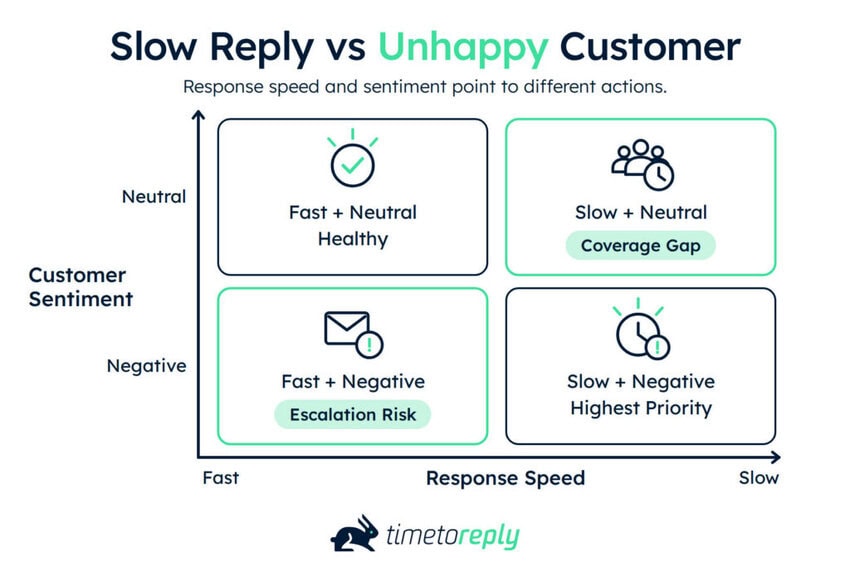
That can change what you staff for and which conversations managers review.
Poor experiences are costly at scale. Qualtrics estimates that $3 trillion in global sales is at risk from poor customer experiences in its previously cited report.
Service quality is often assessed by spot-checking a handful of threads. That’s a small sample, and it can miss patterns across the wider inbox.
Scoring every conversation gives managers a broader view. You can see the overall distribution and find threads at the negative end.
Plotting sentiment against response time creates four useful cases: fast and positive, fast and negative, slow and positive, and slow and negative.
Ontellus lifted the share of emails answered from 62% to 86%. It uses email analytics to examine response times and exchanges within email threads. The team found process and training issues by looking at why some firms had more back-and-forth than others.
Those patterns give managers something concrete to investigate. They also give customer experience optimization work a better starting point.
Response time shows how quickly a team acted, while sentiment shows how the customer experienced that interaction. Together, they reveal problems that either metric can miss on its own. These range from silent dissatisfaction to fast replies that still leave customers unhappy.
Also Read:
Email sentiment analysis runs in five stages. You collect and clean the mail, split each thread into scorable units, and classify them. Then you roll those units into a thread score and route the result.
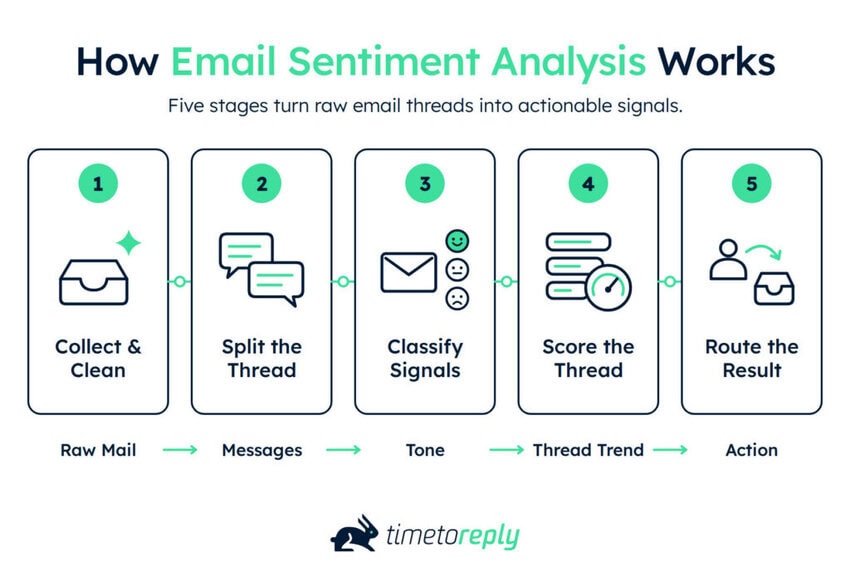
Not every inbox is worth pulling from. Focus on the mailboxes customers use and filter out anything that isn’t a direct customer interaction.
Left in the dataset, auto-replies, out-of-office notices, and no-reply newsletters will distort your email sentiment analysis results. Removing them early is essential for accurate email analytics.
Delivery receipts, calendar invites, marketing sends, ticket-system boilerplate, signatures, and disclaimers all need to go. Sound email management best practices can help keep your data clean.
Also decide whether you’re scoring inbound mail, outbound replies, or both.
Getting this right pays off beyond sentiment scoring. A clean inbox is the foundation for any email productivity gain.
An email thread isn’t one document. It’s a series of turns, and replies often contain the entire quoted history.
If you feed that raw thread into a model, the same text can be scored more than once. Strip quoted content first, then decide whether to score each message or the full thread.
Scoring each message is usually the simplest approach. Some teams go further and score individual paragraphs when one email mixes praise with a complaint.
Whichever approach you use, keep it consistent across the dataset. Changing the scoring unit halfway through can make the trend harder to interpret.
This is the classification stage, where the model labels the cleaned text.
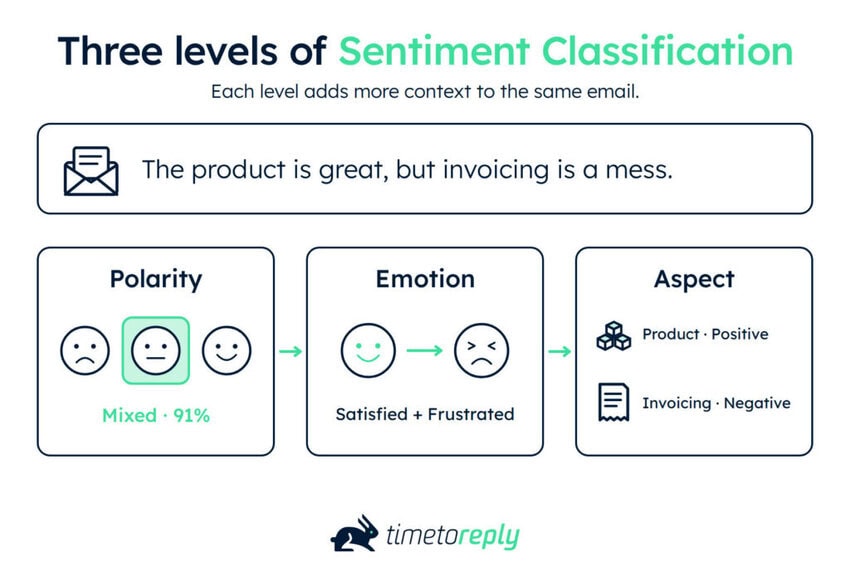
Polarity classifies a message as positive, neutral, or negative, usually with a confidence score. It’s the simplest option, and is often enough for trend reporting.
Emotion adds detail, such as frustration, confusion, urgency, or satisfaction. This can help teams choose a suitable response.
Aspect-based scoring goes further by linking sentiment to specific topics. For example, “the product is great, but your invoicing is a mess” contains both positive and negative sentiment.
Be realistic about what models can infer. A 2025 review shows that modern networks still rely heavily on surface-level cues, rather than deep understanding.
A single message score can be misleading. The thread score gives managers a view of the whole conversation.
Simple averaging can hide a change in sentiment. For example, a thread that ends badly may still look positive if most earlier messages were positive.
Weighting recent messages more heavily gives a truer read of where the conversation landed. You might give the latest message 0.5, the previous one 0.25, and split the remaining 0.25 across earlier messages.
Track the sentiment delta separately. Comparing the first and latest scores can highlight conversations where sentiment has deteriorated.
A score only matters when someone acts on it. Send email sentiment analysis results to the person or team responsible for the conversation.
Decide what should trigger a review. For example, send threads with consistently negative sentiment to a manager or support lead.
Where possible, send alerts to the person who owns the conversation. With a shared mailbox in Outlook, you can ensure concerning messages reach the right person instead of sitting in a general queue.
Email sentiment analysis collects, cleans, classifies, and aggregates customer emails before routing the result. Cleaning removes noise, classification identifies sentiment, and thread scoring adds conversational context. The final step, routing, turns those scores into actions like reviewing a deteriorating customer conversation.
Also Read:
Email sentiment analysis is harder because email is long, threaded, asynchronous, and professionally polite. Reviews are usually self-contained and opinionated, while chat is immediate and conversational. Those differences create noise and hide negative sentiment.
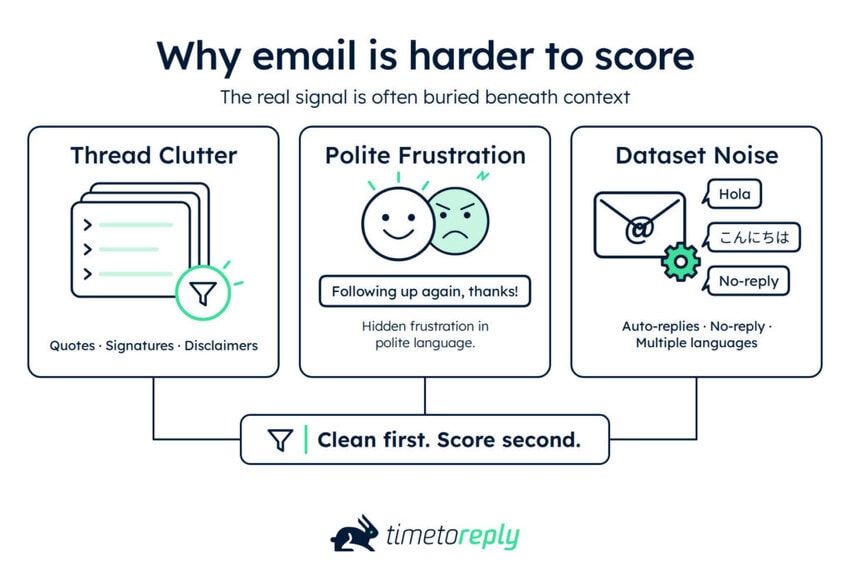
Business emails often contain more inherited text than new content. Quoted history, signature blocks, and confidentiality footers can outweigh the sentences that actually matter.
That imbalance affects scoring before the model even runs. Legal disclaimers use formal language, while signatures may contain job titles, awards, and taglines. Such details have little to do with the customer’s mood.
Remove this inherited content before scoring. In email analytics, clean input can have a bigger effect than changing the model.
Professional emails don’t always say what customers actually feel. A frustrated customer might write, “Just following up on this again, thanks!” A sentiment model could read those polite words as mildly positive.
Frustration will show up in structure before it does in language. Frequent follow-ups, shorter replies, dropped pleasantries, and new CCs are all worth tracking. A model reading only for sentiment at the word level will miss them.
Sarcasm adds another layer of difficulty. A 2025 arXiv study of 5,929 labeled tweets found that filtering it out increased accuracy by 21%.
The study focused on tweets, not emails, but it points to the same limitation. Email sentiment analysis can struggle when context changes the meaning of the words.
Auto-replies, transactional messages, and multilingual threads can distort an email dataset. Mechanical messages must be removed before scoring, or they’ll drown out genuine customer interactions.
Standard headers such as Auto-Submitted, X-Auto-Response-Suppress, Precedence, and List-Id can help identify automated mail. Out-of-office replies also need care. Their neutral or formal wording may give a sentiment model a misleading signal.
Multilingual mail needs its own policy. Translation can remove some nuance, and a model may perform differently across languages depending on its training data.
Decide which languages the model can score with enough confidence for your use case. You can exclude the rest or send them for separate review.
Email carries more clutter and less direct emotional language than chat or reviews. Quoted text, signatures, and automated messages all distort scores. Professional politeness further hides frustration. Preprocessing helps, but reliable email sentiment analysis must account for structure, sarcasm, and language.
Also Read:
An email sentiment analysis score has two layers. Each message gets a value on a fixed scale, then those values roll into a thread score that reflects the conversation’s direction.
There’s no universal industry benchmark. Set your own baseline, then track how sentiment moves from there.
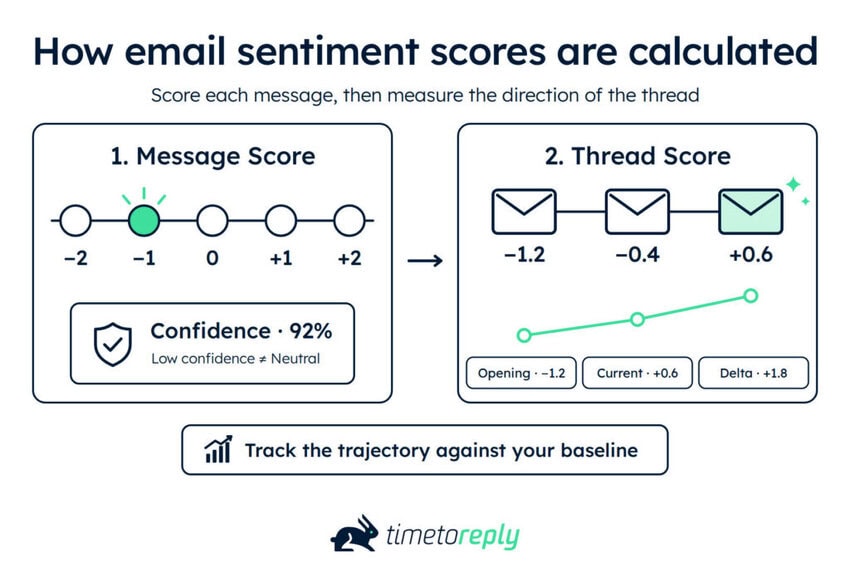
Pick a scale and use it consistently. A five-point scale from −2 to +2 is a practical choice, with 0 representing neutral sentiment.
Most models also return a confidence score, so keep both values. A negative label at 51% confidence means something different from one at 96%.
Treat low-confidence results as uncertain, not neutral. Neutral is a genuine sentiment reading, while low confidence means the model isn’t sure.
Decide what happens to mixed messages.
If an email praises the product but attacks billing, one score can hide that difference. So, score separate paragraphs where useful, or flag mixed messages for human review. Don’t average opposing sentiments into a misleading middle.
Weight recent messages more heavily because conversation direction matters. A thread that starts angry and ends resolved isn’t the same as one that starts positively and deteriorates.
Keep three fields: the current thread score, the opening score, and the delta between them. A falling delta can then trigger a review before frustration becomes an escalation.
The table below is an illustrative example, not measured customer data.
| Message | Direction | Message score | Running thread score | What changed |
| 1. Initial request, polite and specific | Inbound | 0 | 0.0 | Baseline set. Neutral is normal for a first contact |
| 2. Acknowledgement, no answer yet | Outbound | +1 | +0.3 | Friendly, but nothing resolved |
| 3. “Any update on this?” | Inbound | −1 | −0.2 | First inbound follow-up, delta falling. Alert fires |
| 4. Partial answer, one question unanswered | Outbound | 0 | −0.1 | Thread stalls rather than closes |
| 5. “This is the third time I’ve asked” | Inbound | −2 | −0.9 | Explicit escalation language |
| 6. Customer adds their manager to CC | Inbound | −2 | −1.4 | Structural escalation signal |
The running thread score shows the conversation’s direction better than any single message. By message 5, the customer has already signaled repeated frustration.
There’s no universal good email sentiment score. Scales, models, and cleaning methods vary, so the same score can mean different things.
A better approach is to create your own baseline. Start with about 90 days of historical data. Then track the median score for each team and watch how it changes. The same approach applies to customer success analytics.
Model stability is also a concern. When a 2025 arXiv paper scored one review 100 times with GPT-4o, the results ranged from negative to positive.
That variation makes trends more useful than individual scores. Look at where sentiment is moving, rather than focusing on one number.
Score each message using the same method, then roll the results up to the thread level. Keep the opening score, current score, and change between them. Since models and scales vary, use your historical baseline to track sentiment trends.
Also Read:
Three approaches suit different stages of a customer sentiment analytics program. You can code messages by hand, wire up a model or API yourself, or use a platform that reads your mailboxes directly.
The right choice depends on your resources, accuracy needs, and data-governance requirements.
| Method | Setup effort | Accuracy ceiling | Data leaves your tenant? | Best for |
| Manual spreadsheet coding | Low | High on small samples | No, if handled carefully | Testing the idea and building a labeled set |
| General-purpose model or sentiment API | Medium | Moderate to high | Usually, unless self-hosted | Teams with engineering capacity |
| Email-native analytics platform | Low | Moderate to high | Vendor-dependent | Ongoing use across a team |
Start here, even if you plan to buy a tool later. Export around 200 threads, put them in a sheet, and have two people score each independently.
You’ll learn what your customers actually sound like, and where human reviewers disagree. That disagreement gives you a realistic accuracy baseline.
Keep the file as your gold set. You can use it to validate any model or platform you test later.
This is the build option. You send cleaned email text to a model or sentiment API, then store the results.
The classification itself isn’t the main workload. Mailbox access, cleaning, deduplication, thread assembly, storage, and access control usually take more effort.
That makes this approach best suited to teams with engineering resources and a clear governance plan.
The third option is an analytics platform that connects to your mailboxes and handles cleaning, threading, and scoring. You give up some model-level control in exchange for much less implementation work.
Fit matters more than feature count. The best email analytics platforms differ in how they handle email, helpdesk data, governance, and reporting.
For example, timetoreply is designed for email-first teams and connects with Outlook, Microsoft 365, Gmail, and Google Workspace. Its email analytics software adds AI-assisted signals for sentiment, intent, urgency, escalation, and stalled conversations.
The main advantage is operational simplicity. The analysis happens within the inbox rather than requiring you to build and maintain a separate pipeline.
You can run email sentiment analysis manually, build a custom system, or use a dedicated platform. Manual scoring sets a reliable baseline, while a custom pipeline offers more control. Email-native platforms simplify ongoing analysis.
Also Read:
Email sentiment analysis handles clear tone well, but struggles with irony and sarcasm. Research suggests models can reach human agreement on clear sentiment, while both humans and models struggle with sarcasm.
Accuracy is most useful as a comparison, not a standalone figure. A 2025 Scientific Reports study measured agreement between human raters and between models.
For sentiment, both groups reached a Krippendorff’s alpha of 0.95. There was no significant difference between them.
Alpha measures agreement between independent raters. A 1.0 score means perfect agreement, while scores below 0.80 are generally treated as unreliable. For sarcasm, both groups fell to 0.25.
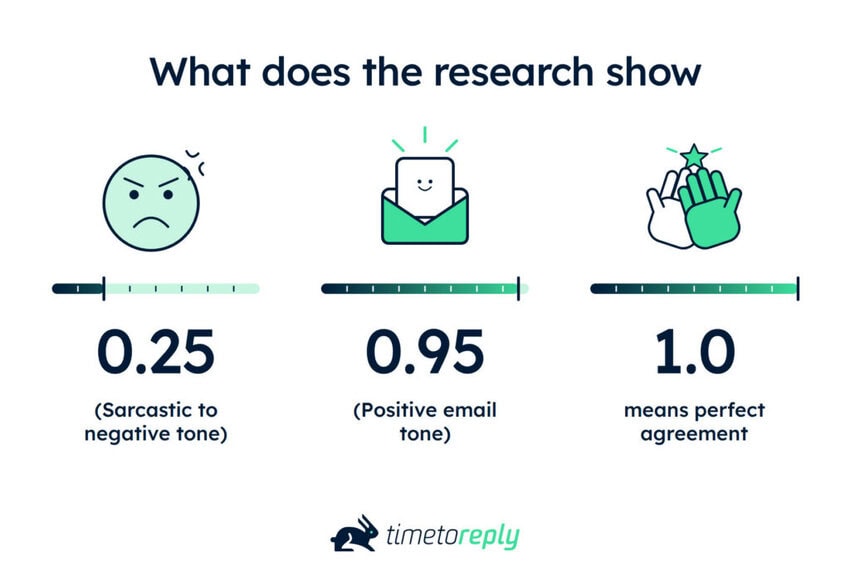
Machines aren’t necessarily worse than people at reading tone. They can run into the same ambiguity people face. Alpha also measures agreement, not whether a label is objectively correct.
Email sentiment analysis can misread sarcasm, negation, and mixed sentiment.
Sarcasm reverses the apparent meaning without changing the vocabulary. “Great, another outage” could look positive because of the word “great.”
Negation can reverse a sentence, and weak classifiers may miss it. “I wouldn’t say I’m happy with this” contains a positive word, but expresses dissatisfaction.
Mixed sentiment is harder to capture in one label. A customer might praise your team while criticizing your billing. Those two signals averaged into a single score tend to cancel each other out.
This makes neutral scores worth reviewing, especially when positive and negative points appear together.
Aspect-based scoring can separate those signals by topic. Paragraph-level scoring is a cheaper approximation.
Don’t rely on a vendor’s published accuracy figure alone. It was measured on their data. Your customers, issues, and language may be different.
Use the 200-thread gold set you built in the spreadsheet step. It should reflect your real mix of customers and issues. Run your chosen method over those threads and compare its labels with your human scores.
For negative sentiment, check precision and recall. Precision tells you how often negative labels are correct. Recall shows how many of the actual negative messages the method finds.
Overall accuracy can hide the failure that matters most. Re-run the check quarterly because language and customer behavior change. That review can also feed into customer churn analysis.
A gold set won’t make the model accurate by itself. It gives you a defensible way to measure how well it works on your own mail.
Email sentiment analysis can match human agreement on straightforward sentiment, but sarcasm remains difficult. Treat scores as signals rather than facts, and validate them against a gold set from your own mail. Track precision and recall for negative sentiment, then repeat the test as your customer mix changes.
Also Read:
Email contains more identifiable information than many other service channels. Email sentiment analysis can therefore involve data protection, employment rules, and customer commitments.
The main questions are simple: what gets read, what gets stored, and whose emails you’re scoring.
Email analytics platforms differ in how deeply they process messages.
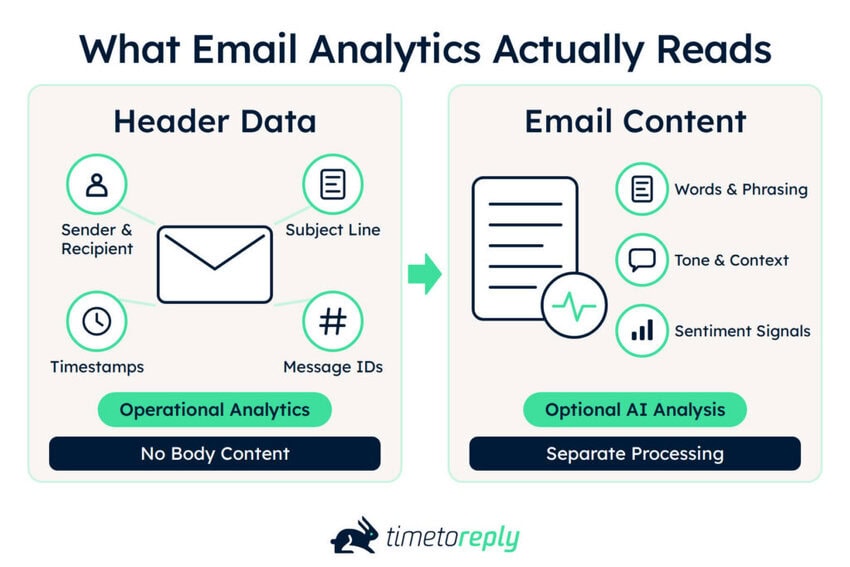
Some use only header data, such as senders, recipients, subject lines, message IDs, and timestamps. That’s enough for reply times, volume, and SLA reporting.
timetoreply’s operational analytics core works this way. It only ingests header information and doesn’t access email body content or attachments.
Content-level analysis is different. Any system that scores tone has to process the words themselves, creating a separate processing activity.
Ask vendors what content they access, why they need it, where it’s processed, and how long they retain it.
Customer emails can contain personal data, so GDPR may apply when you’re analyzing them.
You need an appropriate lawful basis and clear retention rules. Document the processing purpose in your wider email management policy.
Regulated sectors may have extra requirements. Healthcare organizations need to consider HIPAA, while financial services may have additional retention and privacy obligations.
The EU AI Act adds another issue for employee monitoring. It prohibits certain AI systems that infer emotions in workplaces, with the prohibition applying from February 2, 2025.
The scope depends on how the system is used. Scoring customers is different from scoring employees, so get legal advice before using sentiment analysis for staff assessment.
Treat email sentiment analysis as more than another operational metric. Decide who can see sentiment scores, whether they can affect performance reviews, and how long those scores are retained.

timetoreply lists SOC 2 Type II compliance, ISO 27001 certification, GDPR and HIPAA compliance, and a Google security audit. Its current terms also distinguish standard header-data processing from optional AI features that process email content.
Before connecting a mailbox, document your own rules for access, retention, and permitted uses. Review them with your legal or security team when customer or employee data is involved.
Be clear about what your system reads, why it uses that data, who sees the results, and retention periods. Staff-monitoring use cases need a separate legal review before deployment.
Also Read:
Without a named owner and a clear threshold, email sentiment analysis becomes another metric no one acts on. The four uses that tend to change behavior are catching escalations, spotting slow churn, coaching on tone, and prioritizing urgency.

Escalation rarely comes from a single angry email. It shows up as sentiment dropping across several messages.
Set alerts for sustained negative shifts, then review the thread. A new CC plus falling sentiment is worth attention.
Managers can use timetoreply’s escalation indicators and stalled conversation detection to catch these patterns early. These features reveal at-risk conversations before they become formal escalations.
Churn, especially for enterprise customers, doesn’t always start with a clear complaint. Tone cools gradually as engagement drops, giving account teams a crucial signal to watch.
Per-account sentiment tracking gives a clearer view than team-level averages alone. Engagement and tone together support efforts to improve customer retention.
Fewer people on the thread, shorter replies, and longer gaps can all signal declining engagement. Sales and account teams can apply the same method, not just customer support.
Customer churn analysis can then add context to the sentiment trend.
Most coaching focuses on metrics agents can already see. Tone data adds a view of how customers received the reply.
Look for repeated patterns rather than ranking agents. If an agent’s threads often become less positive after their second reply, review those conversations together.
Read the emails before drawing a conclusion. The score can point you to a conversation, but it cannot explain everything that happened.
Each month, review three threads per agent where sentiment changed the most. AI conversation summaries can speed that up, and customer service tools add broader operational context.
First-in-first-out is a poor fit for most shared mailboxes. A routine invoice query may need less attention than a stalled implementation.
Urgency detection can help teams surface messages that need a faster response. A negative thread with a deadline attached may need attention before older, routine requests. This is where email analytics for customer service teams can help.
Zendesk’s 2026 CX Trends report found that 86% of consumers say responsiveness and accurate resolution strongly influence buying decisions.
Yet between 30% and 40% of departments take no action after receiving experience data, per Medallia’s 2026 report. The signal is only as good as the response it triggers.
Email sentiment analysis creates value when it prompts action. Start with one trigger, such as sustained negative sentiment or falling engagement. Set a clear threshold and assign someone to review each alert.
Also Read:
Sometimes the right answer is to skip email sentiment analysis. Low volume, no follow-up owner, staff scoring, and using sentiment as satisfaction are four clear stop conditions.
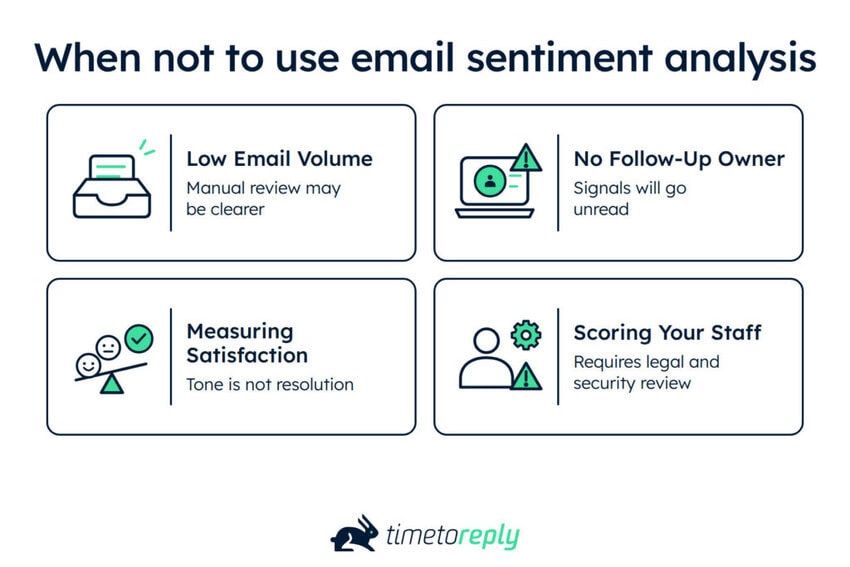
If you’re only receiving a few hundred threads a month, manual review may be more useful. A manager can read the conversations directly instead of adding another analysis layer.
That can also support email productivity without introducing a new scoring system. The exact threshold depends on your team, workflow, and customer service challenges.
A sentiment score is only useful when someone can act on it. If negative threads go nowhere, adding another layer of analysis won’t solve much.
The next step could be a review, escalation, or coaching conversation. Without one, there’s little reason to track the score. In 2025, Qualtrics found roughly one in five consumers who used AI for service saw no benefit.
Customers can sound calm while still feeling unresolved. That makes sentiment an imperfect measure of customer satisfaction. A 2026 preprint examining 70,450 support conversations found tone and satisfaction disagreed in 44% of cases.
That’s a single-source finding rather than a universal benchmark. Sentiment works best alongside CSAT and other feedback measures, not in place of them.
Scoring employee emotions raises different concerns from analyzing customer emails. The EU AI Act restricts certain AI systems that infer emotions in workplaces.
Get legal and security review before scoring employee communications. Customer sentiment analysis and employee monitoring shouldn’t be treated as the same use case.
Low volume, no action plan, and a satisfaction goal are all signs email sentiment analysis isn’t the right fit. Scoring staff emails raises separate legal concerns and needs appropriate review.
Also Read:
1. What is sentiment analysis in simple words?
Sentiment analysis uses software to identify whether text expresses positive, negative, or neutral sentiment. It considers word choice, phrasing, and context when making that assessment. With email sentiment analysis, the same process can be applied to large volumes of customer messages.
2. What is sentiment analysis in customer service?
In customer service, sentiment analysis identifies the tone of customer interactions across emails, tickets, chats, and calls. It can help teams find negative conversations and changes in sentiment that may need attention. Email sentiment analysis focuses specifically on what customers express in their messages.
3. How is sentiment analysis used in customer service?
Teams use sentiment analysis to flag conversations, prioritize queues, and support coaching. The results point agents or managers toward threads that may need review.
4. What are examples of sentiment analysis?
Common examples include scoring product reviews, monitoring social mentions, analyzing survey responses, and reviewing support conversations.
In email, a thread might start neutral, turn negative after a follow-up, then escalate when the customer CCs their manager. That pattern can flag an issue before the customer states it directly.
5. What is consumer sentiment analysis?
Consumer sentiment analysis measures household confidence about the economy, usually through an index. Customer sentiment describes how your own customers respond to your business. Check which meaning a source uses before quoting a figure.
6. What is a good customer sentiment score?
There’s no universal benchmark because scales vary by model, vendor, and data-cleaning method. Use about 90 days of your own data to set a baseline, then track changes over time.
7. How do you calculate a sentiment score?
Calculate a sentiment score by rating each message on a consistent scale, such as −2 to +2. Keep the model’s confidence value, then roll message scores into a thread-level score. Store the opening score, current score, and change between them to track sentiment over time.
8. Can ChatGPT analyze my emails?
A general-purpose model can label individual emails, making it useful for testing the idea. It’s less suitable as a production system.
Results can vary between runs, and processing large volumes becomes harder to manage. Pasting customer emails into a consumer chatbot can also move personal data outside your controls. Redact sensitive data first, or use a system covered by your organization’s data policies.
9. What is the best KPI for measuring customer satisfaction?
There’s no single KPI for customer satisfaction. CSAT measures immediate satisfaction, NPS measures willingness to recommend, and customer effort score measures how easy the interaction was.
Each relies on customers responding to a survey. Sentiment can complement these measures by covering conversations without survey feedback.
10. What are the 4 metrics of customer service?
Four common measures are first response time, resolution time, first contact resolution rate, and CSAT.
Sentiment adds another dimension by showing how the customer’s tone changes throughout the interaction. It helps explain what the operational metrics alone can’t show.
Also Read:
Email sentiment analysis shows how customers sound, then tracks how that tone changes across a conversation. It doesn’t measure whether they were helped, but it can reveal cooling accounts and rising escalations while operational metrics still look fine.
Start small. Hand-score 200 threads, set a baseline from your own history, and give one alert a named owner.
Answer the compliance questions before scaling, then add tooling when manual review stops working. It can become a useful part of efforts to improve customer service.
To see relationship signals alongside the reply times you already track, book a demo with timetoreply.
Get live inbox alerts and reply quickly to customer emails with timetoreply

CEO @ timetoreply
Howard Moodycliffe is CEO of timetoreply, an email analytics & relationship intelligence platform for B2B customer-facing teams. He writes about email performance, SLA management, and how organisations can use communication data to protect customer relationships and revenue.


Trusted by high-performing inbound sales teams and customer-facing teams globally.
Close more deals and delight more customers with the faster, smarter, deeper email analytics and performance optimization software that works straight from your team’s inbox.