
There isn’t one sentiment analysis tool that fits every customer team or communication channel. The timetoreply tool works well for teams analyzing sentiment in business email and customer conversations. Qualtrics XM Discover supports broader feedback programs, while Medallia targets large-scale customer experience analytics.
The right choice depends on where you get your customer feedback. Email, support tickets, surveys, and reviews need different approaches to sentiment analysis.
We monitor more than 50,000 mailboxes (as of September 2026) and see this gap often. So, we decided to help you out by listing the best customer sentiment analysis tools for different needs.
This guide compares nine sentiment analysis tools, explains how we selected them, and breaks down their pricing.
Sentiment analysis tools analyze customer conversations to determine how people feel about a company, product, or interaction. They process text from sources like emails, support tickets, surveys, reviews, and social media. They then classify the sentiment as positive, negative, neutral, or mixed.

Some tools go beyond a basic sentiment score. They can reveal the subject of the sentiment. They can also identify emotions and show how customer sentiment is evolving.
The most useful sentiment analysis tools also show what caused the score to change. That difference matters. A score gives you a trend. A reason gives your team something to act on.
Most sentiment analysis tools developed from social listening or customer experience analytics. A smaller group grew out of customer service analytics and support workflows. The main difference is the type of customer data each tool was designed to analyze.
Nearly all of them now bundle AI customer insights, which is part of why the category has blurred.
The three main types of sentiment analysis
There are three main types of sentiment analysis. Each provides a different level of detail. These also align with the customer service metrics many teams already track.
Most business tools use fine-grained or aspect-based analysis. Emotion detection is harder to validate. All three approaches can struggle with sarcasm and negation.
Sentiment analysis tools show how customers feel about a company, product, or interaction. They pick up emotional cues from customer conversations and label their feelings. Some tools can also identify the topic behind the sentiment.
The best sentiment analysis tool depends on the channel you need to analyze. It also depends on how your team plans to use the results.
We evaluated each tool’s verified capability, pricing, G2 ratings, and associated channel.

A tool that works well for social listening may be a poor fit for teams analyzing support tickets or email. The goal is to compare each product against the job it is designed to do.
We compared the tools by their supported channels, sentiment features, pricing, and G2 ratings. We also checked that each product is currently available.
These sentiment analysis tools differ mainly in the customer channels they analyze. They also vary in the depth of their sentiment features and their pricing. Some focus on email, support tickets, or social media. Others combine feedback from multiple sources.
The table below compares features, such as their main use cases and published pricing.
| Tool | Best for | Starting price | G2 rating | Free option |
| timetoreply | Customer sentiment inside email | $44/mailbox/mo billed monthly, 15-mailbox minimum | 4.2 | 14-day trial, no card |
| Qualtrics XM Discover | Enterprise multi-channel VoC | Not public, contact sales | N/A | No |
| Medallia | Large-scale CX programs | Not public, contact sales | 4.5 | No |
| Chattermill | Unifying support and product feedback | Not public, contact sales | 4.4 | No |
| Brandwatch | Consumer and brand intelligence | Not public, contact sales | 4.4 | No |
| Brand24 | Affordable brand monitoring | $249/mo month-to-month ($199 billed annually) | 4.6 | 14-day trial, no card |
| Sprout Social | Social media teams | $99/seat/mo month-to-month; sentiment sits in Advanced at $399/seat/mo annually | 4.4 | 30-day trial, no card |
| Thematic | Customer feedback analysis | $25,000/year | 4.8 | Personalized free trial |
| SentiSum | Support conversation analysis | Not public, contact sales | 4.8 | No |
* All prices and ratings verified, as of September 2026.
Email-focused tools that didn’t make this list are covered in our best email analytics platforms roundup.
For the wider category, including sentiment analysis tools that don’t focus much on customer tone, see our customer service tools guide.
The best choice depends on the type of customer feedback you need to analyze. For email, timetoreply is one option to consider. Qualtrics XM Discover and Medallia suit organizations analyzing feedback across multiple channels. Brandwatch is designed for social and brand monitoring.
The sections below explain what each tool does, who it suits, and what it costs.
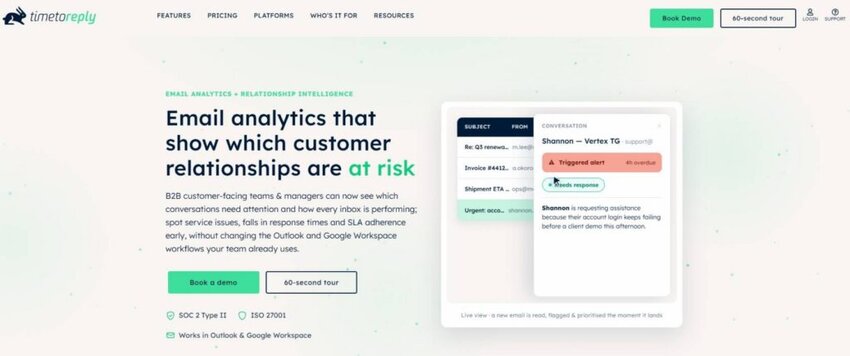
Image via timetoreply
The timetoreply tool is an agile email analytics platform. It combines operational data, such as response times and SLAs, with customer-language signals.
Its Smart Data features analyze business email for sentiment, intent, and urgency. This helps teams learn how quickly they respond and what customers are communicating.
Key features
Pros
Cons
Pricing

Image via timetoreply
Tool level
Usability
Pro Tip: Turn Smart Data on after your reply-time baselines settle. Tone reads far better against a known response pattern.

Image via Qualtrics
Qualtrics XM Discover helps organizations analyze customer feedback from multiple channels. It can assess sentiment in customer comments and apply those insights across different data sources.
This makes it a better fit for broader voice-of-customer programs than teams focused on one channel.
Key features
Pros
Cons
Pricing: Contact Sales
Tool level
Usability
Pro Tip: Check which data sources your plan actually includes. Vendor documents often list every possible feature. However, you can only analyze the data sources you connect and pay for.

Image via Medallia
Medallia is a sentiment analysis tool designed for large customer experience programs that need to analyze feedback at scale.
Its text analytics features identify themes, sentiment, empathy, and more detailed emotions. These features work across customer feedback in multiple languages and dialects.
Medallia also connects these insights to its wider customer experience platform. This gives teams one place to analyze feedback and track customer experience data.
Key features
Pros
Cons
Pricing: Contact Sales
Tool level
Usability
Pro Tip: Ask how the platform’s text model fits into your current categories. When a larger company acquires a software solution, the tool often loses its original flexibility.
Also Read:

Image via Chattermill
Chattermill is a highly versatile sentiment analysis platform. It combines feedback from surveys, reviews, and support tickets into one central view.
Its machine learning model looks at written comments to track sentiment by topic. It looks at written feedback, rather than just the rating. This means a five-star review can still show negative sentiment when the text describes a problem.
Key features
Pros
Cons
Pricing: Contact Sales
Tool level
Usability
Pro Tip: Test the software with your messiest data first during the demo. AI models look great on polished survey responses, but their real quality shows when processing raw, messy support tickets.

Image via Brandwatch
Brandwatch is a social listening and consumer research tool. It tracks mentions across social networks, websites, forums, news outlets, and review sites.
Its Consumer Research feature automatically labels these mentions as positive, negative, or neutral. It supports sentiment analysis in over 40 languages.
Key features
Pros
Cons
Pricing: Contact Sales
Tool level
Usability
Pro Tip: Test a sample of your customer comments before using Brandwatch at scale. This helps you see whether its sentiment labels fit your customers’ language.
Also Read:

Image via Brand24
Brand24 is one of the few brand sentiment analysis tools that publishes pricing. This tool combines web and social media monitoring with sentiment analysis.
It tracks mentions across social networks, news sites, reviews, forums, and other online sources. The tool also supports more than 90 languages.
Key features
Pros
Cons
Pricing

Image via Brand24
Tool level
Usability
Pro Tip: Set alerts for negative mentions of your brand and three main competitors. This can make the tool more useful than relying on the main dashboard alone.

Image via Sprout Social
Sprout Social is one of the more complete social media sentiment analysis tools. This tool tracks social media sentiment while helping you manage and monitor your accounts in one place.
Sprout Social tracks customer sentiment directly inside its Smart Inbox and Reviews features. Its social listening tools also let you monitor sentiment across topics and competitors.
Key features
Pros
Cons
Pricing

Image via Sprout Social
Tool level
Usability
Pro Tip: If sentiment scoring is a priority, check which plan includes the features you need before paying.
Also Read:

Image via Thematic
Thematic is a customer feedback analytics platform built around open-ended feedback. It identifies themes and analyzes sentiment across customer comments. You can use it with sources such as NPS, CSAT, surveys, and other feedback data.
Key features
Pros
Cons
Pricing

Image via Thematic
Tool level
Usability
Pro Tip: Use Thematic when you need to understand the reasons behind a sentiment, not just label comments as positive or negative.

Image via SentiSum
SentiSum is one of the sentiment analysis tools built for customer support teams. It analyzes conversations for sentiment, topics, and recurring issues.
Its AI automatically tags conversations based on the issues customers raise. It can also connect sentiment to those issues. This helps teams see what drives negative feedback.
Key features
Pros
Cons
Pricing: Contact Sales
Tool level
Usability
Pro Tip: Track negative sentiment alongside issue tags. This way, you can identify which support problems are causing the most frustration.
The right sentiment analysis tool depends on your customer channels. The timetoreply tool fits email-first teams. Qualtrics XM Discover, Medallia, and Thematic suit broader customer feedback programs. Brandwatch, Brand24, and Sprout Social are better for social and brand monitoring.
Also read:
First, consider the customer channel it can analyze. Then, think about the type of sentiment data you need. A tool built for social media may not suit email or support tickets. So, start with those two criteria before comparing price, features, or team requirements.
Work through these five questions:

The fourth question is easy to overlook. A sentiment analysis tool may look inexpensive when you look only at its price per seat. But the minimum purchase can make the actual cost much higher.
The customer experience vs customer service distinction also matters when making this choice.
If your main goal is to reduce churn, start with customer churn analysis. To improve customer satisfaction scores, focus on improving the core customer experience first.
Using the wrong tool for the wrong channel makes it much harder to reduce customer churn.
Start with the channels your customers use most. Then look at the cost, including any minimum number of seats or mailboxes. If you mostly communicate with customers via email, a social media tool may not be the right fit.
Also Read:
1. Can ChatGPT do sentiment analysis?
Yes, ChatGPT can classify the tone of text you paste in, and it handles nuance reasonably well. It isn’t a monitoring tool, though. It won’t watch your inbox, score every conversation, or alert you when a key account turns negative.
2. Which AI tool is best for sentiment analysis?
The best AI sentiment analysis tools differ by channel. For business email, timetoreply reads tone, intent, and urgency in Outlook, Microsoft 365, and Gmail. Qualtrics XM Discover and Medallia are better for enterprise programs that include surveys and calls. For social listening, Brandwatch and Brand24 lead.
3. How accurate are sentiment analysis tools?
Results vary by provider, language, and topic. Sentiment analysis tools often struggle with sarcasm, negative statements, and technical jargon.
4. How much do sentiment analysis tools cost?
Costs range from pay-as-you-go pricing to large custom contracts.
5. What are some free tools for sentiment analysis?
Text2data, Hootsuite’s brand analyzer, and Formula Bot all offer free scoring for text you paste in.
6. Can you analyze sentiment in email?
Yes. Some tools analyze sentiment directly from email conversations. The timetoreply tool’s Smart Data layer identifies sentiment, intent, and urgency in email conversations and works with Outlook and Google Workspace. Other sentiment analysis platforms can analyze email alongside other feedback channels, depending on the product.
7. What is the difference between sentiment analysis and intent detection?
Sentiment analysis looks at how a customer expresses their feelings, such as positive, negative, neutral, or mixed sentiment. Intent detection looks at what the customer is trying to do, such as requesting a refund, renewing a service, or raising an issue. The two provide different types of information and can be used together.
8. Do sentiment analysis tools work in languages other than English?
Yes, most of the tools on this list support multiple languages. Brand24 supports more than 90 languages, while Brandwatch supports over 40.
9. Are there open-source sentiment analysis tools?
Yes, you have a few open-source options. VADER is a rule-based tool made for social media text, while TextBlob is another option.
10. Is sentiment analysis worth it for a B2B team?
It can be, if you point it at the right channel. B2B relationships usually run through email and account conversations, not public social posts. A social listening tool will miss most of the signal. The value comes from catching a souring relationship early, while there’s still time to act.
The right sentiment analysis tool depends on the feedback you need to analyze and where that feedback comes from. For teams focused on email, timetoreply may be a better fit. Qualtrics XM Discover, Medallia, Chattermill, and Thematic support broader customer feedback and customer experience use cases.
Brandwatch, Brand24, and Sprout Social are centered on social and brand monitoring. SentiSum, by contrast, focuses on analyzing customer support conversations.
Sentiment analysis tools get acquired often, so check that the vendor still exists. Then check the real entry cost, including minimums.
Tone data only pays off if someone acts on it, which is where customer retention improves.
Want to see what your team’s email is telling you? Schedule a demo today.
Get live inbox alerts and reply quickly to customer emails with timetoreply

CEO @ timetoreply
Howard Moodycliffe is CEO of timetoreply, an email analytics & relationship intelligence platform for B2B customer-facing teams. He writes about email performance, SLA management, and how organisations can use communication data to protect customer relationships and revenue.


Trusted by high-performing inbound sales teams and customer-facing teams globally.
Close more deals and delight more customers with the faster, smarter, deeper email analytics and performance optimization software that works straight from your team’s inbox.