
To enhance productivity with email analytics, you need more than just a full inbox and a few hunches. You need a clear view of what is slowing the team down, where emails are getting stuck, and which habits are making work harder than it should be.
Email analytics gives you that visibility. It helps teams spot delays, balance workloads, and make better decisions about how email is handled day-to-day. Instead of spending time reacting to problems, you can start fixing them early and keep things moving.
In this post, we’ll tell you exactly how to enhance productivity with email analytics. We’ll also give you a list of tools you can use for the same.
But first, let’s cover some basics.
Email analytics can be about performance or productivity. On one side, it shows how emails are performing in terms of opens and clicks. On the other hand, it shows how well a team is handling email, including response speed, workload, and follow-up habits.
This article is about the second side of email analytics. We are focusing on email management and team productivity, because that is where email analytics can help teams save time and work more effectively.
Email analytics can enhance productivity by:
For example, if you notice that reply times are higher on certain days, email analytics can help you trace that back to a spike in email volume or uneven workload.
Once you see that pattern, you can redistribute emails or adjust priorities for those days. This kind of small adjustment can reduce delays and help the team stay consistent without adding extra effort.
As such, when you use email analytics well, it becomes easier to keep inboxes organized and teams working smoothly.
Now, let’s go a bit more in-depth into the ways in which email analytics enhances productivity.
When you analyze when and how often emails are read and replied to, you can spot inefficiencies and plan smarter. You can enhance productivity with email analytics by optimizing time allocation and reducing mental fatigue.
Email analytics can also help teams set performance benchmarks and improve accountability across departments.
Here are some ways in which email analytics helps enhance productivity.
Now that you understand what you stand to gain, let’s discuss how to enhance productivity with email analytics.
Email analytics improves productivity by giving teams clear visibility into reply times, workload balance, and follow-up habits, so they can fix delays rather than react to them. Turning inbox activity into visible patterns helps teams work more consistently and spend less time guessing what is slowing them down.
Also Read:
Email analytics is useful because it shows what is actually happening in the inbox. Instead of guessing why replies are late or why the team feels swamped, you can look at the numbers and see where the slowdown is coming from.
Once you know that, it becomes much easier to fix the problem. Small changes to how emails are handled can save a lot of time and make the whole team work more smoothly.
You do not need to track everything.
Start with the basics, like reply time, first response time, email volume, and unanswered emails. These are usually enough to show where things are working and where they are not.
If reply times are creeping up, that is a good sign that something needs attention. Maybe one person is overloaded, or maybe important emails are getting lost in the mix.
Use a tool like timetoreply to monitor key reply time metrics, as shown below.
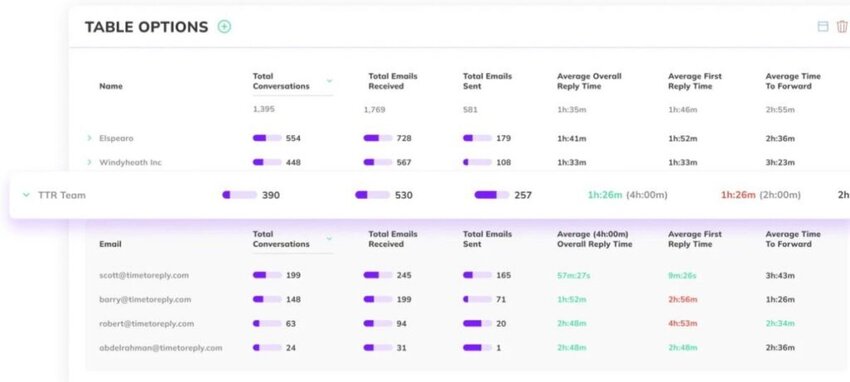
Image via timetoreply
Once you have the data, look for patterns.
Are some inboxes always slower than others? Are certain types of emails taking too long to answer? Is one person handling far more messages than everyone else?
This is where email analytics can save time. It helps you stop guessing and focus on the real issue that’s stopping you from delivering exceptional customer experiences.
People work better when the target is clear.
That could mean aiming to reply within a certain time, clearing a set number of emails each day, or meeting an agreed SLA for important messages.
Use SLA monitoring software solutions like timetoreply that send reminders when emails approach SLA.
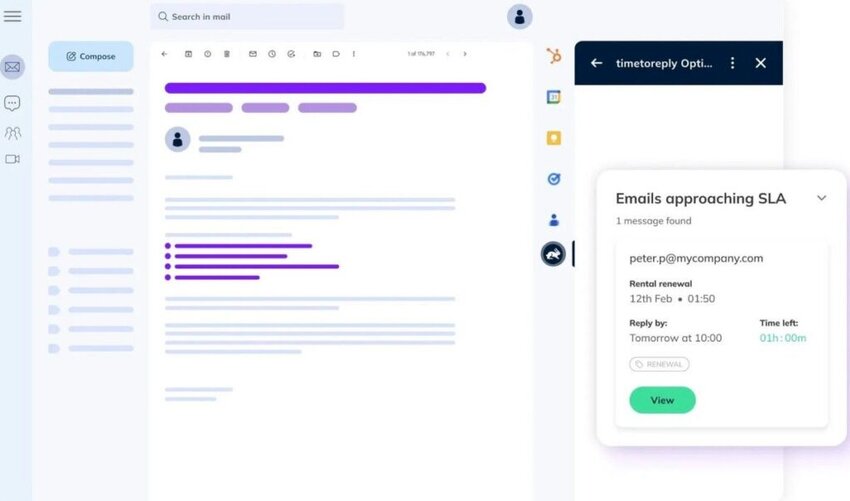
Image via timetoreply
This ensures that your team doesn’t take too long to reply and meets customer expectations. This, in turn, improves customer experience and boosts customer retention.
A lot of time gets lost in small repetitive tasks. Email analytics can show where automation would help most.
That might mean routing emails more clearly, flagging urgent messages, or helping teams catch unanswered emails faster.
Do not try to automate everything, just the parts that slow people down.
Productivity does not improve based on a single email analytics report.
You need to look at the trends over time and see whether things are actually getting better. Are replies getting faster? Is the workload more balanced? Are fewer emails slipping through?
That kind of review makes it easier to keep improving without making the process more complicated than it needs to be.
Begin by tracking core metrics such as reply time and email volume, then use that data to spot bottlenecks, set clear benchmarks, and automate repetitive steps that slow people down. Reviewing these trends over time keeps the approach improving without making the process more complicated than necessary.
Also Read:
In addition to using email management software, consider these tips to further enhance business productivity and improve response times:
By using email analytics for productivity, you can spot which emails matter most. Use rules and tagging systems to automatically flag these messages and bring them to the top of your inbox.
Many platforms let you assign urgency levels based on sender behavior or customer service SLA requirements. This makes it easier to respond in order of importance, rather than by the time the message was received.
A great way to enhance productivity with email analytics is by tracking how much time is spent for inbox management. Based on this data, allocate specific times for checking and responding to emails to avoid constant interruptions.
Encourage your entire team to adopt the same habit for consistency. Time-blocking also allows you to analyze whether certain hours are more efficient for email tasks.
If you find yourself sending the same email responses more than once, it’s time to build a template with canned responses and a relevant subject line. You can enhance productivity with email analytics by gaining insight into which types of inquiries are repeated often.
This can be messages like refund requests, meeting confirmations, or product FAQs. Not only does using email response templates save time, it also ensures your replies are consistent and professional.
Most email tools allow you to insert templates with just a few clicks or shortcuts. Plus, you can measure how well templates perform and tweak them for better engagement.
Also Read:
Analytics are only useful if you act on them. Periodically review and adjust your email management practices to ensure they align with evolving needs and goals.
Set some time aside weekly or monthly to review your email performance. Look at metrics like average response time, open rate, resolution time, and volume.
Use these insights to understand where your team is excelling and where delay in email responses happen. If performance drops, check for common bottlenecks — maybe a specific type of email isn’t being handled well, or workload isn’t balanced.
You can enhance productivity with email analytics by creating a feedback loop that leads to smarter decision-making.
Email analytics offer a team-wide view of communication habits. To enhance productivity with email analytics, you need to set performance benchmarks to keep team members aligned and motivated.
Share these metrics in a dashboard or during weekly syncs so everyone knows where they stand. If someone is falling behind, you can track email marketing data against benchmarks to identify areas that need support.
Many email tasks can be automated, and customer service analytics can tell you exactly which ones. If you notice that certain emails are always forwarded, tagged, or answered similarly, it’s a good candidate for automation.
Most email platforms support automation rules for assigning emails, sending auto-replies, or tagging based on content. Make sure to review automations regularly to ensure accuracy and relevance.
By leveraging the right email management software and implementing these productivity tips, you can transform how you handle emails, leading to improved efficiency and better overall performance.
The most effective habits include prioritizing emails with smart filtering, setting dedicated time blocks, using templates for common replies, and reviewing performance on a regular schedule. Sharing team benchmarks and automating repetitive workflows keeps everyone aligned and focused on the work that matters most.
Also Read:
With such a wide range of email management software tools available to boost email efficiency, choosing the right one can be difficult. But worry not! Here are five of our favorite email productivity tools for managing customer service emails:

Image via timetoreply
The timetoreply tool helps empower customer-facing teams with data insights and automation to optimize their email performance, cut down on email reply times. It enhances productivity with email analytics, boosting efficiency and improving customer experiences across the entire email communication process. The timetoreply tool stands out by not just focusing on the speed of reply but on the overall effectiveness of your email interactions.
Best for: Teams looking to optimize email performance, improve resolution rates, and enhance customer satisfaction.
Key features
Pros
Cons
Pricing: Starts at $38 per month, with discounts available for an annual plan.
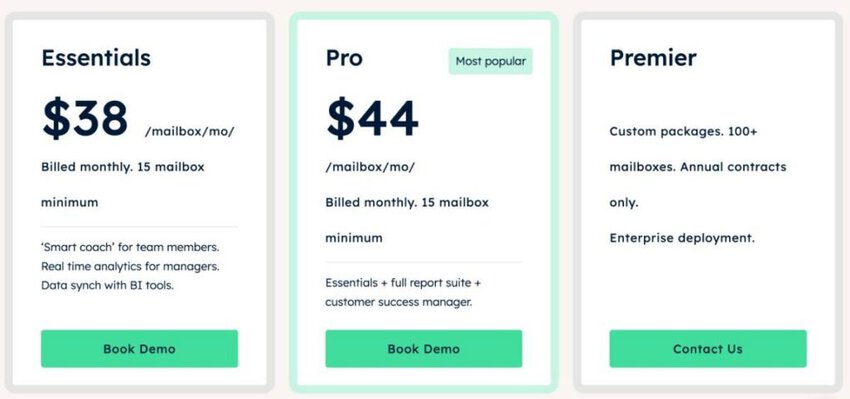
Image via timetoreply
Tool Level
Usability
Pro Tip: Timetoreply provides insights on each team member’s performance. Use this to figure out where to make improvements.

Image via Superhuman
This AI-powered tool is designed for speed, offering a range of shortcuts and commands that allow users to quickly perform actions in their inbox without the need for a mouse.
Superhuman’s key selling point is speed, promising users they’ll get four hours back each week in productivity savings. It also offers insights to enhance productivity with email analytics.
Best for: Busy professionals and executives who want to improve email productivity.
Key features
Pros
Cons
Pricing: Starts at $12/user/month, billed annually, with a free plan as well.
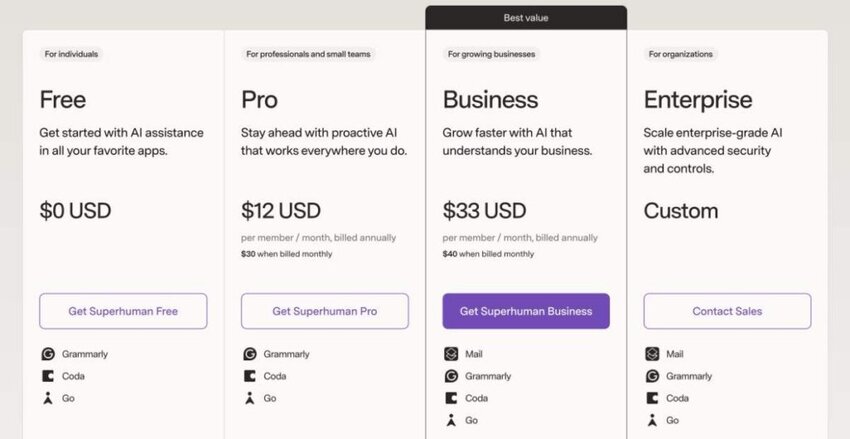
Image via Superhuman
Tool Level
Usability
Pro Tip: Take full advantage of the keyboard shortcuts to navigate the tool faster and save time.
Also Read:
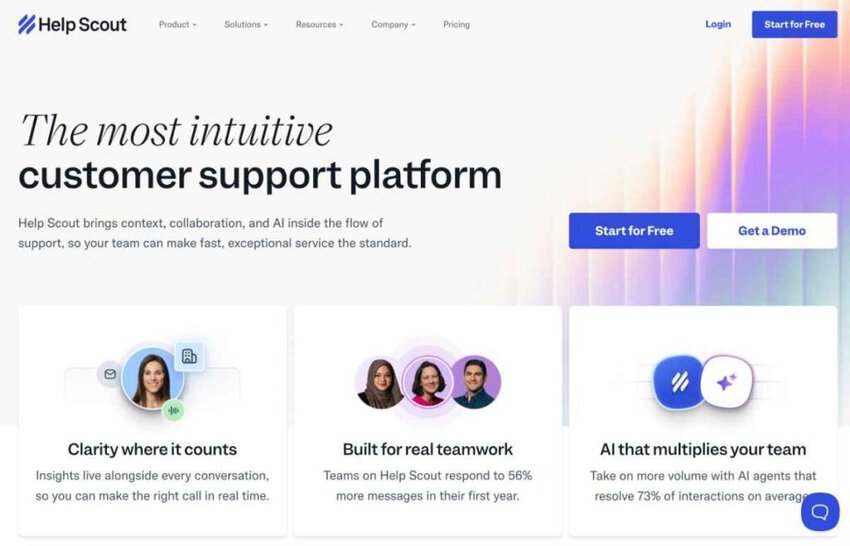
Image via Help Scout
Help Scout is tailored to the needs of teams on the frontline of customer-facing interactions. The tool provides a shared inbox that allows multiple team members to manage and respond to emails from a centralized location.
Help Scout’s top selling point is its laser focus on customer service teams, helping them enhance productivity with email analytics and an extensive knowledge base. Using its customer service email metrics, teams have improved customer satisfaction ratings.
Best for: Frontline customer-facing teams.
Key features
Pros
Cons
Pricing: Plans start at $30/user/month and AI answers cost $0.75 per resolution.
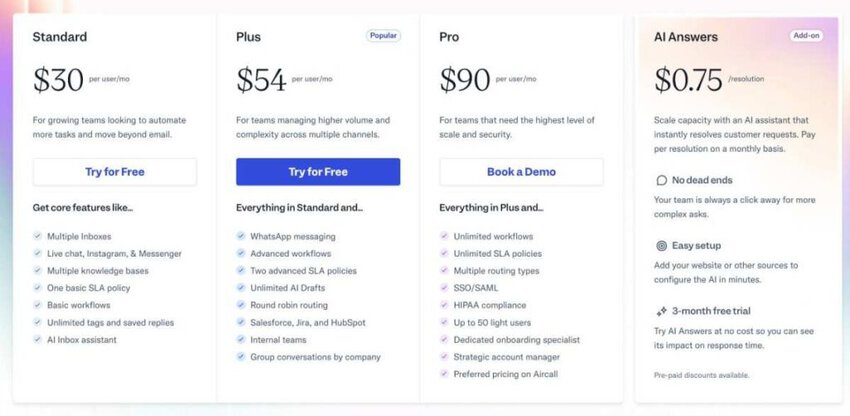
Image via Help Scout
Tool Level
Usability
Pro Tip: Help Scout has one of the best automated reply features. Take advantage of this to free up your time and focus on more pressing matters for your business.
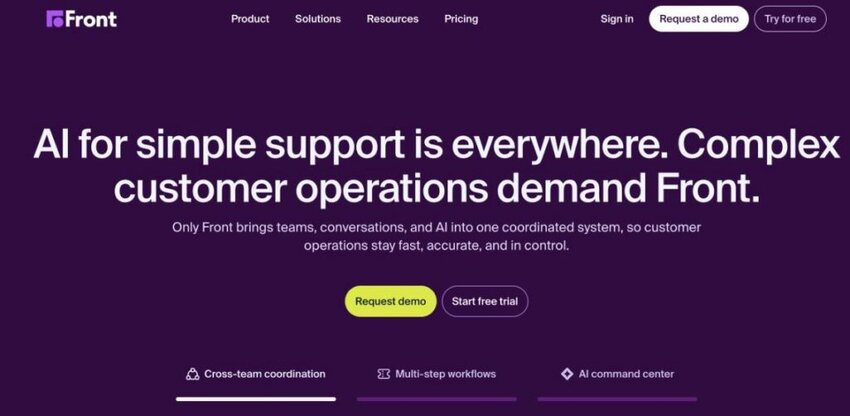
Image via Front
If you want to enhance productivity using email analytics, Front is a good option to consider. It can help you deliver exceptional customer service at scale.
This email management software solution can manage high volumes of customer inquiries and build workflows across multiple channels. Front helps you enhance productivity with email analytics by delivering personalized, timely, and efficient support.
Best for: Scaling customer service operations with a focus on collaboration and efficiency.
Key features
Pros
Cons
Pricing: Pricing starts at $35/seat/month for up to 10 seats.
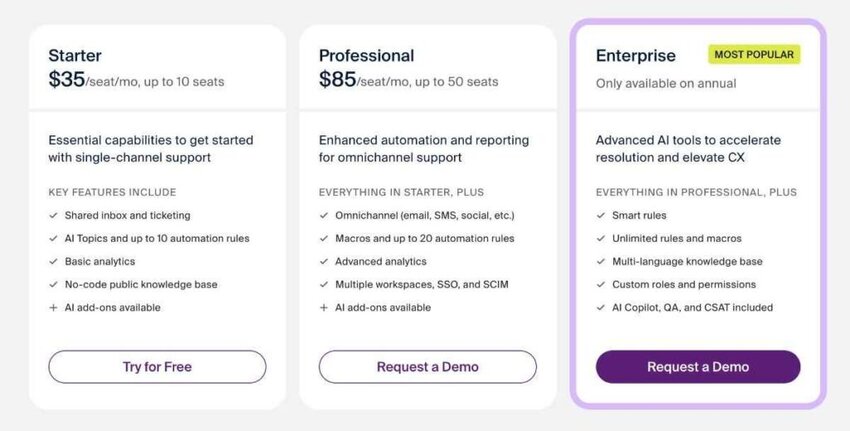
Image via Front
Tool Level
Usability
Pro Tip: Front offers workflow customization, allowing you to decide how you manage emails to increase efficiency.
Also Read:
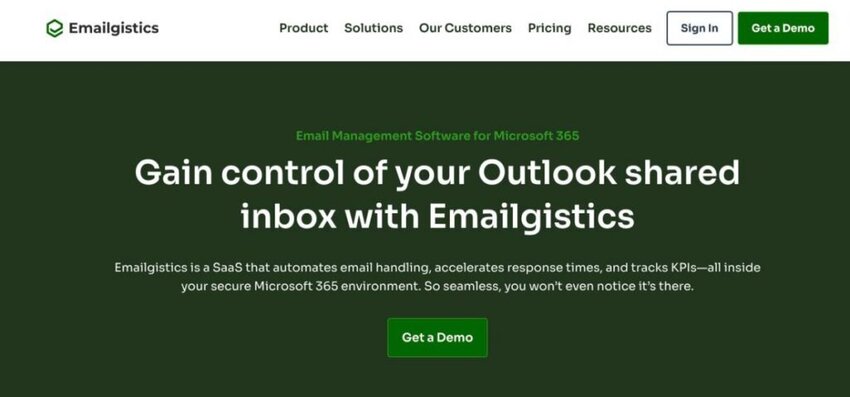
Image via Emailgistics
Emailgistics is a powerful email management platform built specifically for teams using Microsoft Outlook and 365. It transforms shared mailboxes into efficient communication hubs by adding structure, visibility, and performance tracking to optimize email workflows.
This tool adds advanced routing, workload balancing, and real-time insights to enhance productivity with email analytics — all without requiring users to leave their Outlook email account.
Best for: Microsoft 365 and Outlook-based teams seeking better email distribution, accountability, and reporting.
Key features
Pros
Cons
Pricing: Plans start at $13/user/month.

Image via Emailgistics
Tool Level
Usabiity
Pro Tip: For increased efficiency, use Emaillogistics to automatically assign incoming emails to the right people.
Strong options include timetoreply, Superhuman, Help Scout, Front, and Emailgistics, each offering a different mix of reply-time tracking, automation, and team reporting. The best fit depends on your team size, your existing inbox setup, and how much visibility you need into individual and shared mailbox performance.
1. How can email analytics help me prioritize follow-ups more efficiently?
Email analytics helps prioritize follow-ups by providing insights into response times, email open rates, and engagement patterns. It identifies which emails have been left unanswered for the longest or show the highest engagement. This allows you to focus on the most critical follow-ups first.
2. How often should I review my email analytics data?
It’s a good idea to review your email analytics weekly or bi-weekly. This allows you to track performance trends, catch potential issues early, and make quick adjustments.
3. Is email analytics suitable for small teams or only for large enterprises?
Email analytics is beneficial for teams of all sizes. While large enterprises may use it for monitoring large-scale communication operations, small and medium-sized teams can gain just as much value.
Tools like timetoreply offer scalable features that help even small teams manage workloads, optimize response times, and automate repetitive tasks.
4. Can email analytics software integrate with tools like Outlook or Gmail?
Yes. Most email analytics solutions, such as timetoreply, are designed to seamlessly integrate with platforms like Microsoft Outlook and Google Workspace. Because of this integration, you don’t need to change your existing email setup to leverage email analytics.
5. What features should I prioritize to enhance productivity with email analytics software?
To enhance productivity with email analytics, prioritize software that includes:
These features work together to help you better understand your communication patterns and make data-backed decisions to improve efficiency.
Also Read:
Since email is at the heart of most business communication, how you manage it can significantly impact customer experience. That’s why it’s important to enhance productivity with email analytics, especially for customer-facing teams.
By giving your team real-time visibility into performance metrics, trends, and opportunities for automation, email analytics enable smarter, faster, and more consistent service.
Ready to elevate your email performance and transform customer interactions? Experience how timetoreply’s advanced tools can optimize your team’s efficiency, enhance response time, and deliver exceptional customer service.
Start your free trial today and see firsthand how we can empower your team to achieve new levels of performance excellence.
Get live inbox alerts and reply quickly to customer emails with timetoreply

Head of Customer Success @ timetoreply
Barry Blassoples is the Head of Customer Success at timetoreply, where he helps customer-facing teams boost revenue and protect brand reputation by providing actionable insights to improve their business email response times. He has over 15 years of leadership experience across customer success, sales, and marketing roles in high-growth tech companies.



Trusted by high-performing inbound sales teams and customer-facing teams globally.
Close more deals and delight more customers with the faster, smarter, deeper email analytics and performance optimization software that works straight from your team’s inbox.