
Customer success software helps your team track customer progress and solve issues early. There’s no single best tool, only the best fit for your team and specific needs. In this guide, you’ll discover the leading platforms. You’ll compare their key features, pros, cons, and pricing to find the best fit for your business.
Reliable customer success software gives you a clear view of every single customer journey. It helps you track customer health, spot problems early, and build long-term relationships. The best solutions make it easier to give every customer the support they need.
As your business grows, it becomes harder to keep up with every customer. It’s easy to miss important updates or forget to follow up. Customer success software keeps everything in one place. It helps your team stay organized and act before you lose clients.
A great customer experience is no longer a bonus. PwC’s 2025 Customer Experience Survey backs this up. It shows that 53% of customers expect a smooth experience as a basic standard to remain loyal to a brand.
This guide will show you why customer success software is worth using. We’ll compare the top tools for 2026. You’ll see their main features, pros, cons, and pricing. You’ll also get tips to help you choose the best solution for your business.
We chose the best customer success software by evaluating how effectively each platform helps reduce churn, improve customer retention, and deliver long-term value. Instead of ranking tools by popularity, we assessed factors such as customer health monitoring, automation, integrations, reporting, scalability, ease of use, and overall impact on customer success outcomes.
Here are the criteria we used to select the top customer success software:
Before you choose customer success software, consider the features your team needs most. Look for health scoring, useful automation, and simple reporting.
Strong customer onboarding support also determines whether you lose or keep clients. Also, make sure the tool connects with your email platform. Many early churn signals first appear in customer emails.
The right choice depends on your team size, budget, and the features you need most. Look for a solution that connects with your existing tech stack and delivers results. A reliable platform also protects your sensitive customer data with top-tier security standards.
The best customer success software depends on your business size, goals, and customer success priorities. A platform that works well for an enterprise managing thousands of accounts may not be the best fit for a growing SaaS startup.
The table below groups the top tools by their strongest use case, making it easier to shortlist the best options before exploring the detailed reviews.
| Customer success software | Best for | Free plan | Starting price | Rating |
| timetoreply | Customer-facing teams that run on email and want response time analytics | ❌ | $44 per mailbox/month | Capterra: 4.5/5 G2: 4.3/5 |
| Gainsight | Large enterprise customer success teams with complex portfolios | ❌ | Custom pricing | Capterra: 4.4/5 G2: 4.5/5 |
| Custify | Growing B2B SaaS success teams that want easy customer lifecycle management | ❌ | Personalized quote | Capterra: 4.9/5 G2: 4.7/5 |
| ChurnZero | Mid-market SaaS teams focused on reducing customer churn | ❌ | Custom quote | Capterra: 4.7/5 G2: 4.7/5 |
| Totango | Teams that want flexible success plays | ❌ | Custom pricing | Capterra: 3.7/5 G2: 4.3/5 |
| Planhat | Mid-market and RevOps-led teams that need customer health tracking | ❌ | Custom quote | Capterra: 4.5/5 G2: 4.5/5 |
| Akita | Small teams wanting simple customer success tools | ❌ | $49/month for 2 full-access users | Capterra: 4.4/5 G2: 3.8/5 |
| Vitally | Product-led and mid-market teams using CRM data | ❌ | Custom pricing | Capterra: 3.7/5 G2: 4.5/5 |
| ClientSuccess | Startups and SMBs wanting fast rollout, customer retention, and renewals | ❌ | Custom quote | Capterra: 4.2/5 G2: 4.4/5 |
| HubSpot Service Hub | Teams already using HubSpot CRM and want an all-in-one platform | ✅ | $10 per seat/month | Capterra: 4.4/5 G2: 4.4/5 |
| Zendesk | Customer support and service teams | ❌ | $19 per agent/month (billed annually) | Capterra: 4.4/5 G2: 4.3/5 |
These prices and ratings are verified as of July 2026 and may change over time.
Each platform serves different business needs. Some tools like timetoreply stand out for response time analytics. Others like ChurnZero focus on customer health and churn prevention. Choose the customer success software that matches your team size, budget, and goals.
Customer success software lets you keep a pulse on customer health and reduce churn. It gives your client-facing teams the exact data they need to stop problems early. This improves customer retention and grows your revenue.
Keeping existing customers brings more growth than finding new ones.
A recent Benchmarkit SaaS report proves this. It shows that the median Net Revenue Retention (NRR) was close to 101% in 2025. It also found that customer expansion now drives about 40% of new recurring revenue.
When your existing customers stay longer and spend more, your business grows.
Here are the main benefits of customer success software:
In 2026, customer retention fuels long-term business growth. Customer success software helps you find hidden churn risks early and improve onboarding. It also frees up your team to build stronger customer relationships.
The leading customer success software platforms include timetoreply, Gainsight, ChurnZero, Totango, and more. We’ll compare their features, AI capabilities, pricing, strengths, and weaknesses. You’ll see what each platform does best, how teams use it every day, and its pricing details.
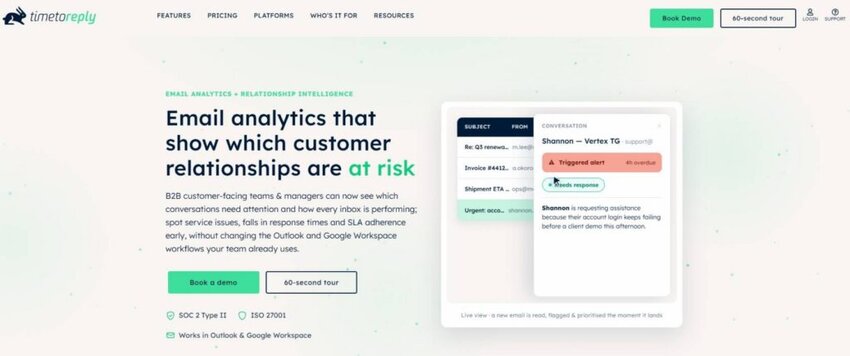
Image via timetoreply
If you mostly rely on email for customer service, timetoreply is worth considering. It’s an email analytics and response time solution built for customer-facing teams.
The platform fills a gap that many customer success software platforms leave behind. Most tools use health scores and renewal reports to show you what happened recently. In real time, timetoreply shows you what’s currently happening in your customers’ inboxes. That live view is its edge. It helps you spot problems early and improve response times before customers walk away.
Every customer email carries two signals. The first shows how your team performs through reply times, Service Level Agreement (SLA) status, and workload. The second shows how customers feel through tone, urgency, and intent. Many teams track neither well, yet slow responses can be an early sign of churn risk.
The timetoreply customer success software helps you monitor both signals. Its AI-powered Smart Data feature analyzes customer sentiment, intent, and urgency in emails to help teams identify at-risk conversations early. This allows customer success managers to prioritize important issues and take action before they impact customer relationships.
It tracks email response times, workloads, and SLA performance across shared inboxes and individual team members. The platform works directly with Outlook, Microsoft 365, and Gmail, and integrates with existing CRM systems, allowing teams to include email performance data in broader customer health insights.
Key features

Image via timetoreply
Pros
Cons
Pricing
The timetoreply customer success software provides three paid plans:
ul>
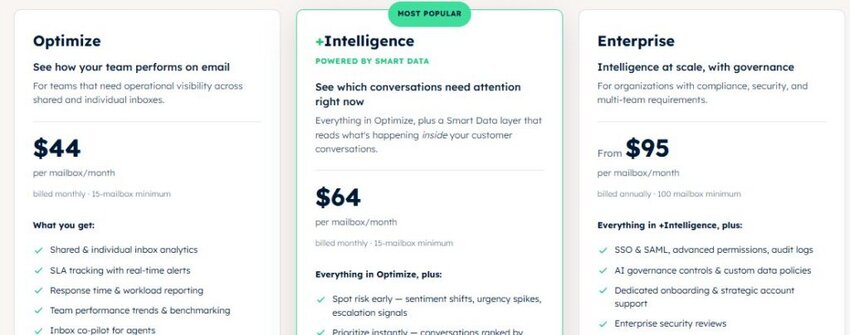
Image via timetoreply
Tool level
Usability
Pro tip: Set email response time goals for different customer segments. Review weekly reports to identify delays before customers churn.
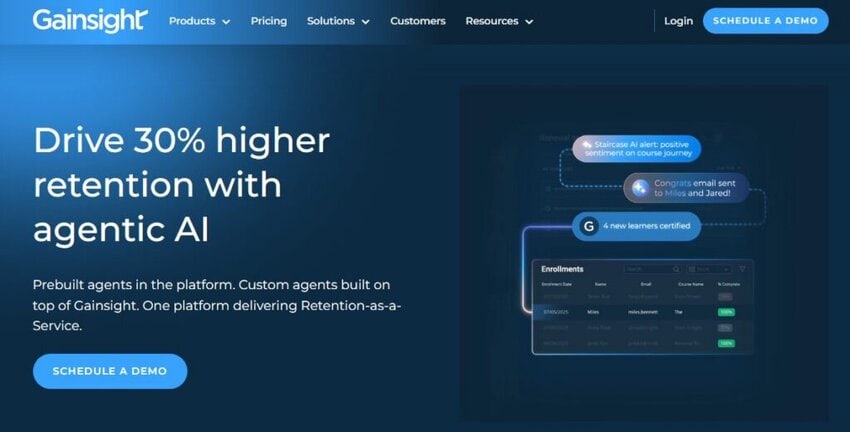
Image via Gainsight
Gainsight is an enterprise customer success software platform. It works well for large companies managing complex customer portfolios.
The platform combines CRM, product usage, support tickets, and survey data in one place. It uses this information to create health scores and flag churn risks. The customer success software then suggests the next best action.
Gainsight also offers strong reporting. You can track customer retention, product adoption, and revenue across different customer groups. This helps leaders make better decisions and share clear updates with stakeholders.
Although Gainsight offers many advanced features, new users should expect a learning curve. Teams usually benefit most after investing time in setup and training.
Key features
Pros
Cons
Pricing
Gainsight offers a personalized quote for its customer success software. You need to contact the sales team for exact pricing.
Tool level
Usability
Pro tip
Start with a simple customer health score before adding advanced rules and automation. This makes adoption much easier.

Image via Custify
Custify is a customer success software platform built for small B2B SaaS teams. It works particularly well if you want to lower customer churn and increase adoption. The tool makes it very easy to spot clients who are ready to upgrade or buy more seats.
It stands out among the top customer success tools that are very easy to use.
The platform brings together product usage, billing, and customer support data into one dashboard. It then uses that information to create customer health scores and complete customer profiles.
Custify also makes it easier to manage daily work. You can automate routine tasks and create customer success playbooks. This makes it easier to focus on important customer accounts without hiring more people. Concierge onboarding also helps your team get up and running faster.
Key features
Pros
Cons
Pricing
Custify provides personalized quotes for its customer success software.
Tool level
Usability
Pro tip: Connect all your fragmented data sources before creating playbooks. This helps your customer success software deliver more accurate alerts and automation flows.
Also Read:
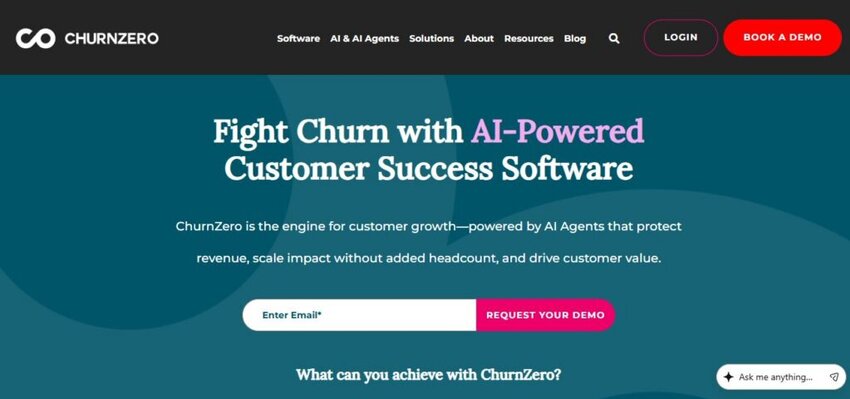
Image via ChurnZero
As its name suggests, ChurnZero is designed to help you keep more customers. It’s a favorite for mid-sized SaaS companies that want to spot churn risks early. This customer success software helps your team lower churn and increase renewals.
The platform tracks how customers use your product and how often they engage with it. It turns that information into customer health scores and automated journeys.
When customer activity drops, ChurnZero alerts your team and triggers the right workflow. This helps your customer success managers reach out before renewal is at risk. The customer success software platform also includes in-app messaging. You can guide clients without asking them to leave your product.
Key features
Pros
Cons
Pricing
ChurnZero doesn’t publicly list pricing on its website. You’ll need to get in touch with the sales team for a custom quote.
Tool level
Usability
Pro tip: Set up an alert for when an account’s top user leaves their company. This is a major hidden churn risk you need to act on.

Image via Totango
Totango is flexible customer success software that scales from startup to enterprise. It’s known for SuccessBLOCs. These are prebuilt playbooks that let teams launch onboarding, adoption, or renewal programs. That head start reduces hours of setup.
Totango has since combined with Catalyst, bringing the two platforms under one roof. You get Totango’s segmentation and automation. Catalyst’s cleaner, more modern workspace gives you a clear view of customer activity.
For teams that want reusable programs and room to grow, it strikes a useful balance.
Key features
Pros
Cons
Pricing
Totango offers two paid plans for its customer success software. Each plan comes with a personalized quote.
Tool level
Usability
Pro tip: Start with Totango’s ready-made SuccessBLOC templates. You can customize them later as your customer success process grows.
Also Read:

Image via Planhat
Planhat is customer success software built around a flexible customer data platform. It works well for mid-market companies and Revenue Operations (RevOps) teams. It helps them connect customer success, revenue, and product usage data in one place.
Unlike other tools, Planhat doesn’t force you to follow a fixed structure. You can organize data in a way that fits your particular business needs. This makes it a great choice if you have unique products, account types, or customer journeys.
The platform also includes customer health scores, playbooks, workflow automation, and revenue tracking. Many teams use this customer success software as their single source of truth.
Key features
Pros
Cons
Pricing
Planhat provides custom pricing for its customer success software. Confirm current pricing from its sales team.
Tool level
Usability
Pro tip: Build custom health scores that match your customer engagement and product usage data. This gives your team more accurate customer insights.

Image via Akita
If you want simple customer success software, Akita is a worthy choice. It’s a lightweight platform for small and growing teams. It helps you get started quickly without a long or complicated setup.
Unlike complex enterprise customer success software, Akita keeps things simple. It gives you all the essential features you need to increase customer satisfaction.
The platform connects with your existing systems and brings your data into one place. It then turns that information into customer health scores and customer segments.
You can also create automated playbooks that start when an account needs attention. If you’re moving away from spreadsheets, Akita makes the transition much easier. It helps you track customer health and act on it instead of features you may never use.
Key features
Pros
Cons
Pricing
Akita offers three paid packages:

Image via Akita
Tool level
Usability
Pro tip: Connect your billing system first. This lets you see which high-paying clients are using your app the least.
Also Read:

Image via Vitally
Vitally is customer success software popular with product-led and mid-market teams. It pairs a flexible data model with a fast, modern interface. This helps customer service teams and account managers work faster and stay productive.
The customer success software helps your team manage daily tasks from one place. Docs, notes, and project tools sit right next to health scores and dashboards. The platform also provides customer feedback tools like surveys to track satisfaction rates.
Vitally works especially well for fast-growing SaaS companies that need flexibility. Its customizable workspace allows teams to build workflows that match their process.
Key features
Pros
Cons
Pricing
Vitally offers three paid plans for its customer success software. They all include custom pricing, depending on your team’s needs.
Tool level
Usability
Pro tip: Use the custom Indicators feature to set up alerts for quiet accounts. The system can automatically message your team so you can save the relationship.

Image via ClientSuccess
As its name suggests, ClientSuccess helps businesses strengthen customer relationships. The customer success software suits startups and SMBs wanting to get started quickly.
It lets customer success management teams track account health with its SuccessScore metric. This feature combines customer product usage, engagement, and feedback into one score. That makes it easier to see which accounts need attention.
ClientSuccess also offers renewal tracking, lifecycle playbooks, and reporting tools. Executive dashboards help you share customer retention trends with company leaders.
Key features
Pros
Cons:
Pricing
ClientSuccess offers custom quotes based on your business size and needs. Here are the tiers you get:
Tool level
Usability
Pro tip: Encourage your managers to use the one-click Pulse update every week. It helps keep your health metrics highly accurate.
Also Read:

Image via HubSpot
HubSpot is customer success software for teams that already use its CRM. It keeps customer success, support, sales, marketing, and customer service data in one platform. Instead of switching tools, you can manage the whole customer journey from one place.
Teams can see past conversations, sales pipeline activity, marketing engagement, and account details. That complete view is HubSpot’s advantage over standalone customer success software. It helps you deliver a more consistent customer experience.
HubSpot Service Hub is also easy to learn. Small businesses can start with free tools and upgrade as they grow. Larger teams benefit from advanced automation, reporting, and customer success features.
Key features
Pros
Cons
Pricing
HubSpot Service Hub offers a free plan, plus three paid tiers:
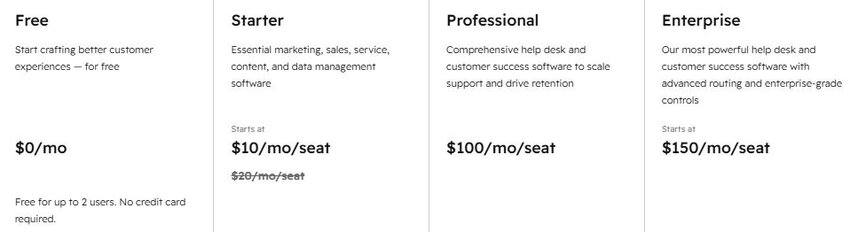
Image via HubSpot
Tool level
Usability
Pro tip: Set up an automatic notification that alerts you when a deal closes. Your team can start user onboarding instantly to provide a smooth customer experience.
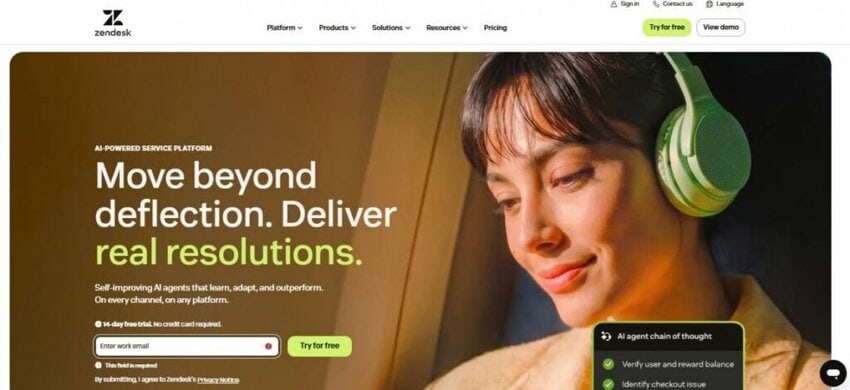
Image via Zendesk
If you deliver customer success through reliable support, Zendesk is worth a thought. The platform is mostly known for its help desk and customer support solutions. However, it’s also a great customer success software tool for service-focused teams.
Zendesk helps you keep customer conversations, tickets, and account details in one place. Many companies already use it as the foundation of their customer service operations. By tracking every touchpoint, your team can spot where most customers feel frustrated.
The platform also offers reporting, automation, and customer insights. These features help your team improve retention without adding another platform. Even so, you may need advanced lifecycle management features as your business grows. In this case, you can use Zendesk alongside dedicated customer success software.
Key features
Pros
Cons
Pricing
Zendesk offers a free 6-month trial to startups. You can include up to 50 agents. The customer success software solution also provides four paid plans.
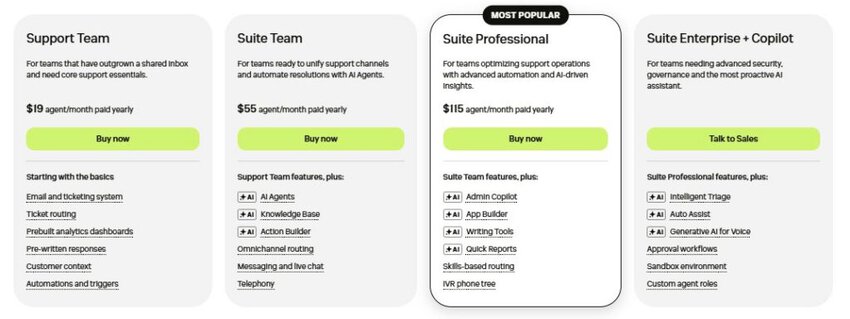
Image via Zendesk
Tool level
Usability
Pro tip: Create a VIP routing tag. This lets tickets from your highest-paying accounts skip the queue and get resolved quickly.
Also Read:
The best customer success software depends on your business size, goals, and budget. Some tools focus on reducing churn. Others help you improve onboarding, increase engagement, or track customer health.
Here’s a quick guide to help you pick the right option:
AI is changing how businesses use customer success software. It’s doing more than automating simple tasks. Leading platforms help you spot churn risks and suggest clear next actions. This helps you step in and save your most valuable relationships before customers leave.
Salesforce’s State of Service 2025 report shows that more businesses are using AI. It reveals that 69% of service experts use at least one form of AI. Of these, 53% use generative AI, 44% use predictive AI, and 39% use agentic AI.
The same study shows how AI benefits both companies and customers. 90% of businesses using AI say it helps them improve customer satisfaction and experience. Here are some more advantages of using AI:

Image via Salesforce
Before you choose any customer success software, look past the AI label. Check what the technology actually does. Confirm whether it tracks customer health, predicts churn, and spots at-risk accounts.
Here are some key changes to expect:

Image via Avaya
The best customer success software doesn’t simply advertise AI. It uses AI to help you identify customer risks earlier and automate repetitive work. Top platforms also provide insights that help you make smarter decisions. Tools like timetoreply’s Smart Data show how AI can turn everyday email conversations into useful signals.
Also Read:
Many businesses confuse these software categories, but they each solve a different problem. Customer success software helps you manage the customer journey after the sale. It covers every step from onboarding and adoption to renewal.
A CRM manages relationships and sales, while a help desk handles customer issues. Product analytics shows how customers use your solution.
Let’s look at how each category differs from customer success software:
A CRM system helps your sales team manage inbound leads, opportunities, and deals. It focuses on every step before a customer signs up. The goal is to help you win new business and grow your sales pipeline.
Customer success software takes over after the sale. It helps you onboard customers, monitor account health, and reduce churn. It also supports your team with managing renewals and finding growth opportunities.
These two tools work best together. They give your teams a complete view of the customer journey.
A help desk manages reactive customer support. It helps your team organize tickets, answer customer questions, and solve problems quickly.
Customer success software takes a more proactive approach. It tracks customer health and watches for warning signs. This helps your team act before problems become support tickets or cancellations.
Some businesses use support platforms like Zendesk for customer success. However, dedicated customer success software offers deeper lifecycle management.
Product analytics tools show you how customers use your product. They track feature adoption, user activity, and engagement. This information helps you understand customer behavior.
Your customer success software then turns that product data into deeper insights. It uses it to create customer health scores, playbooks, and automation flows. Your team can then act on the insights to improve customer retention and long-term growth.
Email analytics adds another valuable layer to your customer success software. Tools like timetoreply measure response times and SLA performance. The platform also tracks customer email activity.
Slow replies are often one of the first signs of customer risk. Combining email analytics with your stack provides a clearer picture of customer relationships.
A CRM helps you win new deals, while a help desk solves customer issues. Product analytics explains how clients use your product. Customer success software helps you keep and grow customer relationships. Adding email response analytics gives your team an early warning system that many businesses overlook.
Buying customer success software is only the first step. The real value comes from a successful rollout. It all starts with clean data, clear goals, and avoiding common mistakes.
Here are the steps to implement your customer success software:
Before activating your customer success software, organize your data. Fix all missing or outdated information and delete duplicate customer accounts.
Then link the systems and apps your team uses daily. These could be your CRM, help desk, billing tools, product analytics, and email platform. This ensures your customer health scores are reliable from the start.
Don’t try to move all your customers into the new system at once. Do it in bits instead. Pick one group, like new customers, enterprise accounts, or customers at risk of leaving.
Test your CS workflows with them first. Your team can find problems and gather feedback. After fixing the issues, you can slowly expand.
Decide what you want the platform to help you improve. Choose clear customer success metrics, like churn rate, renewal rate, or product adoption.
Set a starting point for each metric. Then track changes after the rollout. This helps you see if the customer success software delivers real value.
When everyone owns the platform, no one takes full responsibility. Choose one person to lead and manage the customer success software platform rollout.
This person can handle the setup, user training, reporting, and ongoing improvements. You should also give each team member clear responsibilities.
Don’t automate every process on day one. Too many alerts can overwhelm your team and cause important tasks to get lost.
Also, avoid building complicated customer workflows right away. Start with the basics, review what works, and add more features over time. This helps you get the most value from your customer success software.
Done well, a rollout takes weeks, rather than months. It also pays for itself using customer accounts you would otherwise have lost.
Customer success software delivers results when you start with accurate data. Before launching, test the system with one customer group and set clear metrics. Then assign one person to lead the rollout and improve the setup over time. This simple approach prevents team burnout and helps you keep more customers.
Also Read:
1. What is customer success software?
Customer success software is a platform that helps you keep and grow clients after they buy. It connects product usage, customer support, and account data into one view. The tool then scores customer health so teams can act early.
The goal is to proactively strengthen relationships. It helps your team spot risk before churn, drive adoption, and increase renewals.
2. What is the difference between CRM and customer success software?
A CRM helps you attract new customers and manage sales opportunities. Customer success software focuses on keeping those clients after the sale. It helps you improve customer health, increase product adoption, and reduce churn. Most businesses use both tools side by side.
3. What is the best customer success software?
There’s no single best tool. The best customer success software depends on your specific business needs. Gainsight works well for enterprise companies, while ChurnZero focuses on reducing churn.
If you’re a growing SaaS team, Custify is a strong pick. HubSpot fits companies already using its CRM. If you need detailed email response time analytics, timetoreply works best.
4. What is the strongest factor for customer success?
Being proactive is the biggest factor in customer success. When you spot problems early, you have more time to help your customers. Taking action before a customer complains increases your chances of keeping them. Customer success software makes this easier by tracking customer health, product usage, and engagement.
5. What are the 4 pillars of customer success?
The four main pillars are onboarding, adoption, retention, and expansion. Onboarding helps customers see the value of your solution quickly. Adoption encourages them to use your product regularly.
Retention keeps customers renewing. Finally, expansion helps you grow accounts through upgrades and additional services. Good customer success software supports all four stages.
6. What are the 4 C’s of customer loyalty?
The four C’s of customer loyalty often refer to:
7. What are the 4 P’s of customer engagement?
The four P’s are personalization, proactivity, promptness, and people. Personalization creates experiences that match customer needs. Proactivity helps you solve problems early.
Promptness builds trust through fast responses, and people keep customer relationships personal. Customer success software helps you improve all four by providing better insights.
8. How does customer success software reduce churn?
Customer success software finds warning signs before customers leave. It tracks product usage, customer engagement, health scores, and communication patterns. When customer activity changes, your team receives alerts and can take action quickly. This helps prevent churn instead of reacting after it happens.
9. How much does customer success software cost?
The cost of customer success software varies by provider and business size. Small business platforms may cost a few thousand dollars each year. Enterprise solutions cost much more. Many vendors offer custom pricing based on users, customers, or features. Always check the full cost before choosing a platform.
10. How long does implementation take?
Most customer success software platforms take between two and eight weeks to launch. Smaller platforms can often be ready within a few days. Larger enterprise solutions need more time to set up. They include deeper integrations and custom flows. Clean data and a clear rollout plan help speed up implementation.
11. Do you need a dedicated customer success team to use it?
No. Many small businesses use customer success software with one person or a shared team. Customer support and account managers often share responsibility in the early stages. As your business grows, you can build a dedicated customer success team to get the most value.
12. Who should use customer success software?
Any business that depends on recurring revenue can benefit from customer success software. It works especially well for SaaS companies, subscription businesses, and B2B organizations.
Customer success, support, and account management teams use it to improve customer health and reduce churn. If losing customers quietly hurts your growth, this software gives you the visibility to stop it.
Also Read:
The best customer success software matches your business goals and the way your team works.
Large businesses with complex portfolios get the most value from platforms like Gainsight or Planhat. Mid-sized and product-led companies may prefer Vitally, ChurnZero, or Totango.
Smaller teams often find success with Custify, Akita, or ClientSuccess. If you already use HubSpot, keeping everything in one platform can make your work much easier.
No matter which customer success software you choose, your goal stays the same. You want to identify customer risks early, improve customer engagement, and increase renewals. Customer health scores and visual dashboards give you better visibility.
At the same time, customer health scores don’t tell the whole story. Some of the earliest warning signs appear in your inbox. Slow replies and unanswered email threads can damage customer trust long before a health score changes. timetoreply helps you find those warning signs across Outlook, Microsoft 365, and Gmail.
Ready to see where your response times stand? Book a demo today and turn your email data into a customer success advantage.
Get live inbox alerts and reply quickly to customer emails with timetoreply

Head of Customer Success @ timetoreply
Barry Blassoples is the Head of Customer Success at timetoreply, where he helps customer-facing teams boost revenue and protect brand reputation by providing actionable insights to improve their business email response times. He has over 15 years of leadership experience across customer success, sales, and marketing roles in high-growth tech companies.



Trusted by high-performing inbound sales teams and customer-facing teams globally.
Close more deals and delight more customers with the faster, smarter, deeper email analytics and performance optimization software that works straight from your team’s inbox.