
Email SLAs for logistics firms help teams address one of the most common operational problems: slow email replies. They set clear rules for how quickly emails should be answered and resolved.
This matters because logistics runs on timing. When an update, approval, or fix is delayed, the impact can spread across the whole chain.
Effective email SLAs for logistics firms focus on four things: reply times, resolution goals, escalation steps, and reporting. Together, these parts create a clear process for handling emails.
That process helps teams avoid delays and missed messages. It also keeps communication more consistent across operations and customer support.
If you need help setting email SLAs for logistics firms, this post will help. Read on to learn what email SLAs are, why you need them, and their key components.
Email SLAs for logistics firms are agreements between logistics service providers and stakeholders that define the expected response times for emails. You can set email customer service SLAs for internal workflows or external communication with clients, carriers, and third-party logistics providers.
These agreements set clear guidelines for communication, ensuring that inquiries, requests, and issues are promptly addressed. They serve as the benchmark, setting a standard to strive for in delivering top-notch customer service.
An email service level agreement (SLA) may apply to the following communication aspects for logistics firms:
Also Read:
Email SLAs for logistics firms help teams manage high volumes of customer, carrier, and internal emails more efficiently. This leads to faster replies, smoother operations, and fewer communication gaps.
Here’s why you require an email service level agreement in logistics:
Boost customer satisfaction: Delays in communication lead to dissatisfaction and even lost business. Delivering top-notch logistics services is the cornerstone of improving customer experience and cultivating customer loyalty. According to a recent Salesforce study, 43% of customers would stop buying from a brand due to a poor customer service experience.
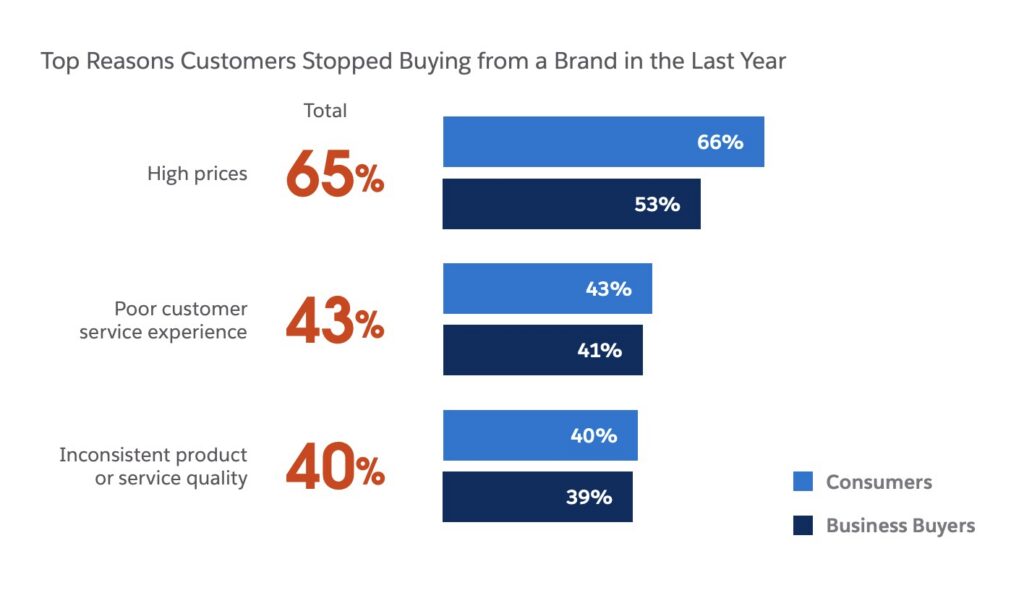
Image via Salesforce
Operational efficiency: Slow email response times can jam up other departments. A warehouse can’t release a shipment if the customer hasn’t confirmed the delivery time. Email SLAs streamline communication workflows, reducing the risk of bottlenecks and ensuring smooth operations. Setting email SLAs for logistics firms helps streamline processes, maximize productivity, and enhance overall efficiency.
Enhanced reputation: Timely and professional responses make you look good. You build trust and credibility with your customers by consistently meeting or exceeding SLA targets. Become a trusted brand and watch your pipeline grow.
Happy customers are repeat customers: You make them happy when you meet customer expectations. And happy customers tend to spend more. According to a recent survey, 86% of customers say that quick resolutions impact their decision to buy from a brand.
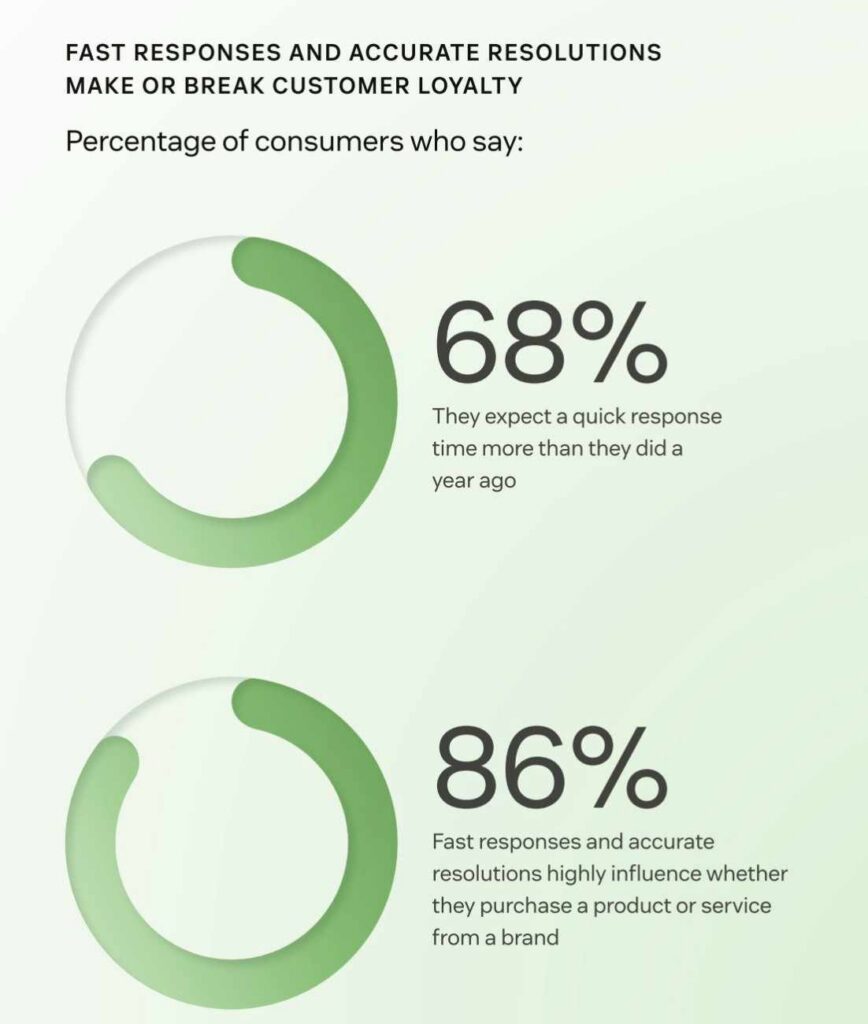
Image via Zendesk
Mitigate risk: By clearly defining who does what and when, email SLAs for logistics firms eliminate confusion and keep everyone on the same page. A well-defined service level agreement ensures a hassle-free journey for both the service provider and customer.
Timely email responses are essential for meeting customer demands, achieving high customer satisfaction, and maintaining a competitive edge in the industry.
Also Read:
The best email SLAs are simple and easy to follow. They cover how fast teams should reply, how quickly issues should be fixed, when to escalate problems, and how to track results.
Clearly defined and structured email SLAs for logistics firms ensure that email communications support smooth logistics services and operations.
Here are the key components of an effective service level agreement.
The first thing you need to do is set clear goals for how long your team can take to respond to customer emails.
Email response time delays, especially delays in customer orders, shipments, or customer complaints, can cause bottlenecks in operations. These delays often lead to frustrated clients and impact overall satisfaction.
To avoid these email marketing issues, categorize email types by urgency and assign response windows. It helps manage expectations and boost customer satisfaction. Here are the main categories to include in email customer service SLAs for logistics firms:
A delay in customer service resolution, such as fixing an incorrect bill of lading or updating service details, can disrupt your supply chain.
This is why email SLAs for logistics firms should clearly outline resolution timeframes based on the complexity and type of customer challenges. This ensures problems are addressed promptly, helping you maintain excellent service standards.
When issues are not resolved within the agreed-upon service levels, especially during busy periods, escalation ensures they receive the necessary attention.
Email SLAs for logistics firms define the structured process for escalating unresolved or critical emails to higher authority levels. Specify who to escalate to, under what circumstances, and the expected timeframe for escalation.
First-response time, SLA adherence rate, escalation rate, and CSAT are some key metrics you should track. Tracking these key performance indicators ensures accountability and helps logistics teams identify areas for improvement in the communication process.
Effective email SLAs for logistics firms include important metrics and email analytics for tracking and reporting SLA compliance performance.
Here are specific metrics that apply to email SLAs for logistics firms:
Also Read:
You can create effective email SLAs for logistics firms by setting realistic goals and making expectations clear to everyone involved. You should also use the right tools to monitor response times and review the results often. These steps help teams avoid delays and missed emails.
Here’s how you can set clear email SLAs for logistics firms.
Define clear metrics: Determine the key performance indicators (KPIs) for your email SLAs, such as response time targets and resolution times. Logistics customers expect quick replies within an hour or less. The average company responds within 12 hours, leaving much room for improvement.
Communicate expectations: Clearly communicate SLA guidelines to all stakeholders, including internal teams, customers, and partners. Ensure a mutual understanding of key roles and responsibilities in meeting SLA targets.
Utilize SLA response management tools: Invest in email performance optimization tools, like timetoreply, that facilitate SLA monitoring and enforcement. timetoreply provides real-time analytics for team and individual email response times, empowering simple email performance optimization.
Monitor and adjust: SLAs for logistics firms are not set in stone. SLAs should be regularly reviewed to ensure they remain relevant and achievable. Adjust targets based on evolving business needs and improve email response times using data from performance metrics.
Email SLAs for logistics firms are essential for companies looking to optimize communication processes and enhance customer satisfaction. By defining clear expectations, implementing best practices, and leveraging email SLA management tools, logistics firms can streamline their operations and deliver exceptional service to all stakeholders.
Also Read:
1. What are email SLAs for logistics firms?
Email SLAs for logistics firms are agreements that set clear expectations for how quickly your team will respond to and resolve customer emails. They help ensure timely communication across all logistics operations.
2. What is an SLA for email response?
An email response SLA is a commitment to reply to email communications within a defined timeframe.
3. What are some examples of email SLAs for logistics firms?
Here are several examples of email SLAs for logistics firms:
4. What is an acceptable email response time for logistics firms?
A good email response time for logistics companies depends on the communication type. Here are some industry benchmarks
5. What should email SLAs for logistics firms include?
Email SLAs for logistics firms should define response and resolution timeframes, escalation paths, and monitoring methods.
6. How do you set email SLA targets for logistics firms?
The easiest way to set SLA targets is to sort emails by urgency. Not every message needs the same reply time. A missed delivery update needs attention much faster than a general inquiry. It also helps to look at your current response data so you can set targets that push the team without setting them up to fail.
7. Which email metrics should logistics firms track for SLA performance?
Logistics teams should look at more than just reply speed. A fast reply is good, but the issue also needs to be solved. So track first response time, resolution time, missed SLAs, and customer satisfaction. That combination gives you a better sense of whether the team is actually helping, not just replying quickly.
Use a tool like timetoreply to track email performance metrics at individual and team levels. It works within your existing inbox and provides great insights into your team’s email productivity.
8. What is the difference between internal and external email SLAs?
Internal SLAs keep your team aligned. External SLAs help you stay responsive to customers and partners. They work together, though. If dispatch does not reply on time, customer service may not have the right update to send out. That’s why you need clear email SLAs for logistics firms, both internally and externally.
Also Read:
Email SLAs for logistics firms can make a real difference because they create structure where things often move quickly and get complicated. They make it easier to respond faster, manage priorities, and keep customers informed.
For effective SLA tracking, you should:
Using a tool like tiemtoreply makes it easier to track key SLA performance metrics. It can help you set SLA thresholds and get alerts when an email is about to cross those. This makes it easier to adhere to the set standards and improve customer experience.
Book a demo with timetoreply to see how easy it is to track SLA performance and keep your team accountable.
Get live inbox alerts and reply quickly to customer emails with timetoreply

Head of Customer Success @ timetoreply
Barry Blassoples is the Head of Customer Success at timetoreply, where he helps customer-facing teams boost revenue and protect brand reputation by providing actionable insights to improve their business email response times. He has over 15 years of leadership experience across customer success, sales, and marketing roles in high-growth tech companies.


Trusted by high-performing inbound sales teams and customer-facing teams globally.
Close more deals and delight more customers with the faster, smarter, deeper email analytics and performance optimization software that works straight from your team’s inbox.