
Some teams just need a cheaper shared inbox. Others want a full help desk or a fast email client for one person. And if the real issue is reply speed, that’s where timetoreply fits.
It’s worth being clear on that last one, because most inboxes won’t show it. According to timetoreply, about 88% of customers expect a reply within an hour, and not every Missive alternative is built to help you meet that expectation.
This guide covers nine Missive alternatives, what each is for, pricing, ratings, and a quick way to find your fit.
The best Missive alternative depends on what you need it to do, from reply-time tracking to an all-in-one inbox.
The breakdown below matches each Missive alternative to a common use case so that you can find the right fit faster:
We selected these Missive alternatives based on five criteria, including collaboration depth, reporting and analytics, and pricing.
Each one reflects what a Missive user actually needs in a replacement. All pricing and ratings are current as of June 2026.
To check these facts, we read each Missive alternative’s live pricing page and its latest reviews on Capterra and G2.
We also looked at how the client teams we work with use these Missive alternatives on a day-to-day basis. Many of them run Outlook and Gmail together, so we paid extra attention to tools that handle both.

Image via Missive
You need a Missive alternative when its per-seat cost, learning curve, or limited reporting on reply time starts to hold your team back.
Missive is a collaborative inbox that brings team email, internal chat, and multi-channel messaging in one place. It also runs across Gmail, Outlook, and IMAP.
The real-time shared drafting is genuinely good. Small teams that live in one window tend to love it. The free plan covers up to 3 users, and paid plans start at $18 per user each month.
Still, teams outgrow it. Here are the most common reasons they start looking for Missive alternatives.
That last gap matters a lot. For context, timetoreply found that 86% of customers expect their question to be resolved on the first reply. Also, satisfaction drops by up to 15% with every extra round of back-and-forth.
A shared inbox helps you collaborate. But it rarely tells you whether you’re winning or losing on speed.
This is why customer service SLAs should sit at the center of the decision, not a tidier inbox.
A faster and more consistent reply protects revenue and retention, while a slower one quietly costs you both.
Independent data backs this up. In a 2024 Revenue Hero study of 1,000 B2B teams, the average first response took more than a day, and many leads never received an effective reply.
So the right Missive alternative should make reply speed visible so you can act on it.
Most Missive alternatives differ from Missive on platform support, per-seat price, and whether they track reply times.
The table below compares all 9 alternatives against Missive as the baseline, making the differences easy to scan.
Each tool name links to its full review, each price is in USD per month, and each rating links to its source.
| Tool | Best for | Platform (Gmail/Outlook) | Start price (monthly) | Rating (source) | Reply-time/SLA analytics |
| Missive (baseline) | Collaborative team inbox and chat | Yes / Yes | $18/user | 4.9 (Capterra) | Basic |
| timetoreply | Reply-time measurement and SLA tracking | Yes / Yes | $38/mailbox | 4.5 (Capterra) | Deep, native |
| Front | All-in-one omnichannel inbox | Yes / Yes | $35/seat | 4.5 (Capterra) | Moderate |
| Help Scout | Simple help desk and knowledge base | Yes / Yes | $30/user | 4.6 (Capterra) | Moderate |
| Hiver | Gmail-native shared inbox | Yes / Limited | $35/user | 4.7 (Capterra) | Basic to moderate |
| Gmelius | Gmail automation and shared inbox | Yes / No | $21/user | 4.7 (Capterra) | Basic |
| Zoho TeamInbox | Budget multi-channel inbox | Yes / Yes | $6/user | 4.2 (G2) | Basic |
| Spark | Cross-platform collaborative client | Yes / Yes | $10/user | 4.7 (G2) | None |
| Superhuman | Fast individual email client | Yes / Yes | $30/user | 4.7 (G2) | None |
| Freshdesk | Full ticketing at scale | Yes / Yes | ~$23/agent | 4.5 (Capterra) | Strong (ticketing) |
Ratings were verified on 2026-06-25
The 9 best Missive alternatives in 2026 are timetoreply, Front, Help Scout, Hiver, and Gmelius, among others.
Each tool is compared with Missive, including features, pros, cons, pricing, and the team it best fits. They’re grouped by job, starting with reply-time analytics, then shared inboxes, help desks, and email clients.

Image via timetoreply
First on the list of Missive alternatives is timetoreply. It layers email analytics and reply-time tracking onto the inboxes you already use. It works across Outlook, Microsoft 365, and Gmail.
Where Missive helps your team collaborate, timetoreply shows whether that work is winning customers fast enough. You see the first response time by team, customer, and mailbox. Then you set targets and coach against them.
For context, Telarus cut response times in some groups from 7 hours to 2 hours, and Deel halved its average reply time after rolling it out. Brands like ATPI, Petronas, and Willis Towers Watson track reply times the same way.
Key features
Pros
Cons
Pricing
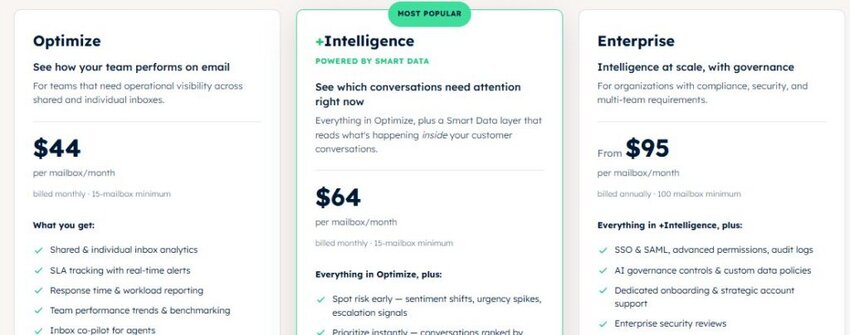
Image via timetoreply
Best for: Mid-market and enterprise customer-facing teams that must prove and improve SLA performance.
Usability: Setup takes just a few hours, and weeks of historical data load immediately, allowing you to see trends on day one.
Migration from Missive: There’s no real migration here, since timetoreply runs alongside Missive instead of replacing it. You connect your Gmail or Outlook mailboxes and keep working as you do now, with reply-time tracking added in the background.
Pro tip: If you cannot answer “Are we fast enough?” with a number today, start here first.
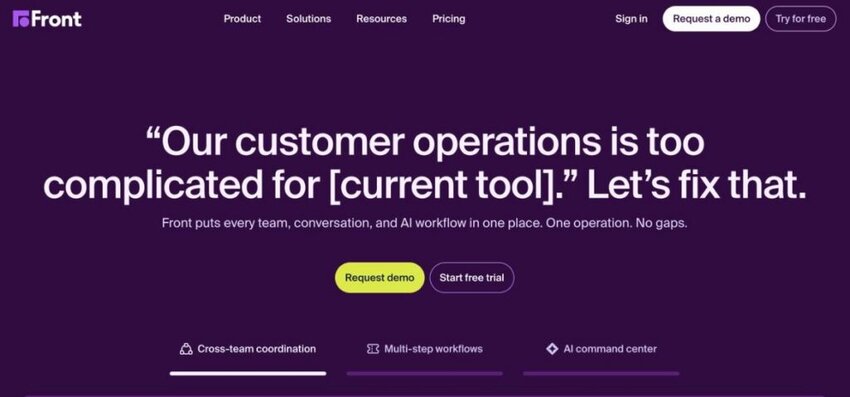
Image via Front
Next among Missive alternatives is Front, a shared inbox that works much like Missive.
It combines team email, internal comments, and multiple channels into a single workspace. If you want a collaborative setup with enough room to scale, Front fits the bill.
Key features
Pros
Cons
Pricing

Image via Front
Best for: Customer-facing teams scaling omnichannel support and customer experience.
Usability: Familiar to Missive users, though the feature depth needs some onboarding.
Migration from Missive: Migration is straightforward, since both tools use a similar shared inbox and collaboration model. Also, Front documents how to import contacts and conversations, and it offers guided onboarding for larger teams.
Pro tip: If you choose Front, pair it with reply-time analytics so SLA reporting also covers your Outlook mailboxes.
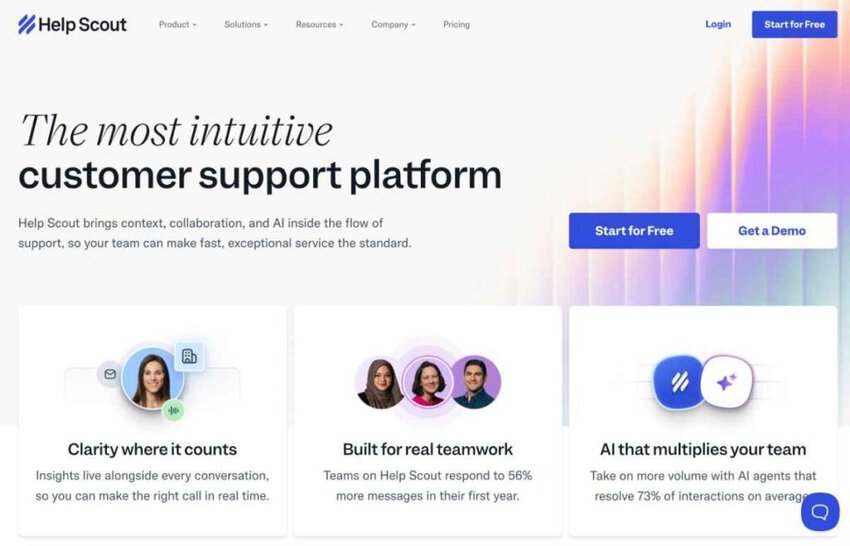
Image via Help Scout
Help Scout is a clean, simple Missive alternative for support teams.
It pairs a shared inbox with a help desk, then adds a knowledge base and chat widget that Missive omits. Because it runs across Gmail and Outlook, the platform is rarely a blocker.
The built-in reporting is well-suited for teams tracking customer service analytics, and many teams find it easy to get started with.
Key features
Pros
Cons
Pricing
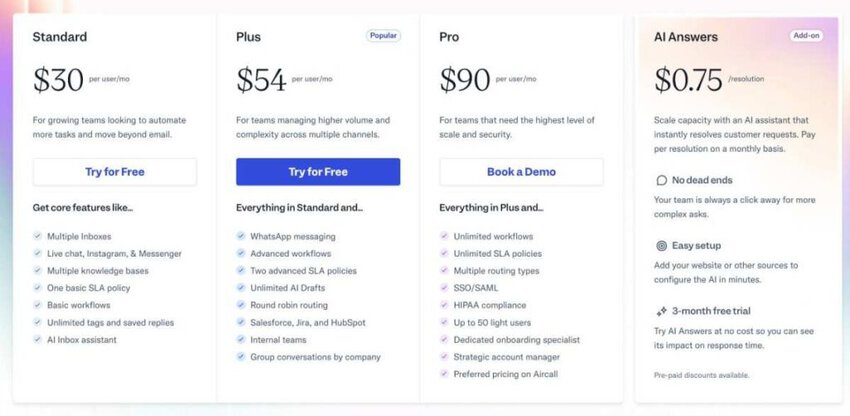
Image via Help Scout
Best for: Support teams that want a simple help desk and setup.
Usability: Quick to roll out and onboard.
Migration from Missive: Help Scout imports your contacts and past conversations, so the migration is fairly straightforward. You’ll set up mailboxes and a few workflows, but the shared-inbox basics carry over.
Pro tip: Write a handful of Docs articles before you switch on the Beacon widget. That way, it can deflect common questions from day one, rather than sending everything to your team.
Also Read:

Image via Hiver
Hiver is a strong Gmail-native option among Missive alternatives. It turns Google Workspace into a shared help desk your team runs without ever leaving Gmail.
For Gmail-based teams who found Missive’s separate app somewhat challenging to use, Hiver removes the learning curve and adds reporting inside Gmail.
Key features
Pros
Cons
Pricing

Image via Hiver
Best for: Gmail-based teams adding shared-inbox structure without a new app. Consider pairing with Gmail email analytics for better reporting.
Usability: Very easy for Google Workspace teams, since it lives inside Gmail.
Migration from Missive: Since Hiver runs inside Gmail, there’s no new platform to move to, just an install across your Google Workspace. Your email already lives in Gmail, so setup is mostly assigning shared inboxes and inviting the team.
Pro tip: Hiver is better suited to Gmail teams. If you also run Outlook mailboxes, measure both with a single analytics layer.

Image via Gmelius
Gmelius is another Gmail-native Missive alternative, built around automation. It adds shared inboxes, Kanban boards, and email sequences inside Gmail.
Teams that want to automate repetitive work without leaving Google Workspace tend to gravitate to it.
Key features
Pros
Cons
Pricing

Image via Gmelius
Best for: Gmail teams that want shared inboxes plus automation.
Usability: Easy for Gmail users, with a short setup for boards and rules.
Migration from Missive: Gmelius offers documented CSV and API imports for your Missive data. And since it runs inside Gmail, your team can transition without hassle. But expect to rebuild some automations and boards since those don’t always migrate well.
Pro tip: Start with one shared mailbox and a couple of automation rules before rolling Gmelius out widely. It’s easier to adjust a small setup once you see how your team actually works day-to-day.
Also Read:

Image via Zoho TeamInbox
Zoho TeamInbox is a budget-friendly pick among Missive alternatives. It offers shared inboxes, assignments, and basic analytics at a low per-user price.
If you’re watching costs, it handles the basics of a shared inbox without much fuss, and it’s a sensible choice among cheaper customer support tools. Teams already using other Zoho apps will find it an easy add.
Key features
Pros
Cons
Pricing

Image via Zoho TeamInbox
Best for: Budget-minded teams, especially current Zoho users.
Usability: Straightforward, with a familiar Zoho-style setup.
Migration from Missive: Import by CSV or API, then map your threads to new shared inboxes. Teams already on Zoho will find the setup quickest, since their accounts may already exist. Spend a little time recreating the rules and views you relied on in Missive.
Pro tip: If you already run Zoho CRM or Desk, connect them during setup so your contacts and conversations stay in sync.

Image via Spark
Spark, created by Readdle, is a cross-platform Missive alternative for teams looking for a polished client.
It runs on Mac, Windows, iOS, Android, and the web and adds shared drafts and comments on top. Think of it as Missive’s collaborative drafting in a leaner package.
Key features
Pros
Cons
Pricing

Image via Spark
Best for: Individuals and small teams that want a great client with light collaboration.
Usability: Intuitive, with a clean and modern interface.
Migration from Missive: Light, since Spark connects to your existing Gmail, Outlook, or IMAP accounts. Your mail stays in place, so you layer Spark on top rather than moving data. That makes it low-risk to trial alongside Missive before you decide.
Pro tip: Spark is better suited to smaller teams. You should pair it with an analytics tool like timetoreply once reply speed becomes a metric you track closely.
Also Read:

Image via Superhuman
Superhuman is a speed-focused Missive alternative for individual power users. It pairs a fast, keyboard-first email client with AI drafting, and it’s built for executives and busy professionals who want a clear inbox.
Essentially, Superhuman focuses more on personal velocity than team collaboration.
Key features
Pros
Cons
Pricing

Image via Superhuman
Best for: Individual power users and executives who value speed.
Usability: A short learning curve for shortcuts, then very fast.
Migration from Missive: Simple for an individual since Superhuman connects directly to Gmail or Outlook. This is a personal upgrade rather than a team migration, so shared mailboxes and assignments do not carry over.
Pro tip: Commit the first week to learning the keyboard shortcuts. That’s where Superhuman’s speed comes from, so the upfront effort pays off quickly.
Also Read:

Image via Freshdesk
Freshdesk is a Missive alternative that’s suitable for teams that have outgrown a shared inbox. It is a full help desk with ticketing, SLAs, a self-service portal, and omnichannel customer service.
If you only need shared email, Freshdesk can feel like overkill, so size the plan to your real ticket volume.
Key features
Pros
Cons
Pricing

Image via Freshdesk
Best for: Support organizations that need full ticketing and SLAs.
Usability: More setup than a shared inbox, with broad admin controls.
Migration from Missive: Plan for more work here, since you move from conversations to tickets. Freshdesk imports contacts and historical email for you, but you have to design ticket fields, SLAs, and workflows from scratch.
Pro tip: Size the plan to your real ticket volume before you commit. Freshdesk spreads its features across several tiers, which makes it easy for teams to pay for features they might not need.
Also Read:
The right Missive alternative depends on your most important variable, not a long wish list.
First, decide what job you are really hiring the tool to do. Then match it to one of four questions: your platform, your team size, the channels you support, or the metric you are judged on. That usually points to one or two clear picks, depending on your situation.
Team size matters as much as the platform you choose. Smaller teams can thrive on a lightweight shared inbox or a decent email client, but larger teams usually need more reporting and SLAs.
Manual tracking breaks down once you pass a dozen mailboxes, and that’s the point where an analytics layer earns its place.
If you would rather not pay per seat at all, look at an open-source option. A self-hosted tool like Freescout lets you own your data. You do take on setup and maintenance yourself, though, so weigh that trade-off.
One more thing on migration. Export your Missive data and history before you switch. Most tools import data by CSV or API, and the steps vary.
If reply-time history matters to you, plan how you will keep measuring it through the move. That way, you keep your baseline and can prove the switch paid off.
For more on the metrics that matter, see our guide to customer service metrics.
Also Read:
1. What is the best Missive alternative?
The best Missive alternative depends on what you need the tool to do. If your goal is faster replies, timetoreply tracks and improves response times across every mailbox, which most shared inboxes can’t do on their own. For an all-in-one shared inbox, Front is a good match. Hiver and Gmelius work well for Gmail-native teams, and Help Scout or Freshdesk covers the help desk.
2. Why do teams look for Missive alternatives?
Usually, teams look for Missive alternatives due to cost or visibility reasons. The per-seat price climbs as you hire more staff, the interface takes new staff a while to learn, and the reply-time reporting is thin. Many teams also need to prove to leadership that replies go out on time. A purely shared inbox tool won’t show you that.
3. Which Missive alternative is best for tracking reply times and SLAs?
This is what timetoreply is made for. It tracks first response time, average reply time, and SLA adherence across Gmail, Outlook, and Microsoft 365. You can set targets for a specific team, customer, or mailbox and coach against them. Front and Hiver do include reporting, but it only covers what happens inside their own platform, not reply speed across your mailboxes.
4. Do Missive alternatives work with CRMs like HubSpot and Salesforce?
Most Missive alternatives do. For instance, timetoreply links up with HubSpot, Salesforce, Zapier, and a REST API, so your reply-time data lands in the tools your team already uses. Front, Help Scout, and Freshdesk also offer CRM integrations. Just check what each plan includes, since the depth varies by tier.
5. What is the best Missive alternative for Outlook or Microsoft 365 Teams?
If reply-time tracking is the priority, timetoreply runs across Outlook, Microsoft 365, and Gmail. As such, mixed-stack teams get a single view of performance rather than two. For shared inbox options, Front and Help Scout both handle Outlook and Gmail well.
6. Do Missive alternatives have better reporting and analytics?
For reply-time and SLA analytics, timetoreply tops the list. It covers mailboxes across Gmail and Outlook and puts response time at the fore. Front, Help Scout, and Freshdesk give you general reporting on volume and team activity. While Hiver and Gmelius, being Gmail overlays, stay more basic.
7. Is Missive a shared inbox or a help desk?
Missive is a collaborative shared inbox. You get team chat and multi-channel messaging, but not full help desk ticketing. If what you’re after is knowing whether your team replies fast enough, timetoreply adds reply time and SLA tracking on top of any inbox, including Missive. For proper ticketing and a customer portal, look at Help Scout, Freshdesk, or Front.
8. How do I migrate off Missive?
Start by exporting your Missive data and history. Most alternatives let you import via CSV or API, but the steps aren’t always the same across platforms. Consider allotting time for setup and training. Also, decide up front how you’ll keep tracking reply times during the move.
9. What is the best Gmail-native Missive alternative?
A Gmail team that wants a Missive alternative to track reply times can plug timetoreply into Google Workspace to measure SLAs without leaving the inbox. If you want the shared inbox built into Gmail itself, Hiver and Gmelius both work. Hiver is the more help-desk-oriented of the two. Gmelius is a decent choice for automation and visual boards.
10. Is Missive worth it?
For a small team, the answer is usually yes. If what you want is collaborative drafting and one inbox for email, SMS, and social, Missive holds up well. The trouble starts later. As per-seat costs climb, you start needing deeper reporting, or you grow past what the collaboration model can do and want a help desk or an analytics layer.
11. Which Missive alternative is right for a mid-market team?
Mid-market teams handle a lot of email across Gmail and Outlook, and they’re usually on the hook to ensure replies land on time. The timetoreply tool measures reply times against your SLAs across every mailbox, and it sits alongside whatever shared inbox or help desk handles the day-to-day. You get the daily workflow covered and the numbers leadership keeps asking for.
All in all, the best Missive alternative for your team depends on the job you need done and the platform you run. Match the tool to your team size, your channels, and the metric you are judged on, and the shortlist gets short fast.
Front and Hiver fit teams that mainly want collaboration. Help Scout and Freshdesk make more sense if you want a help desk, whereas Superhuman is aimed at individuals who value speed.
If your real goal is faster, more consistent replies, see how timetoreply can help. It measures and improves response times across all the mailboxes you run.
Book a demo to see your team’s reply times in action.
Get live inbox alerts and reply quickly to customer emails with timetoreply

Head of Customer Success @ timetoreply
Barry Blassoples is the Head of Customer Success at timetoreply, where he helps customer-facing teams boost revenue and protect brand reputation by providing actionable insights to improve their business email response times. He has over 15 years of leadership experience across customer success, sales, and marketing roles in high-growth tech companies.



Trusted by high-performing inbound sales teams and customer-facing teams globally.
Close more deals and delight more customers with the faster, smarter, deeper email analytics and performance optimization software that works straight from your team’s inbox.