
Image via Front
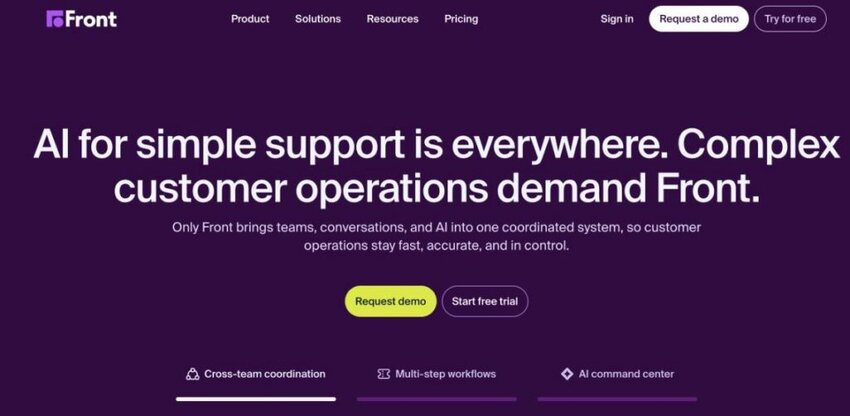
Front is a customer communication platform that brings emails, SMS, and social accounts into a single hub. It helps teams manage customer conversations more efficiently through centralized communication management.
Front combines team collaboration tools with AI-powered automation to improve response speed. The platform allows teams to assign conversations and notify teammates when input is needed.
Like timetoreply, Front measures email response times and tracks trends in customer communication through email analytics. However, the level of reporting and email response time tracking is not as detailed as timetoreply.
This tool is also useful for teams that manage high volumes of customer emails across multiple departments. Managers can also monitor team activity without micromanaging every interaction. The platform supports structured communication while still keeping an email-like experience. This makes it easier for teams to adopt without a steep learning curve.
Front was designed to replace your existing inbox. If you’re looking for a solution that works with your existing mail client (Microsoft 365, Outlook, Gmail, etc), then timetoreply could be a better option for you.
Key features
- Shared collaborative inbox management across email, SMS, and social channels
- Custom automated workflow creation for faster customer request handling
- Internal team collaboration and teammate notification system
- Centralized storage and management of customer conversations
- Email response time tracking and analytics for Outlook or Gmail
- Multi-inbox and multi-channel account connection capabilities
- Shared draft creation and approval workflows for team email responses
- Role-based access controls for managing team permissions and inbox visibility
Pros
- For any size of team, from 5 to 5000 users
- Measures email response times, but this is not their focus
- Analytics reveal trends in customer communication and team workloads
- Great for teams working off a shared mailbox
- Encourages real-time collaboration to reduce bottlenecks
- Secure with industry-standard encryption
- Extensive integrations of 100+ apps
- Offers open APIs for further customization
Cons
- Designed to replace your inbox.
- Not designed for sales teams.
- Requires all email communication to move to a single platform
- Large migration for some companies requires staff to learn a new platform
- IT may not allow this move due to being tied to Outlook or Gmail for security reasons
- Lacks integration with some apps
- Only offer cloud-based solutions, which can be seen as a con for some larger organisations that require on-premises solutions.
- Can become pricy when scaling up for a growing team
Looking for the best alternative to Front? Schedule a demo now.
Pricing
Front offers pricing plans based on team collaboration needs and customer communication volumes. Its pricing is structured per seat/month, including:
- Starter: $35/seat/month
- Professional: $85/seat/month
- Enterprise: $105/seat/month, billed annually

Image via Front
Why should you choose timetoreply over Front?
If you want to maximize email productivity and unlock the benefits of email analytics, but you’re not prepared to move all your email communications onto a single platform, timetoreply is an ideal alternative to Front.
The timetoreply tool is among the best customer service tools for teams looking for insights into shared and individual inboxes without the hassle of having to move their day-to-day email activities to an entirely new platform.
Once you’re set up with timetoreply, you can connect your existing inboxes and, within minutes, start seeing data on your team’s email performance, helping you make instant improvements to your email response times.
Also Read:
- A complete guide to writing customer service emails
- Mastering remote customer service: Best practices for managing remote teams
Zendesk

Image via Zendesk
Zendesk is a cloud-based ticketing and customer service platform that helps businesses manage customer support. It allows teams to organize and resolve support tickets across multiple communication channels.
It provides companies with a customizable front-end portal and live chat features. It also offers integration with popular applications such as Salesforce and Google Analytics.
In addition, it offers a range of sales-focused features. This includes CRM, sales call logging, contact enrichment, and lead recommendations. It works seamlessly with Outlook, Office 365, and Gmail, and you don’t need to reroute emails through another platform.
Zendesk also helps businesses standardize their customer support processes across teams. It ensures that every customer request is tracked and resolved through structured workflows. This improves consistency in how issues are handled across the organization. The platform also helps managers identify bottlenecks in support operations.
The platform is best suited for growing businesses that need ticketing, advanced automation, and customer support tools in a single system. However, companies looking for a simpler email management solution may find Zendesk more feature-heavy than necessary.
If you’re after a simpler alternative to Zendesk that still offers core ticketing functionality, consider timetoreply.
Key features
- AI-powered customer support automation and resolution workflows
- Multi-channel messaging, voice, and live chat support capabilities
- Automated workflow and support ticket management tools
- Customer service analytics, reporting, and performance tracking
- Workforce management and agent performance optimization tools
- Live chat and messaging support tools
- SLA-based ticket prioritization and escalation rule configuration system
- Customer journey tracking across multiple channels and support interactions
Pros
- Offers solutions for sales and support teams
- Tracks support requests across web, mobile apps, and social media
- Excellent collaboration tools
- Extensive knowledge management platform
- Strong ticketing system software
- Excellent security functionality and support
- Extensive app marketplace of over 1800+ apps integrated to Zendesk
- Offers a customizable customer experience that helps teams remain productive
Cons
- Requires you to go all-in on their platform
- Users require training and upskilling to get most out of the solution
- Some businesses find ticketing systems impersonal and prefer dealing with their customers on email
- Some communication inevitably lands up circumnavigating the ticketing system
- Technical setup required
- Only offer cloud-based solutions which can be seen as a con for some larger organisations that require on premise solutions.
- Can be expensive, especially when you use all the features
Does your business really need so many features?
Looking for the best alternative to Zendesk? Schedule a demo now.
Pricing
Zendesk offers tiered pricing plans designed to accommodate businesses of all sizes, from startups to large enterprises. The plans include:
- Support Team: $25/agent/month
- Suite Team: $69/agent/month
- Suite Professional: $149/agent/month
- Suite Enterprise + Copilot: Custom pricing

Image via Zendesk
Why should you choose timetoreply over Zendesk?
There’s no denying it: Zendesk is a powerful email analytics platform for any company looking to manage their customer service and sales inquiries at scale.
For mid-sized companies, however, moving all your email operations to Zendesk is a major time and financial investment.
If you only want to start tracking customer service metrics on your team’s email performance without the countless bells and whistles offered by Zendesk, timetoreply can help.
Like Zendesk, timetoreply enables you to improve your team’s efficiency by empowering them with data and reports on email performance that can be used to enhance email productivity.
If your business is growing fast and you find the volume of incoming customer service emails is too much for your customer support or sales team to manage, you can start hiring new reps or build new systems to help keep team shared inboxes under control.
With timetoreply, you get data on your shared inboxes. You also get granular detail on individual inboxes.
If you don’t want to move your customer-facing and sales teams onto a whole new platform but still want to extract meaningful data from your existing email activities, timetoreply is the perfect alternative to Zendesk.
Also Read:
- The impact of delayed email responses on logistics customer service
- How quick customer service resolution equals better customer experiences
Freshdesk (Now Freshworks)
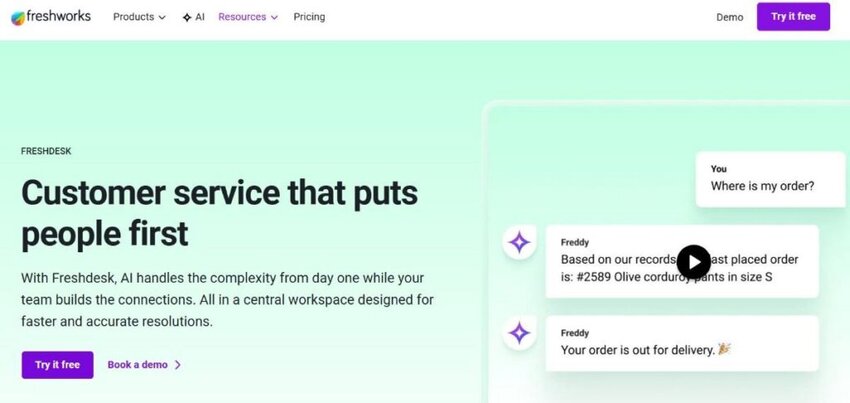
Image via Freshdesk
Freshdesk is an online, cloud-based customer service software solution that provides companies with help desk support and offers several smart automations to help companies resolve customer queries more quickly. Like Zendesk, it is a specialized ticketing system.
The platform is ideal for B2C brands that receive a high number of incoming requests and is a popular choice among companies that are scaling and looking to boost customer engagement and improve email communication.
The solution enables companies to triage customer service requests, build automated workflows, and tag fellow support agents into conversations, making it ideal for collaborative customer service.
Freshdesk allows integration of social media accounts, support phone numbers, live chat, and website conversations to provide support teams with a single view of all incoming requests, regardless of the channel from which they arrive.
It remains a popular choice for companies that want to scale and optimize their customer service email communication capabilities as they grow.
Key features
- AI-powered automation for resolving customer queries and repetitive tasks
- Omnichannel customer support across email, chat, phone, social media, and web
- Collaborative ticket management with agent assignment and internal tagging
- Automated workflow creation for routing and resolving support requests
- Freddy AI Copilot for agent assistance, summaries, and response suggestions
- Freddy AI Agent for automated issue resolution and customer interaction handling
- Multi-brand support management for handling separate customer-facing identities
- Pre-built automation templates for faster helpdesk workflow setup
Pros
- Ideal for B2C brands receiving high numbers of customer requests
- Smart automations help resolve customer requests more quickly
- Good for collaborative customer service
- Integrates social media, phone numbers, live chat, and website conversations for a single view of customer problems and requests
- Great for companies looking to scale customer service capabilities
- Messaging enables easy engagement via the customer channel of choice
- AI-powered chatbots help guide customers to resolve queries
- Contact Centre solution helps guide resolutions to customer queries and improves call productivity
Cons
- Not built to provide support to sales teams
- Some businesses find ticketing systems impersonal and prefer dealing with their customers via email
- Some communication inevitably ends up circumventing the ticketing system
- Infrastructure investment is required to migrate email activity to Freshdesk
- There is a steep learning curve for new users
- Limited reporting features
- Only offer cloud-based solutions, which can be seen as a con for some larger organisations that require on-premises solutions.
- Customizing reports requires extensive product knowledge and training
- More suited to B2C companies
Looking for the best alternative to Freshdesk? Schedule a demo now.
Pricing
Front offers pricing plans based on team collaboration needs and customer communication volume. Its pricing is structured per seat/month, including
- Growth: $23/agent/month
- Pro: $66/agent/month
- Enterprise: $107/agent/month
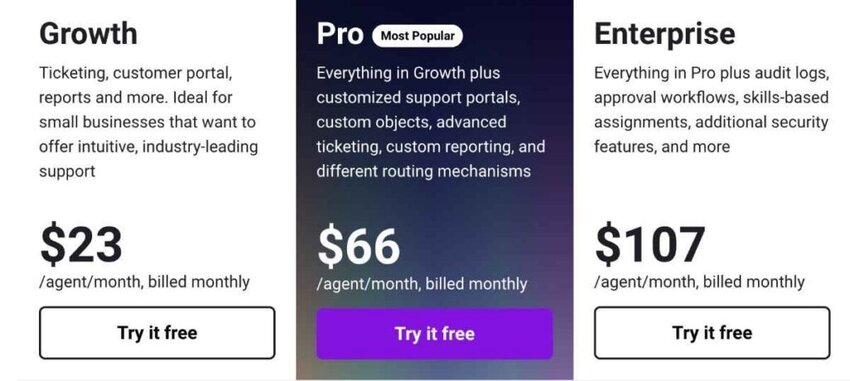
Image via Freshdesk
Why should you choose timetoreply over Freshdesk?
If you’re looking for actionable insights or analytics of your customer service and sales teams’ email activities, timetoreply could be perfect for you.
Your team can use timetoreply’s email analytics to identify trends in support tickets and sales inquiries and apply a data-driven approach to all client-facing email interactions.
For timetoreply, you can continue using your existing inboxes and do not need to migrate to a new platform to access its benefits.T Within minutes of using timetoreply, you can start gaining actionable data insights and use that information to set high-impact goals and targets for your customer-facing teams.
The timetoreply tool is perfect for B2B companies that want to gain insight into their email productivity but don’t need a comprehensive customer service platform.
Also Read:
- Customer service analytics guide for sales and customer teams
- Customer service SLAs: The comprehensive guide
All three tools help teams manage customer communication, but they focus on different strengths:
|
What’s the takeaway from Front vs Zendesk vs Freshdesk comparison?
If your team is overwhelmed with emails and you need a customer service software, you can choose between Front vs Zendesk vs Freshdesk.
Here’s a simple summary of what choosing between Front vs Zendesk vs Freshdesk entails.
Front:
- Best for growing teams that want collaborative email management
- Fits startups or small businesses, as well as mid-sized teams that need faster internal collaboration
- Low to medium complexity with an easy learning curve
Zendesk:
- Best for large companies with high-volume, complex support needs
- Fits enterprise teams that need advanced ticketing and automation
- High complexity with a full-scale support system
Freshdesk:
- Best for small to medium businesses scaling customer support
- Fits teams that want omnichannel support with easy setup
- Medium complexity with strong automation and usability
The right choice depends on your team size, support complexity, and how much structure or flexibility you need in your customer service setup.
When comparing Front vs Zendesk vs Freshdesk to timetoreply in terms of email account management, timetoreply is ideal for companies that want to gain access to actionable data. With timetoreply, businesses can unlock instant improvements in their teams’ email performance. Within minutes of connecting your mail accounts, you can start accessing detailed reports of customer service emails that includes:
- Average time it takes to reply to customer communication and incoming emails
- Average number of conversations per day across various communication channels
- Average inbound emails per hour
Companies can track their team’s performance against their goals and service-level agreements. The timetoreply platform is also an addition to existing processes, not a complete ecosystem change.
Also Read:
- Mastering customer service analytics to elevate your support team
- Standard email response times policy for businesses
FAQ
1. Which is better among Front vs Zendesk vs Freshdesk?
When comparing Front vs Zendesk vs Freshdesk, the best option depends on your business needs.
Front is ideal for teams looking for shared inboxes and collaborative email management. Zendesk is great in providing a full customer service suite with automation and AI tools, while Freshdesk offers a user-friendly platform with strong ticketing and multichannel support.
So, if you have to choose between Front vs Zendesk vs Freshdesk, consider your priorities to make a choice.
2. Is Zendesk more popular than Front and Freshdesk?
Zendesk is mostly recognized for its enterprise-level features, scalability, and robust knowledge base tools. These features have contributed to its long-standing reputation, along with its vast integration ecosystem, which makes it a great choice for large customer service operations.
Front and Freshdesk are also widely used and trusted by many businesses across different sizes and industries. Front is popular with teams that rely on inbox collaboration, while Freshdesk is commonly used by growing companies that need scalable support tools.
3. Are there similar features among Front vs Zendesk vs Freshdesk?
Yes, there are several overlapping features among Front vs Zendesk vs Freshdesk. All three platforms offer ticketing systems, team collaboration tools, customer communication tracking, and integrations with third-party apps.
4. Which is most affordable among Front vs Zendesk vs Freshdesk?
In terms of pricing, Freshdesk is the most affordable, especially for startups or small businesses. It offers a lower entry cost while still providing a free trial for users to explore the features.
Zendesk is also competitively priced for the lowest tier plans but the cost rises significantly for higher-tier plans. Front starts at a higher entry price compared to the rest, and the cost increases as tean scales seats.
If cost-effectiveness is a key factor in your Front vs Zendesk vs Freshdesk decision, Freshdesk might be your best starting point.
5. Can I migrate easily among Front, Zendesk, and Freshdesk?
Yes, migration is possible among Front, Zendesk, and Freshdesk, but the ease of transition may vary. Each of these platforms offers migration tools or API access for data transfers.
Some third-party tools also specialize in migrating among these platforms. However, we recommend you assess your data volume, ticket history, and integration dependencies when planning a switch.
6. What are the key differences in AI capabilities between Front vs Zendesk vs Freshdesk?
Zendesk includes AI agents that can resolve customer requests, automate workflows, and support human agents. Freshdesk also uses AI through its Freddy AI tools, which help with ticket routing, reply suggestions, and automated responses. Front provides AI features to improve inbox management, summaries, and team productivity.
7. Which has stronger reporting and analytics: Front vs Zendesk vs Freshdesk?
When comparing Front vs Zendesk vs Freshdesk in terms of reporting depth, all three tools offer robust features. Zendesk provides dashboards on tickets, agent performance, customer satisfaction, and workflow efficiency. Freshdesk also offers useful reporting tools that help teams track response times, ticket volume, and team performance. Front provides analytics features mainly focused on email response times, workload distribution, and communication trends.
However, if your team wants more advanced and detailed email analytics without moving to a full support platform, timetoreply is a stronger alternative. It focuses specifically on tracking response times, SLA performance, and email productivity across existing inboxes like Outlook and Gmail.
8. Which scales better for high-ticket-volume teams among Front vs Zendesk vs Freshdesk?
Front is better suited for teams that manage a moderate volume of customer emails and prefer a shared inbox workflow. Freshdesk works for growing teams that need automation and omnichannel support. Zendesk can handle large numbers of tickets, complex workflows, and multiple support channels. For very high support demand, Zendesk is usually the strongest option.
Also Read:


