A standard email response time policy defines how long your sales or customer support teams take to acknowledge or respond to emails.
Fast and reliable communication helps manage customer expectations, boost team efficiency, and improve brand reputation. It also builds trust and helps your business stand out.
The standard email response time policy depends on urgency. For example, urgent emails may require a one to two-hour response time. You must also acknowledge receipt of such emails, especially if you don’t yet have a resolution.
According to Freshworks, faster response times (a little over three minutes) achieve an almost 100% customer satisfaction score. This drops to 63.7% for slower responses (over seven hours).
In this article, we’ll break down what a standard response time policy is and why you should implement it. Discover ways to improve your team’s response times.
The average email response time is 14 hours and 54 minutes, according to Email Analytics. Customer support teams respond in an average of one hour and 22 minutes, while slower teams take up to eight hours.
For sales inquiries, the average response time is 47 hours, with only 23% of companies replying within five minutes. For internal communication, the ideal response time is same-day or within 24 hours.
Response times vary depending on email type. Sales inquiries are directly tied to revenue, so slow responses can lead to lost revenue. Customer support emails require quick responses to resolve issues, but some concerns may take longer to resolve properly. For internal emails, the speed of your response depends on the task urgency.
Businesses can use these benchmarks to set Service Level Agreements (SLAs). This is an agreement with customers about how fast a support team should acknowledge and resolve incoming queries. Here’s a benchmark table for average response times by email type:
| Email type | Average expected response time |
| Customer support | One to eight hours |
| Sales inquiries | 47 hours, but aim for five minutes |
| Internal communication | Same day or within 24 hours |
For sales emails, the ideal response time is between 5 minutes and 1 hour. Sales leads contacted in under five minutes have a 32% close rate. This is 2.6 times higher compared to leads contacted after 24 hours.
Urgent response time is important because potential customers are often comparing multiple businesses at once. Being the first to respond with a helpful answer increases your chances of capturing their attention before they move on to a competitor.
This directly impacts your sales pipeline. Timely communication keeps leads engaged while they’re still in the decision-making stage. In contrast, delayed responses reduce conversion, as prospects may have already chosen another provider or lost interest.
Also Read:
A highly effective customer support team responds in five minutes and 35 seconds for complex inquiries, according to Freshworks. Slower response times are over eight hours.
Customer support response time is usually split into two parts:
These targets are usually defined through Service Level Agreements (SLAs), which set formal expectations for response and resolution times.
SLA compliance then tracks how consistently teams meet these targets. In fact, 91.08% of top-performing teams meet SLA goals compared to 37.67% of lower-performing teams:
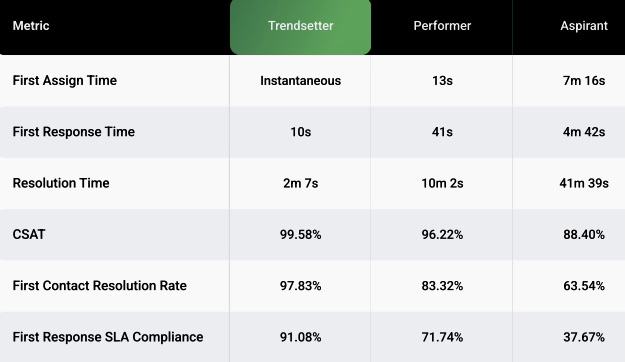
Image via Freshworks
Responding quickly to customer support emails and resolving issues faster can help improve customer experience and satisfaction.
SLAs are often priority-based. High-priority issues, such as payment failures, require immediate acknowledgment because they directly affect product usage, while non-urgent requests like general how-to questions are assigned longer response windows.
Support teams typically prioritize tickets by severity, ensuring critical issues are handled first.
A good internal business communication response time is typically within the same day, with non-urgent messages expected to be answered within a few hours and up to 24 hours, depending on workload and priority.
Internal communication is especially important in remote and hybrid teams, where internal collaboration depends heavily on tools like Slack and email. Because teams are not physically co-located, delays in responses can slow down decision-making and disrupt workflows.
In fact, remote work is now a significant part of modern employment, with one in five Americans working from home regularly, according to Statista.
To improve internal communication response times, businesses should define clear expectations in a standard email response times policy.
This can include setting a 24-hour maximum for non-urgent emails and using faster channels like Slack for urgent communication. Some teams also set stricter internal benchmarks, such as two to four hours for active project discussions.
Customer service and sales teams often struggle with unclear email response policies and not tracking key metrics like first response and resolution time. They also lack clear guidance on which emails should be treated as urgent.
Let’s break down these challenges.
This happens because companies don’t set or enforce clear rules for how fast emails should be replied to. As a result, email replies become inconsistent (some are fast, others are delayed), which slows down communication across teams.
This breaks workflow execution. Meaning team members are stuck waiting for email replies before they can continue their tasks.
This happens because companies don’t use email analytics tools like timetoreply to automatically track response times, meaning your team’s performance data is not consistently collected.
As a result, teams lack visibility into how quickly they respond to emails, and there are no shared benchmarks for expected reply times. This leads to inconsistent communication, where different team members respond at different speeds, making it harder to improve overall efficiency.
This can occur if emails aren’t tagged as “urgent” or fail to include deadlines in subject lines. This leads to slower responses and reduced productivity because employees spend time sorting through emails instead of completing work. As a result, time-sensitive requests (like project deadline clarification) and approvals get delayed or missed.
Also Read:
A professional email response time policy is a set of clear guidelines that outlines how fast employees should reply to emails. A good standard email response times policy should be based on urgency, not a fixed time for all emails.
For example, customer support emails should be handled within six hours, while sales inquiries should be responded to within five minutes.
Customer support and sales teams use this policy to decide how fast to reply to different types of emails (urgent vs non-urgent). Managers also use it to set expectations and monitor whether teams meet these standards.
Email response time matters because it directly reflects a business’s professionalism and reliability. Faster responses improve customer trust and can also increase sales by ensuring potential customers are engaged before they turn to competitors.
It also affects internal operations, where quick email responses help teams complete approvals, updates, and project decisions without unnecessary delays.
While tools like Slack and Microsoft Teams are widely used for internal communication, email remains essential in most organisations. In fact, 95% of businesses still use email communication, according to Workshop.
Fast email response time is an important factor in maintaining both internal and external communications efficiency.
Having a fast standard email response time helps increase customer loyalty, which leads to higher customer retention. It also helps you close more sales because prospective customers can see your business is responsive and reliable, making them more likely to choose you over competitors. Let’s break down these benefits:
Benefit #1 – Boost customer loyalty
Great customer service is the foundation of good customer retention strategies. When customers receive high levels of care, they are more likely to purchase from you again. In fact, 29% of customers stop buying from a brand due to poor customer experience, according to PwC. This can be caused by poor customer care, such as slow or unhelpful responses.
A quick email reply time is essential to every successful customer service strategy. Helping customers find information quickly or resolve issues creates a smooth, positive customer experience that boosts customer loyalty.
Benefit #2 – Close more sales
Fast email reply times ensure every prospective customer gets the information, care, and attention they need. When prospective customers receive high levels of care during the sales process, they’re more likely to purchase more in the future.
Additionally, satisfied customers are more likely to recommend you to friends and colleagues. This further underlines the importance of having a standard email response times policy.
You can measure your average response time by tracking the time it takes for a customer to receive a response to their email.
Tools, such as timetoreply track first response times, average response times over a series of emails, and the time taken to resolve a customer request. For example, you can use the timetoreply extension to set up custom alerts for urgent emails:
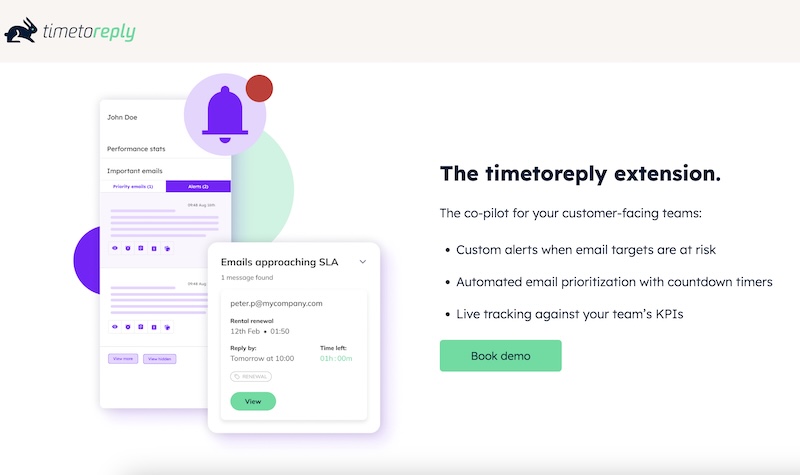
Image via timetoreply
The timetoreply extension tool by timetoreply helps individuals and businesses improve email response speed by tracking and measuring email performance. Once installed, sales reps can easily see which emails need immediate attention and which still require a response. It also measures team performance against SLAs and colleagues:
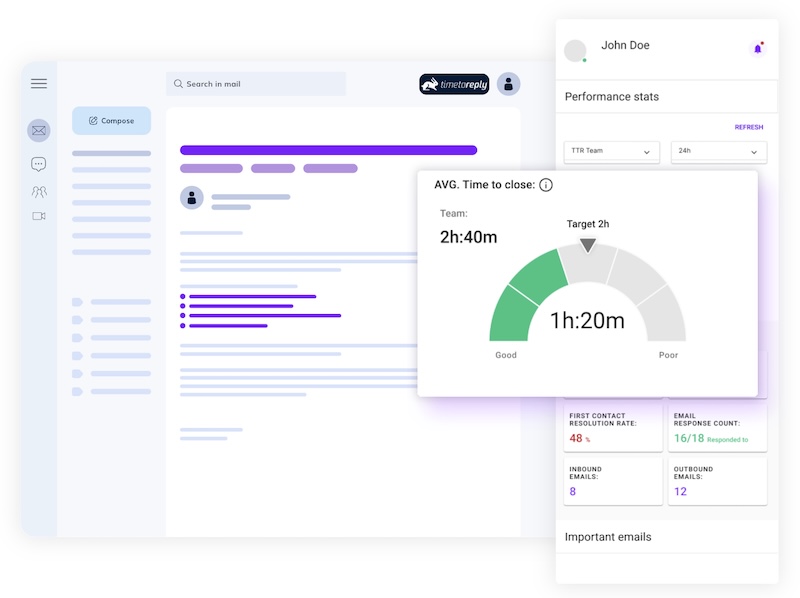
Image via timetoreply
The timetoreply extension integrates with all major email platforms (like Gmail or Outlook). A quick installation (no training necessary) is all you need to effectively measure response times. This allows you to carefully implement your standard email response times policy and boost sales.
Also Read:
1. How long is it acceptable to wait to reply to an email?
Acceptable email response time is 24 – 48 hours during weekdays. However, the standard email response times policy is to respond quickly if it’s urgent. If you can’t resolve an issue right away, send an immediate response and inform them the resolution will take time.
2. What is the 24-hour rule for emails?
The 24-hour rule for emails just means you should try to reply within one business day. It helps ensure you are keeping customers engaged and not losing their interest. That’s why this is often included in the standard email response times policy for most companies.
3. How soon should an email be replied to?
It depends. For example, customer support emails should typically be responded to within six hours, while sales inquiries require even faster responses, sometimes within five minutes. For urgent issues, respond immediately or follow your standard email response times policy.
4. What is the email response policy?
A standard email response times policy sets the basic rules for how quickly professionals and businesses should reply to messages. It helps sales or support teams stay on the same page. If things get busy, even a short reply saying you’ll follow up later is better than silence.
5. Does a standard email response times policy apply during weekends?
Usually, a standard email response times policy doesn’t apply during weekends, unless your team works weekends as well, which is quite common in the retail industry. That said, it’s acceptable to respond during business hours (Monday or Tuesday) if a customer emails them on Friday.
6. What is the 3-21-0 email rule?
The 3-21-0 email rule means checking emails 3 times a day, spending 21 minutes per session, and aiming for 0 emails left in your inbox after each session to reduce overload and improve productivity.
7. What is considered a fast email response time in business?
A fast response time is typically within five minutes for sales inquiries and under six hours for customer support emails. You can use this as a benchmark and include it in your standard email response times policy.
8. Why is email response time important for customer service?
Fast email replies are important for resolving customer issues quickly. This improves trust because customers feel your business is responsive and reliable. It also reduces frustration and prevents customers from switching to competitors due to slow responses.
Also Read:
An effective standard email response times policy sets clear email response time expectations based on urgency, not fixed response times for every email type.
For example, sales inquiries may require replies within minutes. Customer support or internal communication emails can have longer response windows depending on priority.
Businesses should also define SLAs (Service Level Agreements) for first response and resolution times. Then track these performance metrics and how effectively support and sales teams perform. You can do this using email analytics tools like timetoreply. Book a demo to see how it works.
This helps you improve email response times and customer trust. It also helps speed up internal business communication and reduces the risk of losing customers due to delayed replies. Start improving email response times today by using the benchmarks outlined in this article and create your own standard email response times policy.
Get live inbox alerts and reply quickly to customer emails with timetoreply

Head of Customer Success @ timetoreply
Barry Blassoples is the Head of Customer Success at timetoreply, where he helps customer-facing teams boost revenue and protect brand reputation by providing actionable insights to improve their business email response times. He has over 15 years of leadership experience across customer success, sales, and marketing roles in high-growth tech companies.


Trusted by high-performing inbound sales teams and customer-facing teams globally.
Close more deals and delight more customers with the faster, smarter, deeper email analytics and performance optimization software that works straight from your team’s inbox.