
Businesses create service level agreements (SLAs) to promise customers a certain level of service. These agreements define how fast a team should respond and how issues should be resolved.
However, creating these agreements is only one step. Without effective SLA monitoring, there’s no clear way to ensure those commitments are consistently delivered.
That is why SLA monitoring has become a key part of modern customer service operations. It allows teams to track service metrics, identify risks early, and ensure every request is handled within the agreed-upon timeframe.
In this post, we will explore what SLA monitoring is and why it matters for service teams. We’ll also cover methods and best practices to help teams maintain SLA compliance efficiently.
SLA monitoring is the process of tracking whether service teams meet the commitments defined in a service level agreement.
It focuses on measuring if teams respond to and resolve support issues based on defined timelines. The core components of SLA monitoring typically include:
Service level agreement monitoring plays a key role in how well a service team performs every day. Without SLA management and monitoring, teams may lose track of service quality, which can lead to customer churn.
Below are a few reasons why monitoring service level indicators is important for customer service providers:
This reduces confusion and avoids situations where tasks are left unattended. It also makes it easier for managers to hold the team accountable for performance.
This allows teams to focus on high-priority requests first. As a result, critical issues are handled on time while less urgent ones are scheduled properly.
This helps them identify what needs to change. Better decisions can then be made to improve team efficiency and service delivery.
SLA monitoring shows how work is distributed across the team. Managers can use this insight to balance workloads more fairly.
SLA monitoring ensures that service standards are consistent across all these channels. This creates a more reliable customer experience.
In simple terms, SLA monitoring helps teams track and deliver a reliable customer experience. It ensures that service promises are not just made but consistently kept.
Also Read:
To monitor service level agreements, teams rely on a mix of structured methods. These methods help ensure visibility, accountability, and timely action across all service requests. The key methods involved in an SLA monitoring process include:
An effective SLA monitoring strategy involves defining what needs to be measured and how different requests should be handled. Teams cannot track performance properly if all requests are treated the same way.
That is why requests are grouped into categories based on urgency, impact, or type of issue. This makes it easier to assign realistic response and resolution times that reflect the importance of each request.
An urgent issue may require a response within one hour, while a low-priority request could be handled within one or two days.
Clear categorization also improves how teams communicate and collaborate. When a ticket is tagged correctly, team members have a mutual understanding of how critical it is. This reduces delays caused by back-and-forth clarification.
Real-time tracking allows teams to see the status of every request as it happens. It gives a live view of response times, pending tasks, and tickets that are close to their SLA limits.
For instance, SLA monitoring tools like timetoreply provide dashboards that break down conversations and label support requests based on urgency and priority. This makes it easy for agents to know what needs attention first without guessing.
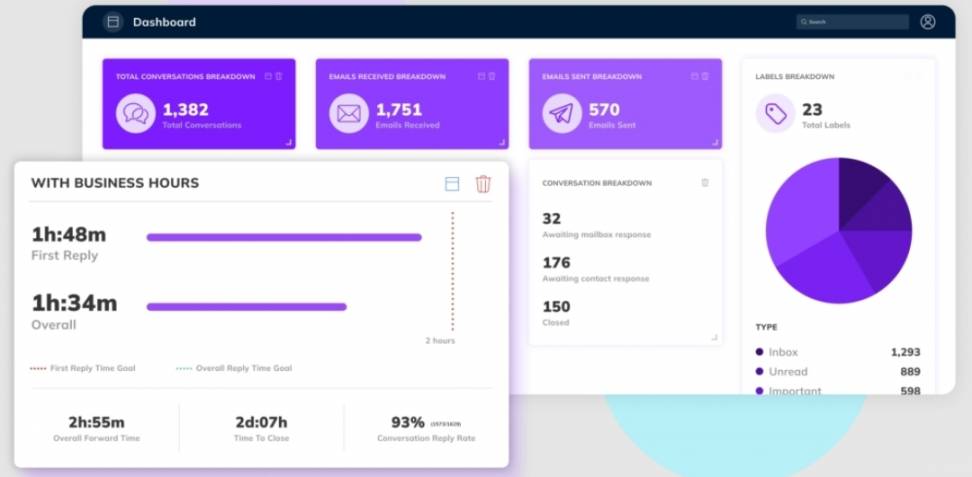
Image via timetoreply
In practice, a support team can open the dashboard at any time and quickly spot which tickets are overdue or at risk of being late. This helps them take action before a breach happens. Managers can also use SLA dashboards to monitor team performance and balance workloads when needed.
Another core part of SLA monitoring is automated alerts and notifications. Instead of waiting until a deadline is missed, alerts notify teams when a request is close to breaching its SLA.
These alerts can be set based on time, priority, or type of request. This ensures that teams avoid SLA violations. You can also configure alerts for escalations. If a ticket remains unattended for too long, the system can notify a team lead automatically.
Notifications can be delivered through email, Slack, or within the support tool itself. See how timetoreply delivers alerts and notifications to team inboxes with a countdown timer for live tracking of SLA targets.
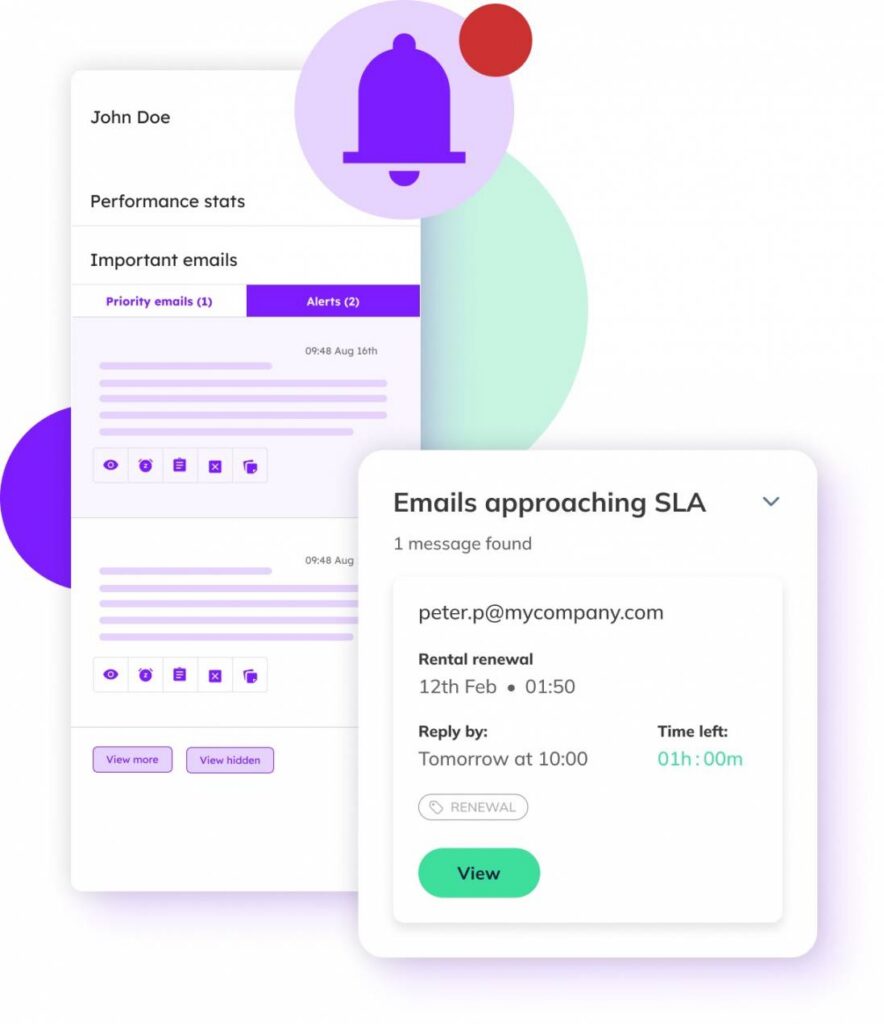
Image via timetoreply
One practical way teams carry out SLA monitoring is by reviewing performance data. This involves pulling SLA reports that show key metrics.
To do this, teams set a schedule for reviewing reports, such as at the end of each week or month. Analytics and reporting tools make this process much easier by collecting and organizing the data automatically. For example, timetoreply lets you generate scheduled reports that show how SLA targets are met.
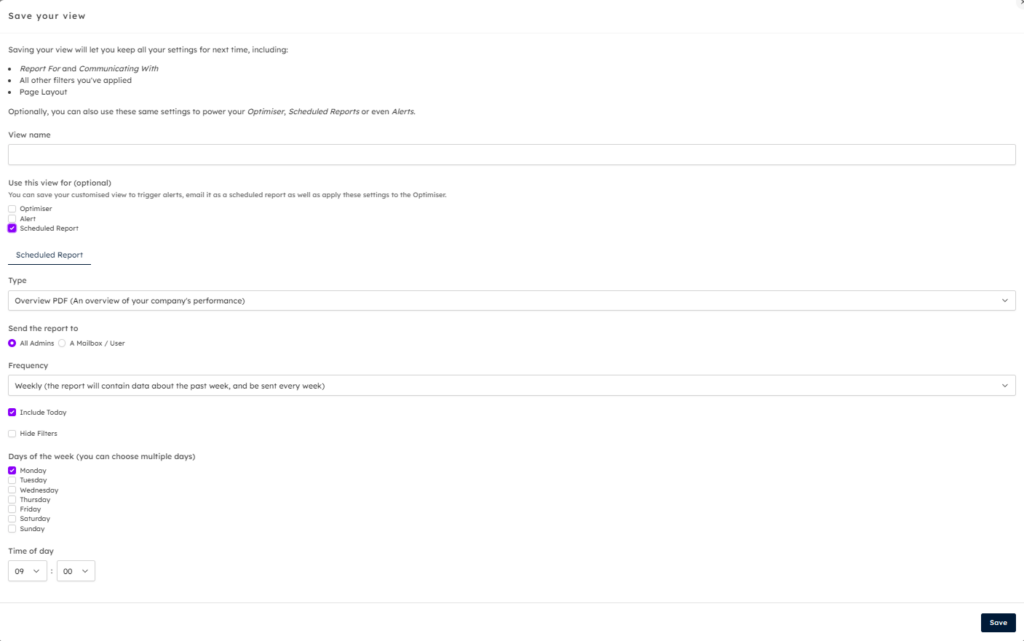
Image via timetoreply
Teams can identify areas that need improvement and ensure they are staying on track.
SLA monitoring also involves analyzing historical data, documenting patterns, and tracking progress over time. Teams can analyze trends to see whether response times are improving or worsening over time.
Understanding how customers feel about your service is just as important as meeting response targets. Customer feedback tracking is a method of SLA monitoring that focuses on the user experience rather than just technical metrics.
Feedback tracking allows teams to see if meeting SLA goals translates into positive experiences. To implement this method, teams can link feedback tools to their help desk platforms.
This allows them to automatically send surveys to customers after a ticket is resolved and collect their responses.
By combining customer feedback with traditional SLA monitoring metrics, teams gain a complete view of business performance.
In essence, effective SLA monitoring combines multiple methods to provide visibility, accountability, and actionable insights.
Also Read:
Measuring SLA performance requires tracking specific metrics that show whether teams are meeting their commitments. These metrics give managers and agents a clear picture of service quality, efficiency, and areas for improvement.
Some SLA metrics and key performance indicators (KPIs) to monitor include:
First response time measures the time it takes for a team to acknowledge a customer request. It shows how quickly a team reacts to inquiries, which directly affects customer satisfaction. Teams can track average first response times daily or weekly.
Take a look at how timetoreply tracks and displays individual and team response time metrics.
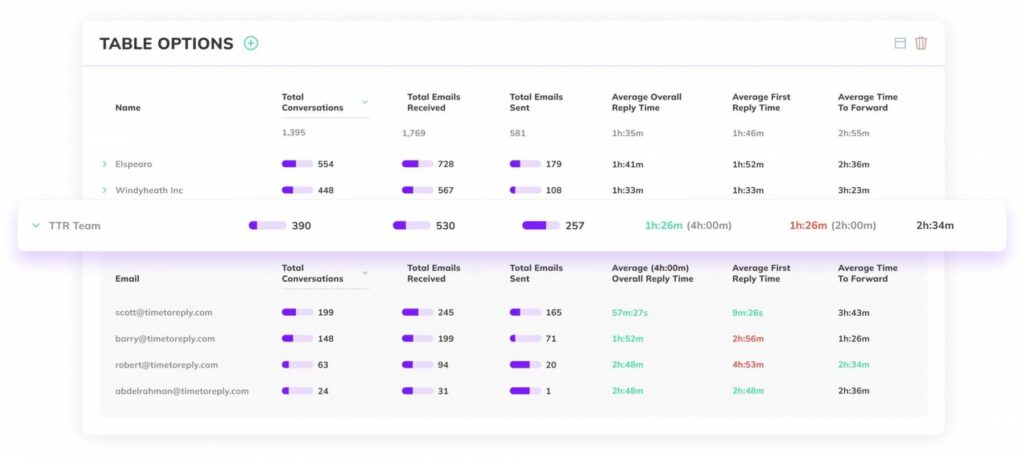
Image via timetoreply
This customer service metric measures how long it takes to resolve a request or issue fully. It shows whether a team can handle requests efficiently within the SLA limits. Tracking resolution time helps identify bottlenecks, such as complex issues or overloaded agents.
Customer satisfaction scores give insight into the quality of the service beyond speed or technical compliance. After a ticket is resolved, customers are asked to rate their experience through a survey on a scale of one to five.
Common survey questions often include “How satisfied are you with the resolution?” or “Was your issue handled effectively?”
The results are collected and averaged to generate a CSAT score.
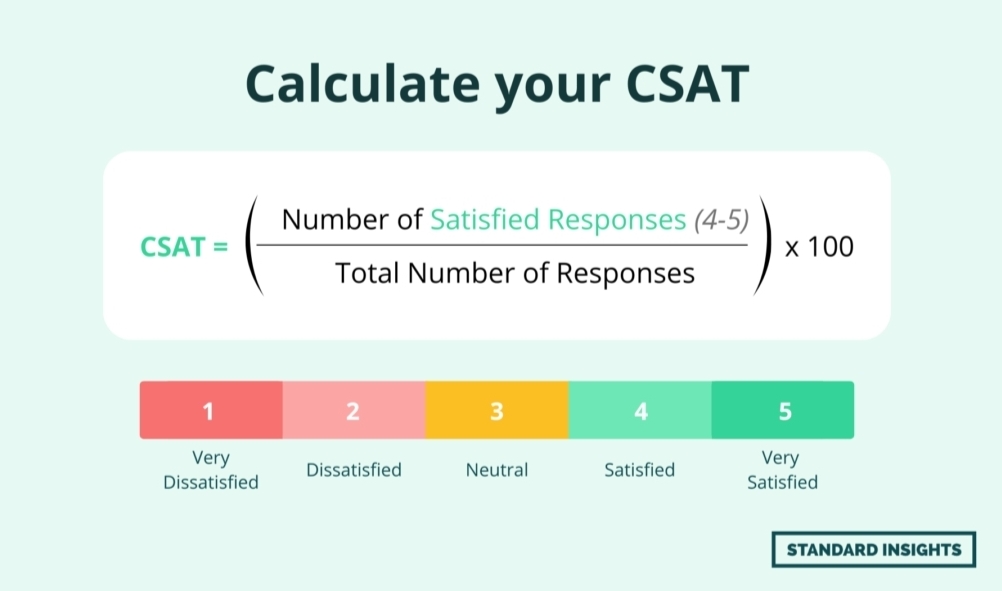
Image via Standard Insights
Ticket backlog tracks the number of unresolved tickets at any given time. A large backlog increases the risk of SLA breaches. Regularly reviewing the backlog helps managers allocate resources efficiently. It also prevents small issues from snowballing into critical problems.
This metric measures how often tickets fail to meet their SLA targets. It is a direct indicator of whether SLA monitoring is effective. A high breach rate may signal the need to adjust workflows or provide additional support to agents.
System uptime measures the amount of time a service or system remains available and operational. It is usually expressed as a percentage over a given period. High uptime is important for meeting SLAs, especially for customer-facing platforms and support tools. Monitoring uptime helps teams detect outages and maintain consistent service availability.
By tracking these metrics, teams can get a complete picture of performance. SLA monitoring helps businesses determine if targets are met and understand how customers feel about the service.
Also Read:
1. How does SLA monitoring work?
SLA monitoring involves tracking key service metrics against the targets defined in a service level agreement. A monitoring tool collects data from support systems and compares it to the SLA limits. If a ticket is close to breaching its SLA, the system alerts the team. SLA monitoring dashboards also show trends so managers can see how well the team meets service commitments over time.
2. What tools help with SLA monitoring?
Many tools are useful for effective SLA monitoring. For teams that manage shared inboxes or email support, tools like timetoreply provide clear visibility into response times. Helpdesk platforms such as Zendesk, Freshdesk, and others also include built-in SLA monitoring and reporting features.
3. What metrics are used in SLA monitoring?
SLA monitoring usually focuses on several key performance metrics. The most common ones are first response time, resolution time, ticket backlog, and SLA breach rate. Some teams also track customer satisfaction and escalation time. These metrics help managers understand how efficiently the team handles requests.
4. How can companies improve their SLA monitoring strategy?
Companies can improve their SLA monitoring strategy by defining clear service goals and tracking the right metrics. First, establish realistic response and resolution targets. Next, use tools that automate SLA monitoring to analyze data and identify workflow issues. Training team members on SLA priorities can also improve results.
5. What are the common mistakes to avoid in SLA monitoring?
When implementing SLAs and monitoring them, common mistakes to avoid include:
6. What happens when an SLA is breached?
When an SLA is breached, the ticket has exceeded its agreed response or resolution time. This can trigger alerts, escalations, or internal reviews. Frequent breaches may negatively impact customer trust and team performance metrics.
7. How often should SLA performance be reviewed?
Teams should review SLA performance weekly or monthly. Frequent reviews help identify trends and fix issues early. This keeps service quality consistent.
8. Can SLA monitoring be automated?
Yes, SLA monitoring can be automated with the right tools. Modern analytics platforms like timetoreply track response and resolution times in real time without manual input. They can send alerts before an SLA is breached, helping teams act quickly. These tools also generate detailed reports and dashboards to show performance trends.
Also Read:
Effective SLA monitoring gives teams the insight they need to improve customer service. It helps businesses set support expectations and work towards meeting them.
By tracking the right metrics, using automation, and reviewing performance regularly, businesses can stay on top of their commitments.
More importantly, SLA monitoring gives teams the visibility they need to measure customer satisfaction and improve workflows. As customer expectations continue to grow, a robust SLA monitoring strategy is essential for delivering superior customer service.
Use timetoreply to track, manage, and optimize SLAs to stay efficient and proactive.
Get live inbox alerts and reply quickly to customer emails with timetoreply

Head of Customer Success @ timetoreply
Barry Blassoples is the Head of Customer Success at timetoreply, where he helps customer-facing teams boost revenue and protect brand reputation by providing actionable insights to improve their business email response times. He has over 15 years of leadership experience across customer success, sales, and marketing roles in high-growth tech companies.



Trusted by high-performing inbound sales teams and customer-facing teams globally.
Close more deals and delight more customers with the faster, smarter, deeper email analytics and performance optimization software that works straight from your team’s inbox.