
Choosing between timetoreply vs Missive? We’ll keep this useful and quick.
This guide answers three core questions: which tool measures reply speed best, which one helps customer success, support, and sales teams collaborate better, and which delivers better value for money.
You’ll get a quick table, clear pros and cons, and practical advice for support, sales, or customer-success teams.
Read on to see which tool saves time, reduces missed emails, and gives managers the metrics they need to coach teams effectively.
Before we get into a detailed timetoreply vs Missive comparison, let’s do a quick side-by-side comparison.
| timetoreply | Missive | ||
| Core purpose and target users | |||
| Primary focus: Reply-time analytics / SLA tracking | |||
| Primary focus: Shared inbox + team collaboration | |||
| Best for: Support/CS teams tracking SLAs | |||
| Best for: Teams that co-author and chat around email | |||
| Key features and capabilities | |||
| Email analytics: First response, avg reply, SLA alerts | (Basic) | ||
| Dashboard custom reports and exports | (Limited) | ||
| Shared mailbox visibility/ownership tracking | |||
| Automation and rules (routing, auto-labeling) | |||
| Setup, onboarding, and ease of use | |||
| Quick setup | |||
| No training, simple onboarding | |||
| No learning curve | |||
| Pricing and value for money | |||
| Pricing model | Per mailbox | Per user | |
| Free trial | |||
| Predictable cost for shared inboxes | (Cost rises with users) | ||
| Security, access, and data protection | |||
| SOC 2 Type II | |||
| GDPR/privacy compliance | |||
| Encryption | |||
| ISO 27001 | (Not mentioned) | ||
| Customer support and learning resources | |||
| Help center and learning resources | |||
| Live chat or email support | |||
| Dedicated onboarding | |||
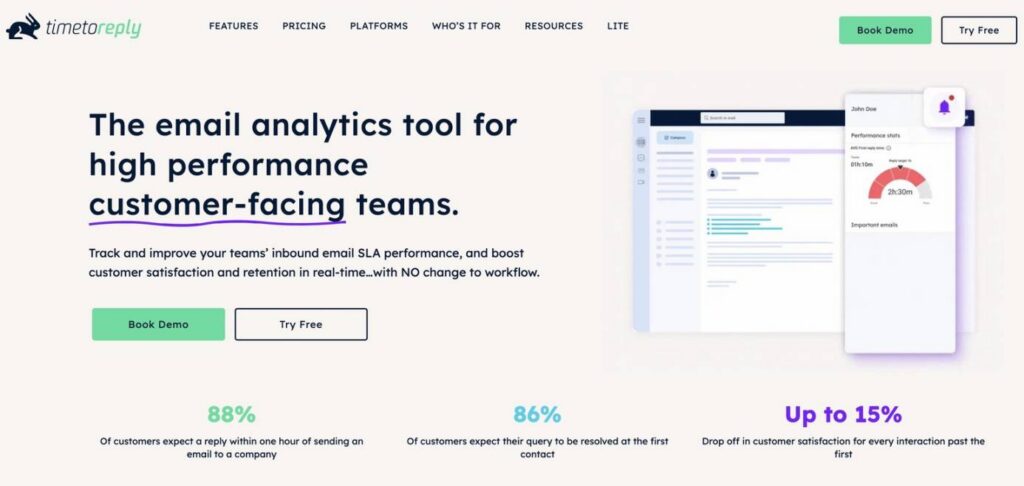
Image via timetoreply
The timetoreply tool helps teams stay on top of email customer interactions by making response habits visible. It connects to your team members’ inboxes and tracks response times automatically, without changing how your team works day to day.
It’s designed so managers and reps both know where things are stuck — who’s busy, which emails are overdue, and which customers waited too long.
Teams often use timetoreply to identify trends over time. You can compare weeks, months, or teams and see whether response speed is improving or slipping.
This makes it easier to test changes. If you adjust schedules, routing, or workloads, you can see the impact on reply times almost right away.
For teams that rely on email as a core customer communication platform, timetoreply provides valuable insights.
Pros
Cons
Also Read:
 Image via Missive
Missive positions itself as a unified inbox that doubles as a team chat app. You see the email thread and the internal conversation side by side. That makes it easy to talk about a customer message without forwarding or external notes.
You can assign conversations, add labels, and use templates to speed replies. For teams that draft messages together or need approvals, those tools save a lot of back-and-forth.
Missive aims to replace a collection of small tools. This includes inboxes, chat apps, and basic task lists. It provides a single platform and helps you avoid switching apps. It’s especially useful for startups and small businesses that want a single hub.
Pros
Cons
Also Read:
Now, let’s do a detailed feature-by-feature comparison of tiemtoreply vs Missive.
If your main problem is “we take too long to reply,” timetoreply solves that.
It’s for teams that live or die by response time. These include support desks, key account management teams, sales inboxes, and customer success teams that track email SLAs.
If your main problem is “we fight over drafts and lose context,” Missive solves that.
It’s for teams with multiple team members that need in-thread collaboration and better team coordination. This includes teams who co-write replies, leave notes, and want chat next to email.
In short, choose timetoreply when you need data on performance and choose Missive when you need to change how people work together.
In this section of our timetoreply vs Missive comparison, we’ll compare them directly on their core capabilities. So, let’s get started.
Email analytics and reporting
The timetoreply tool focuses on one thing: showing how fast your team responds to customer queries via email. It highlights slow replies, shows which inboxes are overloaded, and helps managers track response times against internal targets or SLAs.
Here’s a look at its email analytics dashboard.
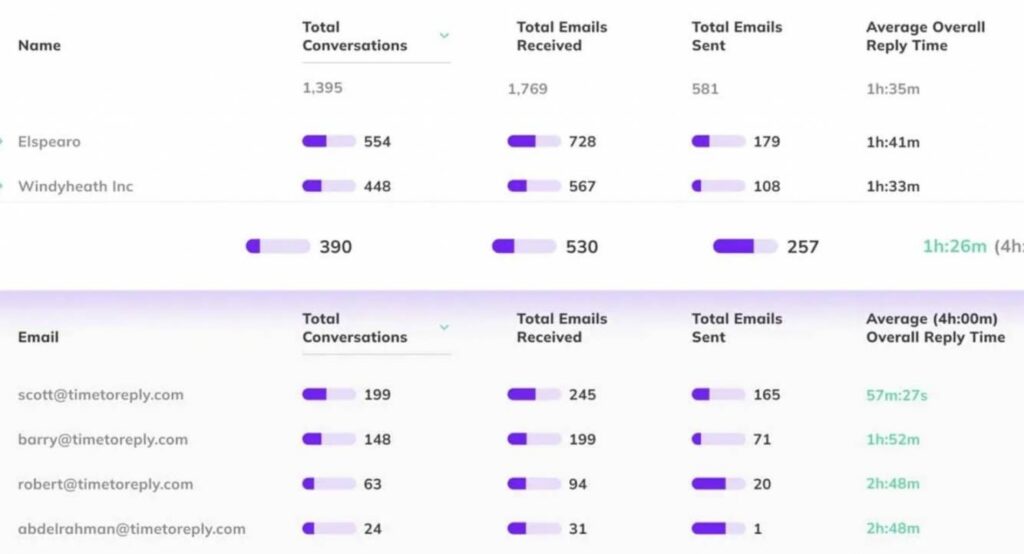
Image via timetoreply
Missive does include email analytics, but they are built into a collaboration tool. Instead of detailed performance reporting, Missive’s analytics help customer support teams see where conversations are piling up and who is handling what.
In a timetoreply vs Missive comparison, analytics is where the split is clear. While timetoreply helps you measure and improve customer service efficiency, Missive helps teams stay aligned while they reply.
The takeaway: if response speed is a metric you report on, timetoreply fits better; if it’s just a signal to guide teamwork, Missive is enough.
Collaboration and shared inbox features
If your team works out of shared inboxes and you want to stop messages falling through the cracks, here’s the simple difference between timetoreply vs Missive:
So, timetoreply vs Missive: which one should you choose?
Use timetoreply if you want to boost team productivity and improve response times of your customer-facing teams. It will help you boost customer satisfaction and convert leads with prompt replies. Use Missive if you want to improve team collaboration and reduce confusion when multiple people are responsible for client communications.
Workflow and productivity tools
Most email busywork comes from the same problems: checking what’s overdue, figuring out who should reply, and rewriting the same answers. In the timetoreply vs Missive comparison, both tools reduce this friction, but in very different ways.
The timetoreply tool reduces busywork by surfacing priorities. Instead of checking inboxes manually, teams get alerts when something needs attention. Managers don’t have to chase updates because the system shows what’s stuck and where response times are slipping. It’s less about helping someone type faster and more about helping the team focus on the right incoming emails at the right time.
It also offers third-party integrations and advanced automation that play well with CRMs and BI tools.
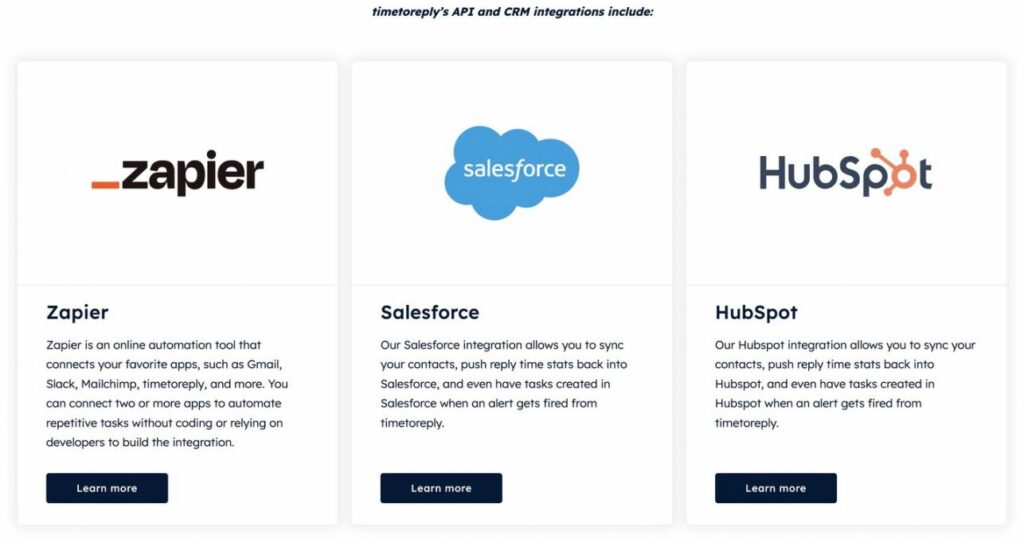
Image via timetoreply
Use rules to create tasks in external systems, push SLA alerts into dashboards, or wire up Zapier for custom workflows. That’s handy when email is one part of a bigger process.
Also Read:
Missive reduces busywork by removing steps. It puts workflow tools directly inside the inbox. You assign tasks, leave internal notes, reuse replies, and pass work between teammates without leaving the email thread. Instead of managing flow from the outside, Missive enables teams to manage it as they reply.
So, timetoreply keeps email SLAs and alerts tight, while Missive reduces manual handoffs and helps teams work together.
Key takeaway: Choose timetoreply if you want to enforce SLAs, improve response times, track team performance, and improve customer engagement. Choose Missive if you want in-inbox automation and templates that reduce everyday busywork.
If you’re comparing timetoreply vs Missive, setup is a good place to start because it tells you a lot about how each product works.
If you want to get something useful running quickly, timetoreply tends to be the faster out-of-the-box option. Sign up, connect the mailboxes you care about, download the extension, and set basic SLAs. Most teams can see live metrics in minutes.
Onboarding with timetoreply is mostly for managers. Once mailboxes are connected, the product runs quietly in the background and surfaces data through dashboards and alerts. Agents don’t have much to learn, which makes rollout easier across bigger teams.
Missive feels different from the start. You’re setting up shared inboxes, inviting teammates, and deciding how conversations should flow between people. That means onboarding takes more thought, especially if you want consistent rules and templates across teams.
You can also see the difference in how easy each tool feels to use. The timetoreply tool is built around dashboards and reports, so there’s not much to learn, and it still makes sense even if you log in once a week.
Missives fit better on a single screen, such as messages, internal chat, and task handling. This gives teams flexibility but adds a learning curve.
That’s why rollout is worth thinking about when comparing timetoreply vs Missive. The former is quicker to adopt and easier to maintain, while the latter works best for teams that are happy to invest time early on to shape their inbox setup.
In this section of our timetoreply vs Missive comparison, we’ll cover their pricing plans and comment on the value they bring to the table. So, here you go.
The timetoreply tool doesn’t hide its pricing behind “contact us” for pricing and is quite transparent. You have tiered pricing plans with monthly prices. It offers a free demo, and you can talk to the team about quarterly or annual options.
The pricing plans include:

Image via timetoreply
The pricing is per mailbox, not per user, which keeps costs in check.
Missive offers a 30-day risk-free trial with no credit card required, so you can test its robust features before paying.
Its monthly pricing plans are:

Image via Missive
Since the pricing is per user, costs can rise quickly for large organizations.
With timetoreply, your money goes toward data you can act on. You get reply-time tracking, shared mailbox performance, SLA alerts, custom reporting, and predictions that help teams improve response times. That focused approach makes timetoreply feel cost-efficient if improving email performance is your priority.
Missive spreads value across email collaboration features. You get shared inboxes, conversation commenting, templates, rules, task assignments, and integrations. At higher tiers, you also get advanced analytics and security controls, which broaden its appeal beyond just email.
So, timetorpely vs Missive: Which offers more value for money?
In practice, timetoreply vs Missive comes down to where you want to spend.
The timetoreply tool tends to be a better value for teams that need performance insights and SLA control, because you’re paying only for what you use. Missive is a better fit if you want a full suite of collaboration tools and are willing to pay per user for broader functionality.
Overall, timetoreply usually offers more value for teams focused on performance data, while Missive rewards teams that need collaborative email management.
When you compare timetoreply vs Missive on security and data protection, both email analytics tools treat this seriously.
The timetoreply tool is SOC 2 Type II compliant, ISO 27001 certified, and GDPR-compliant, and it encrypts data in transit and at rest. It only processes email headers (not message bodies or attachments), and it uses modern secure login methods so you don’t hand over raw passwords.
Missive is also SOC 2 Type II compliant and GDPR-compliant, and it encrypts all data both while it’s moving and when it’s stored.
The gist of this timetoreply vs Missive comparison is that both tools are secure.
When it comes to getting help, timetoreply vs Missive both give you what you’d expect. This includes docs, guides, and real people to answer questions and provide solutions for common customer inquiries.
The timetoreply email analytics tool offers straightforward guides and hands-on help that make it easier to get started and understand reports early on. You’ll find detailed self-help guides on various topics, as shown below.
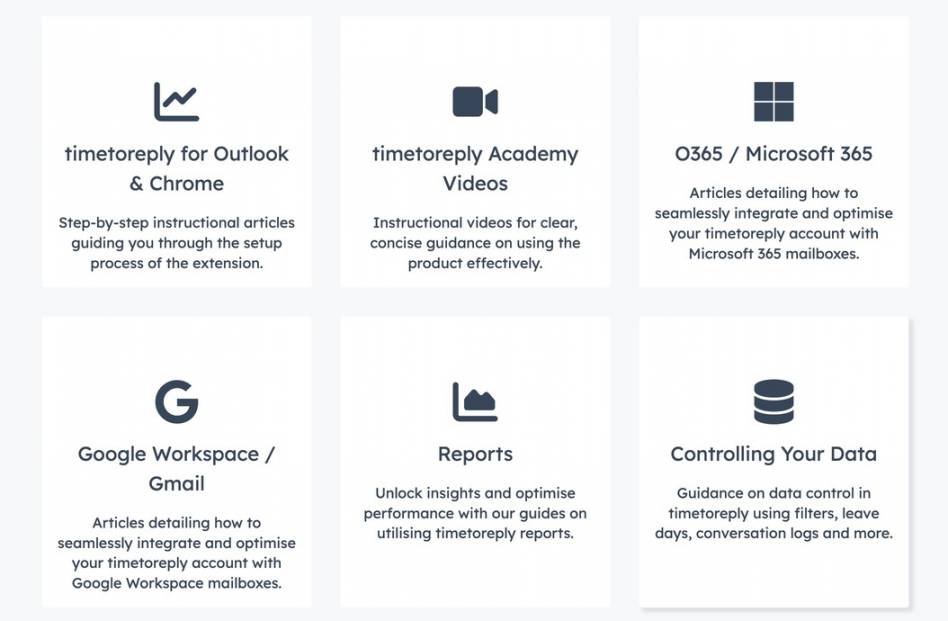
Image via timetoreply
Missive also does a good job here, with a detailed help center and quick responses when teams have questions about inbox workflows or rules.
We’d say that timetoreply is quicker to get started with, but Missive also provides decent support as you start using the product.
Also Read:
If your team’s success depends on hitting response-time targets, a few very practical things matter: reliable alerts when SLAs are in danger, a fast setup so you get value quickly, and security/compliance you can show IT.
The timetoreply scores on all three, and that’s why it stands out in this timetoreply vs Missive comparison.
Here are some things that make it a great choice for all customer-facing teams.
You don’t need a long rollout plan, as timetoreply is designed to be layered on top of your existing mailboxes. Simply connect, set business hours and SLAs, and you start seeing key metrics in real time. That means early wins in days, not months, which helps get stakeholder buy-in fast.
The product surfaces team-level views and individual breakdowns so managers can run short coaching cycles. Instead of “he seems slow,” you get clear metrics you can attach to a coaching conversation or to staffing decisions. That kind of clarity shortens the feedback loop between data and behavior.
Here’s a look at some of the metrics you can track.
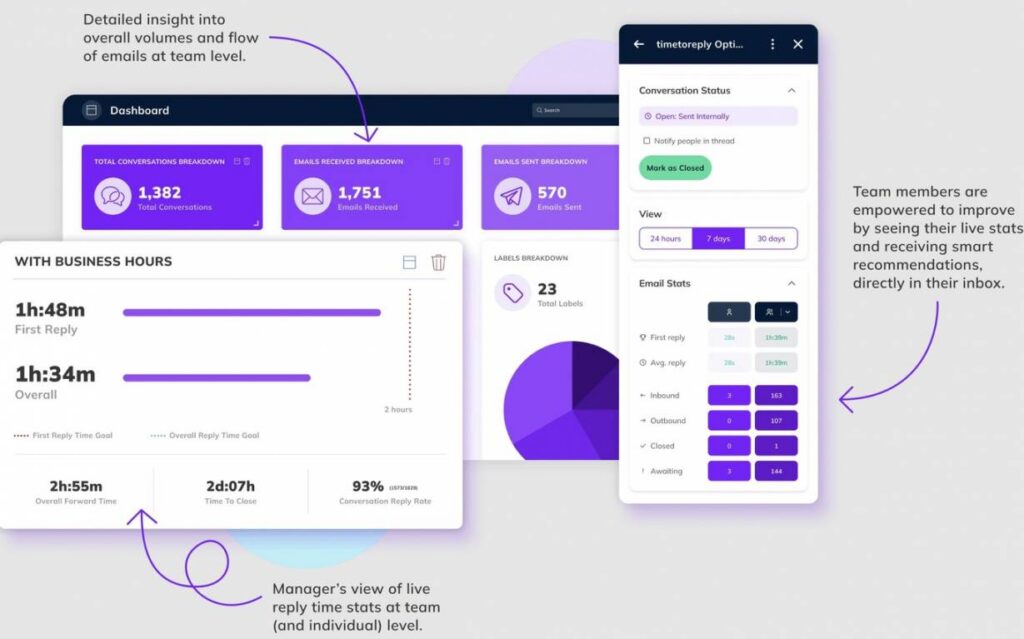
Image via timetoreply
The data isn’t trapped in a single dashboard. It lets you export and feed metrics into broader BI or workforce-planning tools. So the email performance story becomes part of broader operational reporting rather than a siloed insight.
1. What’s the main difference between timetoreply and Missive?
At its core, timetoreply measures and enforces email speed. It’s about numbers, SLAs, and coaching. Missive focuses on seamless workflow inside the inbox with comments and co-authoring.
When you weigh timetoreply vs Missive, choose timetoreply if you want tight performance tracking and Missive if you want collaborative inbox work.
2. Missive vs timetoreply: Which one gives better SLA and reply-time reporting?
In a straight timetoreply vs missive comparison, timetoreply is stronger on SLA and reply-time reporting. It tracks first response and average response times, flags overdue threads, and exports reports for audits. Missive shows basic response trends inside the inbox, but it’s not focused on SLA enforcement like timetoreply.
3. Timetoreply vs Missive: Which one offers more value for money?
When comparing timetoreply vs missive on price, think about what you’ll actually use. If your goal is measurable response-time improvement, timetoreply’s mailbox pricing and focused feature set deliver clearer ROI. If you want a seamless collaboration workspace for every agent, Missive’s per-user plans can make sense, but usually cost more as teams grow.
4. Will timetoreply or Missive require big changes to how agents work?
If you compare timetoreply vs missive from the agent perspective, timetoreply won’t force behavior changes. Agents will work as usual, but managers will get reports on their email performance.
Missive asks teams to collaborate inside its app, which often improves handoffs but requires a short learning period and new habits like leaving internal notes.
5. Can timetoreply integrate with our CRM or BI tools?
Yes, timetoreply supports integrations and data exports so you can push reply-time metrics into CRMs or BI stacks (HubSpot connector and common export/webhook options are documented). That makes it easy to include email performance in broader operational reporting.
6. How long does it take to get useful data after setup for timetoreply vs Missive?
The timetoreply tool is built for fast time-to-value. Connect mailboxes and set business hours/SLAs, and you can see live metrics in hours. Missive gives immediate collaboration value, but building consistent reporting or rules usually takes a little longer. If you want actionable insights, timetoreply gets you there faster.
7. Can Missive do the same advanced analytics as timetoreply?
Missive provides basic response-time views and workload trends, but it’s not optimized as a standalone reply-time analytics engine.
For deep SLA tracking, scheduled KPI exports, and manager dashboards focused on response performance, timetoreply is the stronger, purpose-built option. If you need both collaboration and detailed analytics, you can run both tools together.
8. Which tool will deliver faster ROI on improving customer email experience?
If your core goal is measurable improvements in response speed and SLA compliance, timetoreply typically offers the faster ROI. It’s focused on the exact metrics that drive customer satisfaction, gives managers actionable alerts, and surfaces coaching signals you can act on immediately.
So, what’s our verdict on this timetoreply vs Missive comparison?
If speed and accountability are your priorities, timetoreply gives you clear measurement and alerts so managers can coach and enforce SLAs.Missive helps teams collaborate and avoids context switching, but it’s not a substitute for focused analytics.
For teams that want to reduce response times and prove improvement, timetoreply is the better fit. Try timetoreply to start tracking reply-time KPIs and sign up for a demo to compare results quickly.
Get live inbox alerts and reply quickly to customer emails with timetoreply

Head of Customer Success @ timetoreply
Barry Blassoples is the Head of Customer Success at timetoreply, where he helps customer-facing teams boost revenue and protect brand reputation by providing actionable insights to improve their business email response times. He has over 15 years of leadership experience across customer success, sales, and marketing roles in high-growth tech companies.



Trusted by high-performing inbound sales teams and customer-facing teams globally.
Close more deals and delight more customers with the faster, smarter, deeper email analytics and performance optimization software that works straight from your team’s inbox.