
Email can slow teams or power them, depending on the tool you pick.
This timetoreply vs Missive vs Superhuman guide will help you choose among these popular tools. You’ll understand which tool is best for analytics, collaboration, and personal inbox management.
You’ll find features, pros, cons, and pricing to make a direct comparison and choose the right tool.
Let’s start with a head-to-head quick comparison.
| timetoreply | Missive | Superhuman | |
| Core purpose and target users | |||
| Primary focus: reply-time analytics / SLA tracking | |||
| Primary focus: shared inbox + team collaboration | |||
| Built for SLA-driven support/CS teams | |||
| Focus on personal productivity | |||
| Key features and capabilities | |||
| First response & average reply tracking | (Basic) | ||
| SLA dashboards & breach alerts | |||
| Team & mailbox-level performance reports | |||
| Shared drafts & internal comments | (Limited) | ||
| CRM integrations | |||
| BI-ready exports & reporting feeds | |||
| Role-based access controls | |||
| Reporting access controls (who sees metrics) | |||
| Setup, onboarding, and ease of use | |||
| Quick setup | (Depends on scale) | ||
| No training, simple onboarding | (Learning curve for keyword shortcuts) | ||
| Works without switching the inbox | |||
| No learning curve | |||
| Pricing and value for money | |||
| Pricing model | Per mailbox | Per user | Per user |
| Free trial/demo | |||
| Predictable cost for shared inboxes | (Cost rises with users) | (Cost rises with users) | |
| Strong value for SLA-focused teams | |||
| Strong value for collaboration-focused teams | |||

Image via timetoreply
The timetoreply tool helps teams see how quickly they answer emails. It connects to your existing mailboxes and collects response time data.
Dashboards show first response time, average reply, overdue threads, and more. Managers can set alerts and export reports to track team performance. They can then coach them to improve response times and reduce churn, which often happens due to slow responses.
Because the product focuses on measurement and alerting, agents keep using their usual inbox. That means rollout is simple and adoption is fast.
In a timetoreply vs Missive vs Superhuman comparison, timetoreply stands out for clear SLA tracking and manager-ready reports.
Pros
Cons
Also Read:

Image via Missive
Missive is built for teams that want to work together on emails. It puts shared drafts, private comments, and presence indicators inside each conversation.
That makes it easy to co-write replies and avoid duplicate messages. Teams that rely on fast approvals and tight coordination find this helpful.
Onboarding is simple for small groups. Invite teammates, connect an inbox, and start using shared snippets and templates. As you scale, you can add rules and naming standards to keep behavior consistent.
When comparing timetoreply vs Missive vs Superhuman, Missive stands out for hands-on teamwork in the inbox. However, timetoreply remains the top choice for SLA and response-time tracking.
Pros
Cons

Image via Superhuman
Superhuman is built for people who want to move through email very fast. It is a focused email client with keyboard-driven workflows, shortcuts, and quick triage tools. Users get read statuses, split inboxes, and a design that cuts down on clicks and hunting.
It’s simple and meant to improve the reply speed at the individual level. It is not a replacement for team collaboration platforms like Missive or email analytics tools like timetoreply.
It’s more of an individual email management tool rather than a business one. Individuals may love the speed, but teams still need shared tools to manage ownership and SLAs. Pairing Superhuman with a tool like timetoreply gives both personal speed and team-level measurement.
Pros
Cons
Also Read:
In this section, we’ll compare timetoreply vs Missive vs Superhuman on key parameters.
The timetoreply tool helps managers see how fast teams reply to emails. It helps you track response times and see where delays happen. The focus is on improving customer satisfaction by replying to their emails quickly.
It connects to existing inboxes, shows first response and average reply times, and highlights overdue threads. This makes it simple for support and customer success teams to coach agents and meet SLAs without changing daily habits.
Missive is a collaboration-first shared inbox for teams that co-write and comment inside messages. It adds shared drafts, private notes, and templates so agents can work together in the thread.
Superhuman is a fast, keyboard-driven client for individual power users who want to clear email quickly and stay focused.
In the timetoreply vs Missive vs Superhuman comparison, your choice should match the problem you need to solve.
Pick timetoreply when SLA tracking and measurable reply-time gains matter most. Choose Missive for tight team collaboration and Superhuman for personal productivity.
In this part of our timetoreply vs Missive vs Superhuman comparison, we’ll compare their key features head-on. Here you go.
Email analytics and reporting
The timetoreply tool is built around reply-time metrics. It shows first-response time, average reply time, overdue threads, and custom SLA dashboards. You’ll also get a summary of individual and team performance on reply times.
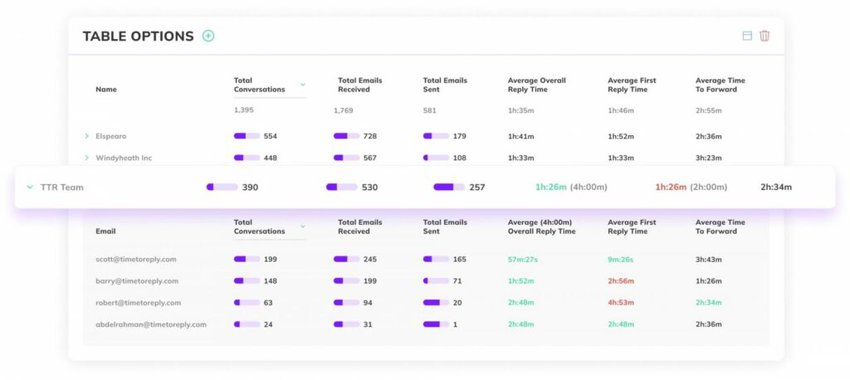
Image via timetoreply
You can receive real-time alerts when conversations near SLA thresholds. These reports are made for coaches and ops managers who need to reduce wait time and measure customer satisfaction.
Missive provides basic trend views and team workload snapshots inside the shared inbox. These views help agents triage and give small teams a simple sense of performance. Missive’s reporting is practical for day-to-day coaching but not designed for audit-grade SLA programs.
Superhuman focuses on personal productivity. It surfaces read states, follow-up reminders, and AI summaries to speed up individual reply work. It is not a team analytics engine and does not offer the same SLA dashboards that timetoreply provides.
Verdict on timetoreply vs Missive vs Superhuman: For reply-time reporting and customer service SLA tracking, timetoreply is the clear choice.
Collaboration and shared inbox features
The timetoreply tool does not try to replace a shared inbox. Instead, it gives visibility across mailboxes and shows who handles what. That pairs well with collaboration tools because managers see the performance impact of teamwork.
It also shows all open email conversations, so your team can respond quickly.
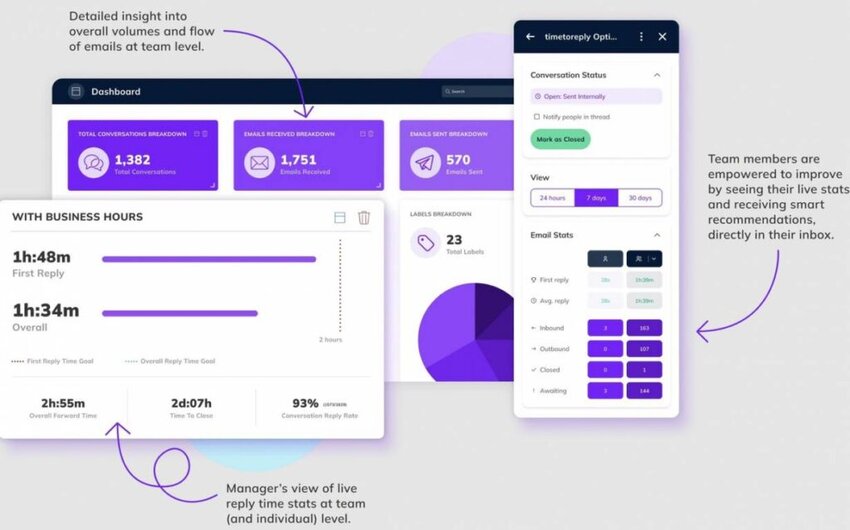
Image via timetoreply
Missive is built for teams that collaborate on emails. It has internal comments, shared drafts, presence indicators, and assignment tools that let teammates co-author replies and avoid duplicate messages. That makes approvals and fast handoffs easier for small teams.
Superhuman includes “team comments” and personal productivity stacks, but its core strength is making one user faster rather than enabling shared, co-authored inbox work at scale. The product is built for individual speed and personal workflows.
So, who wins this round of the timetoreply vs Missive vs Superhuman comparison?
Pick Missive when team collaboration and co-writing emails matter. Pick timetoreply when you want measurement on top of that collaboration.
Workflow, rules, and automation
The timetoreply tool triggers alerts and flags when reply targets are at risk. It can feed those signals into other systems using exports or connectors. So, the workflows are around meeting SLA targets, not routing emails.
Missive supports in-inbox rules and automations for common tasks. You can create rules that tag, route, or trigger actions so agents do less manual work. It aims to help agents work more quickly by automating repetitive steps.
Superhuman speeds individual workflows with shortcuts, snippets, AI drafts, and smart inbox features like Split Inbox. Superhuman’s automations are aimed at single-user productivity rather than team routing.
Overall, all three tools offer different types of workflows and automation.
Integrations, API, and extensibility
The timetoreply tool provides connectors, exports, and API options to feed reply metrics into BI and CRM systems. Its integrations are designed so that email performance becomes part of broader operational reporting. That makes timetoreply useful when you want to measure email inside your data stack. Some of its integrattions include:
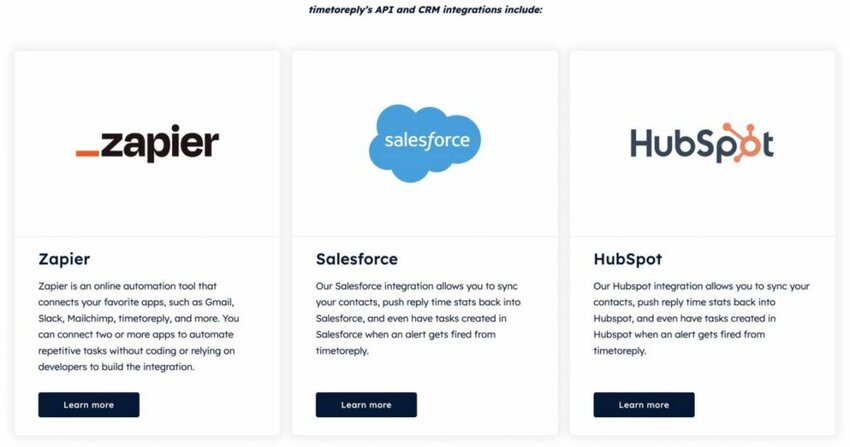
Image via timetoreply
Missive integrates with many channels and apps, including SMS, WhatsApp, and webhooks, so teams can centralize multi-channel work. It offers developer-friendly hooks for custom channels.
Superhuman connects to calendars and other personal productivity tools. It also has features that speed up personal workflows and can link with CRMs for power users.
When thinking about timetoreply vs Missive vs Superhuman, consider where your data needs to go. The timetoreply tool is strongest when reply metrics must feed BI systems and leadership dashboards. Choose Missive when you need many channel plugs for teamwork.
Admin controls and team management
The timetoreply tool lets managers control reporting scopes and mailbox access so key metrics are shown to the right people. That lets leadership run coaching without exposing data indiscriminately. For teams that report on SLAs, controlled access is valuable.
Missive gives team roles, shared mailbox controls, and settings to manage who can edit drafts or see threads.
Superhuman focuses on user enablement for power users. It includes onboarding guides and team features, but it is primarily tuned for the individual rather than organization-wide policies.
Across timetoreply vs Missive vs Superhuman, governance needs differ. Missive supports team roles, Superhuman focuses on individuals, and timetoreply gives managers clean visibility without changing inbox ownership.
Exports, reporting sink, and BI readiness
As such, timetoreply is built to be a data source for team and individual email performance. It supports scheduled exports, CSV downloads, and connectors that bring reply-time tables into dashboards. That makes historical analysis and trend work simple for analysts.
Missive can export conversation data and offers integrations that let teams move data into other tools. Superhuman focuses on improving productivity, so it emphasizes reminders and fast actions more than BI exports.
So, who fares better in this round of the timetoreply vs Missive vs Superhuman debate?
Well, timetoreply is the natural choice for teams that treat email performance as structured data.
Also Read:
The timetoreply tool is quick to set up and easy to use. Admins connect mailboxes using OAuth and configure business hours and SLAs. The UI guides you through mailbox mapping and initial report views.
The staff can keep using Gmail or Outlook and don’t need to change their day-to-day work. This removes any friction makes onboarding really easy.
The training is mainly for managers, who learn how to read the dashboards and set alerts. The self-learning resources and courses on the website are usually enough.
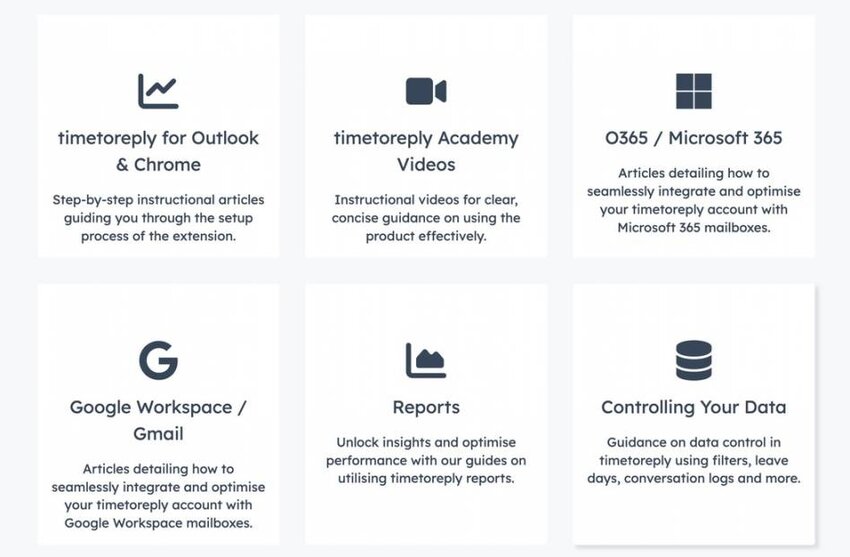
Image via timetoreply
Overall, with timetoreply, the time-to-value is very fast. So, it’s one of the easiest tools to adopt for your business.
Missive is straightforward to get started for small teams. You connect an inbox, invite teammates, and start using shared drafts and comments.
The interface looks like an email inbox with collaboration tools built in, so agents learn quickly. Onboarding grows heavier as you scale; you will need naming rules and templates.
Admins should document templates and standard replies to maintain consistency. Time to meaningful adoption is often days, but consistent behavior takes a few weeks.
Superhuman is focused on personal setup and speed. Installing the client and enabling keyboard shortcuts takes an hour or two. Onboarding is individual, with users customizing shortcuts and reminders to fit their work style.
Because Superhuman optimizes a single user’s flow, it does not manage shared ownership. Rolling it out across a team is a user-by-user effort, not an admin project. Time to personal productivity gains can be immediate for power users.
When you compare setup and onboarding across timetoreply vs Missive vs Superhuman, practical trade-offs appear.
The timetoreply tool gives the fastest time to measurable value with minimal agent retraining. Missive is best for quick team collaboration and simple onboarding for small groups. Superhuman delivers fast, personal wins, but needs separate tools for team workflows.
When comparing timetoreply vs Missive vs Superhuman, pick the tool that matches your rollout capacity and goals.
In this section, we’ll compare timetoreply vs Missive vs Superhuman on their pricing.
Let’s start with timetoreply.
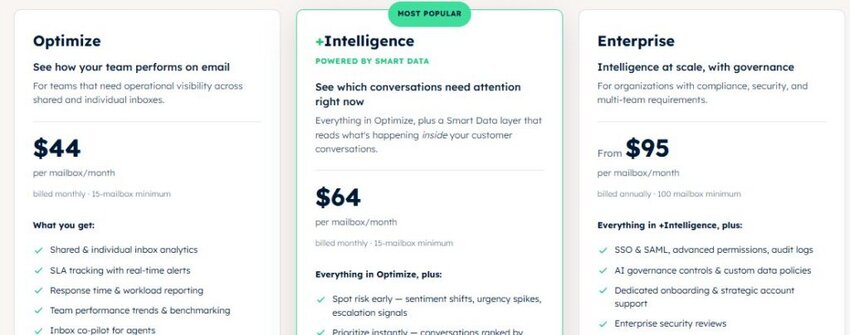
Image via timetoreply
The timetoreply tool charges by mailbox, not by user. This model fits teams that share inboxes. The plans include:
You pay for measurement, not seats. This is cost-efficient when many agents use the same shared inbox.
Missive bills per active user and offers yearly or monthly options. It includes collaboration and basic team analytics.
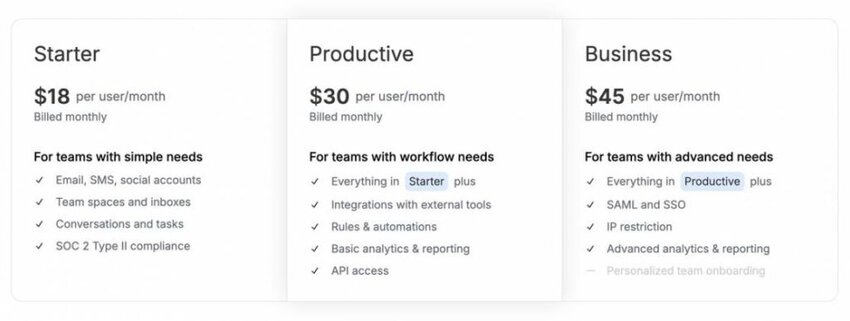
Image via Missive
Plans include:
It’s best for teams that want built-in co-writing and shared inbox features, though costs rise with headcount.
The next on our timetoreply vs Missive vs Superhuman comparison is Superhuman.

Image via Superhuman
Superhuman prices per person, with plans for individuals and businesses. It focuses on personal speed and productivity. Its plans are:
It’s great for power users who want to improve email productivity, but expensive for a team, as you need to pay per user.
So, which one provides more value?
Well, that depends on your needs.
Also Read:
1. If my main goal is improving reply times and SLAs, which tool should I pick among timetoreply vs Missive vs Superhuman?
If speed and SLA compliance are your priority, pick timetoreply. It gives clear first-reply and average reply dashboards, SLA alerts, and exports for BI.
You can see problem mailboxes and coach agents fast. In the timetoreply vs Missive vs Superhuman debate, timetoreply is the best choice for measurable reply-time gains.
2. Which tool is best if my team needs to co-author emails and work together in the inbox?
Using Missive is the simplest way to co-write and comment inside threads. Agents can draft together and add private notes without leaving the inbox.
For team collaboration, Missive reduces errors and speeds approvals. Use timetoreply alongside it to track the impact of better teamwork on reply times and SLAs.
3. Can I use timetoreply together with Missive or Superhuman?
Yes, you can pair these tools without disruption. Run Missive or Superhuman for day-to-day work and add timetoreply for analytics and SLA alerts. That gives agents fast workflows while managers get measurement.
In timetoreply vs Missive vs Superhuman planning, combining tools often gives the best of both worlds.
4. How do costs compare, and which tool gives better value for SLA-focused teams?
For teams that center on SLAs, timetoreply often delivers the best value. Per-mailbox pricing keeps costs steady even as agent counts grow.
Missive and Superhuman are great for collaboration or personal speed, but their per-seat models add cost quickly. Choose based on whether you need email analytics, collaboration, or personal productivity.
5. Which tool among timetoreply vs Missive vs Superhuman is the fastest to deploy and show measurable results?
The timetoreply tool typically shows useful data fastest. Connect mailboxes, set SLAs, and dashboards populate in days. Because agents work on the same inbox, training time is minimal, and managers can act quickly.
Missive and Superhuman show different kinds of wins, but timetoreply gives fast, measurable reply-time results for teams.
6. Can Superhuman replace Missive or timetoreply for teams?
The short answer is no.
Superhuman boosts an individual’s speed, but it does not give shared drafting or team SLA dashboards. Missive handles collaborative replies. The timetoreply tool gives managers the metrics they need.
If you try to use Superhuman alone for teamwork, you will miss shared context and measurement. In timetoreply vs Missive vs Superhuman, combine tools to cover gaps.
7. Which tool reduces context switching and keeps agents focused?
Missive reduces context switching by keeping notes, drafts, and comments inside message threads. Agents do not jump between Slack, email, and docs as often.
The timetoreply tool then measures whether that reduced switching improves reply times. For individual speed, Superhuman shortens decision time, but Missive cuts cross-tool noise for teams.
8. Which is the most secure among timetoreply vs Missive vs Superhuman?
All three tools follow common enterprise controls like encryption and SSO. The timetoreply tool emphasizes retention controls, scoped reporting, and export logs that help audits. Missive focuses on secure shared inbox access with SOC 2 coverage. Superhuman provides SOC 2 coverage and uses Google Cloud infrastructure with strong controls.
Also Read:
This guide shows that tools solve different problems. Missive helps teams write together, Superhuman makes individuals faster, and timetoreply provides performance analytics.
If you must pick one tool today, match it to the gap you want to close: team handoffs, personal speed, or reply-time measurement.
The timetoreply tool is the clearest option when your goal is to prove and improve reply times at scale.
If you want fast wins on SLAs, try timetoreply and see measurable reply-time improvements. You can book a demo to see what it offers.
Get live inbox alerts and reply quickly to customer emails with timetoreply

Head of Customer Success @ timetoreply
Barry Blassoples is the Head of Customer Success at timetoreply, where he helps customer-facing teams boost revenue and protect brand reputation by providing actionable insights to improve their business email response times. He has over 15 years of leadership experience across customer success, sales, and marketing roles in high-growth tech companies.



Trusted by high-performing inbound sales teams and customer-facing teams globally.
Close more deals and delight more customers with the faster, smarter, deeper email analytics and performance optimization software that works straight from your team’s inbox.