
The benefits of cloud-based email management include stronger data security, lower IT costs, and faster deployment. Your business keeps everything online and easily accessible by authorized personnel through a secure provider.
That means you can check messages from any device and keep work moving without delays.
At the same time, automatic updates, spam filtering, and backup tools help prevent data loss and cut downtime. Teams working across different locations can access shared inboxes and synced folders, which improves response times.
Today, we explore the key benefits of cloud-based email management and how they can improve your business.
Cloud email is basically email that’s hosted on remote servers rather than on your own computer or office servers.
Instead of managing everything in-house, you access your email through the internet. This is usually via a web browser or an app. Services like Gmail and Outlook.com, as well as business platforms like Microsoft 365 and Google Workspace, are good examples.
With cloud email, your messages, contacts, and other data are stored in the cloud. This means they’re kept on servers owned and maintained by a provider.
You log in and use your email from anywhere, as long as you have internet access. It works the same way as regular email. Just without needing to deal with your own hardware or software setup.
The benefits of cloud-based email management target businesses needing flexibility and lower IT costs. It also helps remote teams stay connected without relying on a single network or device.
Cloud email works by using remote servers instead of local devices to manage and store your email. You access it using any device with an internet connection to check your emails anywhere.
Here’s a step-by-step breakdown of how cloud emails work:
Cloud email stores and manages your emails on remote servers rather than on local hardware. Services like Gmail, Microsoft 365, and Google Workspace handle storage, syncing, spam filtering, and backups automatically.
Also Read:
Cloud-based email management platforms offer the following advantages over traditional email solutions.
One of the key benefits of cloud-based email management is keeping sensitive information safe. These systems offer built-in encryption that locks emails from unwanted eyes during transfer and storage.
This is important, given that 19% of sensitive emails are sometimes sent to personal email addresses, according to a Better Cloud report.
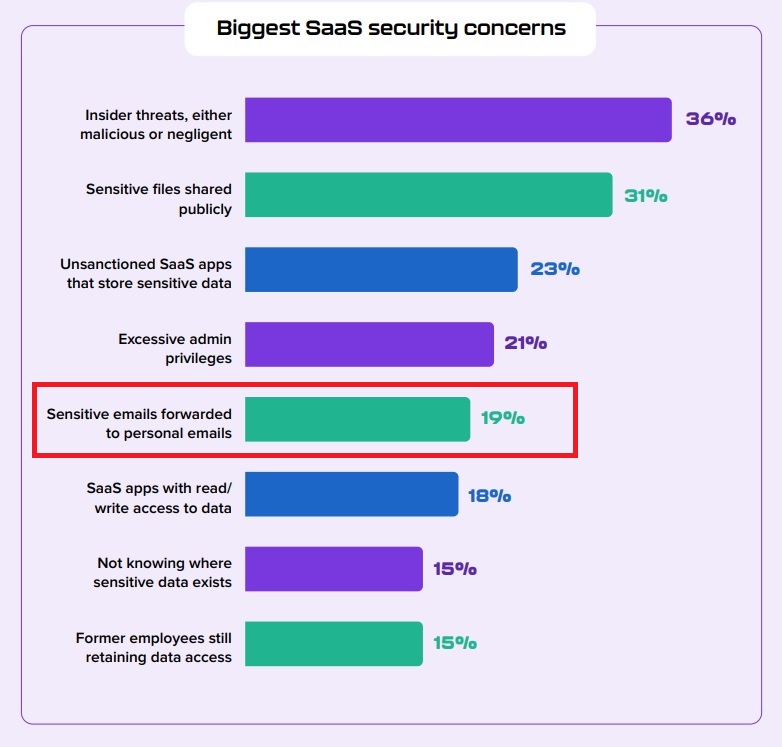
Image via Better Cloud
They also use two-factor authentication. This makes it harder for hackers to get into accounts, even when they have your password.
Another benefit of cloud-based email management is advanced threat detection. They can spot phishing emails and malware before they reach your inbox.
For example, a finance team receiving invoices from vendors would be protected from fake requests that look real but are designed to steal money or data.
Additionally, the security offered by cloud-based systems is now part of compliance requirements in many countries. Businesses have to show that they can protect customer data before they’re granted licenses to operate.
Another benefit of cloud-based email management platforms is scalability. Traditional email systems can struggle to accommodate the growing needs of a business.
In contrast, cloud-based solutions make great customer service tools. This is because they scale effortlessly, allowing businesses to add or remove users and storage as needed.
This scalability ensures that customer service teams can handle increasing volumes of emails.
The ability to access your emails anywhere is one of the biggest benefits of cloud-based email management systems. All you need is a device with internet connection.
Cloud-based email also works across laptops, phones, and tablets. That makes switching between devices quick and easy.
For example, a manager can quickly reply to client emails from their phone while commuting as long as they have account access.
These real-life examples show how the benefits of cloud-based email management stretch beyond convenience.
Also Read:
Unlike traditional email management systems that run on physical devices, cloud-based systems run on multiple servers. Also, one of the benefits of cloud-based email management is that these servers don’t even need to be in the same country as your business.
If one server fails, another takes over. That means your email keeps working, even during system issues or updates.
Additionally, cloud email providers usually guarantee high uptime. Your emails stay available day and night, even during holidays.
This reliability and continuous availability are beneficial for businesses because they build trust. Clients can rest easy knowing their urgent needs will be addressed at any time.
The ability to quickly adapt to changing business needs ranks high among the benefits of cloud-based email management.
Business needs shift quickly, especially while scaling up. With cloud-based systems, companies can instantly scale up email storage and performance.
They don’t have to wait on IT teams or hardware upgrades. This can support larger volumes of customer inquiries with fast response times.
Another major benefit is how fast updates can be rolled out. A business can update its email templates or automate replies for a new product launch in minutes.
Traditional email systems have always needed physical servers, regular updates, and dedicated IT staff. This translates to high maintenance costs.
With cloud-based systems, those costs are significantly reduced. Businesses don’t need to worry about server replacements or emergency repairs. Everything runs online, and updates happen automatically without extra charges.
Additionally, cloud-based email features like shared inboxes and automation save time. Less time spent digging through emails means fewer hours billed and better response times.
One of the most notable benefits of cloud-based email management is automatic backups without extra effort. These systems back up emails in real time. Every message is stored safely the moment it’s sent or received.
Businesses don’t need to rely on manual exports or worry about losing data during power failures. Emails can be stored by category, date, or sender, and there’s no time limit on how long they can be archived.
Cloud-based email systems are versatile, so you’re not restricted to a particular type of hardware. You can deploy them quickly on multiple devices, including smartphones.
Updates also occur automatically, with no action required on the user’s end. New features, security patches, and bug fixes roll out in the background.
A retail company, for example, doesn’t have to pause support services to install updates. The system stays current without affecting customer service because it doesn’t require constant tech support.
On a cloud-based email structure, everything is managed from a central dashboard.
Admins can update settings, add users, or set permissions from anywhere. There’s no need to visit each location or rely on local IT staff.
This setup is especially useful for companies with teams in different time zones or countries. Everyone sees the same shared inboxes, tags, and automated replies. That makes it easier to keep remote communication consistent across locations.
Centralized management also helps with email monitoring and tracking. Managers can view message history, spot missed emails, and respond to issues quickly.
These real-time controls are some of the biggest benefits of cloud-based email management.
Cloud-based email management includes integrations with apps like Slack, Salesforce, and Google Drive. These connections are usually done through simple API keys or built-in connectors.
That means no custom code or expensive tech help is necessary to get started.
Below is an illustration showing some of the integrations supported by timetoreply:

Image via timetoreply
For example, a sales team can link their email system with their CRM tool. This allows them to view customer data and track conversations in one place. A support team might connect their email to Slack, so they get alerts for urgent messages.
Email marketing teams also get a boost from these integrations. They can sync emails with campaign platforms to track leads and automate follow-ups.
These integrations help teams respond faster and keep information synced across tools.
Cloud email stores and manages your emails on remote servers rather than on local hardware. Services like Gmail, Microsoft 365, and Google Workspace handle storage, syncing, spam filtering, and backups automatically.
Also Read:
As helpful as cloud-based email management is, no system is ever perfect. Here are some drawbacks worth considering:
Cloud-based email management is prone to privacy risks, relies too much on internet access, and can be affected by latency or provider downtime. It may also create compliance issues, limit customization, and reduce control over updates.
Also Read:
For many businesses, deciding whether to choose on-premises or cloud email can be confusing.
On-premises means your company owns and runs the email system. It’s installed on local servers. You’re in charge of everything, from hardware and software to backups, updates, and security.
You’ll need IT staff to maintain the system and keep things running. This setup gives full control, but it also comes with more responsibility.
Cloud-based email lives on remote servers managed by a third-party provider. You access it through the internet.
You don’t need to buy or manage physical servers. The provider handles maintenance, storage, backups, and updates. You just focus on using the system.
This is where the benefits of cloud-based email management become clear. There’s less stress on your internal IT team, better uptime, and more flexibility.
Both systems let you easily send, receive, store, and search emails. With the right setup, you can get strong security from either one.
You can also create user accounts, set rules and filters, and archive messages. Both systems also integrate with other business tools, regardless of which option you choose.
Compliance support is possible with both. Whether it’s HIPAA or GDPR, you can configure your emails to meet these rules.
Backup and recovery features exist in both systems, though how they’re handled is different.
Here are notable differences between on-premises and cloud emails:
On-premises email systems are hosted and managed internally, providing full control. Cloud-based email is managed by a provider, offering easier setup, automatic updates, and remote access. Both support core email functions and compliance, but differ in cost structure and flexibility.
To enjoy the full benefits of cloud-based email management services, you must choose the right cloud email service. How do you do it when there are so many options available? Here are some things to consider:
One of the clear benefits of cloud-based email management is reducing hardware and maintenance costs. Therefore, look at the full cost of the service. Some cloud email services seem cheap until extras are added.
The best cloud email service works well with your existing tool stack, including calendars, CRMs, or chat apps. Check if it supports easy integration with the platforms your team already uses every day.
The benefits of cloud-based email management include better uptime compared to most local servers. Go for an email service without constant outages that can slow your team down fast. The right providers offer clear support in case something goes wrong.
A 2025 Thales Security report indicated that cloud storage was the top cloud security target. This reinforces the need to protect sensitive data at all times.
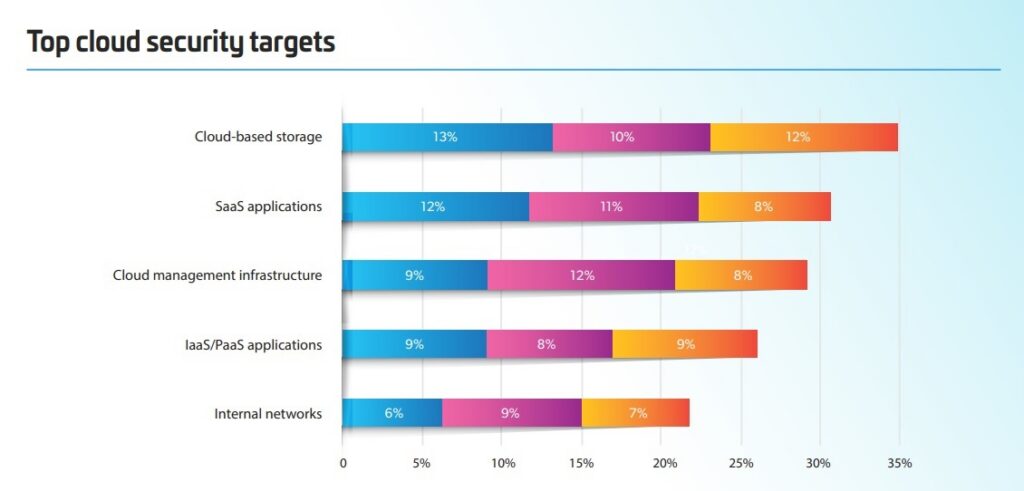
Image via Thales Group
Always check what kind of encryption is used during email transfers and storage. Make sure the service follows rules that match your region’s privacy laws and industry needs.
One of the most crucial benefits of cloud-based email management is automatic backups. Choose a cloud service provider that also provides reliable recovery options in case of data loss.
A cloud email service should load quickly and send messages without long delays. Test this if you can. Slow platforms waste time and can make people miss important messages, especially during busy hours.
Moving from an old system to the cloud shouldn’t take weeks. So, check how long the setup usually takes before signing up. Good providers offer support for importing old emails, contacts, and settings to make migration easier.
One of the important benefits of cloud-based email management is how easy it is to scale without high upfront costs. As your team grows, your email service should grow with it without the need to switch providers later.
To fully reap the benefits of cloud-based email management, you should consider how much customization you need. You should be able to adjust settings, filters, and rules based on how your team works.
Also Read:
Cloud-based email management is changing as technology advances. Some of the forecasted trends include:
One of the biggest changes we will see in cloud-based email management is its growing intelligence. It can work with minimal user effort and input.
AI is already transforming email analytics by automatically sorting and organizing messages. These AI tools learn from your actions.
It provides customer insights into which emails get opened, deleted, or replied to. Over time, your inbox gets more organized without needing constant manual rules.
End-to-end encryption is becoming the norm, not just an add-on. More security technologies are expected in the future. Features like zero-trust authentication and behavior-based security will become standard.
Spoofing attempts are also harder to pull off. The AI checks sender info and flags anything that looks off. This keeps inboxes safer without needing constant user training.
Email platforms will become all-in-one workspaces. We can expect deeper integrations with tools for messaging, file sharing, and task management. This will make the inbox more about task and team management.
As data regulations grow stricter, email platforms will bring default compliance into their core. Whether it’s GDPR, HIPAA, or others, many of these checks run automatically.
This is already a reality for most businesses, according to a 2026 report conducted by Redhat. Of the surveyed organizations, 84% had aligned with GDPR, while 62% were aligned with HIPAA.
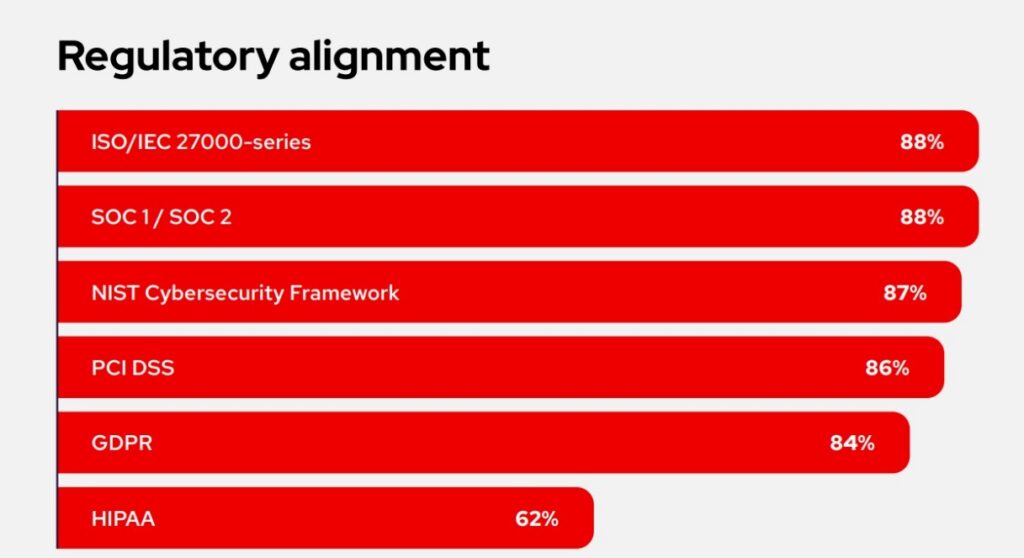
Image via Red Hat
Privacy-first features are also growing, especially for industries like healthcare, finance, and legal.
Cloud providers are starting to focus more on energy use. Providers will lean into renewable energy, carbon-neutral data centers, and optimized server loads.
Email tools will still be fast and reliable with a lighter footprint on the planet.
This shift is part of the wider benefits of cloud-based email management. It can be better for the planet, not just your inbox. It’s a small change, but across millions of accounts, it adds up.
Real-time translation is one of the newer benefits of cloud-based email management. It helps break down language barriers without extra tools.
Built-in translation tools will get more accurate and faster. You’ll be able to read and reply in your language, even if the sender speaks another. This will make working with global teams smoother and quicker.
Future systems will feature stronger security, like zero-trust authentication, built-in compliance, and tighter privacy controls. Email platforms are also becoming productivity hubs with deeper integrations and real-time translation.
Also Read:
1. What is cloud-based email management?
Cloud-based email management is a system that stores and handles your email through online servers instead of local ones, allowing you to access messages from any device with an internet connection.
It includes tools for organizing, filtering, archiving, and securing emails, often with built-in spam protection, backups, and user management.
2. What are the benefits of a cloud-based system?
There are many benefits of cloud-based email management. A cloud-based system offers flexibility, easy access from anywhere, and lower upfront costs since you don’t need to invest in hardware.
It’s scalable, so you can adjust resources as your needs grow. It also often includes automatic updates and built-in data backup.
3. Is cloud-based email more secure than traditional email systems?
Yes, it usually includes built-in encryption, spam filters, and backups, which are key benefits of cloud-based email management. These features reduce the risk of data loss and unauthorized access. They ensure threats are detected and blocked in real time.
4. How does cloud-based email support remote and hybrid work?
It keeps email accessible from anywhere, helping teams stay connected and responsive no matter their location.
It also ensures shared visibility across teams. This ensures that collaboration, updates, and decision-making continue smoothly across different locations or time zones.
5. What kind of storage and backup options do cloud email platforms offer?
Cloud email platforms offer large storage and automatic backups, which are two major benefits of cloud-based email management, especially for established businesses.
Also Read:
The benefits of cloud-based email management can’t be ignored by businesses. The platforms offer a wealth of benefits for customer-facing teams. From enhanced security and scalability to improved email productivity and collaboration.
These platforms are essential for modern teams seeking to optimize their email performance.
Leverage cloud-based email management tools to evolve strategies and deliver high-quality customer experiences at every interaction.
Partner up with timetoreply to bring security and automation to your business like never before.
Get live inbox alerts and reply quickly to customer emails with timetoreply

Head of Customer Success @ timetoreply
Barry Blassoples is the Head of Customer Success at timetoreply, where he helps customer-facing teams boost revenue and protect brand reputation by providing actionable insights to improve their business email response times. He has over 15 years of leadership experience across customer success, sales, and marketing roles in high-growth tech companies.



Trusted by high-performing inbound sales teams and customer-facing teams globally.
Close more deals and delight more customers with the faster, smarter, deeper email analytics and performance optimization software that works straight from your team’s inbox.