
The best remote team tools in 2026 include timetoreply, Slack, Notion, and Trello for improving communication, collaboration, and productivity across virtual teams. Other popular tools like Time Doctor, Microsoft Teams, QuickBooks Time, and Clockify also help businesses keep projects organized.
Managing remote employees is not always simple. Teams can struggle with delayed replies, missed updates, unclear responsibilities, and poor collaboration. It can also become difficult for managers to track workloads, monitor progress, and keep employees engaged throughout the workday.
That is why many businesses now rely on remote team tools to manage daily operations. In this guide, we’ll look at nine of the best remote team tools for managing a virtual team in 2026. We’ll also consider how the tools help remote teams work more efficiently.
When selecting remote team tools, consider features that align with how your team works. These are the factors we looked into when compiling our list of the best remote team tools for 2026:
Remote team tools improve communication by enabling employees to share updates, messages, and files more quickly. They also improve workflows by keeping tasks, conversations, and project information in one place, making collaboration easier.
These improvements happen in different ways:
In essence, remote team tools help teams stay coordinated by making communication smoother and more flexible.
Remote team tools help you:
Also Read:
The best remote team tools vary by focus. Tools like Slack are great for communication, while others like timetoreply help improve email productivity.
Let’s look at what the best remote team tools offer, at a glance.
| Tool | Key Features | Pricing (starts at) | Best for |
| timetoreply | Email tracking, response time analytics, and team inbox visibility | $38/month | Improving email response times in sales and support teams |
| Time Doctor | Time tracking, productivity reports, and app usage monitoring | $8/user/month | Monitoring productivity in remote teams |
| HubSpot Starter Customer Platform | CRM, email automation, CS tools, omni-channel marketing | $20/user/month | Unified sales, marketing, and customer service |
| Trello | Kanban boards, task cards, workflow automation | $5/user/month | Simple project and task management |
| Microsoft Teams | Video meetings, chat channels, and file sharing | $4/user/month | All-in-one communication and collaboration |
| QuickBooks Time | GPS tracking, scheduling, and timesheets | $20/month | Workforce scheduling and payroll tracking |
| Slack | Messaging channels, integrations, and file sharing | $8.75/user/month | Fast team communication and collaboration |
| Clockify | Time tracking, reporting, timesheets | $4.99/seat/month | Freelancers and teams tracking work hours |
| Notion | Shared pages, project boards, databases, and team wikis | $12/member/month | Project management and team documentation |
Each tool offers a different advantage, so the best choice is the one that matches a team’s day-to-day activities.
The best remote collaboration tools to use in 2026 include timetoreply for customer support performance tracking and Trello for task and project management. For communication and collaboration, businesses rely on Microsoft Teams and Slack. Teams also use Time Doctor, Clockify, and QuickBooks Time for time tracking and workforce management.
Below are details of the top nine tools to help you manage your remote workers:

Image via timetoreply
The timetoreply tool is a specialized email analytics software tailored for remote sales, support, and customer success teams who rely on fast, consistent communication. It is one of the remote team tools that offer key insights into how quickly team members respond to emails.
It tracks average email response time and response behavior across shared inboxes. The software requires no installation and is compatible with Google Workspace, Microsoft 365, and more.
The timetoreply platform is useful for small to mid-sized remote teams that need to monitor response times and improve customer communication standards. It works well for businesses managing shared inboxes and handling large volumes of client emails daily.
Key features
Pros
Cons
Pricing
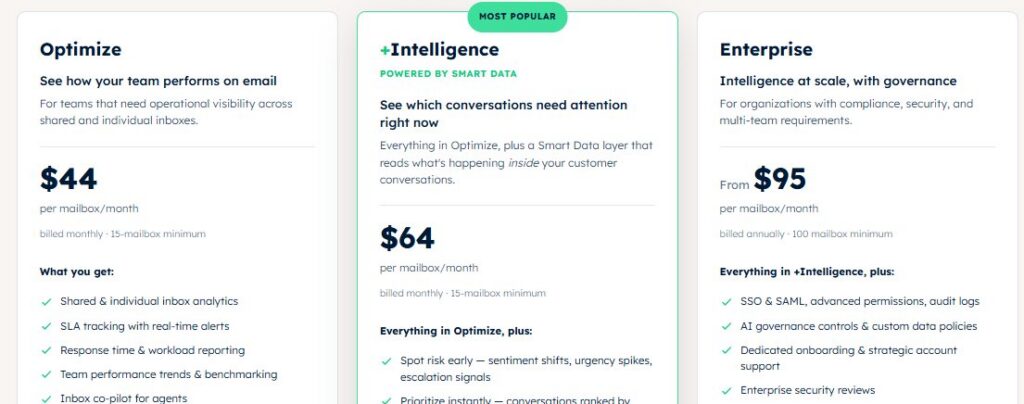
Image via timetoreply
Tool level
Usability
Pro tip: Set and monitor SLA targets for customer-facing teams to improve client retention.
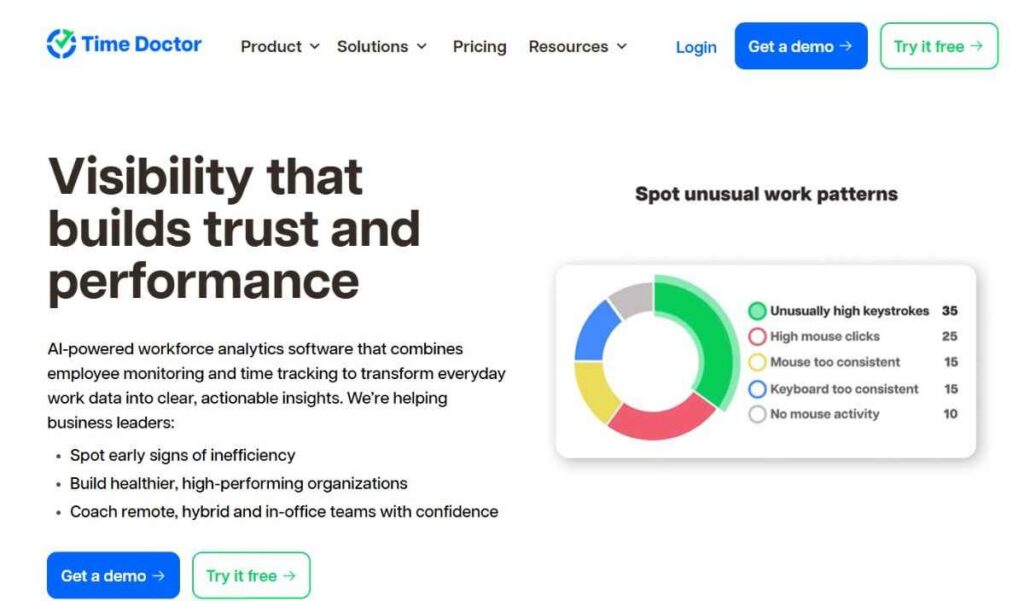
Image via Time Doctor
Time Doctor is one of the most comprehensive remote team tools for tracking tasks and employee productivity. Ideal for client-facing startups and distributed teams, it enables managers to monitor how time is spent across tasks and projects.
This ensures that remote employees stay on track and deliver results. With built-in payroll, reporting, and real-time alerts, it helps ensure transparency while maximizing efficiency.
It works best for teams that need detailed productivity insights, time tracking, payroll support, and accountability across projects.
Key features
Pros
Cons
Pricing
Time Doctor offers a 14-day free trial for its paid plans:

Image via Time Doctor
Tool level
Usability
Pro tip: Use Time Doctor’s workforce analytics to balance workload and prevent burnout.

Image via HubSpot
HubSpot’s Starter Customer Platform is a product bundle that includes features from across HubSpot’s entire product line. It includes the starter plans of Sales Hub, Marketing Hub, Service Hub, Content Hub, and more.
The platform’s ample feature set makes it a solid option for remote teams looking to minimize their tool stack. It also helps manage end-to-end business processes within a single place.
HubSpot’s Smart CRM is one of its core features. It centralizes customer data from across sales, marketing, and customer service, and gives you a full overview of your buyer’s journey. Coupled with features like marketing personalization and sales outreach, you can use the data to power and improve all customer-facing processes.
Key features
Pros
Cons
Pricing
HubSpot offers numerous free tools, while the Customer Platform offers the following pricing plans:
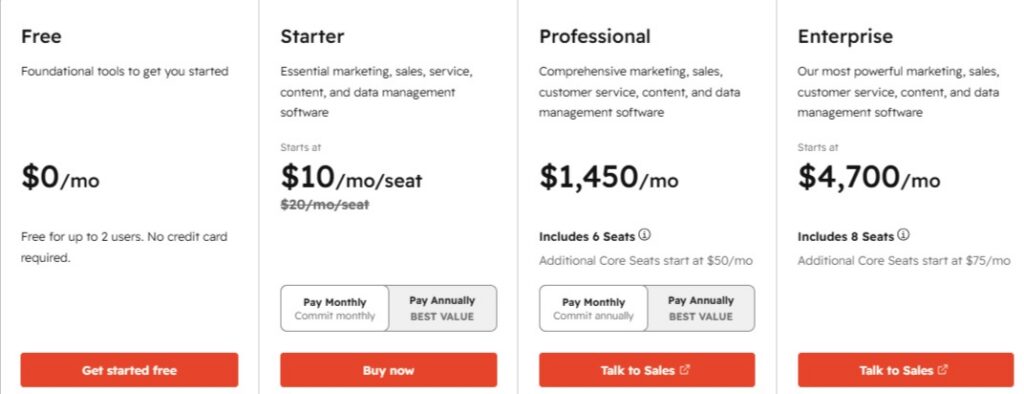
Image via HubSpot
Tool level
Usability
Pro tip: Use HubSpot’s AI agents to automate department-specific tasks like sales prospecting, for example.
Also Read:

Image via Trello
Trello is one of the top collaboration tools for managing projects while working remotely. It uses kanban boards, lists, and cards to help teams organize tasks, track progress, and stay connected from anywhere.
It supports remote access across different devices, including web browsers, iOS, and Android apps. Teams can assign tasks, set deadlines, leave comments, and manage workflows in one place. The platform also supports document sharing by allowing users to attach files to cards from emails and Slack.
Trello is a strong choice for a startup and marketing team looking for a visual project management software to maximize productivity.
Key features
Pros
Cons
Pricing
This is one of the best tools for remote teams that offers a free plan.

Image via Trello
Tool level
Usability
Pro tip: Pair Trello with Slack or Google Drive to improve asynchronous communication, file management, and seamless teamwork.

Image via Microsoft Teams
Microsoft Teams is an all-in-one communication and collaboration platform for remote and hybrid teams. As one of the leading remote team tools, it supports video calls, instant messaging, file sharing, and live document collaboration within one unified interface.
Ideal for businesses already using Microsoft 365, it integrates with apps like Word, Excel, SharePoint, and OneNote. It delivers the flexibility needed to support virtual workspace.
It works well for organizations that need video conferencing tools, document collaboration, and team messaging in one platform.
Key features
Pros
Cons
Pricing
You can use the basic Rooms feature to set up meetings for free. The Business plans offer three paid tiers:

Image via Microsoft Teams
Tool level
Usability
Pro tip: Set up team-specific channels with pre-built templates to organize communication and prevent message overload.

Image via QuickBooks
If you’re seeking a powerful time tracking and scheduling solution tailored for remote field teams, QuickBooks Time works best. It’s one of the most practical remote team tools for all industries.
The tool helps you manage employee time for invoicing, scheduling, and payroll purposes. Managers can track who’s working, where they are, and what they’re doing, all from one platform. The real strength of QuickBooks Time lies in its precision, helping reduce payroll errors.
It works best for construction companies, logistics teams, and organizations managing remote workers on job sites that require strict time and location tracking.
Key features
Pros
Cons
Pricing
QuickBooks Time offers the following plans for tracking time:
There are two plans for payroll integration:

Image via QuickBooks
Tool level
Usability
Pro tip: Enable geofencing to automate clock-ins and reduce time fraud.
Also Read:

Image via Slack
Slack is one of the top remote team tools for instant messaging and collaboration. It enables real-time conversations, file sharing, and video huddles.
With its intuitive interface and customizable channels, Slack helps remote teams stay connected regardless of time zones. It also supports virtual team building.
Slack is ideal for remote startups, tech companies, creative agencies, and hybrid teams that depend on fast communication. It works best for teams that need organized group messages and app integrations across departments.
Key features
Pros
Cons
Pricing
Slack is one of the remote team tools that allows integrations on its free forever plan. The following paid plans offer more advanced features:
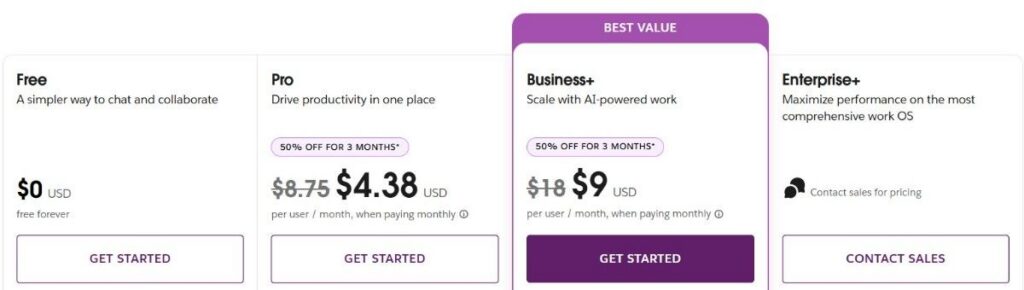
Image via Slack
Tool level
Usability
Pro tip: Use Slack integrations like Google Calendar to automate scheduling and reduce meeting conflicts.
Also Read:

Image via Clockify
Clockify is a timekeeping, reporting, and project management tool. Its free version with unlimited time tracking makes it one of the best remote team tools for freelancers and growing teams. You can track employee timesheets and billable hours, project progress, reports, schedules, and more.
It’s perfect for recording what you’re working on, attendance, and PTO. You can also assign your logs to relevant projects and clients. Clockify is available on the web, mobile (iOS and Android), and desktop (Windows and Mac).
Clockify is best for small to mid-sized teams that want time visibility for billing, reporting, and basic productivity tracking.
Key features
Pros
Cons
Pricing
Clockify offers a free forever plan, four paid plans, and a bundle for team productivity:
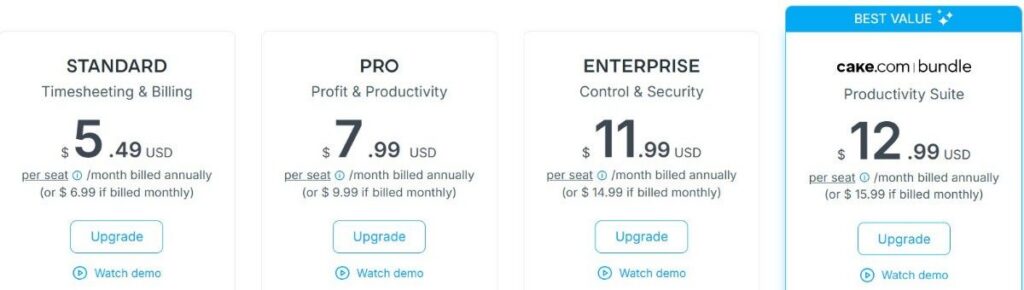
Image via Clockify
Tool level
Usability
Pro tip: Set up reminders and idle time detection to reduce time leakage on inactive work hours.
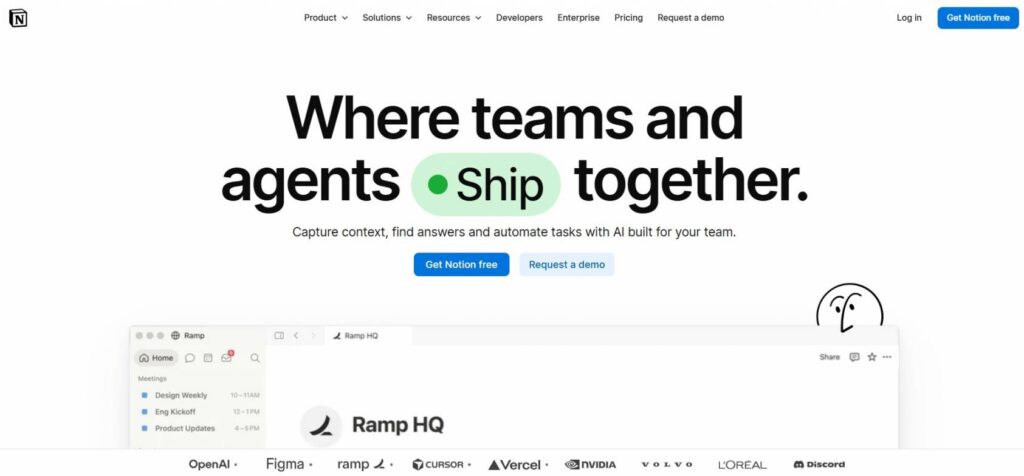
Image via Notion
Notion is a flexible workspace where remote teams can manage projects, documents, notes, and team information. It gives distributed teams one place to organize their work and keep important information easy to find.
It’s one of the remote team tools that works well for teams that rely on shared documents and asynchronous work. Teams can create project pages, build wikis, assign tasks, and share updates without moving between several different tools.
The platform also supports real-time collaboration, comments, mentions, and integrations with other work apps. This makes it useful for remote teams that want to keep project work and team knowledge in the same workspace.
Key features
Pros
Cons
Pricing
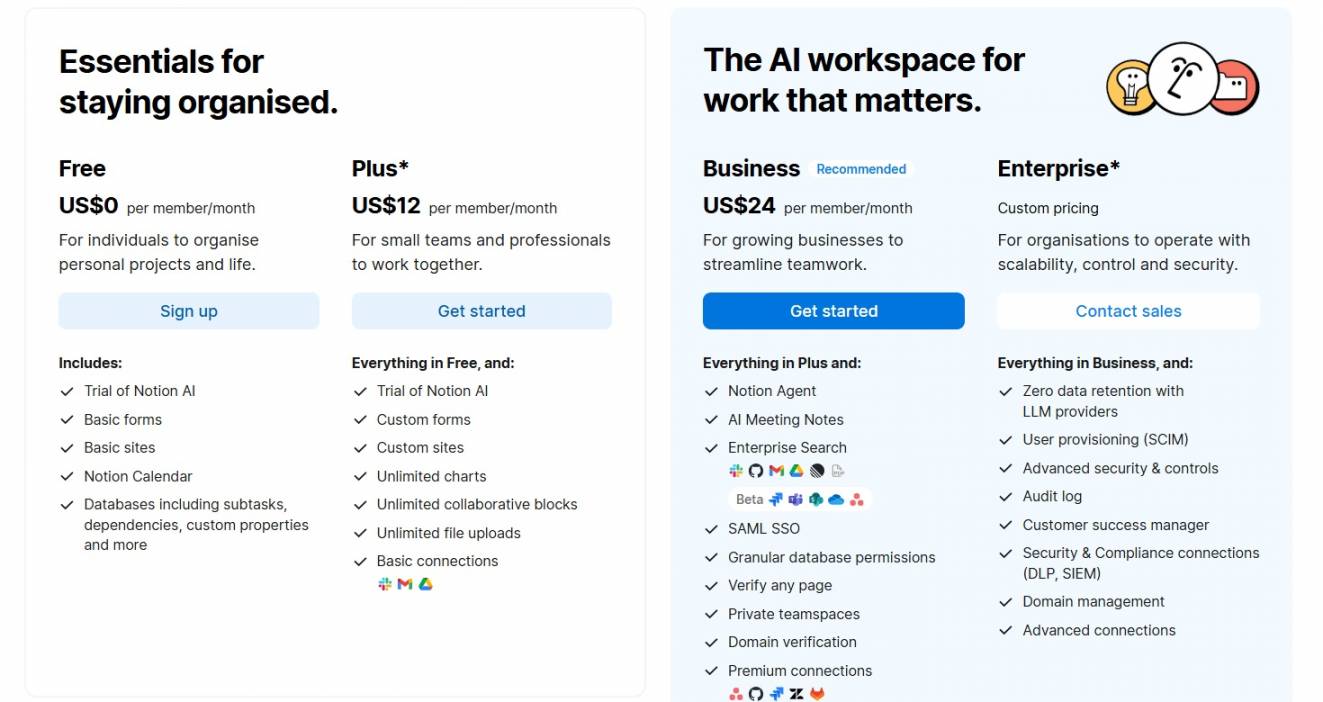
Image via Notion
Tool level
Usability
Pro tip: Create a teamspace for each department and keep shared projects, documents, and updates there.
Also Read:
Also Read:
1. What tools do you need for remote work?
You need remote team tools to effectively manage remote work. They should cover:
2. What is the best online collaborative tool?
The best collaborative tool depends on your team’s needs and workflow:
3. What are remote management tools?
Remote management tools like timetoreply and QuickBooks help team leaders oversee productivity, communication, time tracking, and performance from a distance. They allow managers to monitor work progress and manage schedules without being in an office.
4. What is an example of a remote group collaboration tool?
An ideal example of a remote group collaboration tool is timetoreply. It ensures sales and support teams maintain quick email response times. Clockify is also great for managing team workloads and ensuring projects stay within budget.
5. What do remote jobs require?
Remote jobs typically need:
6. What features should you look for in remote team tools?
When choosing remote team tools for virtual team management, consider the following features:
7. What are the challenges of managing a remote team?
Managing a remote team can be difficult because team members work from different locations and time zones. Some of the challenges businesses face with managing a remote team include:
8. Can remote team tools improve customer response times?
Yes. Remote team tools like timetoreply help businesses monitor email replies and reduce response delays. Faster communication improves customer experience and helps teams maintain better service standards.
Also Read:
With the right remote team tools in your belt, you can efficiently monitor and motivate your remote workers. In fact, your business might flourish because of the freedom you allow them, while you can rest assured that they’re getting the job done.
For teams prioritizing email customer support, timetoreply ensures customers get quick replies. This improves customer satisfaction and conversion rates. Schedule a demo now and discover more remote work features for your team.
Get live inbox alerts and reply quickly to customer emails with timetoreply

Head of Customer Success @ timetoreply
Barry Blassoples is the Head of Customer Success at timetoreply, where he helps customer-facing teams boost revenue and protect brand reputation by providing actionable insights to improve their business email response times. He has over 15 years of leadership experience across customer success, sales, and marketing roles in high-growth tech companies.



Trusted by high-performing inbound sales teams and customer-facing teams globally.
Close more deals and delight more customers with the faster, smarter, deeper email analytics and performance optimization software that works straight from your team’s inbox.