
Front is a popular shared inbox platform for team email collaboration. Teams often look beyond Front as they grow, seeking advanced customer support workflows, reporting, and omnichannel communication features. In this guide, we compare top Front alternatives based on features, pricing, and overall ease of use. Use this comparison to find the right solution for your team’s communication and support operations.
The best Front alternatives include timetoreply for email analytics and team performance tracking, Zendesk for enterprise customer support, Freshdesk for omnichannel workflows, and Gorgias for ecommerce support teams. Other tools like Email Meter, Helpmonks, and EmailAnalytics offer simpler solutions for shared inbox management, reporting, and team collaboration.
Front is widely known for helping teams manage shared inboxes and customer communication. It combines email collaboration, internal notes, and customer messaging tools to support fast-moving teams.
However, Front may not offer the entire set of features, flexibility, and workflow capabilities that every business needs. That is why many companies start comparing Front alternatives.
The right platform depends on your team structure, support processes, collaboration needs, and budget. In this guide, we compare the best Front alternatives based on features, use cases, and pricing to help you choose the best option for your business.
You should opt for Front alternatives if your current tool is too expensive, hard to scale, or doesn’t fully support your team’s workflow. New users also compare alternatives to find a simpler setup or better features.
Here are a few reasons for considering Front alternatives:
The primary differentiator between Front and a platform like timetoreply is that Front is an email management platform to help you receive and organize your emails, whereas timetoreply is an email response management platform that helps you actively improve how you use your team mailboxes.
In essence, exploring Front alternatives helps you find a platform that better fits your team’s needs and growth.
In the next section, we’ll show you how to choose some of the best Front alternatives.
Also Read:
Your choice of the best Front alternatives can be based on how well they support collaboration, integrations, and automation. The right option should match your team’s workflow and improve efficiency, not just replace your current tool.
Here are some essential things to consider when exploring Front alternatives:
Ensure your chosen Front alternatives offer advanced AI support features that let you suggest replies, summarize threads, or automatically route messages.
Performance matters, and laggy customer service software can hurt productivity and customer satisfaction. Consider user reviews or conduct your own speed tests before making a decision.
Overall, choosing the right Front alternative comes down to finding a solution that streamlines workflows and supports your team as it grows.
Front alternatives differ in core features, pricing flexibility, and use cases to meet different team needs. Some tools work for full customer support operations, while others are designed to improve visibility, reporting, or team email efficiency.
Below is a table that compares the top options side by side.
| Tool | Best for | Key Features | Free Plan | Pricing (starts at) |
| timetoreply | Email analytics & response tracking | Response time tracking, team reporting and KPI tracking, inbox insights | No | $38/month |
| Zendesk | Enterprise customer support | Ticketing system, automation, SLA tracking, reporting | No | $25/agent/month |
| Freshdesk | SMB to mid-market support teams | Ticketing, omnichannel support, automation, knowledge base | No | $23/agent/month |
| Gorgias | Ecommerce support teams | Shopify integration, order management, macros | No | $10/month |
| Email Meter | Email reporting & analytics | Gmail/Outlook tracking, performance dashboards | Yes | $19/month |
| Helpmonks | Shared inbox collaboration | Shared inbox, assignments, automation, chat | No | $99/month |
| EmailAnalytics | Email productivity tracking | Email activity reports, response time metrics | No | $19/inbox/month |
Some Front alternatives focus on deep customer support systems, while others prioritize analytics or lightweight shared inbox collaboration.
There are a variety of Front alternatives on the market, such as timetoreply, Zendesk, Freshdesk, Gorgias, Email Meter, Helpmonks, EmailAnalytics, and more.
Each one has different strengths and the best one for you will depend on your needs.
Here’s a breakdown of their features, pros, cons, and pricing to help you choose.

Image via timetoreply
The timetoreply is one of the Front alternatives offering specialized email analytics solution for improving email response time and SLA compliance.
It provides managers with real-time visibility into team inbox behaviors, helping them spot slow response trends before they escalate.
Even better, the tool integrates smoothly with Gmail and Office 365, automating performance metrics tracking. It provides customer service teams with trend alerts and benchmarking features to maintain high standards in team efficiency.
Compared to other Front alternatives, timetoreply provides tailored analytics for different sectors. This includes insurance, professional services, legal services, logistics, manufacturing, and more.
These tailored analytics ensures teams get insights relevant to their unique communication needs. Additionally, timetoreply supports integration with over 5,000 third-party tools, which enhances its basic functionality with more advanced features.
Key features
Pros
Cons
Pricing
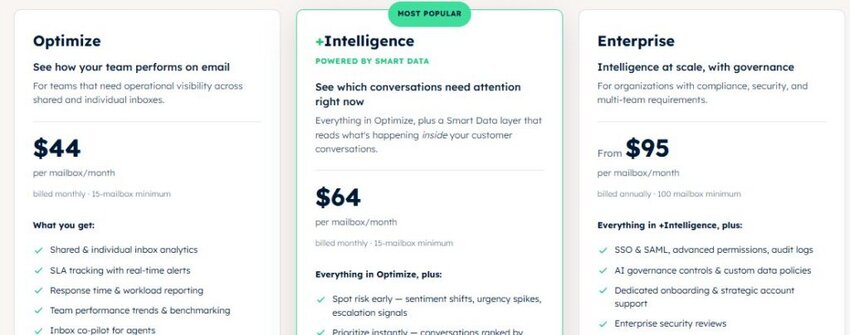
Image via timetoreply
Ready to move beyond Front? Book a demo and see how timetoreply can improve your team’s email performance.

Image via Zendesk
Zendesk is one of the most widely known Front alternatives, and for good reason. It’s a comprehensive customer service platform that helps companies manage customer interactions across multiple support channels, including email, social, and live chat support.
Zendesk Support Suite provides enterprise-level tools to personalize support and business communication. You can create customized help centers, automate ticket routing, and integrate with CRMs and email analytics tools.
Email reporting features are another strong suit of Zendesk compared to some Front alternatives. It offers dashboards that track everything from resolution times to agent satisfaction.
Key features
Pros
Cons
Pricing

Image via Zendesk
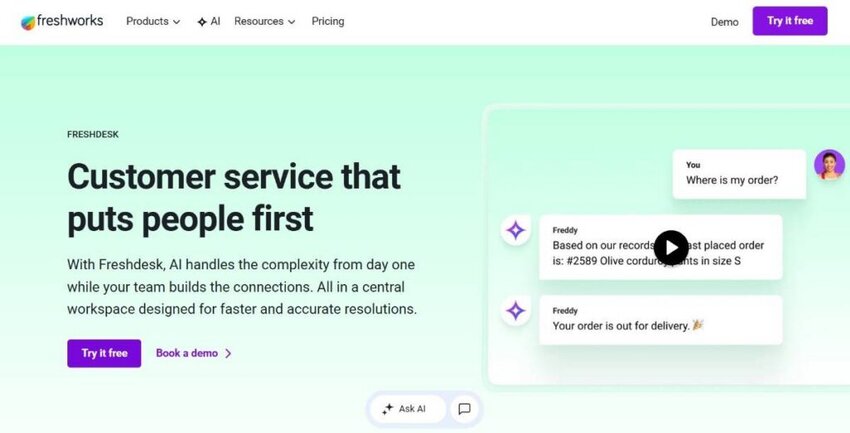
Image via Freshdesk
Freshdesk is one of the leading Front alternatives for managing customer support. This AI-powered customer service tool is ideal for teams seeking streamlined customer experience workflows without having to use a heavy enterprise system.
With Freshdesk’s Freddy AI feature, you can set up chatbots to automatically handle repetitive tasks, customer queries, and resolve tickets more efficiently.
You can also customize customer portals, assign roles, and set up workflows to help reduce manual effort.
Freshdesk offers a shared team mailbox similar to Google Collaborative Inbox or Google Workspace, making it easy for teams to manage support tasks together. It streamlines collaboration, task assignment, and project management within a single platform.
Key features
Pros
Cons
Pricing
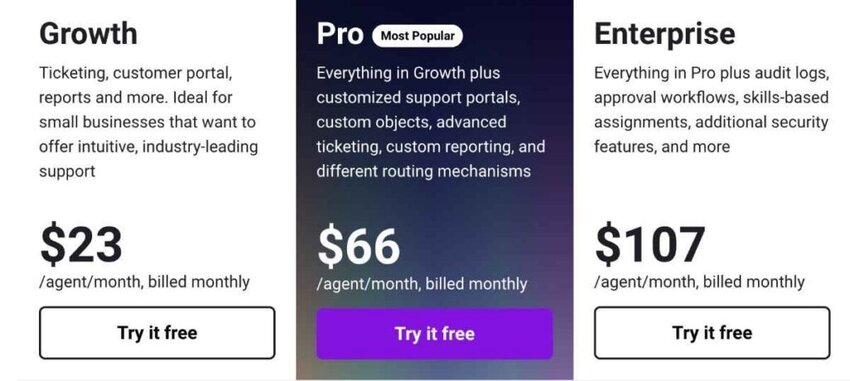
Image via Freshdesk
Also Read:

Image via Gorgias
Unlike many Front alternatives, Gorgias is purpose-built for DTC brands, making it a top choice for fast-growing ecommerce companies.
With native integrations to Shopify, BigCommerce, and Magento, Gorgias connects support teams directly to order and customer data. This allows agents to view order history, issue refunds, or update shipping details without ever leaving the helpdesk.
With Gorgias’s AI feature, you can resolve customer support inquiries using AI-driven personalized or brand-aligned responses.
Another reason Gorgias is one of the best Front alternatives is its focus on revenue-driving support. You can track support-driven sales, upsell within tickets, and assign revenue attribution to agents.
Key features
Pros
Cons
Pricing
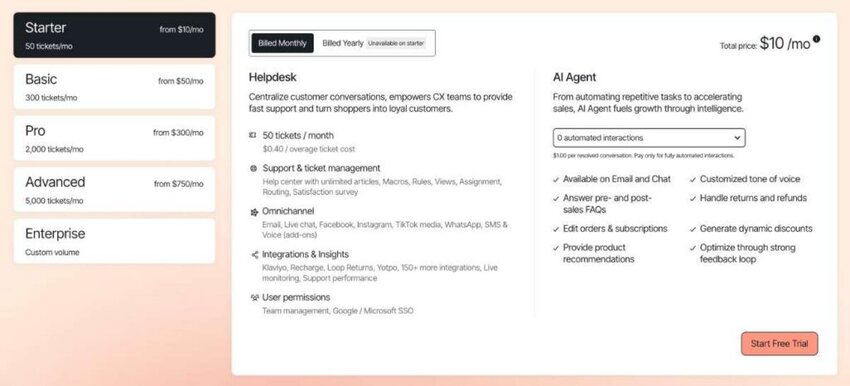
Image via Gorgias
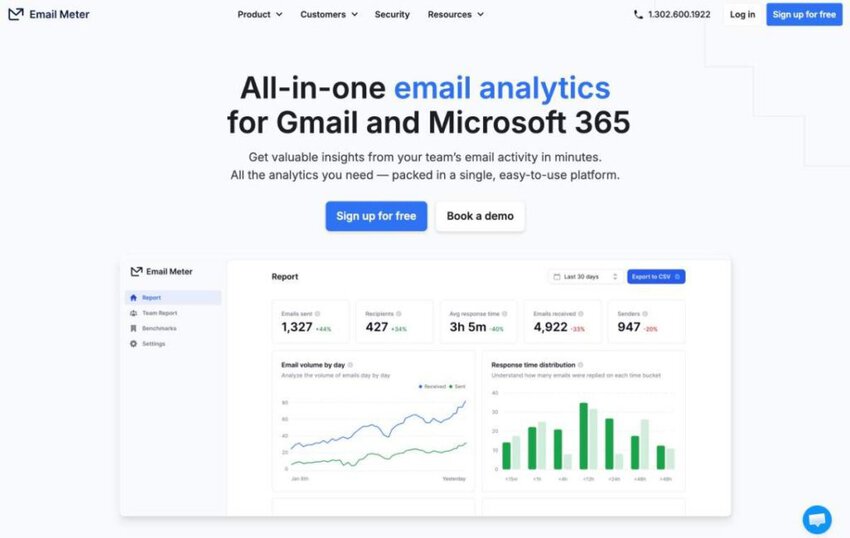
Image via Email Meter
Email Meter is one of the top Front alternatives, especially for companies focused on maximizing email productivity. Compared to most Front alternatives that are customer support tools, Email Meter is an email analytics tool that helps businesses track and analyze how customer service teams use email for support.
Email Meter works by connecting directly to your team mailboxes and pulling customer service metrics like email response time, average resolution times and other key metrics without the need for agents to change how they work.
With Email Meter, you can get insights on individual and team performance across Gmail and Microsoft 365. You can also export email metrics reports for analysis or schedule custom reports to your inbox.
Key features
Pros
Cons
Pricing

Image via Email Meter
Also Read:
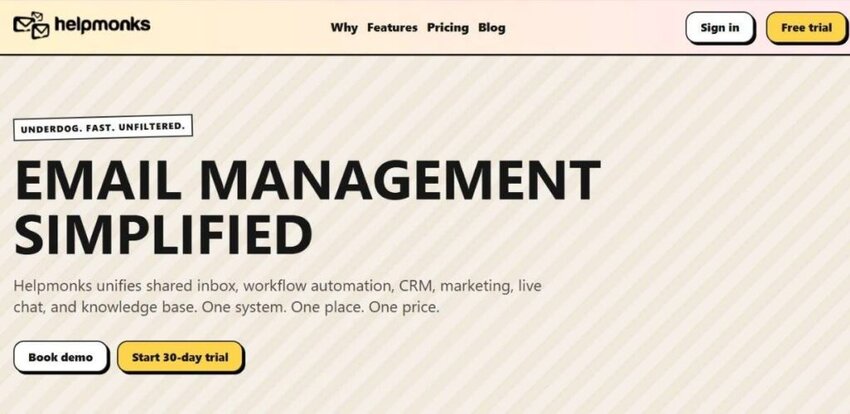
Image via Helpmonks
If you’re looking for powerful Front alternatives that blend shared inbox functionality with advanced tools for marketing and automation, then Helpmonks is a great choice.
It’s one of the Front alternatives that allow centralized email collaboration with live chat, push notifications, and smart workflows. Agents can easily assign conversations, leave internal comments, and tag support queries.
You can manage multiple mailboxes, workgroups, and brands from a single dashboard. Additionally, it provides automation rules that enable you to tag, assign, and trigger marketing emails based on specific criteria.
Beyond email, Helpmonks offers customer relationship management capabilities, email marketing tools, and a knowledge base. Teams can segment contacts, create drip campaigns, and trigger actions based on user behavior.
Key features
Pros
Cons
Pricing
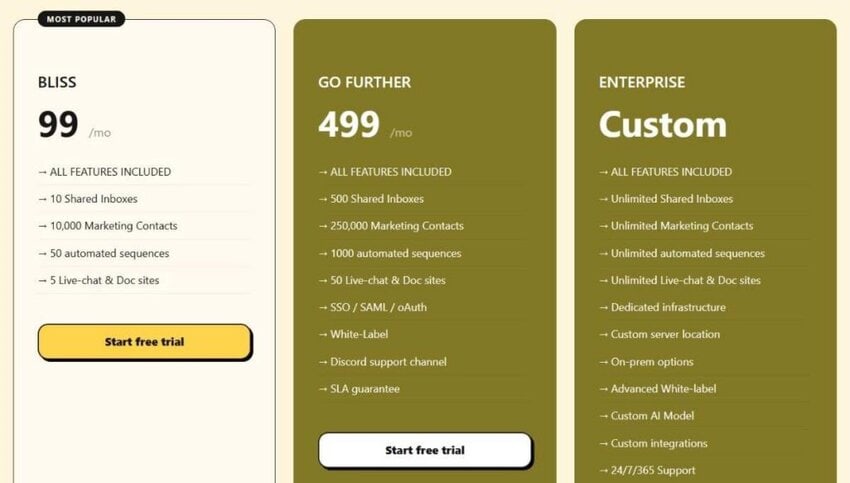
Image via Helpmonks

Image via EmailAnalytics
Among Front alternatives focused on email performance, EmailAnalytics stands out as a top choice. It integrates with Gmail or Outlook to provide insights on send/receive volume, response times, peak activity hours, and key conversations.
The tool enables teams to benchmark SLAs, monitor response-time trends, and prevent overlooked emails. Its daily and weekly dashboards display team-level insights, making it easy to track team performance across agents.
Managers can use this data to improve response times to customer inquiries, distribute workloads effectively, and identify bottlenecks before they become issues.
With visual dashboards, customizable key performance indicators, and exportable reports, EmailAnalytics provides a clear view of internal team communication.
Key features
Pros
Cons
Pricing

Image via EmailAnalytics
Also Read:
The timetoreply tool stands out among other Front alternatives because it focuses on improving email response times and team performance, not just inbox organization. It also offers clear analytics that help teams track, improve, and scale customer communication.
As a business email analytics software, it helps you measure your customer-facing teams’ email activity and metrics. It also helps you gather the data and insights you need to improve team email performance.
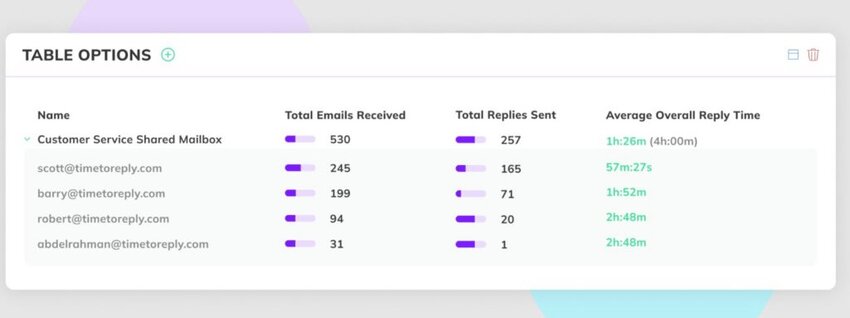
Image via timetoreply
The timetoreply tool works with both Microsoft and Gmail, as well as any other custom mailbox solution you use.
Once you connect your team’s mailboxes to timetoreply, your email activity data will populate instantly, and you can see your team’s individual and collective reply-time performance, average email volume, peak hours for email activity, and much more.
The timetoreply tool is designed to work seamlessly for customer service, sales, and any other customer-facing team in your business, making it the perfect alternative to Front if you need email analytics for multiple departments.
You’ll have all of the metrics you need to improve how your team engages with your customers and your sales leads using email.
Schedule a demo now and discover the future of elevated communication strategies!
Everyone has improved their reply times by 300-400%, giving our customers 3-4 times faster replies and, therefore, a better experience. As a business owner, that’s huge!
The timetoreply tool is different from most Front alternatives that focus on inbox organization and collaboration workflows. It is built specifically to measure and improve email response performance using real-time analytics and SLA tracking.
Below are some distinctive features that make timetoreply an excellent alternative to Front.
Most Front alternatives focus on organizing conversations. The timetoreply tool goes beyond that to offer powerful customer service email analytics. Every email is tracked for response-time performance, not just for visibility.
From the moment you install timetoreply on your team inboxes, it will start collecting actionable data on key metrics such as:
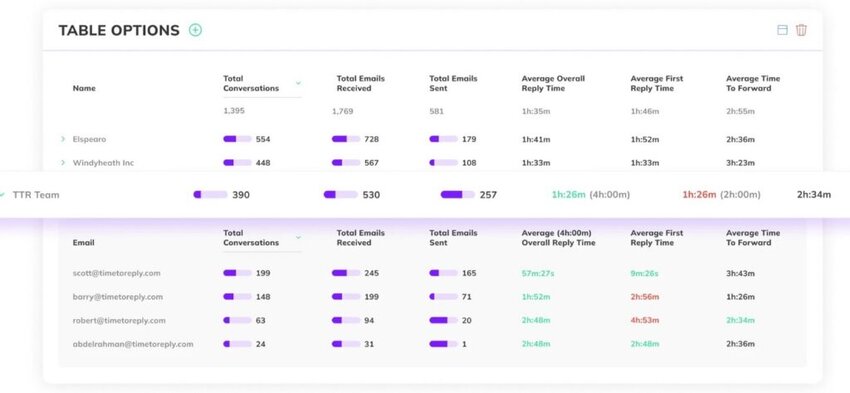
Image via timetoreply
You will immediately start making improvements to your processes, goals, and staffing requirements to ensure your key stakeholders are never left waiting for a reply.
The timetoreply tool is designed to be more than just a standard email analytics tool. It’s here to help you turn those insights into real improvements.
On Front, SLA monitoring and management are only available on higher-tier plans and must be set up using custom rules, so it can be tricky to use without spending time getting it set up correctly.
One way that happens is with goal setting and SLA management.

Image via timetoreply
For example, you will set your customer service SLA goals that your team needs to meet, and timetoreply will compare how your team performs against those goals.
You can see whether your reply times meet your SLA goals, and if they don’t, use the insights to make improvements to ensure they are met in the future.
Suppose you didn’t hit an SLA goal, but then realized it was because you didn’t have enough support reps working during peak email volume times. You will then address this by hiring new team members or routing fewer emails to support via a self-service system.
When you start using timetoreply, you’ll quickly identify key areas for improvement to ensure you always hit your company’s most important email targets.
Front is a solid tool, but getting fully set up and realizing its value can take time. Also, many Front alternatives require time-consuming onboarding and workflow migration. But with timetoreply, you can get set up in minutes.
As soon as your inbox is connected, historical data is populated in your dashboards so you can see past performance.
The timetoreply tool also includes features like:
With timetoreply’s email response management software, your team will level up their email performance. It ensures your customer-facing teams deliver the service experience your existing customers and sales leads expect.
Another difference between timetoreply and most Front alternatives is that timetoreply provides real-time visibility into email performance. Instead of waiting for end-of-month reports, managers can see what is happening inside team inboxes in real time. This includes response time data, workload levels, and email volumes across individuals and teams.
This level of visibility helps leaders act early. If response times start to slow down, it is immediately visible. If one team member is overloaded, it shows up in time. This makes it easier to balance work across the team before problems grow.
The timetoreply tool also helps create clear accountability. Every email is linked to response time performance. This means teams know exactly how they are performing against expectations.
Also Read:
It focuses on improving email response times using real-time analytics. It also helps teams see performance data and make changes to improve customer communication.
1. What are some reliable Front alternatives for email analytics?
The top Front alternatives that offer strong email analytics include timetoreply, EmailAnalytics, and Email Meter. These Front alternatives help monitor team performance, track key performance indicators, and enhance support software with data-driven insights.
2. What’s the best Front alternative for a small team?
If you’re operating at a smaller scale, tools like EmailAnalytics or timetoreply are excellent choices for email management. These Front alternatives are simple to set up, require minimal training, and offer strong ROI through enhanced email reporting and SLA tracking.
3. What kind of key performance indicators can be tracked using email analytics tools?
With email-focused Front alternatives like timetoreply, teams can track a wide range of key performance indicators, including:
4. Are there Front alternatives with marketing or CRM features?
Yes. Platforms like Helpmonks offer integrated tools for email marketing, live chat, CRM, and knowledge base management, which makes it an all-in-one solution for growing brands.
5. Can I use Front alternatives with my current email platform?
Yes. Most Front alternatives integrate seamlessly with Gmail, Outlook, and Office 365, so you don’t have to change your email provider to start tracking performance.
6. Which Front alternatives work best for growing support teams?
Tools like timetoreply, Freshdesk, Email Meter, and Helpmonks work well for growing support teams. They offer email analytics, automation, and collaboration features that help businesses manage larger inbox volumes.
7. Why do businesses switch from Front to alternatives?
Many businesses switch because they need simpler workflows, lower costs, or stronger reporting features. Some Front alternatives also offer stronger email analytics, CRM tools, or support features that more closely match growing business needs.
8. Can Front alternatives support remote or distributed teams?
Yes. Many Front alternatives work well for remote teams and hybrid workplaces. Team members can track emails, monitor shared inboxes, and review performance together from different locations via a single central dashboard.
9. Which Front alternatives are scalable for larger businesses?
Zendesk, Freshdesk, and timetoreply are among the most scalable Front alternatives. Zendesk and Freshdesk support large teams through omnichannel workflows, automation, and robust integrations. timetoreply focuses on email performance across growing teams. It tracks response times, SLAs, and workload data without changing how teams use email.
10. What should businesses consider before choosing a Front alternative?
Businesses should first look at their main workflow needs. Check how easy the tool is to set up and whether it fits current systems like Gmail or Outlook. Also consider integrations, automation features, reporting depth, and pricing. For teams focused on speed and accountability, tools like timetoreply are better.
Also Read:
Front is a powerful email management platform, especially for teams that want shared inboxes and collaboration features. However, it is not always the best fit if your goal is to improve response speed or manage SLAs.
To choose the right Front alternative, start by identifying your primary workflow need. timetoreply, Zendesk, and Freshdesk suit full customer support teams while Gorgias fits ecommerce workflows. Helpmonks works for shared inboxes with automation, and Email Meter or EmailAnalytics are best for basic email tracking.
If your focus is response speed and accountability, timetoreply is the most targeted option. It tracks email performance in real time and helps teams improve SLAs with clear, actionable data.
Schedule a demo now and discover the future of elevated communication strategies!
Get live inbox alerts and reply quickly to customer emails with timetoreply

Head of Customer Success @ timetoreply
Barry Blassoples is the Head of Customer Success at timetoreply, where he helps customer-facing teams boost revenue and protect brand reputation by providing actionable insights to improve their business email response times. He has over 15 years of leadership experience across customer success, sales, and marketing roles in high-growth tech companies.



Trusted by high-performing inbound sales teams and customer-facing teams globally.
Close more deals and delight more customers with the faster, smarter, deeper email analytics and performance optimization software that works straight from your team’s inbox.