
Email management is the process of organizing, tracking, and responding to emails efficiently. Businesses can communicate better, reduce inbox overload, and improve workflows across teams.
Email is essential for any business. It’s the primary channel for internal communication. It’s also used to market to consumers, engage with sales leads, and resolve customer queries.
Nowadays, organizations must manage their email communication channels. The large number of emails businesses receive daily can feel overwhelming. Employees may struggle to keep up with messages. This can slow workflow and affect team performance.
As businesses use email more, a good email management strategy is key. In this article, you’ll learn what email management is. You’ll also learn its benefits and the best practices for managing business emails effectively.
Email management is the structured way to handle business emails in a timely manner. It’s about organizing your inbox and replying on time.
It helps save time and ensures nothing slips through the cracks. It helps businesses improve response times, organize workflows, and increase accountability across teams.
Email management is important because businesses receive large volumes of emails every day. According to Statista, an estimated 376.4 billion emails are sent and received daily in 2025.
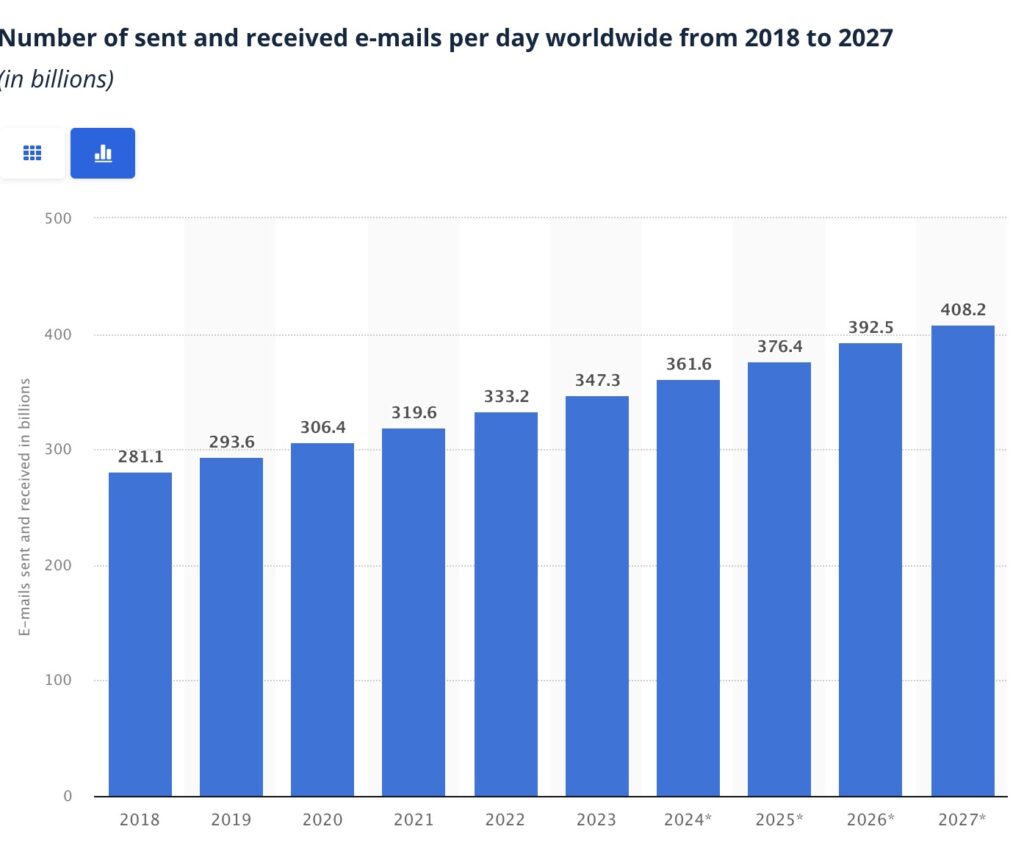
Image via Statista
Employees also spend a large part of their time managing inboxes. A recent Microsoft report found that the average worker receives 117 emails daily.
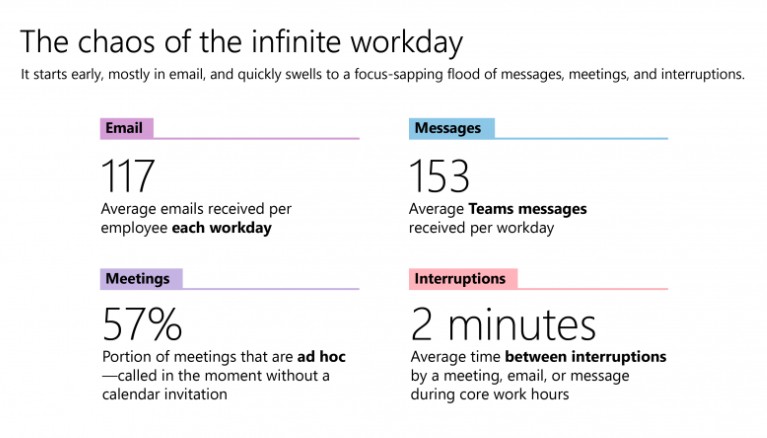
Image via Microsoft
When emails aren’t managed well, teams lose time handling repetitive tasks and follow-up reminders. Email management solves these problems by creating a system for handling communication.
Teams can sort emails by priority, assign responsibilities, track conversations, and schedule follow-ups. This helps businesses improve efficiency, maintain accountability, and create smoother workflows.
Thankfully, email management tools help organizations effectively manage email for remote work and traditional business operations. Organizations that use email management software add a new level of certainty and transparency. No more guessing. No more winging it and hoping for the best.
Email management helps employees use their time on email mindfully. It helps them prioritize and visualize which emails must be responded to and when. This helps them stay focused and improve first-contact resolution rates and response times.
In essence, email management turns chaotic inboxes into structured workflows. This improves speed, clarity, and accountability.
Also Read:
Email management helps improve productivity and reduce time wasted on cluttered inboxes, especially when it’s handled by multiple people. It also helps teams respond faster to customers and focus on important conversations. This way, sales teams can maintain smoother communication across the organization.
Though there are many benefits to email management, here are the three most important.
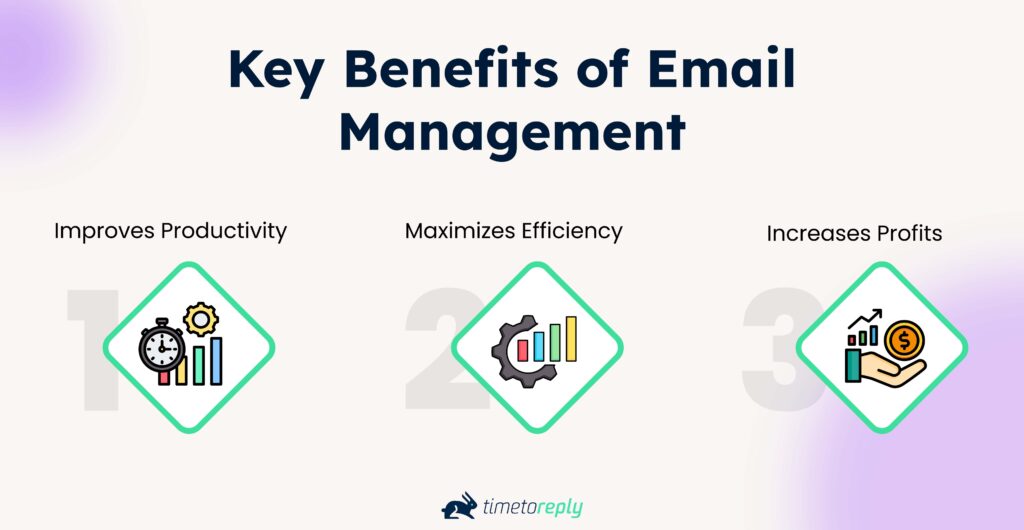
With proper email management, employees can focus on important tasks rather than email. Email management allows better organization of important information. This way, employees don’t waste time scrolling through an overflowing inbox.
Overall, it maximizes email productivity and helps employees manage their time better.
Non-urgent emails must be determined. Email management helps employees prioritize emails. When employees know which emails to respond to, they can resolve customer queries quickly.
With increased time efficiency and improved productivity, your organization can boost profits. A well-run customer service team efficiently responds to customers, sales leads, and internal comms. So you can rest assured that no cent is wasted on cluttered inboxes.
Email management improves productivity, boosts efficiency, and increases profits. It helps teams prioritize communication and reduce time wasted on inbox clutter.
Also Read:
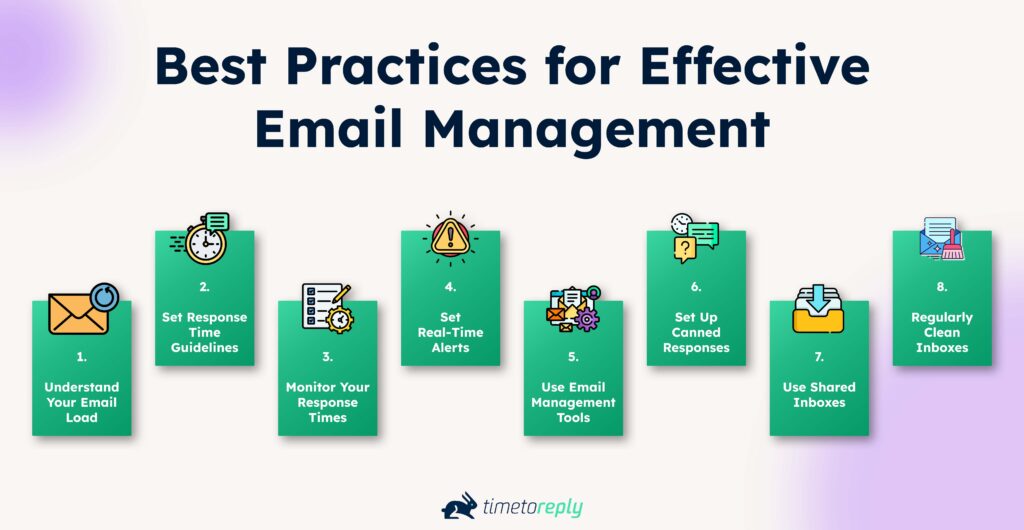
Effective email management combines inbox management with clear email communication. A good practice is to automate routine tasks so you can focus on more important responsibilities. We’ve curated a list of email management best practices that you can follow to ease your email overload.
Do you know how many emails your employees are receiving and sending? Do you know how much time individuals spend on email?
According to a 2025 ZeroBounce Email Statistics Report, 42% of people check their emails three to five times a day.
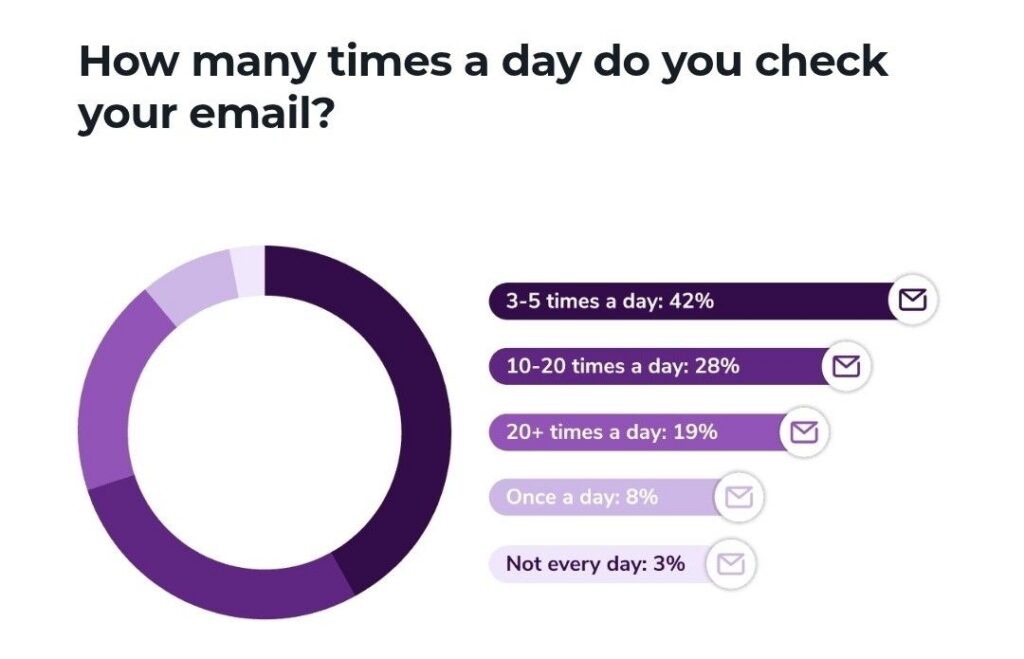
Image via ZeroBounce
You can use an email tool to check how much time each employee spends in their inbox. Effective email management can redirect these hours towards more valuable tasks.
How responsive do you expect your employees to be? How responsive do customers expect them to be?
Set clear response time guidelines. At timetoreply, we help businesses like yours speed up response times and boost customer satisfaction. Here’s how you can do it.
Start by categorizing your emails. For example, you might label them as “urgent,” “important,” or “routine.” For urgent inquiries from key clients, set a response target of under one hour or a few minutes. For routine questions, a 24-hour guideline might work best.
Once you’ve defined your categories, assign a specific response time to each. For instance, if you set a 4-hour window for all inquiries marked as urgent, your team knows exactly what to aim for. This helps improve team collaboration and ensures customers get the help they need when they need it.
Make sure all team members know about these guidelines. Share them during team meetings and put them in an easily accessible document. Clear communication prevents misunderstandings and keeps members accountable.
Managers and team leaders should follow the guidelines themselves. When your leadership shows that quick responses are a priority, the rest of the team will follow suit. It builds trust and sets a strong company culture centered on reliability and excellent customer service.
Monitoring your email response times is key to spotting areas for improvement and ensuring your team meets its goals. Tracking these metrics can drive positive changes in your business. Here’s how to effectively monitor your email response times.
Installing email management software, such as timetoreply, empowers you to measure and enhance your employee productivity. You can measure email response times and performance according to your predefined benchmarks. This way, you are alerted to team members needing more email management support.
Also Read:
It is easy for employees to get distracted and not respond within the stipulated time frame or, worse yet, miss an important email entirely.
With timetoreply, you can set up automated alerts to update employees on email notifications.
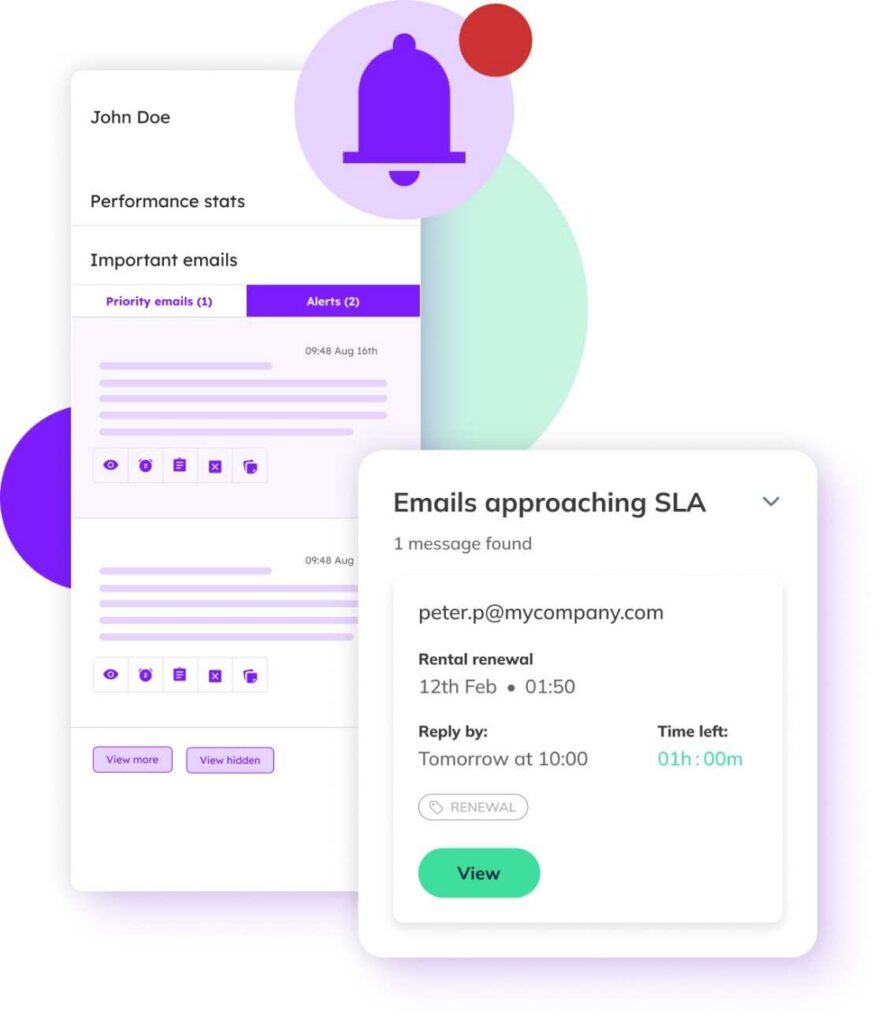
Image via timetoreply
These real-time alerts offer live tracking of your team’s email response time. This kind of alert system prevents emails from being lost or forgotten.
You cannot expect complete visibility over every inbox in your organization. Many excellent email management software solutions can help you do this efficiently.
Email management software, whether a free or paid tool, helps you and your team organize your email inboxes. With email management, you can stay on top of incoming messages from your team, customers, and other stakeholders. Email management software adds a layer of functionality not readily available in your primary inbox.
Depending on the software you choose, whether software solutions with cloud-based email management benefits or downloadable software, you’ll find features that help with different areas.
Here are some benefits of email management tools.
Read more about the best email management software solutions.
Canned responses for common questions can save your team time. They also ensure your communication stays consistent and professional. Here’s how to make them work for your business.
Use our ready-to-use customer service email response templates to get started.
Shared inboxes are generally those accessible to a specific team within a company.
For example, all emails received by sales@company.com can be accessed by all sales team members in the company.
Shared inboxes let several team members work on the same email account. Colleagues can assign, comment on, and track emails. It prevents duplicate responses, reduces response times, and ensures collaboration.
Follow these best practices for shared mailbox management to get the best results.
Check out timetoreply’s shared mailboxes feature.
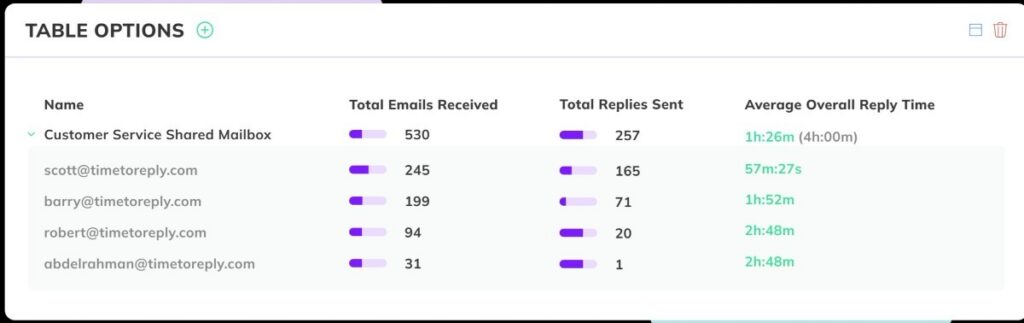
Image via timetoreply
One of the most important email management best practices is to regularly review and clean your email inboxes. This helps reduce clutter.
Here are some best practices:
Effective email management requires clear rules, tracking, and tools. This helps reduce inbox overload and improve response speed.
Also Read:
Timetoreply is a reliable solution for email management. Here are some of its features.
If you can measure each email’s response time, you can optimize it profitably!
You can integrate timetoreply with Gmail or Outlook to track the response time of each incoming email. Then, determine periods between email exchanges and reduce the time gap. You can share peer-to-peer feedback with your team based on these insights to help them improve their response times.
With timetoreply, there are features for group or shared inbox monitoring and reporting, as well as for individual team members. This feature lets you track reply time, email volume, closed queries, and average time to close a query.
You can also see how each of these agents performs in a group mailbox. This lets you know who’s doing the lion’s share of the work, allowing you to distribute work smartly.
Accessing the data you need to make effective changes can be challenging, especially when you need quick daily insights. However, using timetoreply with email clients like Outlook gives you rapid access to detailed email performance reports.
The best part is that you can customize how frequently you want to receive these reports. You can choose between receiving detailed analytics daily, weekly, or monthly. With this data, managers can better support their team members.
Easy access to performance reports helps identify which emails need priority.
In addition to its email analytics software for teams, timetoreply includes a real-time alert system that informs teams and individuals about emails requiring attention. These alerts allow the live tracking of email responsiveness and team communication.
Once you’ve set a time-to-reply benchmark, you can help members reach these targets by enabling this feature. This way, employees are empowered to meet the set time-to-reply target. This ensures that no email is accidentally lost or left to flounder in a busy inbox.
With timetoreply’s reports, you analyze and share comparative leadership reports with your teams. These reports pinpoint top-performing members. You can reward those who consistently meet email management goals.
By monitoring email performance metrics with the timetoreply extension, members are encouraged to rise to the challenge. This helps promote a culture of effective communication.
Here’s a peek at the performance stats it provides.
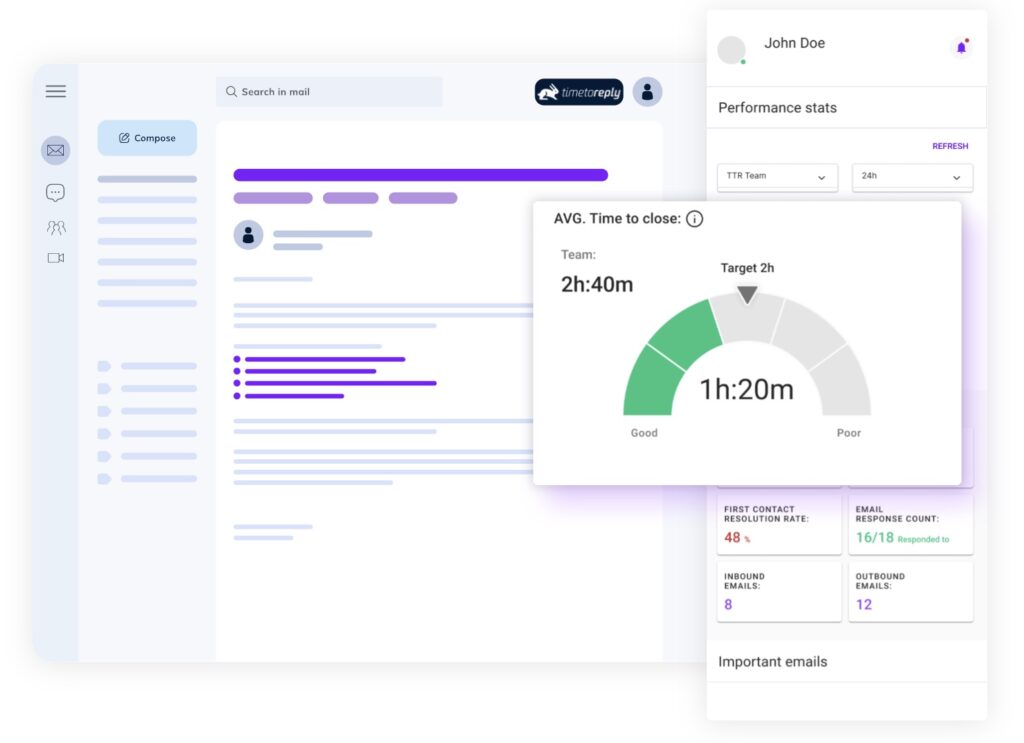
Image via timetoreply
Also Read:
Businesses can manage emails more efficiently by using simple systems that improve organization. Some tips include:
1. What is email management?
Email management is the process of organizing, prioritizing, and handling emails to improve productivity and communication. It involves using tools and techniques to filter, sort, and respond to emails effectively.
2. Why is email management important for businesses?
Proper email management supports better communication and internal coordination for businesses. It helps you prioritize important messages.
For teams, organized email systems help in collaboration, project tracking, and record-keeping. Moreover, businesses can reduce the risk of security breaches by managing sensitive personal email information efficiently.
3. What are some email management best practices?
Some best practices you can follow include:
4. What are some tools for email management?
Various tools can aid in email management, including:
5. How do I reduce the number of emails I receive?
Here are some strategies that you can use to reduce email overload and maintain an organized inbox:
6. How often should I organize or clean my inbox?
Clean your inbox regularly, ideally every day or at least once a week. Daily cleanups help you manage new emails. Also, weekly reviews help you sort, archive, or delete older messages. This routine would prevent emails from piling up.
7. What features should I look for in an email management tool?
A good email management tool should help you stay organized and save time. Look for features like email filters, automation, shared inboxes, and templates. Spam protection and software integration tools can also improve communication and team productivity.
8. What challenges do businesses face in managing emails?
Email management can be difficult for businesses when communication is unstructured. Some of the most common challenges are:
Also Read:
Effective email management is the cornerstone of any successful business. As remote and hybrid work environments grow more popular, digital communication is more critical than ever.
Email management improves efficiency by streamlining communication and ensuring accountability across teams.
Every business needs effective communication systems to support its operations and functionality. If your business handles large volumes of emails from customers and sales leads, develop structured systems. This includes email prioritization rules, shared inboxes, and clear response workflows.
Also, consider implementing the most advanced and versatile email management software. An email management tool like timetoreply helps teams handle email more efficiently and improve productivity. This, in turn, boosts profits.
With timetoreply, you can enjoy features that:
Timetoreply is trusted by high-performing inbound sales teams and customer-facing teams globally.
Book a demo to get started with timetoreply.
Get live inbox alerts and reply quickly to customer emails with timetoreply

Head of Customer Success @ timetoreply
Barry Blassoples is the Head of Customer Success at timetoreply, where he helps customer-facing teams boost revenue and protect brand reputation by providing actionable insights to improve their business email response times. He has over 15 years of leadership experience across customer success, sales, and marketing roles in high-growth tech companies.



Trusted by high-performing inbound sales teams and customer-facing teams globally.
Close more deals and delight more customers with the faster, smarter, deeper email analytics and performance optimization software that works straight from your team’s inbox.