
Most customer success teams have three or four plays written down. A mature function ends up running five to nine. Very few can tell you what results they produced last quarter.
That gap is where this guide starts. You’ll get the nine fields a customer success playbook needs, the plays worth building first, and a full worked example.
This guide also looks at the response time each play needs. Responsiveness matters because 86% of consumers say it shapes what they buy. Zendesk’s CX Trends 2026 research reports this.
Every play in this guide is built on the spec below.
Method: In August 2026, we read twelve ranking and near-ranking guides for this term in US Google. We set aside a Reddit thread, a handbook link index, a 650-word resource page and two pages that returned 403. Where this article says competitors leave something out, that read is what it’s based on.
See how timetoreply helps customer-facing teams track and manage response performance.
A customer success playbook is a documented, repeatable workflow. It runs when a defined event happens in the customer lifecycle.
Each play has four core parts. It has a trigger event, a named owner, a set of steps, and clear completion criteria.
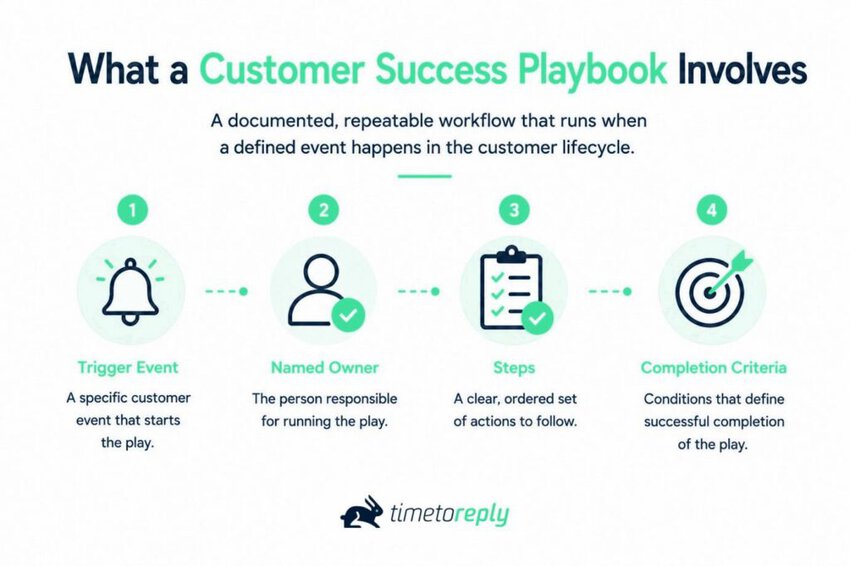
When you document the full workflow, these four parts expand into nine fields. The ninth field helps the team keep the play active and up to date.
The words play and playbook get used interchangeably online, which causes confusion. A play is one workflow for one moment. A playbook is the collection your team maintains. You’ll run five to nine plays, and only ever one playbook.
Most customer success software stores each play as a separate workflow. Your team, however, usually treats the playbook as one system. This difference can make version control harder to manage.
Consistency is getting harder to hold. Forrester’s 2025 Global Customer Experience Index found 21% of brands saw CX scores decline that year. Only 6% reported an improvement. A repeatable workflow gives teams a clear way to handle the same customer situation each time.
One playbook can contain many plays. A plan covers the broader customer engagement strategy.
A customer success plan is account-specific and agreed with the customer. A customer success playbook is internal and repeats across every account that meets the same conditions. One is a commitment to a named buyer; the other is a process your team reuses at scale.
The two documents aren’t the same. A plan names outcomes for one account, with dates the customer has seen.
A playbook never leaves your team. It’s the machinery that delivers many plans at once. Getting the split right points your customer service metrics at the right area.
A customer success playbook contains repeatable workflows for common customer events. Each play has a trigger, owner, steps, and clear outcomes. A playbook supports many accounts, while a customer success plan focuses on one account.
Also Read:
Nine fields. Name, trigger, owner. Then the two parts that most specs skip — which channel each step runs on, and the response time it commits to. Then steps, completion, exit, and a version line. Miss one and the play stops being executable.
Across the guides reviewed, the two fields missing almost everywhere are the delivery channel and the response-time target.
The customer success playbook template below is illustrative. Fill it with your own values.
[Template 1] The customer success playbook template: Nine fields
| # | Field | What it means | Example value |
| 1 | Play name | What your team calls it in conversation | At-risk account play |
| 2 | Trigger | The measurable condition that fires it | Weekly active users down 40% over 30 days |
| 3 | Owner | One named role, plus a backup | Named CSM, backup CS lead |
| 4 | Delivery channel | Which channel each step runs on, and from which mailbox | Email from the shared CS mailbox, then a call |
| 5 | Response-time SLA | First-response target and update cadence, on a stated clock | Reply within 4 business hours, update every 48 |
| 6 | Steps | The sequence, with timing | Five steps across 10 business days |
| 7 | Completion criteria | What “done” means, measurably | Usage recovered, or a documented reason it didn’t |
| 8 | Exit and escalation path | What happens when it finishes without resolving | Escalate to the CS lead, open a save case |
| 9 | Owner of record, version, last reviewed | Who maintains it and when it was last checked | CS Ops, v2.1, reviewed this quarter |
The delivery channel and response time need specific details for customer experience optimization. Each action should state where it happens and when the team must complete it.
Response time also needs a clear target. HubSpot’s 2025 State of Customer Service research found 67% of consumers expect ticket resolution within three hours.
Gorgias reported a 6.3-hour median first response across 14 industries in March 2026. Its data also showed a 5.5x gap between the fastest and slowest response times.

Image via Gorgias
Your numbers will differ from these benchmarks. That is why a generic customer success playbook template may not fit your team.
Set response targets based on your customers, team capacity, and support volume. SLA monitoring then shows whether your team meets those targets.
Nine fields covering the name, trigger, owner, channel, response time, steps, completion, exit path, and version details. Delivery channels and response targets make each play clear and measurable.
Also Read:
Every team should start with three core plays for onboarding, at-risk accounts, and renewals. As the team grows, a customer success playbook can add quarterly business reviews, escalations, expansion, adoption, advocacy, and offboarding.
These plays cover different stages of the customer lifecycle. Each one responds to a specific event and has its own owner, timing, and success measure.
[Template 2] Customer success playbooks by trigger, owner and KPI
| Play | What fires it | Who owns it | Cadence | Primary KPI | Build priority |
| Onboarding | Contract signed | CSM | Once per account | Time to first value | 1 |
| At-risk | Usage or engagement drop | CSM, CS lead backup | Event-driven | Recovered accounts | 2 |
| Renewal | 90 days to contract end | CSM or renewals | Once per term | Gross retention | 3 |
| Quarterly business review | Calendar quarter | C-SM | Quarterly | Stakeholder coverage | 4 |
| Escalation | Severity 1 issue or exec complaint | CS lead | Event-driven | Time to resolution | 5 |
| Expansion | Usage above plan, new team onboarded | CSM with AM | Event-driven | Expansion revenue | 6 |
| Adoption | Feature launch, low feature use | CSM or digital CS | Campaign-based | Feature adoption | 7 |
| Advocacy | High health score, strong survey score | Customer marketing | Event-driven | References secured | 8 |
| Offboarding | Cancellation received | CSM | Event-driven | Win-back rate | 9 |
The first three should come before the rest. They cover the customer moments that affect retention and growth most.
The remaining plays can follow once those core workflows run well. The plays you skip are where revenue leakage starts. Your customer success playbook should reflect your team size, customer base, and main retention risks.
A small team can manage the first three plays with simple one-page documents. Run them manually before adding more customer success tools or automation.
As the team grows, coverage can become harder to manage. Gainsight’s Customer Success Index 2025 puts the North American median at 15 enterprise accounts per CSM.
At enterprise scale, CS Operations can manage the playbook while CSMs handle each execution.
Response targets also need a place in these workflows. Customer service SLAs give teams a standard for how fast they should respond to customer issues.
Email response time tracking can show whether teams meet those targets. It can also reveal delays within specific plays or customer segments.
Churn risk should also guide your priorities. ChurnZero and 6sense’s 2025 Customer Revenue Leadership Study surveyed 793 leaders. It found that 62% ranked early risk detection among their top two priorities.
Customer churn analysis can show which core play needs more attention. Use those findings to decide which workflow your team should build or improve next.
Start with onboarding, at-risk, and renewal plays before you add more workflows. Your team size, response targets, and churn risks should guide which plays you build next.
Also Read:
A customer success playbook is triggered when account activity or communication changes enough to require action.
A trigger is a signal from a known system that crosses a set threshold. The system checks that signal at a defined frequency and alerts the right person.
If two team members can read the same signal differently, the play may not run when needed.
A customer success playbook needs more than a trigger name. You need to know where the signal comes from, how often it updates, and who receives the alert.
[Template 3] Trigger plumbing for customer success plays
| Signal | Source system | Refresh latency | Example threshold | Who gets the alert | False-positive risk |
| Weekly active users | Product analytics | Daily | Down 40% over 30 days | Named CSM | Medium: seasonality, holidays |
| Feature adoption | Product analytics | Daily | Core feature unused for 21 days | Named CSM | Medium: role changes |
| Seat utilization | Billing or admin console | Weekly | Below 60% of licensed seats | CSM and AM | Low |
| Renewal date | CRM | Real time | 90 days out | CSM and renewals | Very low |
| Support ticket severity | Helpdesk | Real time | Any severity 1 | CS lead | Low |
| Ticket volume | Helpdesk | Daily | Triple the account’s 30-day mean | CS lead | Medium: one bad week |
| Thread volume | Email analytics | Daily | Down 50% month over month | Named CSM | Medium: vacation periods |
| Champion reply latency | Email analytics | Daily | Stretches past five business days | Named CSM | Medium: travel, parental leave |
| Unanswered threads | Shared mailbox reporting | Real time | Any customer thread open past SLA | CS lead | Low |
| Our first-response time | Email analytics | Daily | Account average above target | CSM and CS lead | Low |
The final four rows rely on customer communication data rather than product activity. Many teams already have this customer success analytics data within their existing systems. A customer success playbook can use these signals even when product data is limited.
Communication data can add useful context to customer health scores. Customer service emails contain both operational and relationship signals.
Operational signals include reply times, SLAs, and workload. Relationship signals include sentiment, intent, and urgency. The second layer is what AI customer insights surface.
These signals can reveal changes before a customer reports a problem. A customer success playbook can use these changes as early warning signals.
Here’s a practical case for adding communication data to your trigger layer. A champion who replied in four hours and now takes four days has told you something you don’t need an SLA reporting dashboard to know.
Ontellus, a record retrieval and claims firm, reported improved response performance after tracking email responsiveness. Its VP of Customer Management reported a rise from 62% to 86%.
The measure covered emails answered within an eight-hour business day. Ontellus also reported about a 20% reduction in transactional email volume.
Lead Forensics reported a similar change after setting a two-hour acknowledgment target. Its UK Head of Customer Success said average reply time fell from four hours to under two hours.
These results come from specific companies and do not guarantee the same outcome for other teams. The key point is simple. A signal can change once a team starts tracking it.
Zendesk’s CX Trends 2026 research found that 85% of CX leaders say one unresolved issue can lose customers. Response time can therefore become a useful trigger for customer success teams.
At the account level, three communication signals provide a strong starting point. Watch response delays, unanswered threads, and sudden changes in customer reply patterns.
Product activity, support issues, renewal dates, and communication patterns can all provide useful triggers.
Also Read:
Building a customer success playbook involves six steps. Choose the lifecycle moment, define the trigger, assign an owner, sequence the steps, set completion criteria, and pilot the play.
Build one play at a time and focus on a customer moment that affects revenue. Choose a point in the customer lifecycle where delays, churn, or missed revenue create a real cost.
Six of the six guides we read open by telling you to map the customer journey. We’d skip it. Journey mapping can help teams understand the wider customer experience. It should not come before choosing the specific problem the play needs to solve.
Here is a breakdown of the six steps.
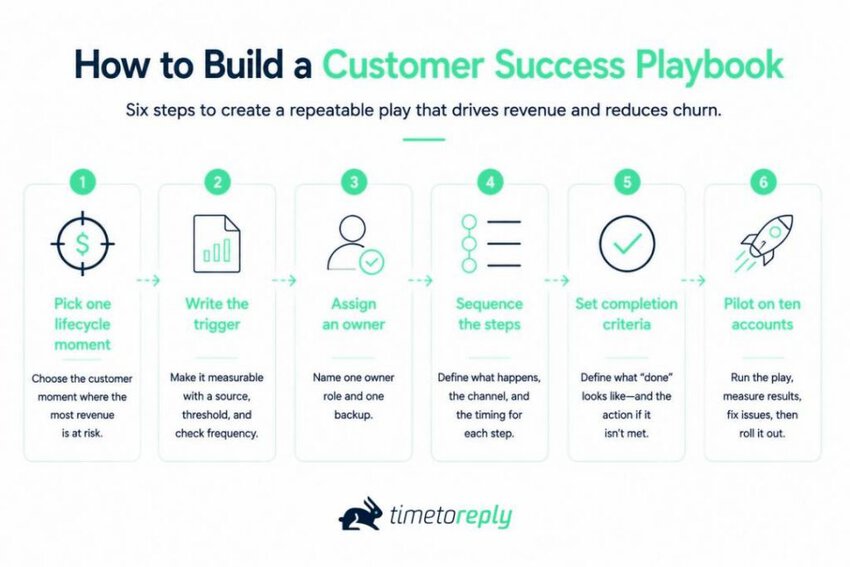
Choose the customer moment where the most revenue is at risk. Do not choose the moment that is easiest to document. Identify the accounts affected and the ARR linked to that stage. If you cannot do this, you may need to choose a different problem.
For most teams, that’s onboarding. The ChurnZero and 6sense study found 60% of leaders rank accelerating onboarding time to value as their top priority. Only 29% prioritize the sales-to-CS handoff, which is exactly where most onboarding plays break.
Make the customer event a measurable condition. Give it a source system, threshold, and refresh interval.
For example, replace “the account seems disengaged” with “weekly active users are down 40% over 30 days.” The data comes from product analytics and gets checked daily.
The trigger should be specific enough that two team members reach the same conclusion. Use the trigger table above to check each required detail.
Assign one person to own the play and another person as backup. Use specific roles rather than naming an entire team.
With shared ownership, delays occur when each person assumes someone else will act. Name a backup to keep the play moving during absences. Add both roles to the customer success playbook.
Write each step with three things attached — what happens, which channel it runs on, and when. For example, write “Day 1, email from the shared CS mailbox, reply within four business hours.” Most teams skip this, but it turns a document into something a CSM can execute alone.
Channel choice also affects the cost and effort of each action. An in-app message and a personal email from a CSM are different customer motions. If a step needs a human reply, it needs a mailbox and a target. That’s what shared mailbox best practices solve.
Write the result that marks the end of the play. Also state what the team should do if that result doesn’t happen. For example, “usage returns to baseline” can define completion. “Usage remains below baseline after 10 business days” can trigger escalation.
Without a clear next step, an at-risk account may receive one follow-up and then receive no further action.
Run the play with ten accounts before you use it across your whole customer base. Track each action from the first trigger to the final result.
With a small test, you can reveal unclear triggers, missing contact details, or steps that are hard to complete. Fix these issues before you publish the play for wider use.
Track the pilot the way you’ll track the live play. Trigger fired, first action sent, outcome, elapsed hours.
Use data to improve email response times, not impressions. If you can’t measure it across ten accounts, you won’t across two hundred.
Choose the right lifecycle moment, define the trigger, assign ownership, map the steps, set completion criteria, and run a pilot. Test the play with a small group before rolling it out to the full team.
Also Read:
The templates below show how to turn common customer events into clear, repeatable plays. The account details, thresholds, and mailbox names are examples, not data from a specific customer.
The at-risk account play starts when customer usage drops and needs a clear response from the team. It sets an owner, response target, action steps, and escalation path.
[Template 4] The at-risk account play, filled in
| Field | Value |
| Play name | At-risk account play, mid-market tier |
| Trigger | Weekly active users down 40% or more over a rolling 30 days, from product analytics, checked daily |
| Owner | Named CSM. Backup: CS lead. Escalation: VP Customer Success |
| Delivery channel | Steps 1 and 3 by email from the shared CS mailbox. Step 2 by call. Step 4 by email from the CSM, copying the champion. Step 5 by email plus a calendar invite |
| Response-time SLA | First reply within 4 business hours of any customer response. Status update to the account every 48 hours until the play closes |
| Steps | Day 1: email the champion, name the change, ask one question. Day 2: call if no reply. Day 4: send a short usage summary and one recommendation. Day 7: loop in the economic buyer if usage is still flat. Day 10: close or escalate |
| Completion criteria | Weekly active users back within 15% of the 90-day baseline, or a documented reason they won’t be |
| Exit and escalation path | If day 10 arrives without recovery, escalate to the CS lead and open a save case with the renewal date attached |
| Owner of record, version, last reviewed | CS Ops, v2.1, reviewed at the start of this quarter |
Why four business hours instead of one? Response targets vary across teams, so use your own first contact resolution data to set the target.
Satguru uses a 30-minute target for 60% of emails, while Lead Forensics reports a two-hour acknowledgment standard. These are company-specific targets, not universal benchmarks.
The onboarding play starts after a customer signs and ends when they reach their first value milestone. It sets the early actions that shape the customer relationship.
[Template 5] Onboarding Play, Filled In
| Field | Value |
| Play name | New customer onboarding play |
| Trigger | Closed-won status recorded in the CRM |
| Owner | Named CSM. Backup: CS lead. AE joins the kickoff |
| Delivery channel | Email from the CSM and one scheduled kickoff call |
| Response-time SLA | CSM sends the kickoff invite within one business day. Customer questions receive a reply within one business day |
| Steps | Day 1: Send the welcome email and kickoff invite. Day 3: Confirm technical setup. Day 14: Check the first value milestone. Day 30: Review progress |
| Completion criteria | Customer completes the agreed action that defines first value |
| Exit and escalation path | If the customer misses the value milestone, review the blocker with the CSM and escalate when needed |
| Owner of record, version, last reviewed | CS Ops, v1.0, reviewed this quarter |
Set the first value milestone using your own product data and customer behavior. Pendo’s 2026 product benchmarks put it at 0.2 days from first login to first key action.
The renewal play starts 90 days before the contract ends and moves the account toward a clear renewal decision. It gives the team set points for health checks, value reviews, commercial talks, and paperwork.
[Template 6] Renewal Play, Filled In
| Field | Value |
| Play name | 90-day renewal play |
| Trigger | 90 days before contract end, based on the CRM renewal date |
| Owner | Named CSM or renewals manager. Backup: CS lead |
| Delivery channel | Email from the CSM, followed by a review call |
| Response-time SLA | Reply to customer questions within one business day. Follow up on unanswered renewal messages within five business days |
| Steps | Day 90: Review account health and renewal risks. Day 75: Send a value recap to the buyer. Day 60: Hold the commercial review. Day 30: Complete renewal paperwork |
| Completion criteria | Contract signed, or the team records a clear reason for non-renewal |
| Exit and escalation path | No buyer response by day 45 triggers escalation to the CS lead |
| Owner of record, version, last reviewed | CS Ops, v1.0, reviewed this quarter |
These three templates cover different points in the customer lifecycle. Start with the plays that address your biggest customer retention or revenue risks.
Customer success playbook templates are a good starting point, but your own data should shape the final rules. Track each play with your customer experience analytics and adjust the steps when results show a problem.
Also Read:
Seven metrics show whether a customer success playbook reaches the right accounts, runs on time, and produces results. Track coverage, completion rate, time to first action, first-response rate, customer replies, outcomes, and execution cost.
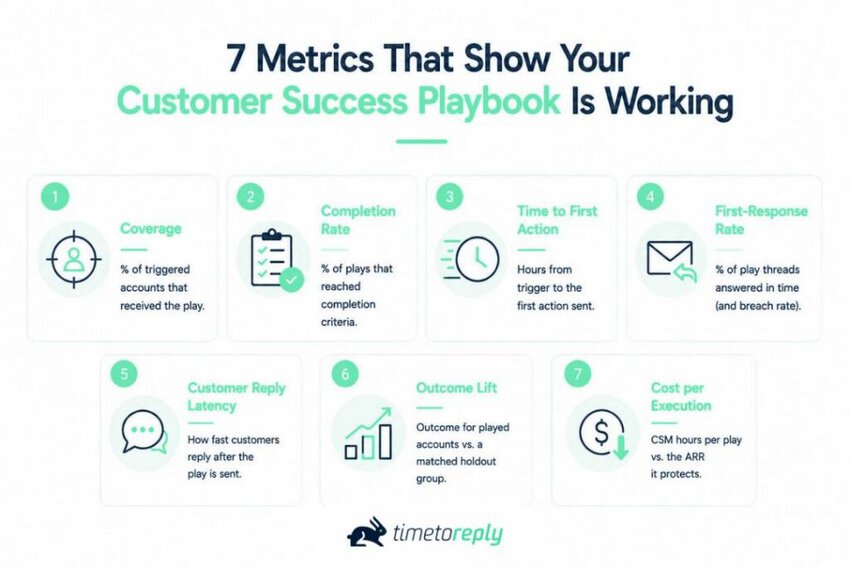
Four metrics carry most of the weight — coverage, completion rate, time to first action, and outcome lift. Three more show how the play is running and what it costs — customer replies, outcomes, and execution cost.
| Metric | How to calculate it | Starting target | Data source |
| Coverage | Accounts that got the play, divided by accounts that triggered it | Above 90% | CS platform or CRM task log |
| Completion rate | Plays reaching completion criteria, divided by plays started | Above 70% | CS platform |
| Time to first action | Hours from trigger firing to the first step being sent | Inside one business day | CS platform plus email analytics |
| First-response rate on play threads | Share of threads the play opened that were answered inside your target, plus the breach rate | At or above the percentage you committed to | Email analytics |
| Customer reply latency | How fast the account replies after the play fires | Stable or improving | Email analytics |
| Outcome lift | Outcome for played accounts, minus a matched holdout group (matched on ARR band, tenure and segment) | Positive and repeatable | CS platform plus BI |
| Cost per execution | CSM hours per play, against the ARR it protects | Falling as the play matures | Time tracking plus CRM |
No standard benchmark exists for play-level performance. Set your targets from your first quarter of data and adjust them over time.
Start with coverage. If a play reaches only 40% of eligible accounts, the issue is execution rather than performance.
Also Read:
1. What are playbooks in customer success?
A play is a workflow a team uses when a specific customer event occurs. A customer success playbook is the collection of plays teams manage. Every play has a trigger, owner, steps, and completion criteria.
2. What is the difference between a customer success playbook and a customer success plan?
A customer success plan covers one account and lists its goals, actions, owners, and dates. A playbook contains repeatable workflows that your team can use across many accounts.
3. What are the 5 pillars of customer success?
There’s no canonical, primary-sourced list of five pillars, despite how often the phrase appears. It’s industry shorthand, not a standard. The common areas include onboarding, adoption, customer health, retention, and expansion.
4. What are the 7 principles of customer success?
There is no official seven-principle framework for customer success. The principles that are commonly used are proactive support, customer-defined value, and useful segmentation. Also, clear metrics, outcome ownership, early escalation, and regular reviews.
5. Can you provide an example of a customer success playbook?
Yes. The at-risk account play in this guide is written out end to end, with all nine fields populated. It fires on a 40% usage drop over 30 days. It runs five steps across ten business days, then closes on recovery or escalates. Copy the table and change the values.
6. What is a CSM playbook?
A CSM playbook contains the workflows a customer success manager uses with accounts. It includes triggers, actions, owners, and response times for each play.
7. How many customer success playbooks should a team start with?
For a small team, you can start with three plays for onboarding, at-risk accounts, and renewals. Then, you add plays for QBRs, escalations, expansion, adoption, advocacy, and offboarding when the three run well.
8. How do you know if a customer success playbook is working?
Track coverage, completion rate, time to first action, and outcome lift. Low coverage shows that the team is not using the play as planned. Anything that’s below 40% coverage means the play is barely running.
9. Who owns a customer success playbook, and who maintains it?
A named CSM or customer success role should own each play, with a backup assigned. Customer Success Operations can maintain the playbook, manage updates, as well as control versions. The play owner runs the workflow but the playbook owner keeps it current.
10. What response time should an escalation or churn-risk play commit to?
Set the target from your current response data and customer needs. State whether the target uses business hours or calendar hours. A common starting point to use is one hour for severe escalations and four business hours for churn risks. These are team targets, not fixed industry standards.
11. Will CSMs be replaced by AI?
No current evidence shows that AI will replace CSMs. AI can handle tasks such as call summaries, account research, and message drafts. CSMs, on the other hand, can handle judgment and customer relationships.
Also Read:
A customer success playbook works when each action, owner, trigger, and response time is clear. Strong plays follow specific rules, not long documents that sit unused.
You can start with three plays for onboarding, at-risk accounts, and renewals. Test each one with ten accounts, then, track coverage and time to first action from day one.
Review your results each quarter and update the plays based on what the data shows. Customer conversations can also reveal response delays, missed signals, and risks that other customer success metrics may miss.
Build each play, run it with real accounts, and measure the results. The data will show which parts work and where the team needs to improve.
If you want to see where response times are slipping across your customer-facing teams, book a demo with timetoreply and see how it tracks reply performance.
Get live inbox alerts and reply quickly to customer emails with timetoreply

CEO @ timetoreply
Howard Moodycliffe is CEO of timetoreply, an email analytics & relationship intelligence platform for B2B customer-facing teams. He writes about email performance, SLA management, and how organisations can use communication data to protect customer relationships and revenue.


Trusted by high-performing inbound sales teams and customer-facing teams globally.
Close more deals and delight more customers with the faster, smarter, deeper email analytics and performance optimization software that works straight from your team’s inbox.