
Hiver suits Gmail or Outlook teams that want a simple help desk inside the inbox they already use. Front suits teams that need one hub for many channels, like email, chat, social, and SMS. Both are capable shared inboxes. Neither was built to measure and improve reply times. Want faster, more consistent replies? timetoreply adds reply-time and SLA analytics across Outlook, Microsoft 365, and Gmail. There’s no change to workflow.
Choosing between Hiver vs Front comes down to one question. How does your team actually work day to day?
Hiver turns your Gmail or Outlook inbox into a shared help desk. Front gives you a standalone hub for email, chat, social, and SMS. Both are strong shared inbox tools, picked by thousands of support teams.
Neither, though, was built to measure and improve your email response times. That gap is where timetoreply fits, and we’ll come back to it.
First, here’s an honest Hiver vs Front comparison. It covers platform, features, analytics, pricing, and the trade-offs that decide the call.
According to timetoreply’s own data, 88% of customers expect a reply within one hour. Another 86% expect their issue to be resolved on the first reply. Satisfaction can also drop up to 15% with each extra exchange.
So, the best tool is the one that helps your team hit those bars.
Short on time? Here’s a quick verdict before we get into the details.
The table below sums up the Hiver vs Front comparison. We’ve added timetoreply as the analytics alternative. Tool names link to their full sections, and pricing is live as of September 2026.
| Criterion | Hiver | Front | timetoreply |
| Best for | A help desk inside Gmail or Outlook | One hub for many channels | Measuring and improving reply times |
| Platform | Gmail + Outlook/M365 (Gmail-native roots) | Gmail + Outlook/M365 (standalone app) | Outlook, M365 + Gmail (works in your inbox) |
| Architecture | Inside your inbox (plus a standalone “Omni” option) | Standalone multichannel app | Analytics layer, not a shared inbox |
| Channels | Email, chat, WhatsApp, voice (add-on) | Email, chat, SMS, social, WhatsApp (omnichannel on Pro+) | Email analytics across your inboxes |
| Free plan / trial | Free plan + 7-day trial | 14-day trial, no free plan | Free trial; 15-mailbox minimum |
| Starting price | $35/user/month (Growth) | $35/seat/month (Starter, single channel) | $44mailbox/month (Optimize) |
| Top tier | $95/user/month (Elite) | $105/seat/month (Enterprise) | $95/mailbox/month, billed annually (Enterprise) |
| AI | Bundled from the Growth plan | Paid add-ons ($20 Copilot, $20 Smart QA, $10 Smart CSAT) | AI-assisted insights (qualitative) |
| Analytics & reporting | Pre-built (Growth); advanced + CSAT (Pro+) | Basic (Starter); advanced (Pro); custom (Enterprise) | Reply-time + SLA analytics on every plan |
| SLA tracking | Pro plan and above ($65) | Professional and above ($85) | Core feature, all plans, across Outlook + Gmail |
| Setup / learning curve | Low (works in your inbox) | Moderate (new platform) | Low (no change to workflow) |
| G2 / Capterra rating | 4.6 / 4.7 | 4.7 / 4.5 | 4.2 / 4.5 |
Our Hiver vs Front review is based on primary sources, not guesswork. To put it together, we reviewed each vendor’s pricing and feature pages in September 2026 and verified ratings on G2 and Capterra. We also went through both tools’ help documentation and user reviews.
We scored both tools on what buyers ask about: platform fit, channels, collaboration, automation and AI, analytics and SLAs, pricing, and support. We clearly note when features require higher tiers.
One disclosure, in the spirit of trust. Since timetoreply is an email analytics software tool, we have a stake in the analytics question. We’ve kept the Hiver vs Front comparison even-handed, and we flag where our own tool fits.
Want the wider market view first? Our roundup of the best email analytics platforms is a good place to start.
Both tools help teams manage shared mailboxes like support@ or billing@. They take a different path to get there. Knowing the difference between Hiver vs Front starts with how each is built.
Hiver is a shared inbox and help desk that works inside Gmail and Outlook. It helps your team manage queries, assign owners, and track email status without leaving the inbox. The tool’s learning curve is low as its interface is the email client people already know.
Hiver now offers two products. “Hiver for Gmail” is the classic in-inbox experience. “Hiver Omni” is a standalone workspace that adds chat, Slack, and voice in one place. Both target customer service, IT, finance, and HR teams.
Our guide to shared mailbox best practices pairs well with either setup.
Front is a standalone customer communication platform with a shared inbox at its core. It pulls email, chat, SMS, social, and WhatsApp into one workspace. Teams log into Front rather than their email clients.
Its design suits high-volume, multichannel support. Front connects to Gmail and Outlook via secure sync, then layers on collaboration, routing, and analytics. A knowledge base, customer portal, and large app library are also available.
The trade-off is a sharper learning curve for teams used to plain email management in their inboxes.
Also Read:
Architecture is the first real fork in the Hiver vs Front decision. It shapes adoption, training, and daily habits more than any single feature.
Hiver is native to your inbox. It runs inside Gmail and Outlook, so agents keep working where they already are.

Image via Hiver
Google’s own AI Overview describes Hiver as working “inside your existing Gmail or Outlook inbox.” For Gmail-first teams, this is the gentlest path to help desk features.
Hiver also offers the standalone Omni workspace. That gives teams a dedicated platform when they outgrow the in-inbox setup.
So Hiver can flex from a light Gmail layer to a fuller help desk over time. If you run on Microsoft, see our guide to tracking response time in Outlook.
Front takes the opposite approach. It’s a separate application that teams open like any other tool. That brings a cleaner multichannel view and strong performance for large teams. For a broader comparison, see our Front vs Zendesk vs Freshdesk guide.

Image via Front
There’s one platform nuance worth testing. Front connects to both Gmail and Outlook. However, advanced Front workflows (like merging, splitting, or moving threads) can break the two-way sync for Outlook users. Mixed Outlook and Front teams should trial their setup before committing.
Switching costs also belong here. Moving to either tool means exporting data, reconnecting mailboxes, and retraining staff. Our guide to adding a shared mailbox in Outlook helps with that setup. A move to Front is the bigger lift, since it is a new platform.
Both Hiver and Front cover the basics of shared inboxes well. The real gaps show up in channels, automation, and just how much AI you get for the price.
Hiver and Front both offer email assignment, internal notes, and collision alerts. Those alerts prevent two agents from replying to the same customer twice. Both also support shared drafts, tags, and saved views.
Front goes a little deeper on collaboration. It places internal discussions right next to customer threads, making complex handoffs easier. Hiver keeps collaboration simpler, with notes and assignments that most teams pick up fast.
Both also offer ticketing and a knowledge base, so customers can self-serve. For more, see our guide to customer service email management software.

Image via timetoreply
This is where Front pulls ahead. Front supports email, chat, SMS, social, and WhatsApp. True omnichannel arrives on the Professional plan and above. Its Starter plan is limited to a single channel type, which is a real constraint.
Hiver focuses on email, live chat, WhatsApp, and basic voice. Helpfully, Hiver includes WhatsApp on its plans at no extra charge. Front bills native WhatsApp at Meta’s rates, plus a 20% admin fee.
For Gmail-led teams, our guide to Gmail analytics is a useful companion.
Hiver and Front both lean on AI, but they approach pricing differently. With Hiver, AI Agents and AI Copilot are bundled into paid plans from Growth upward. This strategy keeps the setup simple and costs predictable.
Front offers AI Topics, Compose, and Summarize across tiers. It then charges for its strongest tools. Front Copilot and Smart QA cost $20 per seat each, while Smart CSAT costs $10 per seat. In fact, all AI tools, other than Autopilot, are included in Enterprise.
So the AI you want shapes the true price gap. Our roundup of customer support tools covers the wider field.
Also Read:
Here’s the part of the Hiver vs Front comparison that most reviews skip. It’s also the most important if reply speed matters to you.
Both tools can report on your inbox. Both also gate the useful reporting behind higher tiers. With Hiver, advanced analytics, CSAT, and SLA tracking begin on the Pro plan. That plan costs $65 per user per month.
Front follows the same pattern. Advanced analytics start on Professional, and custom reports are Enterprise-only. The SLA “time goals” report needs the Professional plan or above.
Front’s help center confirms this report sits on Professional or above. It also notes that the Starter plan has limited access to analytics. For Outlook teams, our email analytics guide provides a unified view.
So, how do Hiver vs Front fare when it comes to tracking response-time SLAs?
Both can track these SLAs, but only in their upper tiers. Neither reports reply times across Outlook and Gmail in one unified, per-rep view. This gap can quietly cost your team money. Our guide to SLA monitoring explains why that view matters.
The gap is telling. Google’s AI Overview for “Hiver vs Front” compares the two tools on only five things. Those are interface, channels, collaboration, AI, and pricing. It doesn’t include an analytics or reply-time category at all.

Image via Google
The market frames this as a shared inbox choice, not a measurement choice. That framing leaves value on the table. Reply speed is measurable money.
A 2026 Optifai Pipeline Study found the average B2B company took 47 hours to respond to a lead. Firms that replied within five minutes were 2.6 times more likely to close than those that waited more than 24 hours.
Our explainer on the impact of response time digs into the link with satisfaction. So, what does good reply-time reporting actually show?
It breaks first-response and resolution times down by person, team, customer, and account. It flags which mailboxes miss their targets and when, and compares internal and external replies. This helps you see real customer-facing speed.
Hiver and Front both report inside their own walls, and neither stitches Outlook and Gmail into one view. Our guide on using data to improve response times shows what to do with that view.
Sticker price is only half the Hiver vs Front pricing story. The other half is what you pay to unlock the features you actually need. All figures below are live as of June 2026.
| Tier | Hiver (per user/month) | Front (per seat/month) | timetoreply (per mailbox/month) |
| Free | $0, unlimited users | None (14-day trial) | None (free trial) |
| Entry | $35 (Growth) | $35 (Starter, single channel, up to 10 seats) | $29 (Essentials, billed annually) |
| Mid | $65 (Pro: SLAs, CSAT, advanced analytics) | $85 (Professional: omnichannel, advanced analytics) | $34 (Pro: full reports + CSM) |
| Top | $95 (Elite) | $105 (Enterprise: AI included, custom reports) | Premier (custom, 100+ mailboxes) |
| AI | Bundled into paid plans | Add-ons: Copilot $20, Smart QA $20, Smart CSAT $10 per seat | AI-assisted, included |
Two patterns stand out.
First, Hiver offers a free plan with AI bundled, so its entry cost is low. Front has no free plan, and it charges for its best AI tools as add-ons. Second, the headline prices hide real gaps. Front’s $35 Starter plan supports only one channel type and caps at 10 seats.
Our shared mailbox reporting software page shows what should be included in any reporting, at any price.
Here’s a simple total-cost example for a team of 10. Hiver Pro costs $65 per user, which is $650 a month, with SLAs and CSAT included.
Front Professional costs $85 per seat, which is $850 a month, before any AI. Add Copilot and Smart QA at $20 each. That adds $40 per seat, or $400 more a month, taking Front to $1,250. Meanwhile, timetoreply Pro, at its 15-mailbox minimum, costs about $510 a month and focuses on reply-time analytics.
Seat billing rules vary across platforms.
Hiver bills per user on flexible monthly or annual terms. Front bills per seat and offers monthly or annual pricing, with 24% savings for an annual commitment. Front also caps its Starter plan at 10 seats and Professional at 50. With timetoreply, billing is per mailbox, with a 15-mailbox minimum and a 30% annual discount.
In the end, the most cost-effective tool depends on your needs. If you care more about a low starting price and bundled AI, Hiver is the better choice. Front is more expensive but supports more communication channels. Be careful with old pricing online. For example, some articles still list Front at $19 per seat, but the current Starter plan is $35 per seat.
Also Read:
No tool wins every round. Here’s the honest balance sheet for each, drawn from their pricing pages and real user reviews.

Image via timetoreply
Pros. Hiver works inside Gmail and Outlook, so adoption is fast, and training is light. It offers a free plan and bundles AI into its paid tiers. It also includes WhatsApp at no charge. Since the interface mirrors the inbox your team already knows, setup is quick.
Cons. Reviewers note that Hiver’s reporting is fairly basic, with limited custom reports. Some report performance lag at higher volumes. For deeper email analytics, many teams add a dedicated layer. Key features like SLAs sit on the Pro tier and above, which raises the real cost.
Pros. Front offers strong multichannel breadth, a polished interface, and deep collaboration. It has a large integration library and a capable AI suite. For high-volume, multichannel teams, it scales well.
Cons. Front is expensive, with its best AI features and custom reporting paywalled behind higher tiers. Reviewers give value-for-money its lowest marks. Mixed Outlook teams should also test sync behavior first.
If the real problem is slow or uneven replies, a shared inbox swap won’t fix it. Telecoms firm Telarus added timetoreply to its stack and saw response times drop from seven hours to two. That’s the kind of improvement reply-time analytics can deliver.
The timetoreply platform isn’t a shared inbox, and it doesn’t try to replace one. Instead, it provides a reply-time and SLA analytics layer for customer-facing teams. It works with Outlook, Microsoft 365, and Gmail. Better yet, it runs inside the inbox your team already uses. That means no workflow changes or lengthy onboarding.
The platform only reads email headers and metadata, never message content. It also meets major compliance standards, including SOC 2 Type II, ISO 27001, HIPAA, and GDPR.
In practice, timetoreply helps teams stay ahead of missed deadlines. Every email receives a countdown timer based on your SLA targets. Agents get inbox alerts when a response risks breaching an SLA. Managers can track live performance data from a single dashboard.
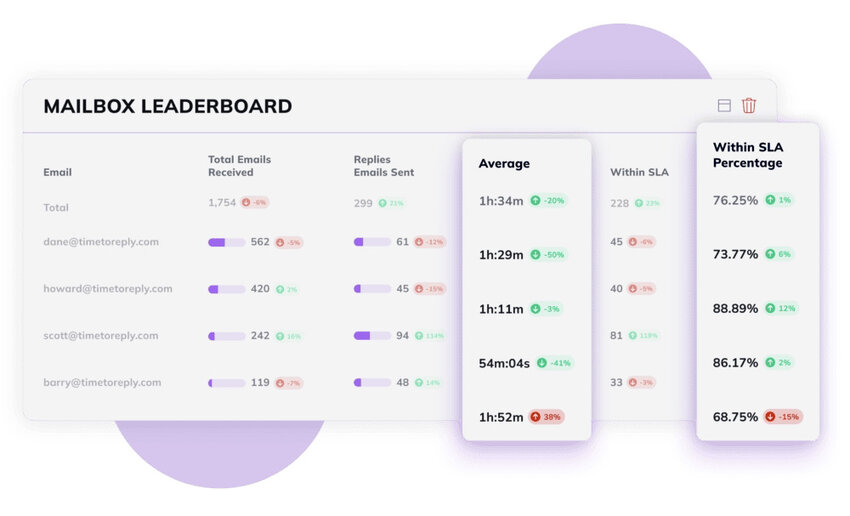
Image via timetoreply
Those insights can be filtered by agent, team, customer, or account. You can also set different SLA targets for VIP customers and standard requests. Our customer service analytics guide covers the metrics that matter most.
The timetoreply impact is visible across several industries:
These are the customer service metrics leaders want to improve.
The reviews echo the same theme. One G2 reviewer found that the average response time from one supplier was 45 minutes. Another supplier took more than six hours.
That kind of side-by-side visibility is hard to get from a shared inbox alone. It’s the difference between guessing at service levels and actually managing them. For industry benchmarks, see our guide to average email response times.
In terms of pricing, timetoreply’s Essentials plan starts at $29 per mailbox per month, billed annually, with a 15-mailbox minimum. The Pro plan costs $34 per mailbox and includes the full reporting suite.
So, if you need help desk features, keep Hiver or Front, then add timetoreply to measure what they can’t. You can also explore email response time tracking to learn more.
Also Read:
For most teams, the choice between Hiver vs Front comes down to channels, budget, and complexity. If your team runs on email, Hiver is the leaner, cheaper fit. If you’re managing chat, social, and SMS too, Front earns its higher price.
But neither tool tells you whether your team is actually replying fast enough. That’s where timetoreply fills the gap. Ask yourself these four questions to land on the right setup.

Image via timetoreply
1. What is the main difference between Hiver vs Front?
The main difference is that Hiver works inside your existing inbox, while Front provides a separate workspace.
Hiver operates within Gmail and Outlook, so teams never leave the email client they know. Front brings email, chat, social, and SMS into one platform. While Hiver suits teams that value inbox simplicity, Front suits those that need a dedicated multichannel hub.
2. Is Hiver or Front better for Gmail teams?
Hiver is usually the better choice for Gmail-first teams. It runs natively inside Gmail, which reduces training and adoption challenges. Front also connects to Gmail, but your team works from the Front app, not Gmail’s inbox.
If staying in Gmail matters, choose Hiver. If you want a separate multichannel workspace, Front is worth the switch.
3. Does Hiver work with Outlook?
Yes, Hiver works with Outlook and Microsoft 365. Although it started as a Gmail-native tool, it now supports Outlook through a dedicated shared-mailbox solution (the Hiver Omni workspace). If your team relies on Outlook, review the features included in your chosen plan before committing.
4. How much do Hiver and Front cost?
Hiver has a free plan, with paid plans at $35, $65, and $95 per user per month. Front has no free plan. Its plans are $35 for single-channel Starter, $85 for Professional, and $105 for Enterprise per seat per month. Front also charges for its best AI as add-ons, so compare the total cost, not just the entry price.
5. Do Hiver and Front include AI, or is it an add-on?
Hiver bundles AI, including AI Agents and Copilot, into its paid plans from Growth upward. Front includes lighter AI like Topics and Summarize across tiers, but charges for its strongest tools. Front Copilot and Smart QA cost $20 per seat each. Smart CSAT is $10 per seat, unless you are on the Enterprise plan.
6. Can Hiver and Front track response-time SLAs?
Both can, but only on higher tiers. Hiver’s SLA tracking starts on Pro, and Front’s SLA report needs Professional or above. Neither tool reports reply times across Outlook and Gmail in one unified, per-rep view. To support dedicated reply time and SLA analytics across both teams, teams often add a tool like timetoreply.
7. Which is better for multichannel support like chat, WhatsApp, and SMS?
Front is the stronger multichannel tool. It natively supports email, chat, SMS, social, and WhatsApp. The platform’s full omnichannel power is unleashed on the Professional plan and above. Hiver covers email, chat, WhatsApp, and basic voice, which is enough for many email-led teams. If social and SMS are central to your support, Front fits better.
8. Is there a free plan for Hiver or Front?
Hiver offers a free plan for unlimited users, with limited features and no advanced analytics. Front doesn’t offer a free plan. It gives a 14-day free trial of its Professional features, with no credit card required. If a permanent free tier matters to you, Hiver is the only option of the two.
9. How hard is it to switch between Hiver and Front?
Switching takes planning. It involves exporting data, reconnecting mailboxes, and retraining your team to work with a new interface.
Moving to Hiver is gentler, especially if you use Gmail, since it stays in your inbox. But a move to Front is a bigger change, since it’s a separate app. You also need to test sync and reporting on a small group before a full rollout.
10. Which is cheaper for a small team?
Hiver is cheaper for most small teams. It offers a free plan and an entry-level tier starting at $35 per user per month, including AI features.
Front’s Starter plan begins at $35 per user per month, supports only one channel type, and is limited to 10 seats. It also lacks a free plan. For budget-conscious teams, Hiver wins on cost.
11. What is a good alternative for measuring reply times?
The timetoreply platform is a strong option for measuring reply times and SLA performance. Unlike Hiver and Front, it’s not merely a shared inbox. Instead, it tracks response metrics across Outlook, Microsoft 365, and Gmail within your existing inboxes. Many teams use timetoreply alongside Hiver or Front to gain deeper visibility into response performance.
12. Do Hiver or Front report reply times across both Outlook and Gmail?
No, not through a single unified reporting layer. Each tool reports within its own environment, and advanced analytics sit behind higher tiers. If your team spans Outlook and Gmail, a dedicated analytics solution like timetoreply provides consistent reply-time and SLA reporting across both platforms.
The Hiver vs Front choice really comes down to how your team works. Pick Hiver to keep a simple help desk inside Gmail or Outlook. Or, go with Front when you need one workspace for many channels and have the budget for it.
Just remember what both tools leave on the table. Neither was built to measure and improve your reply times across every inbox. If that’s your real goal, timetoreply gives you the visibility to act on it. See it on your own data and book a demo with our team.
Get live inbox alerts and reply quickly to customer emails with timetoreply

Head of Customer Success @ timetoreply
Barry Blassoples is the Head of Customer Success at timetoreply, where he helps customer-facing teams boost revenue and protect brand reputation by providing actionable insights to improve their business email response times. He has over 15 years of leadership experience across customer success, sales, and marketing roles in high-growth tech companies.



Trusted by high-performing inbound sales teams and customer-facing teams globally.
Close more deals and delight more customers with the faster, smarter, deeper email analytics and performance optimization software that works straight from your team’s inbox.