Email etiquette tips are simple rules for writing clear, polite, and effective emails in a professional setting. They help you communicate your message in a way that’s easy to understand and respond to.
Email plays a significant role in the success of any business. And that’s because it is often used to engage with and build positive relationships with customers, prospects, and stakeholders. Professionals rely on email because it’s a reliable way to share information and coordinate work across teams and locations.
But here’s the thing: If you regularly communicate via email, then you need to make sure you’re creating an excellent experience for everyone.
In this article, we’ll explain what email etiquette is and why it matters in professional communication. We’ll also share practical email etiquette tips to help you write better messages and get responses.
Email etiquette refers to guidelines and practices for composing, sending, and responding to emails professionally. How you conduct yourself over email significantly impacts how others perceive you and your business.
When customers perceive you as a professional, they are more likely to trust your brand and recommend you to others.
Email etiquette tips are important because they help professionals and businesses communicate clearly and professionally. Poor email etiquette can lead to confusion, delayed responses, and damaged trust.
Practicing key email etiquette tips helps you communicate clearly, professionally, and respectfully. It shows you care about the recipient’s time and attention, and that you’re committed to upholding high standards in your digital communication. And in business, how you show up in an email can shape how people see you and your company.
Also, following proper email etiquette tips can prevent misunderstandings. It also increases your chances of getting a positive response, whether it’s finalizing a deal, resolving a customer’s issue, or collaborating with team members. Ultimately, following proper email etiquette rules contributes to positive relationships with potential sales leads and customers.
Also Read:
Email etiquette tips are crucial in sales because email is a key tool for closing deals. It’s the first direct, one-on-one content brands get with potential customers. And as we all know, first impressions count.
When your first email uses an overly casual tone, it can undermine your credibility. Overly aggressive CTAs, unprofessional language, and unclear follow-ups can also make your emails look spammy. This can push prospects away. These issues can reduce response rates, weaken professionalism, and lower your chances of closing a deal.
That’s where proper email etiquette rules are important. Throughout the sales cycle, clarity, professionalism, and personalization are everything. A single misstep, like using vague language or failing to include a clear call to action, can cause leads to lose interest quickly.
Worse, it might suggest you’re not truly invested in building a genuine relationship with the prospect. When potential clients sense that, they may disengage. And missed lead generation opportunities can eventually affect your revenue.
However, applying email etiquette tips ensures that sales representatives present themselves and the business in the best light. It allows them to clearly articulate value propositions, respond promptly to inquiries, and nurture leads more effectively.
Over time, this kind of consistent, professional email communication builds trust and rapport between sales teams and prospects. These elements are critical for closing deals and driving revenue.
Email etiquette tips help customer service teams respond to customers politely and effectively. When customer-facing teams follow proper email communication practices, they can address issues clearly and reduce misunderstandings.
That’s why email etiquette tips are especially important for them. They’re required to maintain a constant line during both pre- and post-sales.
Every email they send can either strengthen or strain the professional relationship between a business and its customers. In short, professional email communication is the foundation for building a healthy brand image and improving customer satisfaction.
Customer service emails can create a consistent and trustworthy brand experience by applying email etiquette tips. These include using an appropriate greeting, addressing the recipient by name, responding fast, and providing clear, relevant information with a professional tone.
These practices may seem simple, but they go a long way, especially when handling sensitive information or resolving urgent matters. And remember that happy customers are loyal customers.
It’s also worth noting that digital communication, like emails, is archived and retrievable. This means every message can serve as a point of reference in future communication or even legal proceedings.
Structuring each email properly and using a professional email signature can protect the company’s reputation during a legal dispute. To enhance customer service, every interaction matters.
Customer service emails also directly reflect how a brand treats its customers. Good email etiquette improves customer satisfaction because responses become more helpful, relevant, and clear.
A professional tone builds trust, especially when handling complaints or sensitive issues. Lastly, clear, well-structured emails improve first contact resolution by giving customers the information they need the first time.
That’s why using email etiquette tips across all service communications is an investment in your company’s long-term customer relationships and reputation.
Also Read:
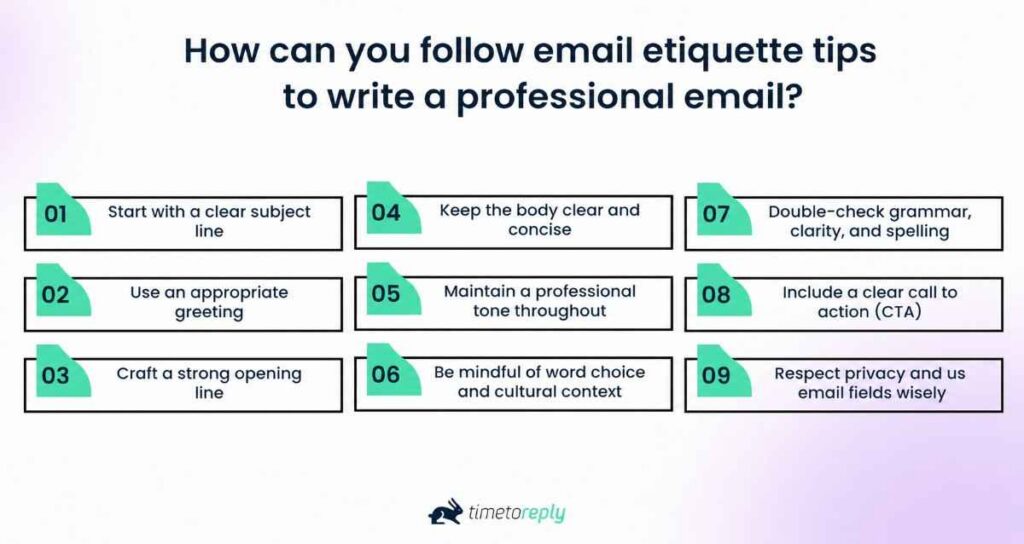
Writing a professional email starts with understanding what you want to communicate and how to present it clearly. Email etiquette tips include using a clear structure, choosing the right tone, and ensuring that messages are easy to understand.
Mastering the art of professional email writing is essential for maintaining long-lasting customer relationships. It’s also useful in a professional setting, such as upholding professional remote team communication.
Below are actionable email etiquette tips to help you compose thoughtful, effective, and professional emails every time.
Your subject line should summarize the message in a few words without being vague or generic. It should help the recipient understand the purpose of your email and decide whether to open it.
Avoid vague subject lines like “Quick Question” or “Important,” because they offer no real context.
Instead, write a clear subject line that quickly summarizes the content of your email, such as:
A good subject line respects the recipient’s time and improves email open rates.
Choose a formal or professional greeting based on your relationship with the reader. Also, always address them by their name when possible.
Aside from your subject line, your opening sets the tone for the rest of your email communication. Always tailor the greeting to the formality required in the email. But if the email is a bit informal, you can use casual greetings. Here are some examples:
You should avoid using “Hey,” “Hiya,” or no greeting at all. When in doubt, use a formal greeting, especially in first-time outreach or formal business emails. This is one of the standard email etiquette tips.
Also, ensure to include the recipient’s name in the salutation. It adds a personal touch and demonstrates attentiveness.
Start your email by stating the reason why you’re writing or by referencing a previous conversation.
It’s important to begin your emails with context. This eliminates confusion and sets the right tone. If you’re replying to a previous email, reference it briefly. For example:
“Thank you for your message regarding the product feedback. I’ve reviewed your notes and would like to discuss…”
A quick introduction or purpose statement is necessary for new conversations. For instance:
“Just wanted to get your attention for two minutes and talk about the revised marketing plan.”
Write your email message in short paragraphs and focus on one idea at a time. Remove unnecessary details and use simple language so the reader can quickly understand your main points.
Here’s why:
Long blocks of text are hard to scan, especially on mobile devices, but short paragraphs increase readability. Also, email clients may truncate long emails or collapse threads.
Avoid jargon unless your recipient is familiar with it. Don’t forget to use standard fonts like Arial or Calibri for a clean, professional look.
Be respectful and polite. Avoid slang or overly casual expressions. You can use exclamation points or emojis, but sparingly.
Email etiquette requires you to maintain a professional tone, whether writing to a colleague, client, or vendor.
Instead of:
Try:
However, avoid being too formal or robotic; instead, your writing should sound polite and confident. Consider reading your email aloud before you hit send. One of the email etiquette tips to remember is that if your email sounds too cold or informal, revise it.
Choose simple and clear words that are easy for all readers to understand.
In a global business environment, you should be mindful of cultural differences, especially in email correspondence. Avoid idioms, humor, or casual greetings as they might not translate well.
Instead, use clear, universally understood language and avoid ambiguous phrasing or sarcasm. Professional communication should feel inclusive and respectful.
Instead of writing:
Try:
This version is clear, respectful, and easy to understand across different cultures.
Review your email carefully before sending it. Correct spelling, grammar, and punctuation mistakes. Read it aloud or use a writing tool to make sure that it’s clear and accurate.
Typos and errors can look unprofessional and alter the meaning of your message. Here are some email etiquette tips to implement before hitting send:
These simple email etiquette tips enhance your credibility and ensure email recipients understand it clearly.
End your email by clearly stating the next steps the recipient can take. It should be specific and easy to follow.
Email etiquette tips dictate that every professional email should have a purpose. Whether you want the reader to respond, schedule a meeting, review a document, or approve a request, write it clearly. This email etiquette helps recipients take the proper next step.
For instance: “Please confirm your availability for a 30-minute call this Thursday or Friday.” You can also use a simple CTA button that attracts attention and solicits action:

Image via Brevo
Add recipients only when they’re directly involved in the message or need to stay informed. This helps protect contact details, avoids unnecessary replies, and keeps communication organized.
When sending to multiple email recipients, respect their privacy by using blind carbon copy (BCC) for recipients who shouldn’t see each other’s email addresses. Here are some email etiquette rules to consider:
Also, be cautious when forwarding emails. Remove irrelevant information and ensure no private or sensitive information is unintentionally shared.
Here are some email etiquette tips for writing professional emails:
If there has been a miscommunication, it’s important to address it politely. Begin by acknowledging the miscommunication and taking responsibility for any mistakes made. Next, explain the situation clearly and provide a solution or further steps to resolve the issue. End the email by thanking the recipient for their understanding and patience, and offer to answer any questions or concerns they may have.
Also Read:
Email etiquette tips include clear dos that emphasize clarity, a professional tone, and structure. The don’ts include using vague language, making spelling or grammar errors, and being overly casual or aggressive.
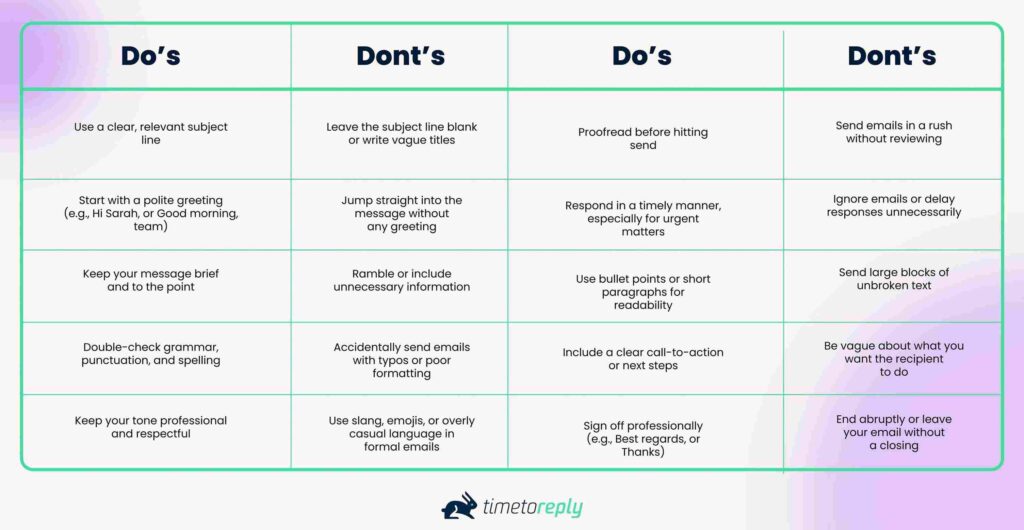
The table below breaks down the basic do’s and don’ts of email etiquette to help you send better emails with confidence:
Email etiquette rules are simple principles for structuring your message, choosing your tone, and communicating your intent.
By following these guidelines, you can help ensure that your emails are well-received and achieve their intended purpose.
Also Read:
Emails that follow proper etiquette are clear and well-structured. They include an appropriate greeting, a focused subject line, a polite tone, and a specific purpose.
Here are some email etiquette examples for different scenarios:
A first-time email should introduce who you are and state the purpose of your message. It should provide enough context for the recipient to understand why you are reaching out.
Example:
Subject: Introduction: Jane Smith from [Your Company Name]
Dear [Recipient Name],
I hope this message finds you well. My name is Jane Smith, and I’m reaching out from [Your Company Name], where we specialize in [briefly state what your company does or your role].
I came across your profile while researching [reason for contact, e.g., potential collaboration, service inquiry, etc.], and I believe there may be an opportunity for us to connect. I’d love to introduce myself and explore how we might work together.
Please let me know if you’d be open to a brief call sometime this week or next. I’m happy to work around your schedule.
Looking forward to hearing from you.
Best regards,
Jane Smith
[Job Title]
[Your Company Name]
[Email Address]
[Phone Number]
[Website URL]
A follow-up email should restate the context, reference the previous email, and state next steps, if any.
Example:
Subject: Following up on my last email
Dear [Recipient Name],
I hope you’re doing well. I wanted to follow up on my previous email regarding [brief mention of the topic or proposal]. I understand you may have a full schedule, but I’d appreciate a quick update when you get a moment.
If you have any questions or need additional information, I’d be happy to provide it.
I’m still very interested in [restate your purpose, e.g., setting up a meeting, sharing a demo, discussing a partnership].
Looking forward to your response.
Best regards,
Jane Smith
[Job Title]
[Your Company Name]
[Email Address]
[Phone Number]
[Website URL]
An out-of-office email should inform colleagues or clients that you’re unavailable. It should also state your return date and when they can expect a response from you. If possible, provide an alternative contact method for urgent matters.
Example:
Subject: Out of Office — John Doe
Dear [recipient],
Thank you for your email. I am currently out of the office and will not be available until [date]. During this time, I will have limited access to email. I may not be able to respond to your message immediately.
If you require immediate assistance, please contact [Name, Title, Contact Info]; they will gladly assist you. Otherwise, I will respond to your email as soon as possible upon my return.
I appreciate your understanding.
Best regards,
John Doe
[Company Name]
[Email Address]
[Telephone Number]
[Link to Website]
A cold email is an unsolicited message sent to a prospective client with whom you have no prior relationship. To be effective, it should clearly explain who you are and why you’re reaching out.
Example:
Subject: Partnership opportunity: [Your company name] + [Recipient company name]
Dear Ms. Smith,
I hope this email finds you well. My name is John Doe, and I’m reaching out to introduce myself and my company, [Insert Company Name]. We specialize in [state your unique areas of specialization].
I came across your company while researching potential clients in the [insert field] and was impressed by your services. I believe we can assist you by [insert benefits that address pain points].
If you want to learn more about how we can help your business grow, I would happily schedule a free consultation call at your convenience. During this call, we can discuss your goals and how our services could benefit your business.
Thank you for your time and consideration. I look forward to hearing back from you soon.
Best regards,
John Doe
[Company Name]
[email address]
[telephone number]
[link to website]
Also Read:
The 7 C’s of email etiquette help make emails clear, concise, correct, courteous, complete, concrete, and considerate.
Whether you’re writing to a colleague, client, or potential employer, how you write your email matters just as much as what you write. Mastering these seven C’s makes you a better communicator. It can help you build trust, save time, and get better results from every email you send.
These seven C’s are among the most practical email etiquette tips you can follow. They help ensure your message is clear, respectful, and encourages readers to take action.
Let’s break them down:
Clear emails communicate one main idea or purpose without confusion or unnecessary detail.
Clarity is everything in email communication. Avoid vague subject lines and unclear sentences. When your message is easy to understand, it helps save time and reduces back-and-forth.
One of the most basic email etiquette tips is knowing exactly what you want to say and how to say it simply.
Concise emails deliver maximum value in a few words. It cuts out fluff to ensure key details aren’t missed.
Time is precious, especially if you’re competing for attention in a recipient’s inbox.
Get to the point quickly by avoiding long-winded introductions and unnecessary fluff. Use short paragraphs, bullet points, and plain language to make your message easier to understand.
This is one of those email etiquette tips that can make you look polished and professional.
Emails should include accurate information, proper spelling, and correct grammar to avoid misunderstandings.
Typos and grammar mistakes can make even a great email fall flat. Always double-check your message before hitting send.
Check everything, from names and dates to facts. Accuracy is about building trust. Many email etiquette tips start with the basics: spell-check, proofread, and review your business emails.
Use professional language that shows respect for the reader and maintains a positive tone.
Your tone says a lot about you and your brand. Being polite, even in a short email, shows respect and professionalism.
Use greetings like “Hi [Name]” or “Good morning,” and sign off with “Thank you” or “Best regards.”
Simple, courteous language can go a long way in building good working relationships, and it’s one of the most overlooked email etiquette tips out there.
Emails should include all key details so the reader doesn’t need to come back for missing information.
Make sure you’re providing the recipient with all the information they need. If you’re setting up a meeting, include the time, date, and location (or link). If you’re sending attachments, double-check to see if the file is attached.
One of the smarter email etiquette tips is to review your email as if you were the recipient. Would you have everything you need to take action?
Emails should be specific and direct, clearly stating the purpose up front, so readers can easily understand them. Avoid vague or indirect language.
Don’t assume that your recipient already understands what you’re talking about. Besides, there are no facial expressions in email communication, so the receiver can’t read non-verbal cues.
Be specific about what you’re asking or stating. Instead of saying “Let’s catch up soon,” say “Can we set up a 15-minute call on Thursday at 3 p.m.?” This makes your message easier to act on. This is among the essential email etiquette tips that can speed up workflows significantly.
Write professional emails with the reader in mind, considering the timing, context, and their expectations.
Always think about how your message will be received.
Are you being too blunt? Is the timing appropriate? Are you sending a message that could have waited until later?
Thoughtfulness is key when applying email etiquette tips. This is one of the most human-centered email etiquette tips, and it makes a real difference.
Also Read:
Mobile email etiquette tips include using short paragraphs, clear subject lines, and front-loading the most important information so it’s easy to read on small screens. It also involves keeping messages brief and well-structured so recipients can quickly understand and respond.
More than half of work emails are first opened on a phone, which means your beautifully crafted message should impress your recipients on a four‑inch screen.
By applying these mobile‑first email etiquette tips, you respect the realities of modern reading habits. It can also guarantee faster response rates and showcase a level of professionalism that stands out, even on the smallest screens.
Here are practical email etiquette tips to shrink your desktop prose into a mobile‑friendly powerhouse, all without losing clarity, tone, or professionalism.
Start mobile emails with a short subject line. Put the key message or action first, so it remains visible even when truncated.
On most mobile apps, only 30–40 characters show before the subject line is truncated. Put the core noun and verb up front like “Draft Contract Ready for Review” and skip filler words (“Hey there,” “Just a quick note”).
A crisp subject line can boost open rates and help busy recipients spot your email in a crowded notification tray.
Here are examples of short yet focused subject lines:
Begin your email with the main point or decision, so readers see the most important information immediately.
Mobile readers prefer skimming through messages. So, you need to open with a one‑sentence summary that answers the unspoken question, “Why should I care right now?”
For example: “We’ve approved the budget; please sign the attached PO by Friday.” Then supply context. If the point doesn’t appear until paragraph three, you risk losing the reader before they even see your main point.
Break your email into short paragraphs and use proper spacing or bullet points to clearly separate ideas.
Long blocks look even longer on a phone. That’s why you need to break ideas into two to three‑line paragraphs and use bullet points for lists. Better yet, apply the “thumb test”: if any paragraph forces you to scroll more than a thumb’s length, split it.
See how the email below has bullet points for better skimming and a quick read:
Subject: ATTENTION: Information about Changes to the [Project/Client Name]
Dear [Team/Department] Colleagues,
I hope you’re having a productive day today. Here are some important updates regarding [Project Name].
Key points:
These changes/updates will be effective from [date]. Please review the attached [document/report] for more detailed information.
If you have any questions or concerns, please don’t hesitate to contact me or [responsible person/department] at [contact information].
Kind regards,
[Your Name]
[Your Position]
[Your Department]
Make links and actions easy to select by keeping them large, clearly labeled, and evenly spaced apart.
Links and call‑to‑action buttons should be large enough for a thumb, at least 44 × 44 pixels, and isolated from other links to avoid mis‑taps. Spell out URLs sparingly, as embedded hyperlinks keep the screen clean.
If you must include multiple links, label them clearly (e.g., “View mock‑ups,” “Approve quote”) so recipients know exactly where a tap will lead.
The short, crisp example below applies our email etiquette tips for easy navigation:
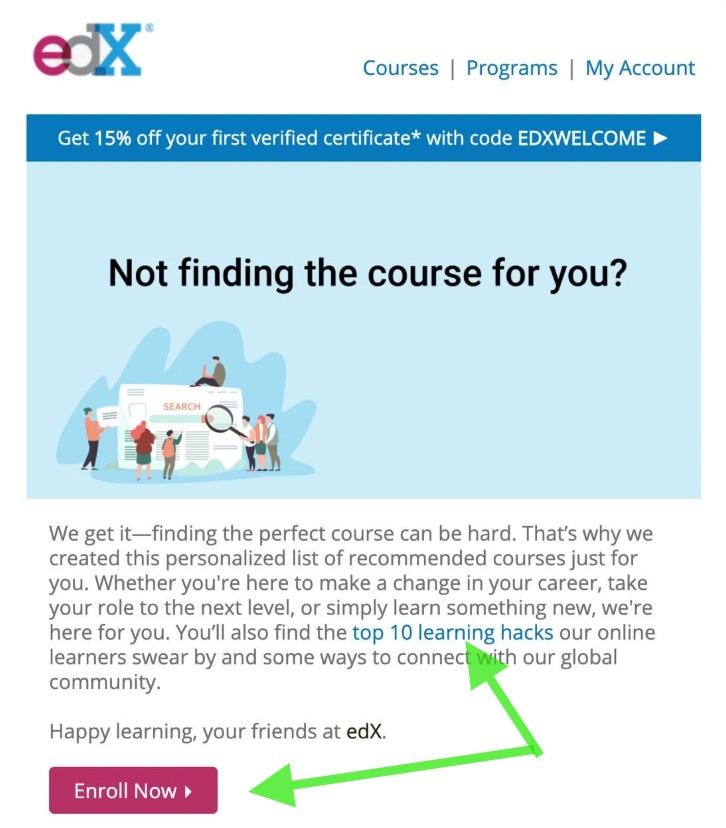
Image via MailerLite
Check that all attachments are necessary, small, and easy to open on mobile devices.
Mobile connections can be spotty. Where possible, link to cloud files instead of sending a 15MB PDF. If an attachment is essential, compress it and mention the file type and size in the body: “Attached: Q3_Report.pdf (2 MB).”
Write in a polite, simple tone. Avoids unnecessary emphasis, such as excessive punctuation or emojis.
Emojis and exclamation points amplify on small screens, sometimes reading louder than intended. You can opt for friendly yet neutral phrasing like “Thanks for reviewing” instead of “Thanks!!!
Sign off with a short closing. In your signature, include only essential information, such as your name, role, and contact details. Extra quotes or huge logos push critical content downward.
Preview your email on a mobile device to see how it actually appears to recipients. This helps you catch formatting issues, broken links, or awkward spacing before sending.
Fire off a test email to yourself and open it on your phone. Check subject truncation, spacing, link placement, and how quickly attachments load.
A 30‑second self‑audit can prevent an embarrassing formatting failure in every client’s pocket.
Also Read:
Using email etiquette tips in writing an email goes a long way. But if you’re not paying attention to email analytics and how people are responding, you’re only doing half the job. To truly improve email communication, you need to look at the numbers behind your emails.
Tracking a few simple email marketing KPIs can show you what’s landing well, what’s being ignored, and where there’s room to tweak your approach. Think of it as using data to sharpen your email game.
Here are some key things to keep an eye on:
Monitoring these numbers helps you understand what’s working and what needs improvement. Even small changes, such as tweaking your subject line or adding a clearer call to action, can lead to impactful results over time.
Also Read:
Some top email communication platforms include timetoreply, Grammarly, Zendesk, and Microsoft Teams, which help improve response time. These tools support better email etiquette by making messages easier to manage across teams.
Mastering email etiquette tips helps you know what to say and how to say it. It also involves using the right email response tools to support your communication efforts.
Today, there are several innovative platforms designed to help you write better emails, respond faster, and maintain a more professional digital presence.
timetoreply helps teams measure and improve their email response times to customers and prospects.
One of the most effective ways to put email etiquette tips into practice is to ensure timely responses, and that’s what timetoreply offers.
It monitors how quickly you or your team reply to emails, giving you real-time data and insights. This helps you improve team accountability, identify slowdowns, and meet response-time SLAs.
After all, one of the top email etiquette tips is replying promptly and professionally, and timetoreply makes it easy to measure and optimize that.
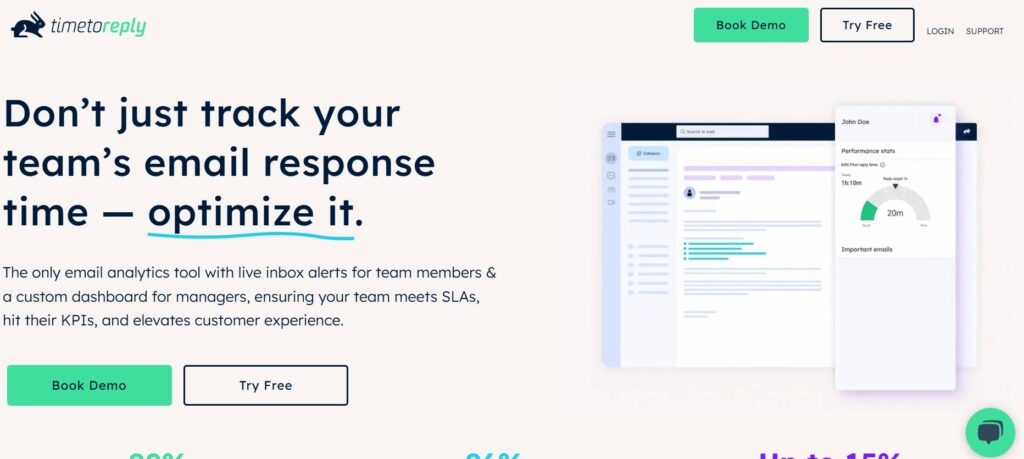
Image via timetoreply
Grammarly is an AI-powered writing assistant that proofreads your emails in real time.
Good grammar and clear messaging are essential email etiquette tips, and Grammarly helps you perfect both.
It checks for spelling, punctuation, tone, and clarity in real time, making sure your email sounds just as professional as it looks.
Whether you’re writing to a customer, colleague, or stakeholder, Grammarly ensures your emails are error-free and respectful — two major pillars of solid email etiquette.
Image via Grammarly
Zendesk and Freshdesk are smart inbox tools that streamline communication by turning emails into trackable tickets. This allows teams to pinpoint which issues to prioritize.
Managing a high volume of customer emails can get messy, but tools like Zendesk and Freshdesk bring structure and efficiency to the chaos.
These platforms provide shared inboxes, ticketing systems, and automated workflows that allow your team to collaborate and respond faster.
Following email etiquette tips like avoiding missed messages, replying promptly, and staying organized becomes much easier when your entire support workflow lives in one streamlined customer support tool.

Image via Zendesk
Microsoft Teams is a team collaboration platform that helps reduce internal email clutter. Instead of emails, it moves everyday conversations, updates, and quick questions into organized channels and chats.
Sometimes, applying good email etiquette tips means knowing when not to send an email.
Microsoft Teams offers real-time chat, video, and file sharing, so your team can handle quick questions or updates without clogging inboxes.
By shifting day-to-day communication and managing remote teams through efficient software, you free up your email for high-priority messages. It also ensures that your emails remain thoughtful, purposeful, and professional.
Image via Microsoft Teams
Response times are important because they affect how customers, clients, and colleagues communicate with your business. Fast and consistent replies show professionalism and help keep conversations moving without unnecessary delays.
The average email response time per industry shows why response time is one of the most crucial email etiquette tips. Here’s why:
Responding to emails within a reasonable timeframe shows recipients that they’re important and respected. One of the most overlooked email etiquette tips is simply responding on time. When you reply promptly, you send a clear signal: you value the recipient’s time and effort.
In contrast, delayed responses can come across as disinterest or even unprofessionalism, especially in customer service emails.
Fast replies foster trust, improve communication flow, and help avoid unnecessary follow-ups. Whether you’re in sales, support, or leadership, prompt email responses are a key part of good email etiquette.
Faster response times are essential for building trust and ensuring a positive customer experience.
Customer service thrives on responsiveness, and that’s where email etiquette tips make a difference.
Responding within a reasonable response timeframe (ideally within 24 hours) can significantly boost customer satisfaction scores. Email etiquette tips like this show that your company is attentive, dependable, and customer-oriented.
On the flip side, long delays often lead to frustration and lost opportunities. By knowing response times, support teams not only follow good email etiquette but also strengthen long-term customer relationships.
Delayed email responses can lead to missed opportunities, lost deals, and weakened professional relationships.
When it comes to email communication, timing is everything. Whether you’re closing a deal or resolving an issue, a delayed email could mean losing a lead, a sale, or even a partnership. In the same sense, you should also know when the best time is to send a follow-up email.
This is where email etiquette tips become a business advantage. A quick, well-crafted response can keep conversations warm and drive customer satisfaction.
Sales and success teams and other customer-facing teams need to apply strong email etiquette, including timely replies, to hit their targets and close opportunities before competitors do.
Fast and timely email replies help set the tone for faster, more efficient communication across teams and organizations.
Responsiveness is more than a courtesy; it’s a reflection of your work ethic and reliability.
One of the core email etiquette tips professionals should follow is to treat every message with urgency, even if it doesn’t require an immediate solution.
Timely replies show that you’re organized, accountable, and respectful of business communication norms.
It also encourages others to reciprocate, creating a culture of fast and effective communication across your team or organization.
Tracking response time metrics helps teams understand how quickly emails are handled and where delays usually occur in the workflow.
One of the most practical email etiquette tips for teams is to track how long it takes to respond to emails. This isn’t just about being quick; it’s about identifying bottlenecks, improving workflows, and enhancing the customer or lead experience.
When sales or support teams monitor response time metrics, they can spot patterns, set realistic customer service SLAs, and create accountability.
Using these insights, you can apply better email etiquette tips across your organization, including assigning urgent responses, setting response deadlines, or using auto-replies. This leads to more efficient and professional communication overall.
Also Read:
1. What are the five email etiquette rules?
Here are the email etiquette tips you should follow:
2. What are the 7 C’s of email etiquette?
These 7 C’s help ensure your email is effective and professional:
3. What are the do’s and don’ts of email etiquette?
Here’s what you should do:
You should avoid these:
4. What is the golden rule of email?
The golden rule of email is: “Treat every email as if it could be forwarded or made public.”
Always maintain professionalism, clarity, and respect in your messages, because once sent, you can’t take them back.
5. Is it okay to use emojis in work emails?
It depends on your workplace culture and the recipient. In more casual environments, a light emoji like a smile or a thumbs-up can add warmth. But for formal communication, or if you’re unsure, it’s best to avoid them.
When in doubt, keep it professional, especially with clients or leadership.
6. When should you use CC and BCC in an email?
Use CC when others should see the email conversation but don’t need to respond directly. Use BCC when messaging a large group of contacts to protect their privacy, or when you need to quietly share an email with a third party without the primary recipient knowing.
7. What are some common mistakes to avoid in email writing?
The most common mistake is writing unnecessarily long or complex emails. Many people also forget email etiquette tips like checking for spelling, grammar, or wrong names before sending. Using unclear subject lines can make people ignore your email. You must also avoid sounding too casual or too formal, depending on the situation.
8. How quickly should you reply to a work email?
For most work emails, replying within 24 hours is considered professional. If you need more time to give a full response, send a short reply to acknowledge the email. Quick responses are among the email etiquette tips that help maintain good communication and show respect for the sender’s time.
Also Read:
Improving response speed starts with building consistent communication habits across teams. You can help your business achieve fast response times by combining clear email etiquette tips with tools that track and manage email performance. You should set response expectations, prioritize urgent messages, and ensure every email has a clear next step.
Tools like timetoreply support these habits by automatically tracking response times and identifying the causes of delays. With the email analysis data, you can adjust workflows and improve consistency across teams.
You can also add custom email SLAs to ensure you always meet your customers’ expectations. Lastly, use its detailed email performance analytics to see how your email response times compare to industry benchmarks.
Ready to get started? Sign up for a demo or our 15-day free trial.
Get live inbox alerts and reply quickly to customer emails with timetoreply

Head of Customer Success @ timetoreply
Barry Blassoples is the Head of Customer Success at timetoreply, where he helps customer-facing teams boost revenue and protect brand reputation by providing actionable insights to improve their business email response times. He has over 15 years of leadership experience across customer success, sales, and marketing roles in high-growth tech companies.
Trusted by high-performing inbound sales teams and customer-facing teams globally.
Close more deals and delight more customers with the faster, smarter, deeper email analytics and performance optimization software that works straight from your team’s inbox.