
Most teams look for a Superhuman alternative for one of two reasons. Either the price climbed after the Grammarly deal or a one-person tool stopped fitting a growing team. Both are fair reasons to leave.
But before you swap inboxes, you need to name the real problem.
For a solo power user, Superhuman’s speed is the whole point. But for a customer-facing team, the issue is that customers wait too long. And oftentimes, no one can see it happening.
The timetoreply tool was created after watching that gap play out across teams. The truth is, a faster inbox does nothing for that blind spot.
So this guide compares nine Superhuman alternatives on what usually decides a switch. That includes speed, price, platform, collaboration, and whether a manager can see the team’s email response time.
You’ll also learn when the smarter move is to measure email analytics and keep your current inbox.
The best Superhuman alternative depends on what you need it to do, from reply-time tracking to a fast AI inbox. The list below matches each Superhuman alternative to a common use case so you can find the right fit faster:
We selected these Superhuman alternatives based on five criteria, including speed and AI, reporting and analytics, and pricing. Each one reflects what a Superhuman user actually needs in a replacement. All pricing and ratings are current as of July 2026:
To check these facts, we read each Superhuman alternative’s live pricing page and its latest reviews on Capterra and G2.
Reporting is the one most Superhuman alternatives skip. A faster inbox is easy to find. Seeing your team’s reply times and SLA breaches is harder, and it matters more.
Most teams look for Superhuman alternatives once the tool outgrows its use case, not because it is bad software. So what is Superhuman, exactly?
Superhuman email is a fast, keyboard-driven client for Gmail and Outlook. It adds Superhuman AI writing, split inbox, and a polish few rivals match.
For one power user who lives in email, it is hard to beat. In almost every Superhuman email review, that speed is the standout.
The trouble starts when a single-seat tool has to serve a growing, customer-facing team.
A few things usually drive the switch:
Price and fit, in that order. Inside a suite, email costs more per seat, and Superhuman still gives teams no shared inbox and no reply-time reporting.
At a glance, Superhuman alternatives fall into three camps. You have faster or cheaper inboxes, shared-inbox tools for teams, and reporting layers that measure reply times.
The table compares all nine Superhuman alternatives against Superhuman as the baseline. Prices are entry-level and verified in July 2026.
| Superhuman alternative | Best for | Works with | Starting price (monthly) | Reply-time/team reporting? | Rating (source) |
| Superhuman (Baseline) | Individual inbox speed | Gmail, Outlook | $30/user | No | 4.8/5 (G2) |
| timetoreply | Measuring team reply times | Outlook, M365, Gmail | $38/mailbox | Yes (full analytics + SLAs) | 4.5/5 (Capterra) |
| Shortwave | Superhuman-style AI speed | Gmail only | $18/seat | No | 4.4/5 (G2) |
| Missive | Collaborative teams | Gmail, Outlook, IMAP | $18/user | Yes | 4.7/5 (G2) |
| Spark | Budget, cross-platform | Gmail, Outlook, IMAP | $10/user | No | 4.4/5 (G2) |
| Front | Enterprise team inbox | Gmail, Outlook, M365 | $35/seat | Yes | 4.5/5 (Capterra) |
| Canary Mail | Privacy, on-device AI | Gmail, Outlook, IMAP | $36/year | No | 4.5/5 (G2) |
| Spike | Conversational email | Gmail, Outlook, IMAP | $5/user | No | 4.7/5 (Capterra) |
| eM Client | One-time purchase | Gmail, Outlook, IMAP | $29.95 (one-time payment) | No | 4.2/5 (Capterra) |
| Hiver | Gmail-native helpdesk | Gmail, Outlook | $35/user | Yes | 4.6/5 (G2) |
The nine Superhuman alternatives below cover the main reasons teams leave Superhuman. Some Superhuman alternatives match its speed at a lower cost. Others add the shared mailboxes and reporting features that a growing team needs.
We start with timetoreply, because it solves the one problem Superhuman cannot. It shows a manager how fast the team is replying.
Each entry covers what the Superhuman alternative does well, where it falls short, the cost, and the switch from Superhuman.
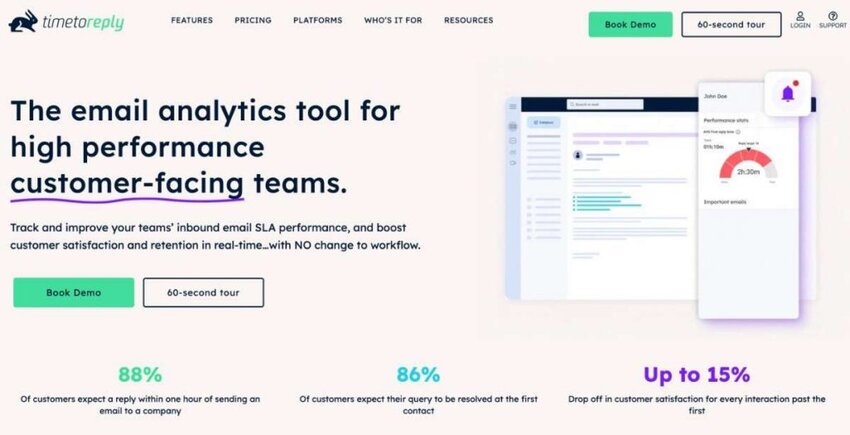
Image via timetoreply
The timetoreply tool takes a different angle from every Superhuman alternative here. Instead of replacing your inbox, it adds an email analytics and reply-time layer on top of it. That works across Outlook, Microsoft 365, or Gmail.
Where Superhuman makes one person faster, timetoreply shows a manager how fast the whole team is. It tracks first-response time across shared and individual mailboxes, so slow replies no longer hide in a busy inbox.
There are real results to back timetoreply’s offering. Telarus cut response times for some teams from 7 hours to 2 hours. Also, Ontellus stated that its responsiveness rose from 62% to 86% after partnering with timetoreply.
Key features
Pros
Cons
Pricing
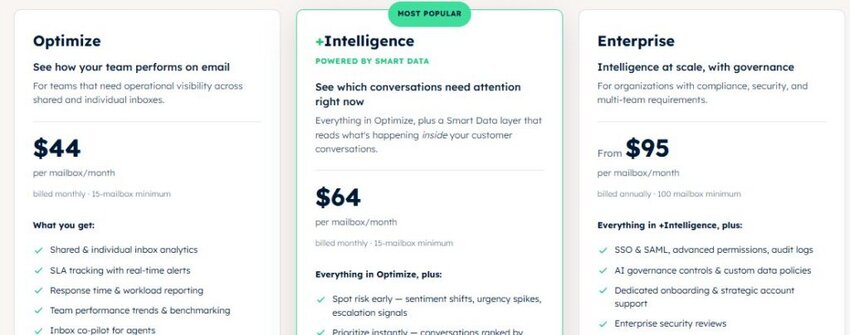
Image via timetoreply
Best for: Mid-market and enterprise customer-facing teams that must prove and improve SLA performance.
Usability: You can be live in about an hour, with two weeks of historical data loaded at once.
Migration from Superhuman: There is no real migration, because timetoreply runs alongside Superhuman rather than replacing it. You connect your Gmail or Outlook mailboxes and keep working as normal, with reply-time tracking added in the background.
Pro tip: If you cannot put a number on your team’s reply speed today, start here before shopping for a new inbox. Measurement first tells you whether a faster client would even move the metric.

Image via Shortwave
Shortwave is a fast, AI-first email client built for Gmail by former Google Inbox engineers. It keeps the keyboard-driven speed Superhuman users expect, then adds AI on top for less money.
For a Gmail-based team, the USP is Superhuman-level speed plus a capable AI assistant at a lower price.
One limit worth mentioning is that this Superhuman alternative is Gmail-only.
Key features
Pros
Cons
Pricing
Shortwave’s pricing is split into two categories: Personal and Business:
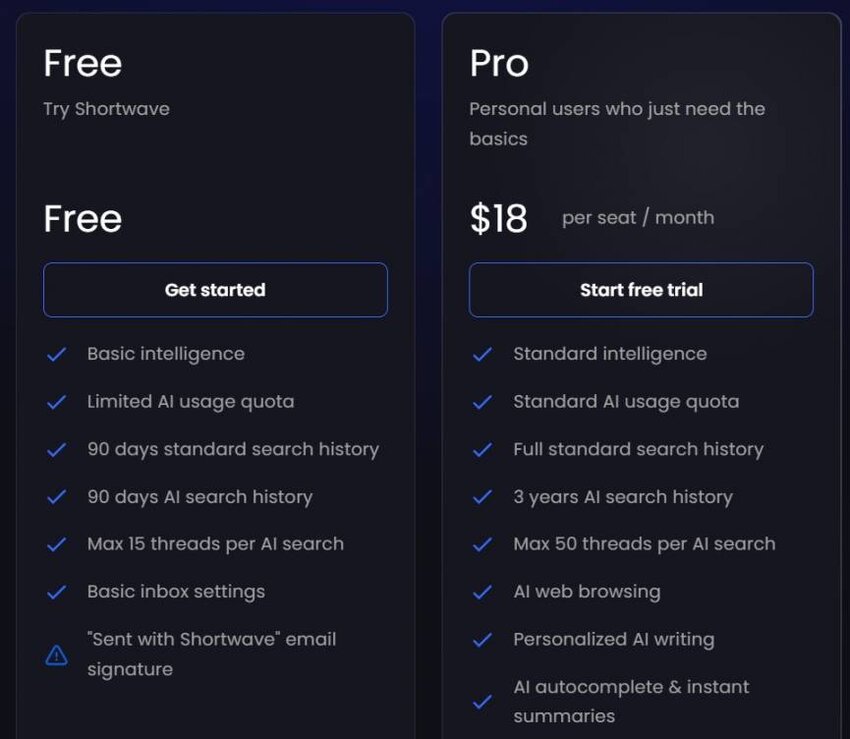
Image via Shortwave

Image via Shortwave
Best for: This Superhuman alternative suits individuals and small Gmail teams that want Superhuman-style speed and AI without the price.
Usability: The interface feels similar to Superhuman, so most people settle in quickly.
Migration from Superhuman: Shortwave publishes a step-by-step guide for moving straight from Superhuman. Because your mail lives in Gmail, you mostly reconnect the account and import settings.
Pro tip: Turn on thread summaries first, since that is the feature switchers miss most. If your team needs numbers, add Gmail reply-time reporting alongside it.
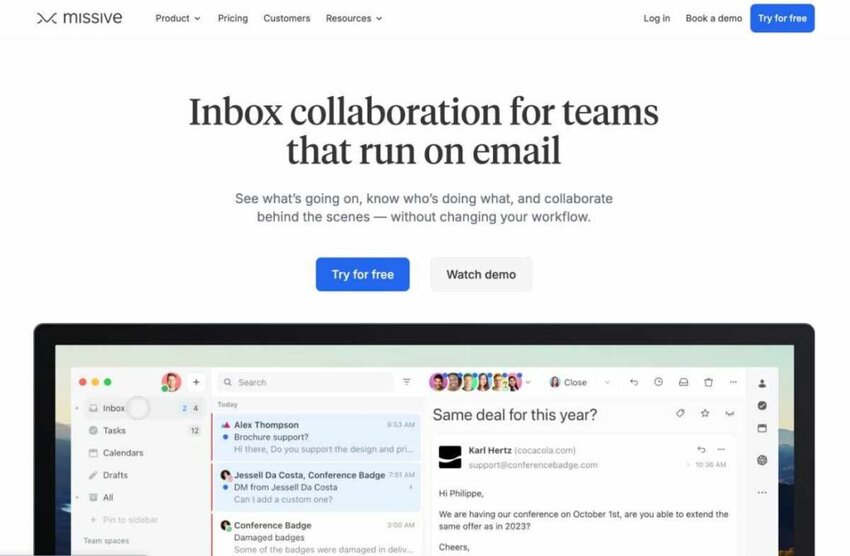
Image via Missive
Missive turns email into a shared team workspace. Where Superhuman speeds up one person’s inbox, Missive is built for several people working the same inbox together.
It also folds in chat and channels like WhatsApp and SMS, so conversations sit in one place.
The standout feature of this Superhuman alternative is collaboration. A whole team can work on one inbox without stepping on each other or losing track of who replied.
Key features
Pros
Cons
Pricing
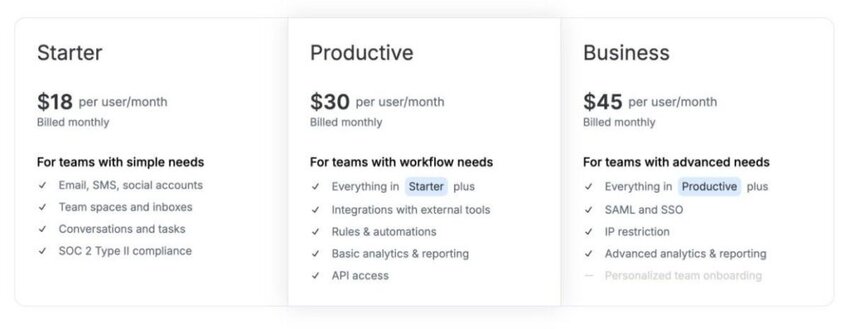
Image via Missive
Best for: This Superhuman alternative suits small and mid-sized teams that share inboxes across email and chat channels.
Usability: The inbox looks familiar, so agents pick up this Superhuman alternative’s chat-in-thread workflow within a day or two.
Migration from Superhuman: Moving off Superhuman means connecting your Gmail or Outlook mailboxes and rebuilding your rules. Missive imports email and contacts, but you set up shared inboxes and automation from scratch.
Pro tip: If leadership wants proof the team is fast enough, pair Missive with shared-mailbox reporting. Missive runs the collaboration, and the numbers come from a tool built for them.
Also Read:

Image via Spark
Spark, from Readdle, is a budget-friendly, cross-platform Superhuman alternative.
It runs on Mac, Windows, iOS, and Android, which few polished clients manage. For a team that wants a smarter inbox on every device without a big bill, Spark is a good fit. Two standout features include a usable free tier and a low price next to Superhuman.
Key features
Pros
Cons
Pricing

Image via Spark
Best for: This Superhuman alternative is well-suited to individuals and small teams who want a single, cost-effective client across all devices.
Usability: Easy to adopt, with a clean design that works the same across desktop and mobile.
Migration from Superhuman: Spark connects your existing Gmail, Outlook, or IMAP accounts directly, so there is little to move. You add each account, and your mail appears in Spark’s smart inbox without exporting anything.
Pro tip: Start on the free tier and let the smart inbox prove its efficiency.

Image via Front
Front is an enterprise-grade team inbox Superhuman alternative. It is a full customer communication platform with shared mailboxes and built-in analytics.
Of the Superhuman alternatives on this list, Front’s reporting comes closest to timetoreply’s. The difference is that Front replaces your inbox to get there, while timetoreply measures the one you keep.
For a customer-facing team, that reporting is the appeal. Managers can see response times and catch conversations before they breach an SLA.
Key features
Pros
Cons
Pricing
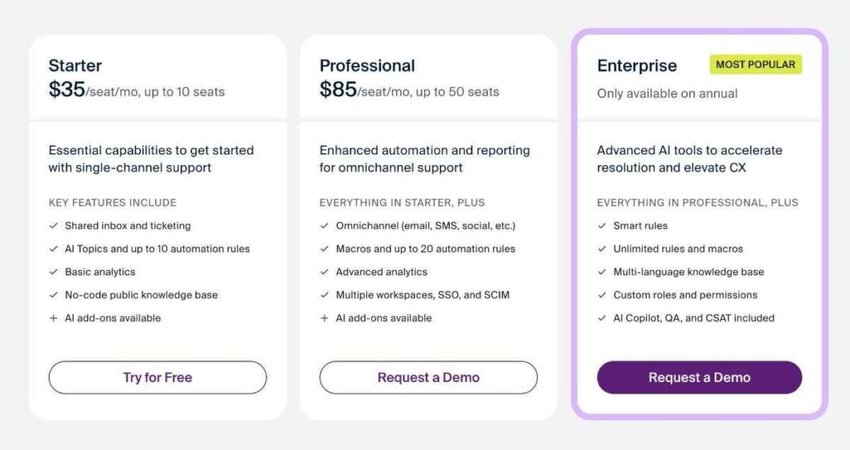
Image via Front
Best for: Mid-market and enterprise support and operations teams that want an all-in-one team inbox.
Usability: Front is a detailed rollout, not a quick install, so budget time for onboarding and admin setup.
Migration from Superhuman: Moving to Front means importing your inboxes and rebuilding rules. It is more involved than a client swap because you are adopting an entire platform.
Pro tip: If you like Front but live in Outlook, test the sync limits with a small group first. Teams that want response-time reporting across Outlook and Gmail can add it separately.
Also Read:

Image via Canary Mail
Canary Mail is a privacy-first Superhuman alternative. It pairs a capable AI assistant with encryption and tracker blocking. As such, security leads the design rather than trailing it.
It runs across Mac, iOS, Windows, and Android for a single user. For a privacy-conscious professional, this Superhuman alternative is a rare mix. You get modern AI tools without handing your whole inbox to a server.
Key features
Pros
Cons
Pricing

Image via Canary Mail

Image via Canary Mail
Best for: Privacy-conscious individuals and small teams that still want modern AI in their inbox.
Usability: Setup is quick, and the privacy defaults make sense out of the box, so there is little to configure.
Migration from Superhuman: Canary connects directly to your Gmail, Outlook, or IMAP accounts, so nothing needs to be exported.
Pro tip: Turn on encryption for external threads that carry sensitive client data.

Image via Spike
Spike reinvents email as a chat. Instead of formal threads, it shows messages as a running conversation, like a messaging app.
Among the Superhuman alternatives, Spike changes how email feels, not just how fast you move through it. That shift suits teams that email each other constantly.
Key features
Pros
Cons
Pricing

Image via Spike
Best for: Teams that email each other constantly and want something faster and friendlier.
Usability: The chat view takes a few days to get used to, then feels quick and natural.
Migration from Superhuman: Spike connects your existing Gmail, Outlook, or IMAP account, so there is nothing to export.
Pro tip: Roll Spike out to one internal team first. The chat style lands best where people email each other all day.
Also Read:

Image via eM Client
Not everyone wants another subscription, and that is where eM Client earns its spot. It is a full desktop email client for Windows and Mac that you buy once and own. For a team tired of per-seat monthly fees, it’s an appealing option.
This Superhuman alternative is a traditional, stable client rather than an AI-first one. That suits people who want a dependable desktop inbox they control, without a monthly bill.
Key features
Pros
Cons
Pricing

Image via eM Client

Image via eM Client
Best for: Individuals and teams that want a capable desktop client without recurring fees.
Usability: The desktop feel is familiar, so traditional Outlook users adopt it quickly.
Migration from Superhuman: eM Client runs an import wizard that pulls your accounts, contacts, and settings on setup. Since it connects straight to Gmail or Outlook, your mail stays where it is.
Pro tip: Price the one-time license against a full year of Superhuman per seat. For many teams, that gap is often the whole reason to switch.
Image via Hiver
Hiver is a Gmail-native Superhuman alternative. It turns Google Workspace or Outlook into a shared-inbox helpdesk without a separate platform.
Your team keeps its familiar inbox, but gains help desk structure on top. For a Google Workspace team, that familiarity is the whole point. Support gets structure and accountability without anyone leaving Gmail.
Key features
Pros
Cons
Pricing

Image via Hiver
Best for: Google Workspace teams that want a help-desk structure without leaving Gmail.
Usability: Very low friction for Gmail users, since it lives inside the inbox they already know.
Migration from Superhuman: Hiver installs as a layer on Gmail or Outlook, so there is nothing to migrate. You add the extension and connect your shared mailbox, and your team keeps working as before.
Pro tip: If Hiver’s built-in reports aren’t detailed enough, add reply-time reporting for Gmail and Outlook. Its analytics cover the helpdesk, not every mailbox your team runs.
Start from your platform and your goal. Teams that need reply-time proof add timetoreply. Gmail teams look at Shortwave or Hiver, and shared-inbox teams at Missive or Front.
Also Read:
The right Superhuman alternative depends on your most important variable, not a long wish list.
First, decide what job you are hiring the Superhuman alternative to do. Then match it to your platform, team size, and the metric you are judged on:
Also Read:
1. What is the best Superhuman alternative?
It depends on the job. To measure and improve team reply times without switching, timetoreply fits best. For a fast AI inbox on Gmail, try Shortwave. For shared team inboxes, look at Missive or Front.
2. Does Superhuman work for teams?
Superhuman is built for individuals, so it has no shared inbox and no manager reporting on reply times. Teams usually add a shared-inbox tool like Missive or Front, plus timetoreply to measure how fast they respond.
3. Is Superhuman the best email app?
Superhuman is one of the fastest single-user clients you can buy. For a solo power user, it’s one of the best email clients. It is a weaker fit for teams, though, since it lacks shared inboxes and reply-time reporting.
4. How much does Superhuman cost?
Superhuman Mail starts at $30/month (or $25/month billed yearly). The Business plan is $40/month. Since the Grammarly deal, email is bundled in the Superhuman Suite, which pushes cost-conscious teams toward a Superhuman alternative.
5. Is Superhuman worth it in 2026?
For a high-volume individual who values speed and polish, Superhuman can still be worth it. Since the Grammarly deal, Superhuman pricing now sits inside a pricier suite. Teams reviewing cost per seat often find better value elsewhere.
6. What happened to Superhuman after Grammarly acquired it?
Grammarly acquired Superhuman in 2025 and then rebranded the parent company as Superhuman. The email client is now Superhuman Mail, bundled inside the Superhuman Suite. The app still works well, but the pricing and bundling changes send many teams looking elsewhere.
7. What is the best Superhuman alternative for customer-facing teams?
For customer-facing teams, the priority is fast, consistent replies. Front and Hiver add shared inboxes with SLA tracking. The timetoreply tool measures and improves reply times across Outlook, Microsoft 365, and Gmail without changing your team’s inbox.
8. Do these Superhuman alternatives work with Outlook and Microsoft 365?
Several do. Front, timetoreply, eM Client, and Hiver all support Outlook and Microsoft 365. Shortwave is Gmail only. Spark, Missive, Canary Mail, and Spike vary, so confirm platform fit before you commit.
9. Can I measure my team’s email response times without switching inboxes?
Yes, and for many teams, that is the smartest move. For example, timetoreply adds reply time and SLA analytics on top of Outlook, Microsoft 365, or Gmail. It needs no change to how your team works, so you keep your current client.
10. How do I migrate my data away from Superhuman?
Start by confirming your mail lives in Gmail or Outlook, since that is where messages sit. Your mail does not move when you change clients, so switching is mostly reconnecting the account. Many Superhuman alternatives offer a guided import.
Plenty of capable email management tools compete here, but the best Superhuman alternative depends on the job you need done.
For individual speed at a lower price, Shortwave is a strong pick. For a shared team inbox, Missive and Front are both capable. And if the real goal is faster, more consistent replies across the team, measure before you migrate.
You can keep the inbox your people already like and still fix the response times your customers feel. The timetoreply tool shows you where the team is slow, then helps you improve it.
See what that looks like for your own team and book a demo
Get live inbox alerts and reply quickly to customer emails with timetoreply

Head of Customer Success @ timetoreply
Barry Blassoples is the Head of Customer Success at timetoreply, where he helps customer-facing teams boost revenue and protect brand reputation by providing actionable insights to improve their business email response times. He has over 15 years of leadership experience across customer success, sales, and marketing roles in high-growth tech companies.



Trusted by high-performing inbound sales teams and customer-facing teams globally.
Close more deals and delight more customers with the faster, smarter, deeper email analytics and performance optimization software that works straight from your team’s inbox.