
A typical workday begins before workers get out of bed. According to Microsoft’s Work Trend Index Special Report, 40% of users are already skimming through emails by 6 a.m. This practice allows them to have a quick start before the day becomes busier.
Yet, an average employee gets up to 117 emails every day, which they read within 60 seconds.
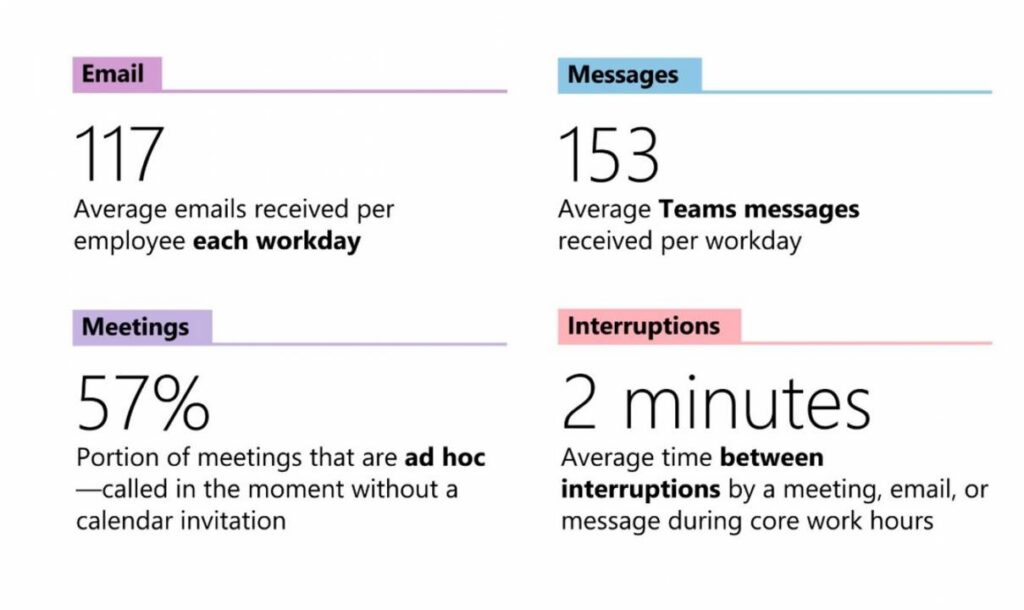
Image via Microsoft
As inboxes grow, teams increasingly rely on email to manage projects, clients, and sensitive data. However, without clear email management best practices, this dependence can quietly drain time.
With email being a common entry point for phishing attacks, businesses may be exposed to compliance and security issues.
In this article, we’ll share 11 email management best practices. They’ll help you reclaim productive hours, minimize risk, and turn email into a more effective operational tool.
Email management refers to the processes, tools, and habits used to handle incoming and outgoing email messages. It also refers to how teams prioritize messages and respond promptly.
Effective email management includes inbox organization, automation, email response standards, collaboration across teams, and ongoing optimization.
Applying email management best practices helps protect valuable time, improve email productivity, and support customer communication. It also reduces the risk of missed messages or delayed email responses.
Ultimately, email management is a critical part of achieving operational efficiency.
Follow these email management tips to help you stay productive at work
One of the most important email management best practices is scheduling a time to check your inbox. Based on Microsoft’s findings in its 2025 special report, workers are interrupted by emails, meetings, or messages for two minutes on average.
These interruptions make it difficult to return to deep work, especially for employees already struggling with concentration. As a result, many professionals spend extra hours completing important tasks.
Instead of monitoring your inbox all day, set specific times to check email. You can do this once in the morning, after lunch, and before the end of the workday. Outside of these periods, silence non-critical email notifications so you can focus on other tasks without distraction.
This helps organize your inbox and improve email productivity across the organization.
Next on our list of effective email management best practices is controlling how and where email notifications appear. With most professionals accessing email on a desktop or a mobile device, unmanaged alerts can be distracting.
Instead of enabling notifications for every incoming message, configure alerts based on priority. For example, limit notifications to flagged messages, emails from clients, or messages marked as urgent through subject line rules.
Additionally, keep separate work and personal email accounts, as it will help you maintain focus. It also ensures that email notifications tied to critical business communication don’t compete with messages from social media platforms or unwanted newsletters.
Also Read:
An organized inbox ensures that incoming messages don’t pile up. This allows you to find important messages and respond promptly. That’s why adopting a folder system is one of the best email management best practices.
Start by creating separate folders based on function or priority. They can be project names, an inquiry, or team members’ names.
You can create folders in Outlook by right-clicking your name in the Folder Pane. Click on New Folder, type a name, and press Enter. Select multiple email messages and drag and drop them into the newly created folder.
Gmail users can create color-coded labels to organize messages. Click on the + beside Labels. It prompts you to enter a name, and you can add sub-folders under the parent label. Drag and drop messages into each label or apply the label to messages. Clicking on a label displays the emails in that category.
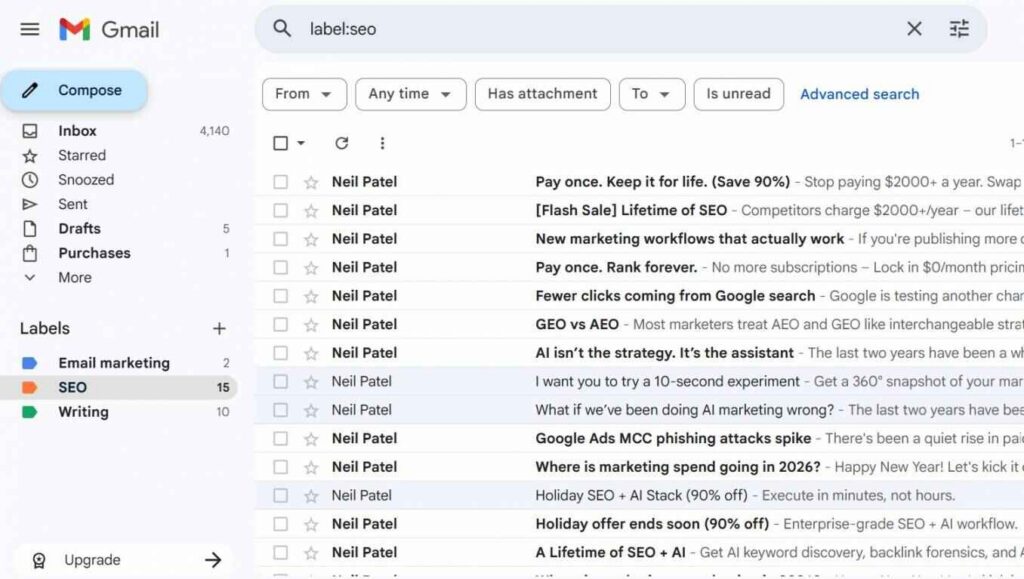
Image via Gmail
Your folders must be logical, consistent, and aligned with how your team works. For instance, emails from key clients should be easy to spot and retrieve.
This reduces the time spent searching through many messages. It also ensures that critical email messages don’t get overlooked among unread emails or spam emails.
Once you have created folders, the next step in applying email management best practices is message automation. Manually reviewing every incoming email wastes valuable time, especially for teams handling many customer service emails throughout the day.
However, applying filters and rules allows email clients to process incoming messages based on predefined conditions. These filters could be sender, subject line, keywords, or past interactions.
In Gmail, check the box next to the email you want to filter, then click on the three dots. Click Filter messages like these and input your filter criteria.
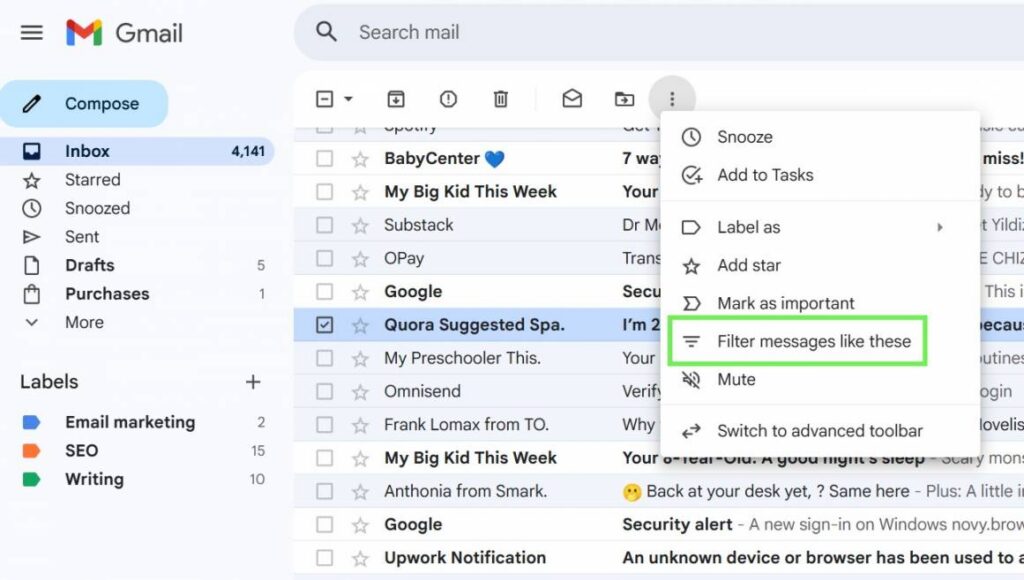
Image via Gmail
To create an inbox rule in Outlook, right-click on a message, then hover over Rules. Select Create rule and choose a folder for all messages from that sender. You can set up advanced rules by clicking More options.
Each rule requires a name, a condition, and an action. You can also set up exceptions to the conditions or add multiple conditions. This will help you reduce repetitive tasks and make your business more productive.
Also Read:
The two-minute rule is a simple but powerful addition to email management best practices. It implies that if you can handle an incoming message in two minutes or less, then complete it immediately.
This rule works for emails that require a “yes” or “no” response or forwarding information. It’s also applied when you want to take quick actions, such as filing, deleting, or archiving an email, that won’t take much effort.
This prevents small actions from piling up into unread messages that clutter your inbox. When messages require more time, you can defer, categorize, or add them to a to-do list.
Coined by Merlin Mann, the Inbox Zero method is one of the popular email management best practices. It’s especially used among professionals, such as customer-facing teams, dealing with many messages daily.
The goal isn’t to maintain an empty inbox at all times, but to create a system where unread emails don’t linger. This encourages users to decide whether to delete, archive, or respond to emails. Also, decide whether to move an email into a separate folder or perform a task.
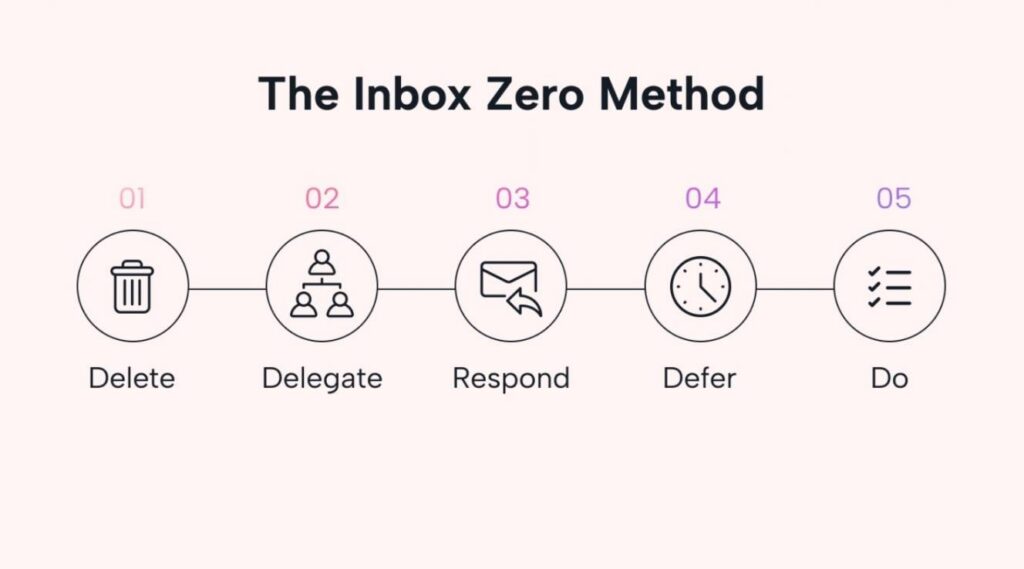
Image via Motion
When combined with other email management best practices like the two-minute rule, it allows you to reply to customers quickly. It also prevents a disorganized inbox, making it easier to focus on important tasks.
Also Read:
If your team handles high volumes of customer communication, you need shared inboxes. Instead of messages landing in individual inboxes where ownership is unclear, a shared inbox allows multiple team members to access incoming emails.
As one of the email management best practices, adding a shared inbox in Outlook or Gmail reduces the risk of unread messages and duplicate replies. Team members can immediately see who’s responsible for each conversation.
It also makes it easier to track messages that were replied to, who replied, and when. This transparency helps you analyze customer service conversations and optimize response times for improved communication.
Many shared inbox tools, such as timetoreply, provide email analytics. It includes crucial metrics like average email response time. It helps you understand how quickly your team handles customer messages. This helps you identify bottlenecks and set realistic response time expectations.
Creating email templates is one of the most practical email management best practices. You can use them for sales follow-ups, customer support emails, meeting confirmations, and status updates.
Canned responses are pre-defined replies to frequently asked questions. They could be answers for greetings, order tracking, or troubleshooting. You can use canned responses across communication channels like email, chat, and social media.
Here’s an example of a canned response from timetoreply. Its AI chatbot extracts information from the company’s Terms and Conditions page to provide a quick response to the question of refund policy.
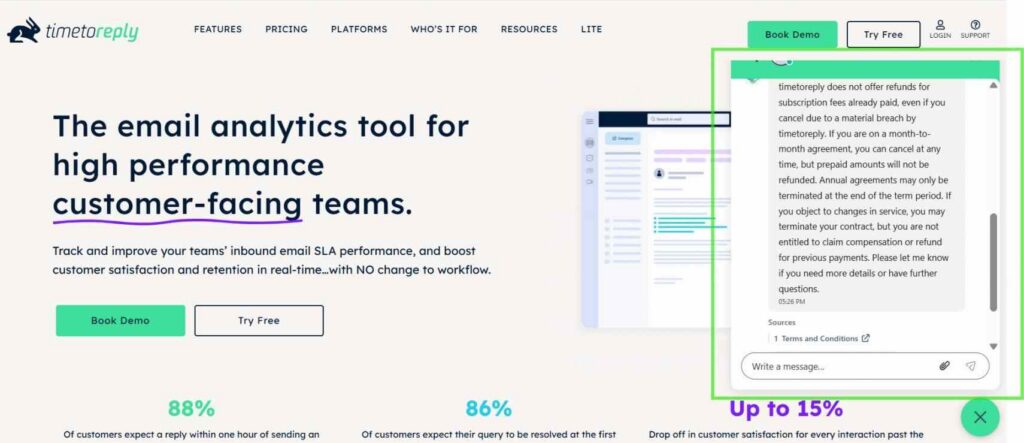
Image via timetoreply
With email templates and canned responses, customer support teams can respond in a few minutes instead of writing emails from scratch. This improves consistency, reduces errors, ensures faster email responses, and increases customer satisfaction.
Also Read:
For customer-facing teams, consistency and visibility matter just as much as fast response. That’s why using customer service email management software is among the key email management best practices for your business.
An email management tool allows teams to track conversations over time and understand the full context of a customer’s emails. So, when another team member is assigned to a customer, they don’t have to start explaining their request or challenge all over again.
It allows teams to collaborate internally without breaking the customer’s experience. It also makes it easier to reply to emails professionally, as teams can use shared templates to remain consistent and on-brand.
This is particularly valuable for sales teams and support teams managing repetitive inquiries or time-sensitive requests.
One of the most crucial email management best practices is setting realistic email service-level agreements (SLAs). You can also reinforce them with real-time reminders that help teams stay productive without sacrificing response quality.
SLAs define how quickly incoming messages should receive a first response or resolution, depending on urgency or customer type. Your team can use real-time alerts to highlight which messages require immediate attention and which can be addressed later.
This prevents urgent emails from being overlooked while allowing team members to manage their workload more effectively. Tools like timetoreply support this by providing custom alerts when email response targets are at risk. Its browser extension automates email prioritization with countdown timers.
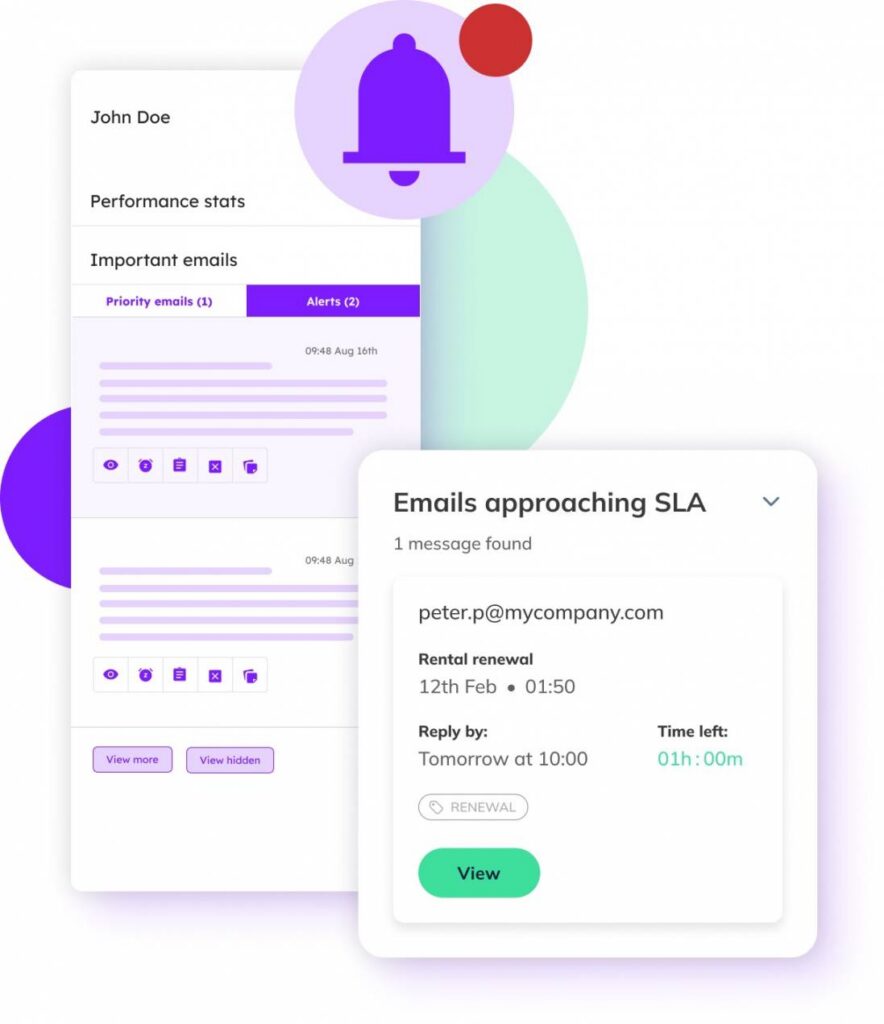
Image via timetoreply
These visual cues make it easy to see which conversations are approaching SLA limits. You can then prioritize responses before delays impact customer experience.
By using reminders and SLAs to prioritize email response, customer service teams can manage emails more strategically and meet customer expectations.
Also Read:
Email management isn’t a one-time thing. You should periodically review inbox rules, folders, and filters to ensure they fit current business needs. This is one of those essential email management best practices that makes your team productive.
During the review, check your subscriptions and use a mass unsubscribe tool to eliminate newsletters that no longer provide value. This process also involves archiving emails that are no longer active.
If you find yourself looking at the same email for three weeks without taking action, your search criteria or folder system needs a refresh. Use the search bar to identify many messages from specific senders or dates and delete messages based on their relevance to current projects.
Cleaning up inbox space prevents a return to a disorganized inbox and keeps systems efficient as email volumes grow.
1. What are the 4 D’s of email management?
The 4 D’s of email management are Delete, Do, Delegate, and Defer. It involves evaluating each incoming email and assigning one action.
Delete unnecessary messages and handle quick tasks immediately. Delegate messages that require others’ input and defer emails that will consume more time.
These email management best practices reduce inbox clutter and ensure your team respond to emails efficiently.
2. What are the 5 C’s of email?
The 5 C’s of email are Clear, Concise, Correct, Courteous, and Complete. Business emails should clearly communicate their purpose and avoid unnecessary details. They should also maintain a professional tone and include all required information.
Following these principles ensures recipients understand your message. It also reduces back-and-forth email messages and supports more effective communication across teams and with customers.
3. What are the 5 D’s of email management?
The 5 D’s of email management expand on the 4 D’s to become Delete, Do, Delegate, Defer, and Decide. The “Decide” step emphasizes making an immediate choice about how to handle each email message. This method encourages faster inbox processing, fewer unread emails, and better prioritization of important tasks.
4. What is the best practice for managing email?
Email management best practices include the following:
Applying these email management best practices helps boost productivity. It also ensures you have an organized inbox.
5. What is the 3-21-0 method of email management?
The 3-21-0 method encourages checking email three times a day, responding within 21 minutes when possible, and aiming for zero unread emails daily. This approach helps you manage emails without allowing them to dominate your workday.
6. What are the 5 C’s in communication?
The 5 C’s in communication are Clarity, Conciseness, Completeness, Correctness, and Courtesy. These principles ensure that messages are easy to understand, accurate, respectful, and actionable.
In business email communication, applying the 5 C’s reduces misunderstandings. It also improves response quality and strengthens professional relationships.
7. What is the 24-hour email rule?
The 24-hour email rule recommends responding to emails within one business day. It shows professionalism and ensures customer inquiries are addressed while interest is still high. It also helps maintain momentum in conversations.
The rule also supports timely, reliable email responses across teams. You can use the 24-hour email rule effectively by setting clear response expectations. This way, customers and team members know when to expect feedback from you.
8. What is bad email etiquette?
Bad email etiquette includes the following:
Practicing good email etiquette improves professionalism and trust. It also boosts the overall effectiveness of email management best practices.
Also Read:
Email remains one of the most critical tools for business communication. However, it can quickly become a source of distraction, inefficiency, and missed opportunities.
With these email management best practices, you can create structured, repeatable processes that enhance productivity. These also boost collaboration and customer satisfaction.
From inbox organization to using the best email management software, effective email management is important. For customer-facing teams, using customer service tools like timetoreply can help automate email prioritization and ensure faster response times.
When treated as a strategic part of daily operations, email becomes easier to manage. Also, your team’s response times will improve, allowing workers to regain valuable time to focus on work that truly matters.
Get live inbox alerts and reply quickly to customer emails with timetoreply

Head of Customer Success @ timetoreply
Barry Blassoples is the Head of Customer Success at timetoreply, where he helps customer-facing teams boost revenue and protect brand reputation by providing actionable insights to improve their business email response times. He has over 15 years of leadership experience across customer success, sales, and marketing roles in high-growth tech companies.


Trusted by high-performing inbound sales teams and customer-facing teams globally.
Close more deals and delight more customers with the faster, smarter, deeper email analytics and performance optimization software that works straight from your team’s inbox.