
The best email analytics tools help businesses measure response times, track team activity, and understand how effectively emails are being handled across teams. Despite the growing popularity of social media and other communication platforms, email remains an effective customer service and retention channel.
In fact, 42.3% of business owners and marketers mentioned that email marketing continues to be among high-performing channels in driving engagement and strong results.
For teams operating in the Gmail and Google Workspace environment, an email analytics tool like Email Meter can be useful for tracking the performance of their email activities.
However, is Email Meter the correct fit for your organization compared to Email Meter alternatives? In this guide, we are taking a closer look at Email Meter and weighing up its pros and cons against a number of Email Meter alternatives, including Freshdesk, Front, EmailAnalytics, and our solution timetoreply.
The best Email Meter alternatives for businesses of all sizes include timetoreply, EmailAnalytics, Front, and Freshdesk. These email analytics tools help businesses track response times and obtain reporting insights across Gmail, Outlook, Microsoft 365, and other email platforms.
Among these Email Meter alternatives, timetoreply stands out for its real-time analytics, cross-platform support, SLA tracking, and flexible reporting capabilities for customer-facing teams.
Email Meter offers email analytics and reporting for teams, giving visibility into response times and overall email performance.
It is an email statistics platform for individuals, teams, and enterprises seeking detailed analytics for Gmail and Google Workspace email environments.
It connects to a team’s mailboxes and generates data and insights that can help organizations make better decisions, tracking response times, email volumes, productivity, workload, and more.
For teams and managers, Email Meter offers real-time data on how team members are performing against the rest of their team and broader industry benchmarks.
An enterprise offering provides a customized email statistics dashboard tailored to each organization’s needs, as well as a domain-level Google Workspace installation to onboard the entire organization more easily.
Just like timetoreply, Email Meter also offers high levels of privacy and security, including ISO27001 certification and simplified GDPR compliance.
While it can be a useful tool for teams working in Google’s email environment, Email Meter provides no support for other email platforms, and integrations with other solutions are limited to reporting tools that plug into Power BI.
Email Meter helps organizations track response times and other important email KPIs, but so does timetoreply, which also offers greater flexibility in the filters applied to key metrics as well as easier integration with CRM systems.
Reports are also only generated on a weekly or monthly basis, compared to Email Meter alternatives that offer real-time tracking. So, teams seeking real-time, daily reporting capabilities may be frustrated with Email Meter.
Another downside of Email Meter is its lack of customization for non-enterprise users, which limits smaller teams from tailoring reports to their specific customer service metrics. As a result, many businesses exploring flexible, cross-platform reporting tools are increasingly turning to Email Meter alternatives.
If you need an email analytics solution that can deliver insights across a broad range of email behaviours and actions and integrate with your email environment of choice, it may be time to consider one of the Email Meter alternatives.
Also Read:
Email Meter helps teams track email activity and performance using structured reports and analytics. However, its limited flexibility and restricted integrations may push some teams to explore other options.
The best Email Meter alternatives include tools like timetoreply, EmailAnalytics, Front, and Freshdesk. Each of these tools offer unique features for email management, reporting, and team collaboration as explored below.

Image via timetoreply
timetoreply is one of the best Email Meter alternatives for sales, support, and customer success teams wishing to improve their email response times.
It offers organizations powerful plug-and-play email analytics that can integrate with any email platform and instantly start generating actionable insights.
Our platform connects to your teams’ mailboxes to measure email reply times and empower you with the clarity you need to make fast, accurate decisions over your customer-facing and sales activities.
Setup is easy: simply link the inboxes you want to track in a few easy steps and start receiving data and insights into a broad range of valuable metrics via an easy-to-use dashboard.
Companies using timetoreply gain insight into individual and shared email reply performance, email volumes, peak hours, and more. This insight will help you boost the performance of your customer-facing teams, ensuring your customers get the care they need and your sales teams can close deals more quickly.
Add our high levels of security and regulatory compliance as well as a powerful public API that unlocks a world of third-party integrations, and timetoreply will just transform your sales and customer service capabilities quickly and affordably.
Key features
Pros
Cons
Pricing
Timetoreply offers affordable and convenient pricing options to suit the needs of teams of any size, with monthly or discounted annual payment options.
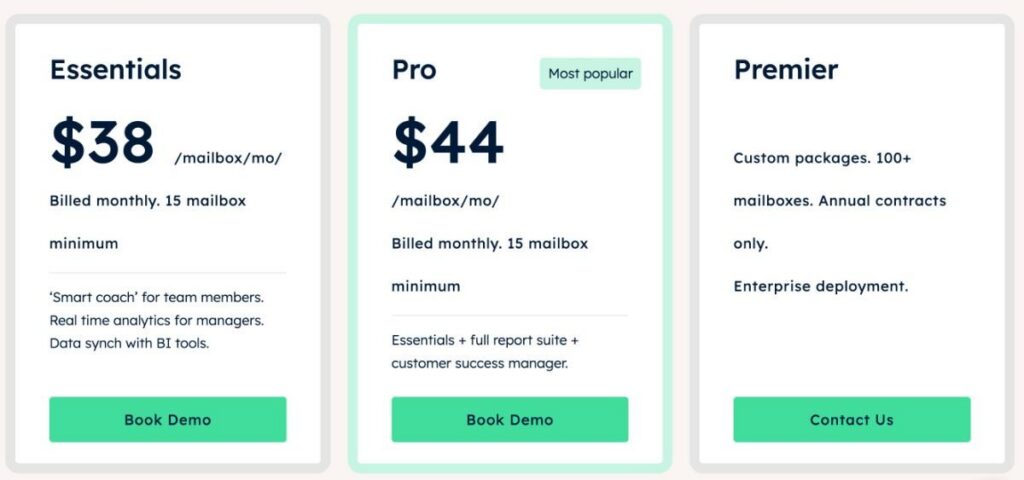
Image via timetoreply
Having trouble with Email Meter? Try timetoreply for free.
Also Read:
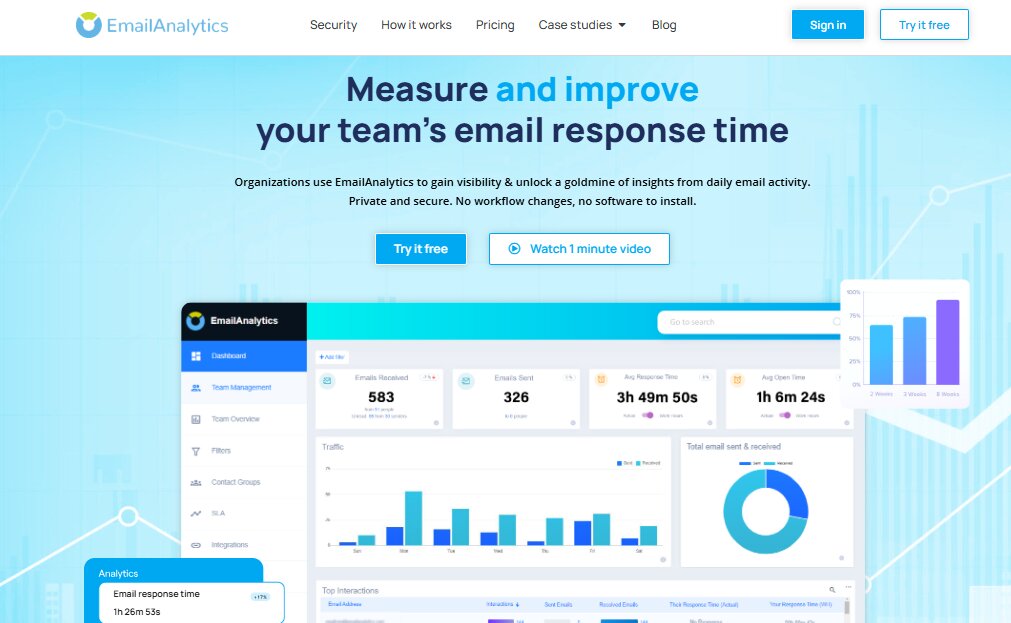
Image via EmailAnalytics
Email Meter alternatives like EmailAnalytics work similarly to Email Meter in that it allows organizations to visualize their team’s email activity within Google Workspace. The solution measures email activity with a view to improving response times.
For teams working exclusively within Google Workspace, EmailAnalytics is among the Email Meter alternatives that can help improve email response times.
However, it is limited to Google’s environment, and the service does not extend to other email platforms. Data is stored in Google Cloud, but other Email Meter alternatives, including timetoreply, can also offer a Google Cloud-hosted solution.
EmailAnalytics also does not provide any integrations with other services, and aspects such as message logs and alerts are not yet available. Security is not as robust as in other Email Meter alternatives, which may create some unease, especially among larger enterprise customers or security-conscious small and medium enterprises.
If you are looking for an email analytics solution that can integrate with any email environment and deliver insights into a broad range of email behaviours and actions, you may need to look at other Email Meter alternatives.
Key features
Pros
Cons
Pricing
EmailAnalytics uses a straightforward per-inbox pricing model. The plan comes with a 14-day free trial with no credit card required.
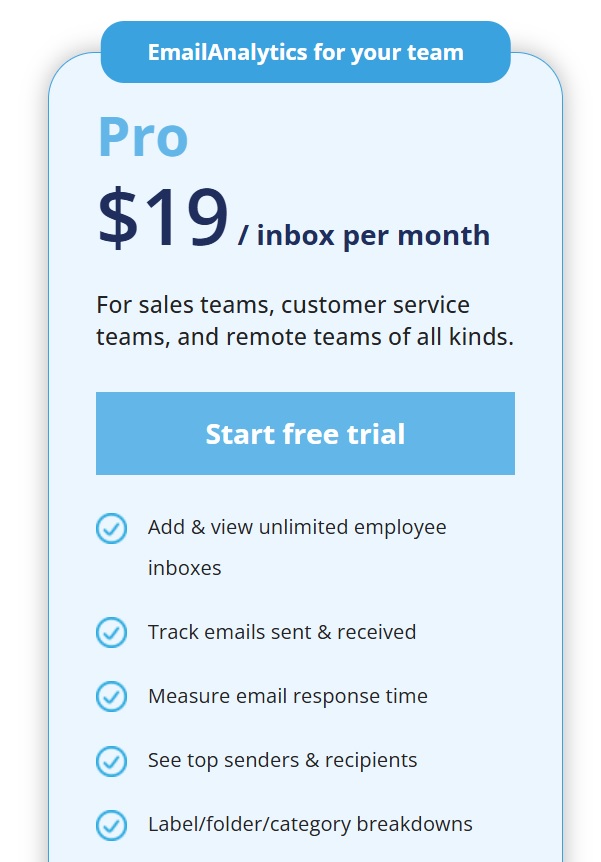
Image via EmailAnalytics
Looking for the best alternative to EmailAnalytics? Try timetoreply for free.
Also Read:
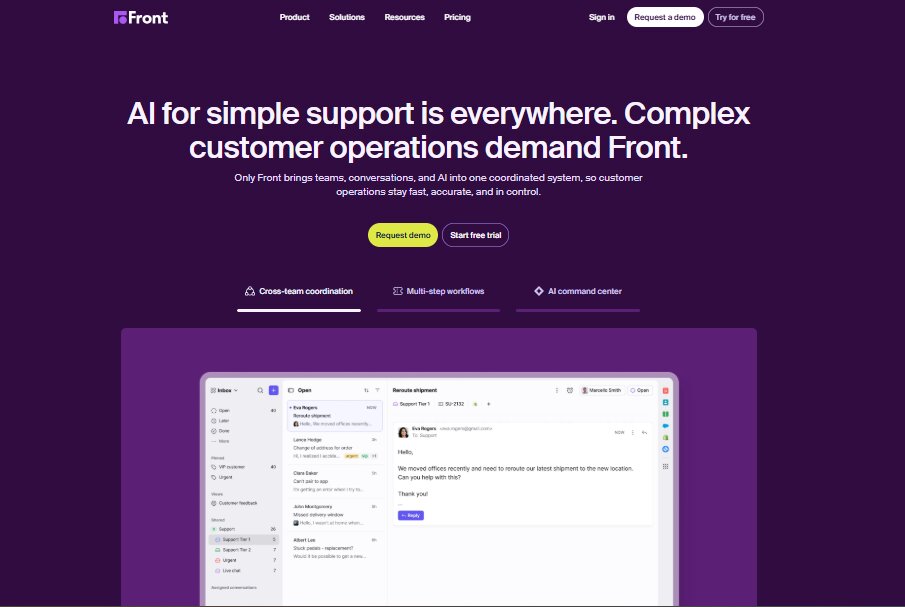
Image via Front
Front is a customer communication platform that combines customer service emails, apps, and teammates into a single view to allow companies to communicate effectively with their customers.
Front offers custom automated workflows and improved collaboration to prevent duplication of tasks while ensuring customer requests are handled quickly and efficiently.
By storing all emails in a single place, Front enables users to quickly notify teammates when their input is needed in internal conversations. Companies can also connect as many inboxes, SMS, or social accounts as they like.
Similar to Front alternatives like timetoreply, Front measures email response times and tracks trends in customer communication through email analytics.
This is one of the best Email Meter alternatives that works best for teams that want to handle customer communication from a single, shared inbox.
Front gives companies powerful analytics into the email performance of their customer-facing support teams, but having to move all email communications into a single platform is not for everyone.
Front was also not designed with sales teams in mind, so companies looking for insights and productivity improvements within their customer-facing sales teams will need to look elsewhere.
Key features
Pros
Cons
Pricing
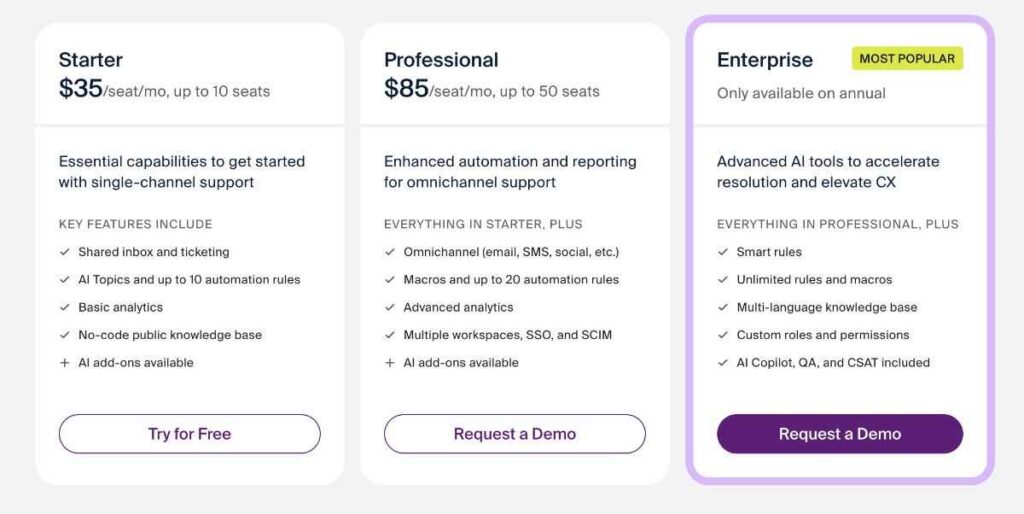
Image via Front
Looking for the best alternative to Front? Try timetoreply for free.
Also Read:
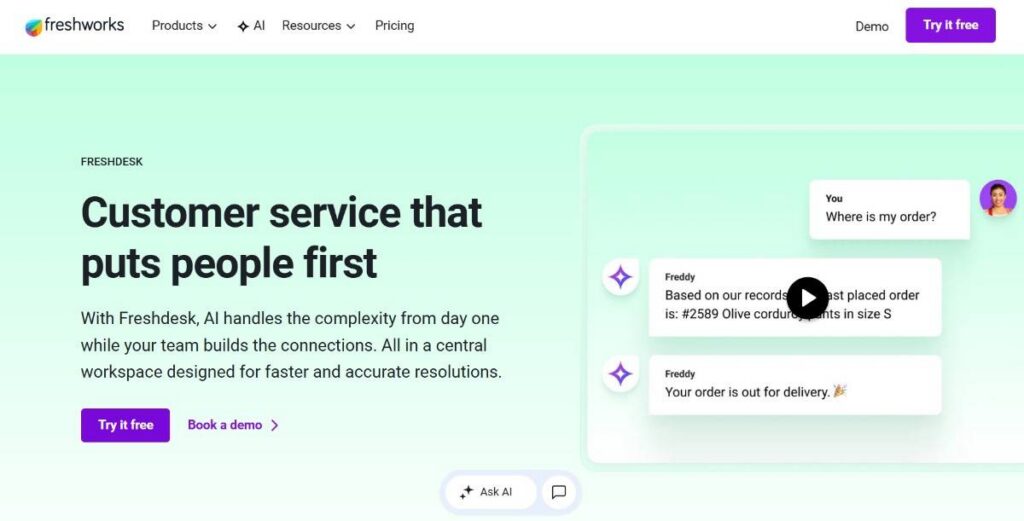
Image via Freshdesk
Freshdesk is an online, cloud-based customer service software solution that provides companies with help desk support and offers several smart automations to help companies resolve customer requests more quickly.
The platform is one of the free Email Meter alternatives ideal for B2C brands that receive a high number of incoming requests. It is a popular choice among companies that are scaling and looking to boost customer engagement and improve customer management.
As a service desk analytics tool, Freshdesk offers analytics across the customer lifecycle to help organizations make business-critical decisions around every customer touchpoint.
Freshdesk allows integration of social media accounts, support phone numbers, live chat, and website conversations to provide support teams with a single view of all incoming requests, regardless of the channel from which they arrive.
It remains a popular choice for companies that want to scale their customer service and email management capabilities as they grow. However, if all you are looking for is insights into your email productivity and helpful email analytics, Freshdesk’s extensive list of features and all-in approach is probably not for you.
Key features
Pros
Cons
Pricing
Unlike other Email Meter alternatives, Freshdesk offers a free plan for small teams and allows up to two users. The paid plans include:

Image via Freshdesk
Looking for the best alternative to Freshdesk? Try timetoreply for free.
Also Read:
Different Email Meter alternatives help teams measure email performance and improve how they handle communication. These tools differ in features, so organisations czb choose based on their email workflow needs.
1. Why should I consider switching from Email Meter to an alternative?
While Email Meter is a useful analytics tool for teams using Gmail and Google Workspace, it has limitations in platform compatibility.
Many businesses need email analytics solutions that work across platforms and offer more customization options. Switching to Email Meter alternatives that are more flexible can improve productivity and better align with your business needs.
2. Do Email Meter alternatives support platforms other than Gmail?
Yes, many Email Meter alternatives support a wider range of email platforms beyond Gmail. For example, timetoreply and EmailAnalytics work with Microsoft Office 365, Outlook, and shared inboxes.
These Email Meter alternatives offer more flexibility in deployment and don’t limit you to Google’s ecosystem. That means better analytics coverage across all your business email communication channels.
3. How do I choose the best Email Meter alternatives for my team?
There are several factors you should consider when comparing Email Meter alternatives to choose the right one for your business. First, consider factors like email platform compatibility, reporting depth, integration with your existing tools (like CRMs), and ease of setup.
If your team relies on fast response times or works across different departments, look for features like SLA tracking, shared mailbox analytics, and custom alerts. You can compare multiple Email Meter alternatives side-by-side to identify which solution aligns best with your performance goals and security requirements.
4. Are Email Meter alternatives secure and compliant with data privacy laws?
Most leading Email Meter alternatives prioritize data security and compliance. However, always check whether the platform stores your email data, how long it’s retained, and if it offers encryption. We recommend you opt for Email Meter alternatives that meet GDPR, HIPAA, and other industry-specific compliance standards.
5. Can Email Meter alternatives provide real-time email performance data?
Yes, many Email Meter alternatives provide real-time email performance data, which is a major advantage over Email Meter’s daily, weekly, or monthly reporting. For instance, tools like timetoreply offer live tracking of key metrics such as reply times. If your business relies on timely communication, choosing a real-time analytics platform is essential for staying competitive.
6. Can Email Meter alternatives integrate with CRM tools?
Yes, many Email Meter alternatives integrate with CRM platforms to help businesses connect email activity with customer data and sales workflows. With this, teams can monitor follow-ups and get better visibility into customer interactions from one place. Some Email Meter alternatives, such as timetoreply, also provide API access and integration capabilities that make it easier to connect with existing business systems.
7. Are there free Email Meter alternatives available?
Yes, some Email Meter alternatives offer free plans or free trials for teams that want to test their features before committing to a paid subscription. For example, Freshdesk provides a limited free plan for small teams, including basic ticketing, pre-built reporting functionality and customer support features.
8. Which Email Meter alternatives are suitable for remote teams?
Tools like timetoreply, Front, EmailAnalytics, and Freshdesk allow businesses to monitor communication workflows even when team members are working from different locations. These Email Meter alternatives also support collaboration through shared inboxes, live dashboards, automated alerts, and cloud-based access. This makes it easy for remote teams to stay aligned and maintain consistent communication standards.
Also Read:
The best Email Meter alternatives depend on what your team needs from an email analytics platform.
If you only need basic reporting within Gmail and Google Workspace, tools like EmailAnalytics may be enough. If your business needs a complete customer service desk with ticketing and multichannel communication, Freshdesk or Front may be a better fit.
However, for businesses focused on improving email response times, tracking team performance, and gaining deeper analytics across different email platforms, timetoreply stands out among Email Meter alternatives.
All in all, timetoreply is the best choice for customer-facing teams that want a scalable email analytics solution that works across Gmail, Outlook, and Microsoft 365.
Request a timetoreply demo today to find out how it can enhance your business productivity among other Email Meter alternatives.
Get live inbox alerts and reply quickly to customer emails with timetoreply

Head of Customer Success @ timetoreply
Barry Blassoples is the Head of Customer Success at timetoreply, where he helps customer-facing teams boost revenue and protect brand reputation by providing actionable insights to improve their business email response times. He has over 15 years of leadership experience across customer success, sales, and marketing roles in high-growth tech companies.



Trusted by high-performing inbound sales teams and customer-facing teams globally.
Close more deals and delight more customers with the faster, smarter, deeper email analytics and performance optimization software that works straight from your team’s inbox.