
AI in email analytics uses machine learning to surface deep insights from your team’s data. It finds patterns, predicts future results, and provides suggestions for the next steps. Tools like timetoreply help you reply faster, spot at-risk customers, and balance workloads.
AI in email analytics uses machine learning to read patterns in your team’s email data. Unlike manual reports, it goes beyond counting messages and reply times.
AI reads sentiment, intent, urgency, and workload. It then turns those insights into helpful recommendations you can act on.
I used to spend weeks building manual data charts and still missed the biggest trends. When I started using AI in email analytics, I’d spot gaps in minutes and immediately know what steps to take next.
According to McKinsey’s State of AI in 2025, 88% of companies now use AI in at least one function. Customer service is one of the most common. Yet most customer-facing teams still measure email the old way. That gap is exactly what AI closes.
This guide covers what AI in email analytics is, how it works, and its capabilities. You’ll also learn its benefits, use cases, and best implementation practices.
AI in email analytics uses machine learning to study your email data and generate insights. Instead of only showing basic opens and clicks, AI looks for patterns, trends, and behavior. Then it flags what needs attention and suggests clear next steps.
Traditional email analytics counts and reports, while AI interprets and predicts. For instance, a basic report shows you that reply times were slower last week. AI in email analytics tells you which accounts were affected and those that are now at risk.
Every customer email gives you two types of data:
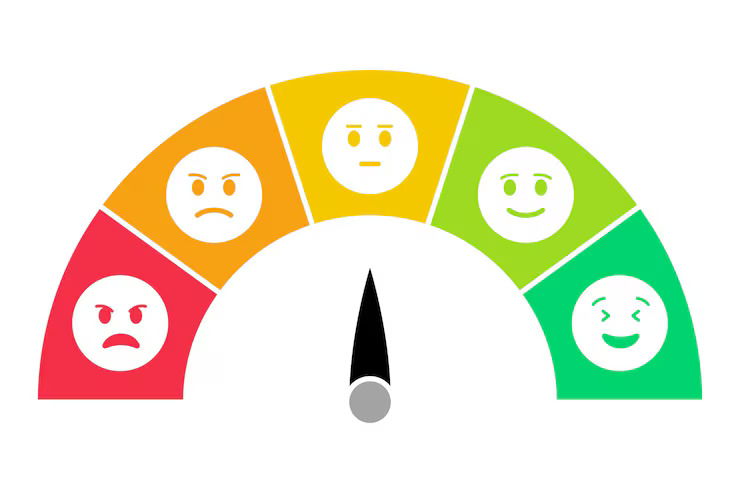
Most teams only measure operational data. AI in email analytics helps you track both types of signals in one place. That gives you a clearer view of both team performance and the customer experience.
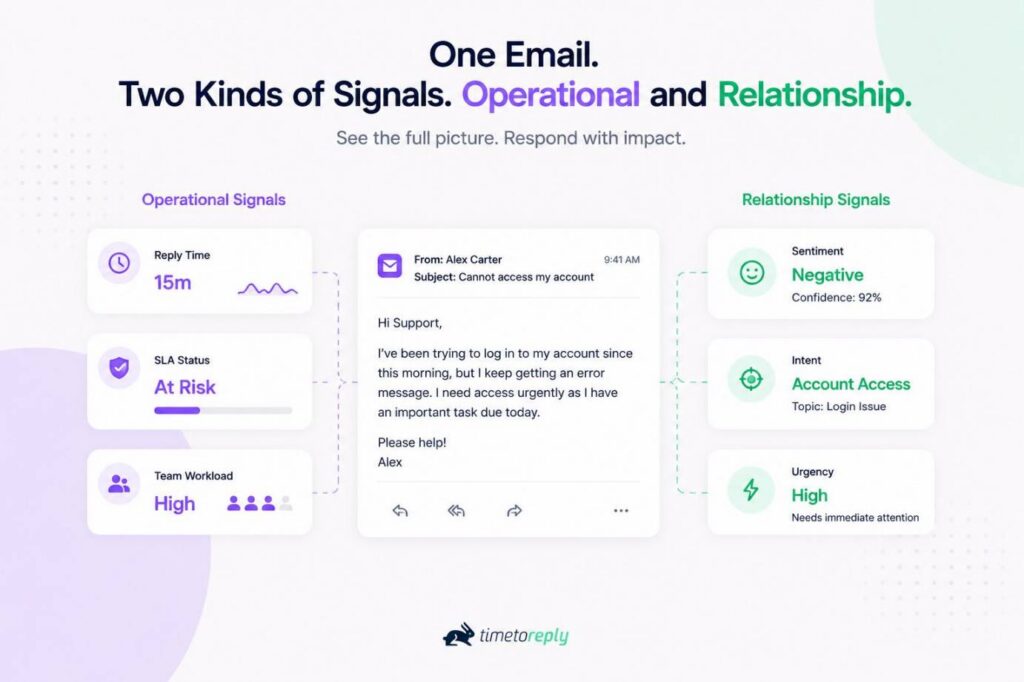
Image via timetoreply
It also helps to know the difference between AI in email analytics and AI in email marketing. AI email marketing focuses on outbound campaigns. It improves subject lines, send times, and personalization to increase sales.
AI in email analytics focuses on inbound customer emails. It helps your team respond faster, improve customer service, and build stronger relationships.
AI in email analytics helps you understand both your team’s performance and customers’ needs. Tracking operational signals and relationship signals helps you improve overall customer service quality.
AI in email analytics connects to your inbox and learns your team’s patterns. It then surfaces insights in real time. You don’t need to change how anyone works. The analytics work alongside the email marketing tools your team already uses.
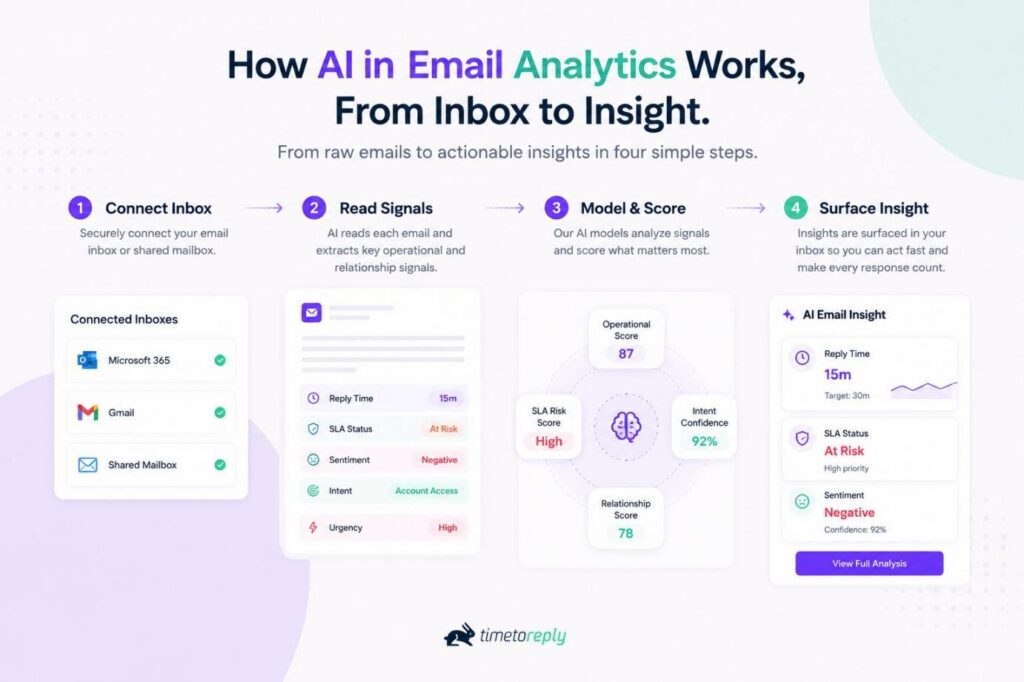
Image via timetoreply
First, the system reads operational data. That means timestamps, threading, email volume, and the gaps between replies. This information helps track metrics like response time, workload, and service level agreement (SLA) performance.
From there, customer data adds context. Where you opt in, AI-assisted signals gauge customer sentiment, intent and urgency. At timetoreply, I call this Smart Data. It’s built to enterprise security standards like SOC 2 Type II, ISO 27001, HIPAA, and GDPR.
Next, AI in email analytics finds patterns across individual and shared mailboxes. It groups similar conversations, spots recurring trends, and identifies high-priority emails.
Managers get real-time dashboards that track team performance, response times, and workload. Team members also receive alerts when emails are approaching SLA targets.
I want to be precise about the word “AI” here. At timetoreply, this is AI-assisted analytics. This includes smart recommendations, prioritization, and Smart Data tags. AI doesn’t answer emails or make decisions on its own. It only gives your team members better information, so they can make the right call.
AI in email analytics connects to Outlook, Microsoft 365 or Gmail. Next, it reads operational patterns plus opt-in relationship signals. It then surfaces prioritized, real-time insight without changing how your team works.
Also Read:
AI in email analytics covers seven core capabilities, from sentiment scoring to workload forecasting. Each one turns a signal your inbox already holds into something your team can use today. You can see these in action in a quick tour.
Here are the AI features to look for:
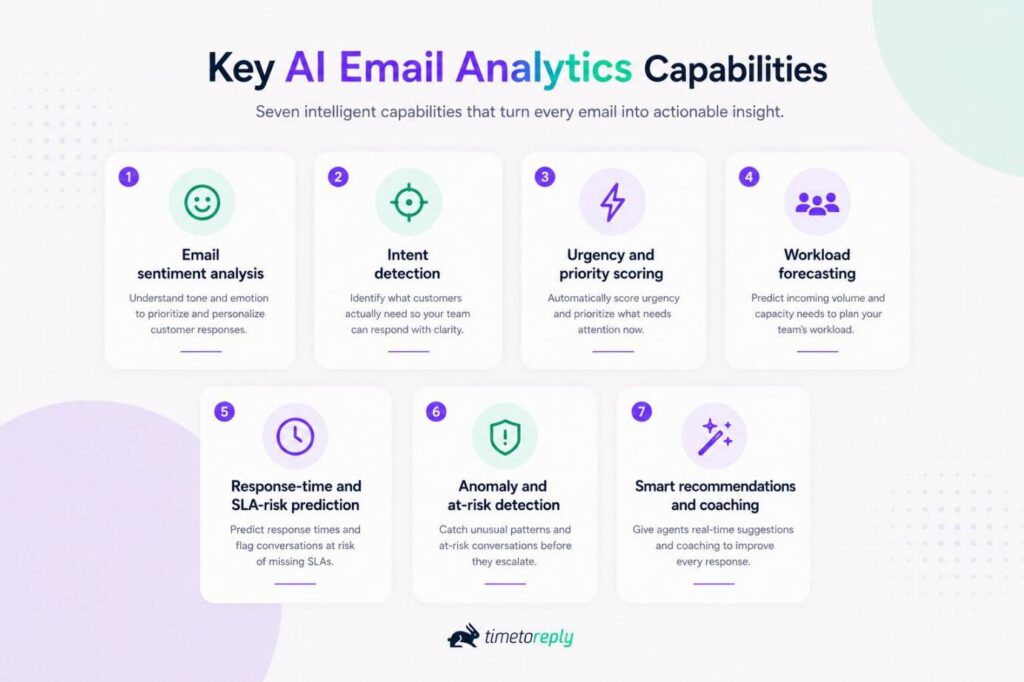
Image via timetoreply
| Capability | What the AI does | Who it helps most |
| Email sentiment analysis | Scores the emotional tone of a message (positive, negative, or neutral) | Customer service and success teams |
| Intent detection | Classifies what the customer actually wants | Customer support, success, and sales teams |
| Urgency and priority scoring | Ranks which emails need quicker replies | Shared mailboxes, support, and service teams |
| Workload forecasting | Predicts inbound email volume and staffing needs | Support managers, service leaders, and operations teams |
| Response-time and SLA-risk prediction | Flags breaches before they happen | Managers, customer service, and account teams |
| Anomaly and at-risk detection | Spots sudden, unusual drops in email activity | Support leaders and customer success teams |
| Smart recommendations and coaching | Suggests next steps and coaching moments | Managers and frontline customer service agents |
AI in email analytics reads the emotional tone of a message and turns it into a signal. It tells you when a customer sounds frustrated, confused, or happy. Email sentiment analysis helps your team spot unhappy customers early. Agents can then respond appropriately before issues spiral out of control.
Customers don’t always say what they want clearly, but AI can read between the lines. It determines whether the sender wants a refund, a product demo, or a price quote. The right AI email analytics solution helps your team route messages to the right person immediately.
With a busy shared inbox, it’s difficult to tell which messages need immediate attention. AI in email analytics reviews customer history, message content, and response deadlines. It then ranks emails by priority. This helps you know which conversations need quick responses and which ones can wait.
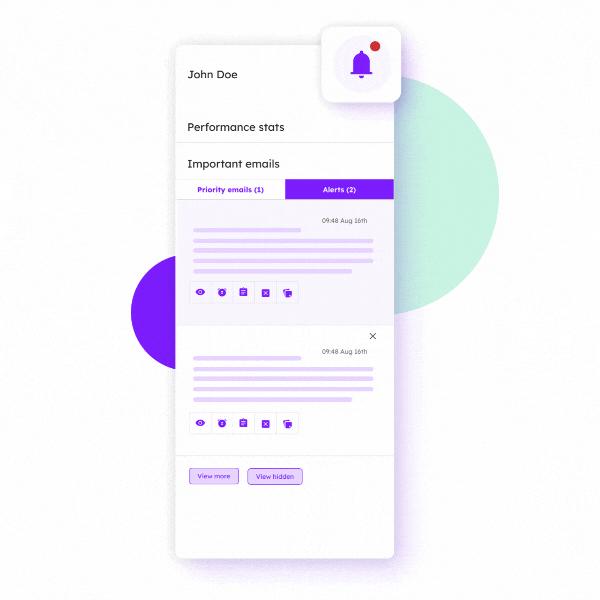
Image via timetoreply
It’s tough to manage a team without any idea of how many emails will arrive tomorrow. AI in email analytics analyzes historical engagement data patterns to predict upcoming busy periods. This way, you can distribute workload and improve productivity.
Salesforce’s 2025 State of Service data backs this up. It shows that 88% of service professionals use AI insights to improve staffing:
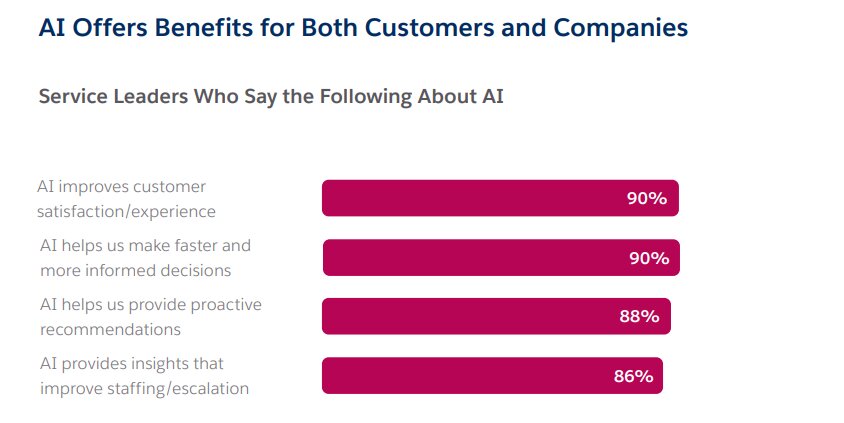
Image via Salesforce
You probably promise customers a reply within a certain time. So, when you miss it, you break email SLAs and damage customer trust.
AI-powered analytics solutions track response-time deadlines. They then send alerts warning you before your team misses those targets. Agents can then respond in time, improving customer satisfaction.
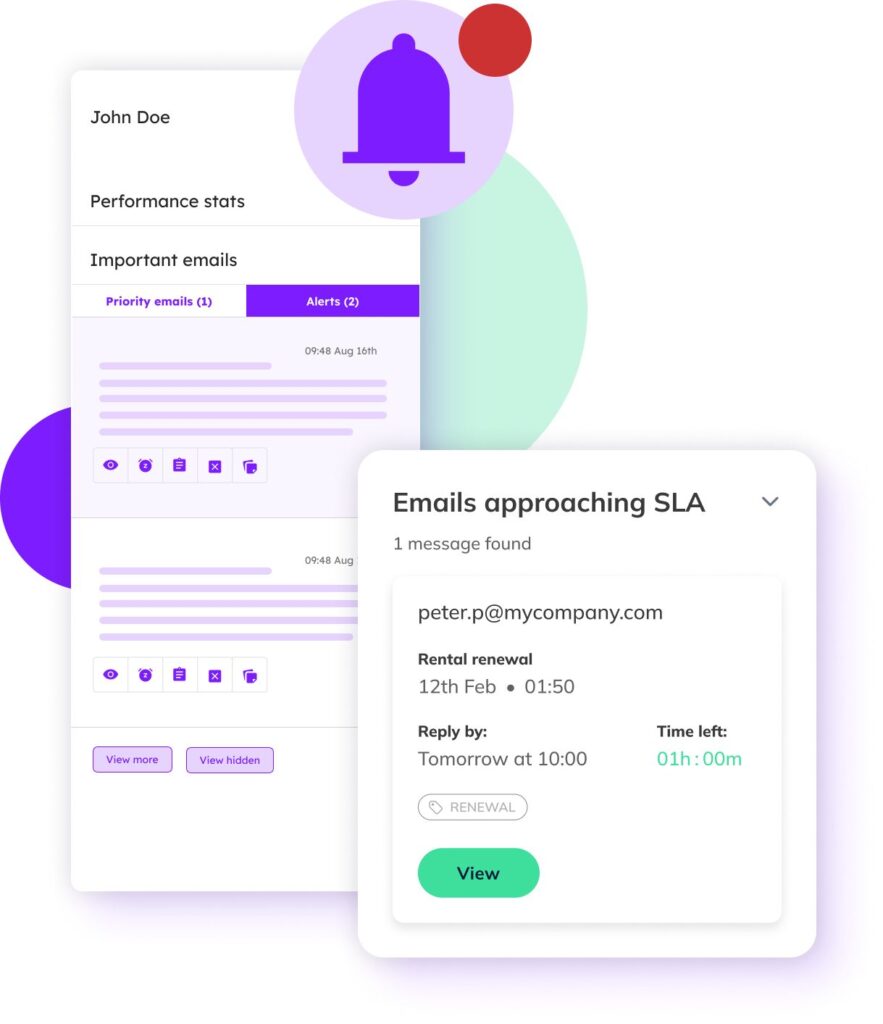
Image via timetoreply
AI in email analytics flags unusual email patterns. It could be anything from sudden spikes in customer complaints to slower replies or lower customer engagement. Early alerts help you investigate and fix problems before customers switch to competitors.
Once AI identifies problems, it also suggests ways to fix them. It may recommend tweaking your workflow or sending quicker email follow-ups. Managers can also use these helpful tips to coach new hires and improve service quality.
AI in email analytics includes functionalities like sentiment analysis, intent detection, urgency scoring, and workload forecasting. It also offers SLA-risk prediction, anomaly detection and smart recommendations.
AI in email analytics helps your team improve performance and deliver better service. It slashes your email response times, reduces churn, and spots workload gaps.
Here are the main benefits of AI email analytics software for customer-facing teams:
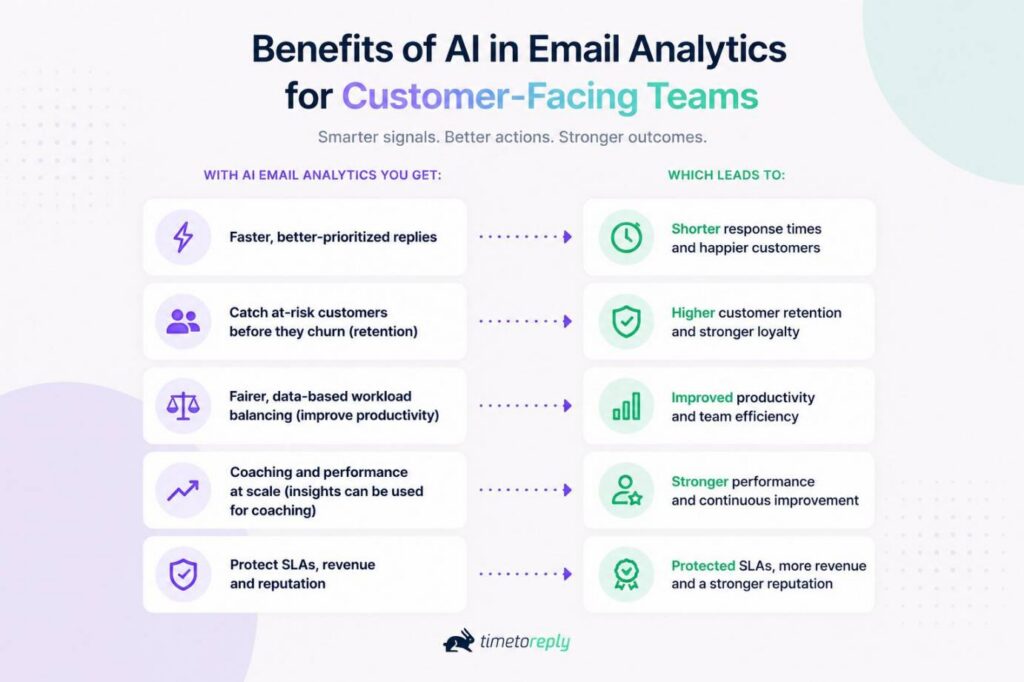
Image via timetoreply
AI helps your team reply faster by showing which messages to answer first. Speedy replies lead to shorter wait times and more satisfied customers.
Research from timetoreply shows that 88% of customers expect a response within an hour. 86% expect their problem to be resolved on the first reply.
After using timetoreply, record retrieval company Ontellus improved its responsiveness from 62% to 86%.
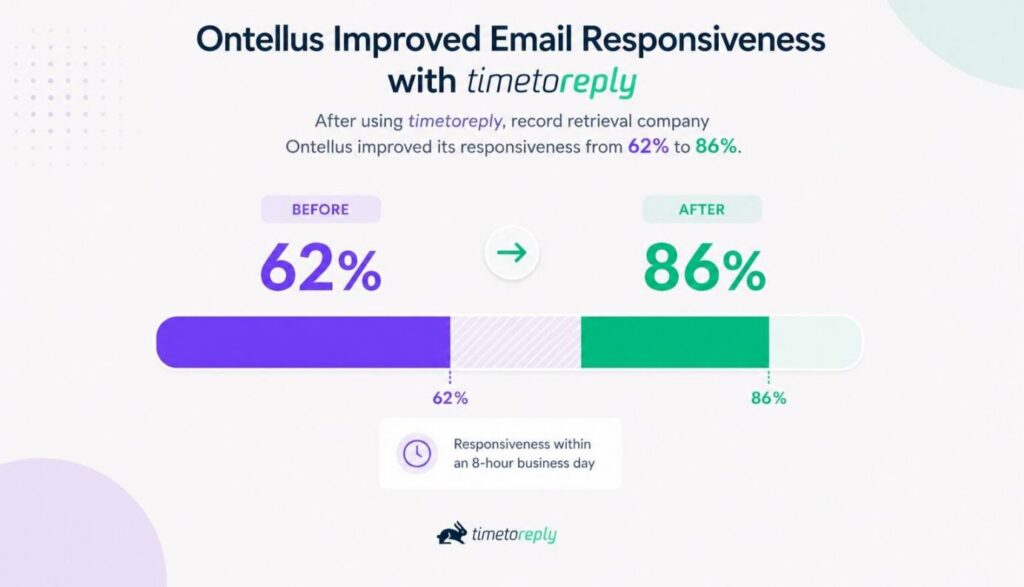
Image via timetoreply
Customers often show warning signs before they leave. They may complain more, respond less often, or show frustration in their emails.
AI in email analytics looks for these patterns in customer behavior and alerts your team. This gives you time to reach out, solve problems, and rebuild trust. Taking action early can reduce churn and improve customer loyalty.
Global payroll company Deel cut its email reply times by 50% after using timetoreply. Faster responses helped the team stay connected with customers and build stronger relationships.
Some team members handle more emails than others. Without clear data, you may never notice the difference.
AI in email analytics shows who has a heavy workload and who can take on more. You can increase your team’s productivity by spreading work more evenly.
One G2 reviewer shared that timetoreply helped them monitor workloads across the team. They use the insights to rebalance assignments whenever needed.
As your business grows, you can’t manually check every single email your team sends.
AI in email analytics reviews thousands of messages to spot trends. It shows what your top performers do well and where others need support.
You can use these real conversation insights to coach your team. Over time, you’ll see your email communication, response time, and customer service improve.
Telecom company Telarus reduced response times in some teams from 7 to 2 hours. When you show someone a real example, they know exactly what to work on.
AI email analytics protects the promises you’ve made to customers. When you can predict an SLA target breach, you can prevent it.
Lead Forensics reduced its average reply time from about four hours to less than two after adopting timetoreply.
A timetoreply G2 reviewer also reported major differences between suppliers. One answered in about 45 minutes with only a 5% SLA breach rate. Another took six and a half hours, with breaches above 50%.
Faster, more consistent replies help you retain customers, earn referrals, and protect your reputation.
AI helps you reply faster, spot unhappy customers earlier, balance workloads fairly, and coach your team with real insights. As a result, you can meet your SLAs, protect your revenue, and build a stronger reputation.
Also Read:
AI email analytics earns its keep across every customer-facing team, from support to account management. The signals are the same. What changes is the job each team needs to accomplish.
Here’s how each team uses AI in email analytics every day:
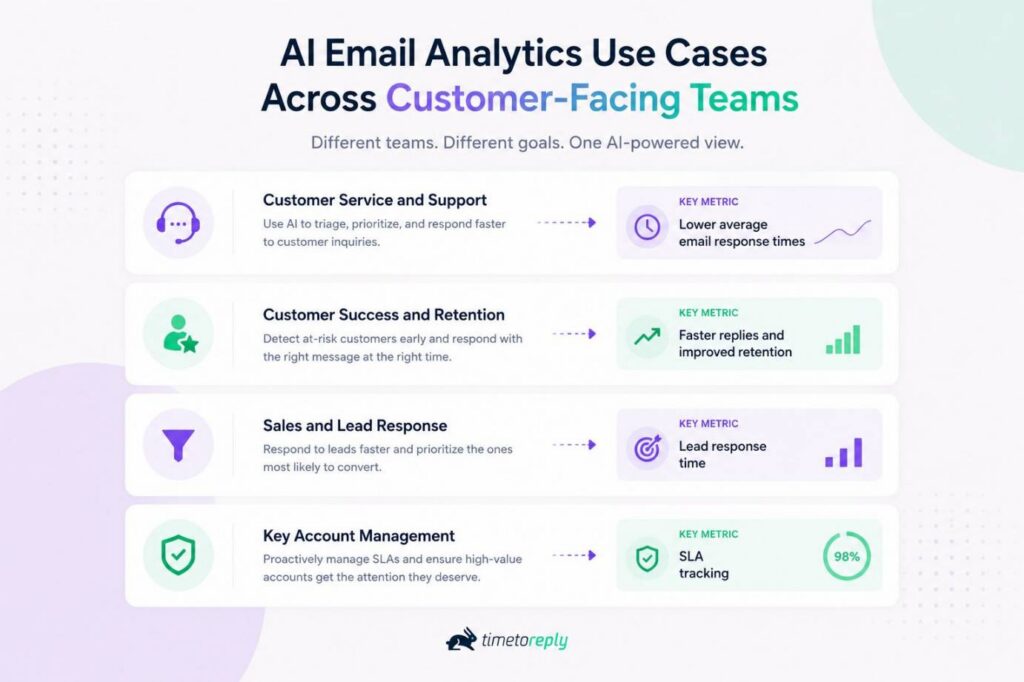
Image via timetoreply
Support teams use AI email analytics to keep average response times low under high volume.
Sentiment and urgency scoring route high-priority time-sensitive emails first. Customer service analytics then show where queues are growing before they become a problem.
Packaging firm Plus Packaging reduced average email response times from 33 to 5 minutes after using timetoreply.
These teams use AI in email analytics to improve customer retention. AI detects changes such as slower replies, negative language, or fewer customer interactions.
Reply-time data also shows whether your team is holding up its end. This is where slow email quietly costs you renewals and referrals. Catching the signal early is the difference between a save and a churn.
Sales teams use AI email analytics to improve reply speeds. The faster you answer a new lead, the better your chances of closing the deal.
Urgency scoring and SLA alerts help sales teams identify high-priority inquiries and respond before competitors do. AI can also detect buying signals, so you can prioritize qualified inbound leads most likely to buy.
Account teams use AI in email analytics to track SLAs per customer and tier. You can set SLAs by account, then watch the ones that need the most attention.
Travel company Satguru used timetoreply to consistently meet customer service level agreements. The company set a goal of answering 60% of emails within 30 minutes and every email within 4 hours.
With clear insights, you can fix small issues before they affect your most valuable relationships.
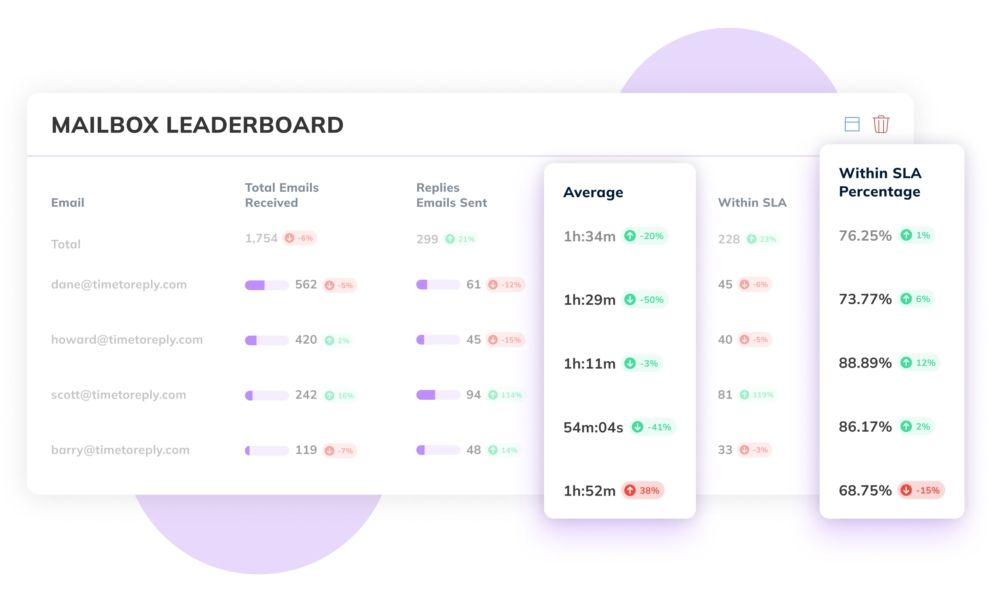
Image via timetoreply
AI in email analytics supports customer support, success, sales, and account management teams. It turns email data into clear insights that help you respond faster and build stronger relationships.
Also Read:
Getting started with AI in email analytics begins with clear goals and human judgment. The technology is only as useful as the goals you point it at. You should also protect customer privacy, understand AI’s limits, and review your results often.
Follow these five email analytics best practices to get the most value from AI:
Before you use AI in email analytics, decide what success looks like. Set clear reply-time goals and SLA targets, so you know what to improve. Track reply times by team, customer, or account level.
This baseline gives AI email analytics software something to measure against. It also makes alerts, reports, and recommendations more useful. With a clear starting point, you can see progress over time.
AI in email analytics should support your team rather than replace it. The solution can alert you about urgent emails or negative sentiment, but your team should always make the final call.
Sometimes, AI may miss the context. For example, a customer might sound upset when they’re actually joking. Use AI to spot important insights, then trust your team to handle the conversation.
Customer trust starts with strong data protection. As you adopt AI in email analytics, make privacy one of your top priorities. Choose reporting software that analyzes email securely and only with the right permissions.
Platforms like timetoreply only read email headers and metadata instead of the message content. It also meets security standards such as SOC 2 Type II, ISO 27001, HIPAA, and GDPR.
These protections matter even more in regulated fields like healthcare, finance, and legal services.
Image via timetoreply
AI in email analytics is powerful, but it has limits. It can spot patterns, flag risks, and predict which emails need attention. However, it can’t fully understand a customer’s history, delicate negotiations, or emotions.
It may misunderstand sarcasm, humor, or sensitive conversations. For these human skills that AI can’t replace, let your team step in.
Check your AI email analytics reports on a regular schedule. Track average response times, SLA compliance, and customer sentiment. Review these key metrics together rather than separately.
Use what you learn to update goals, improve workflows, and coach your team. As your business grows, your email strategy should improve too.
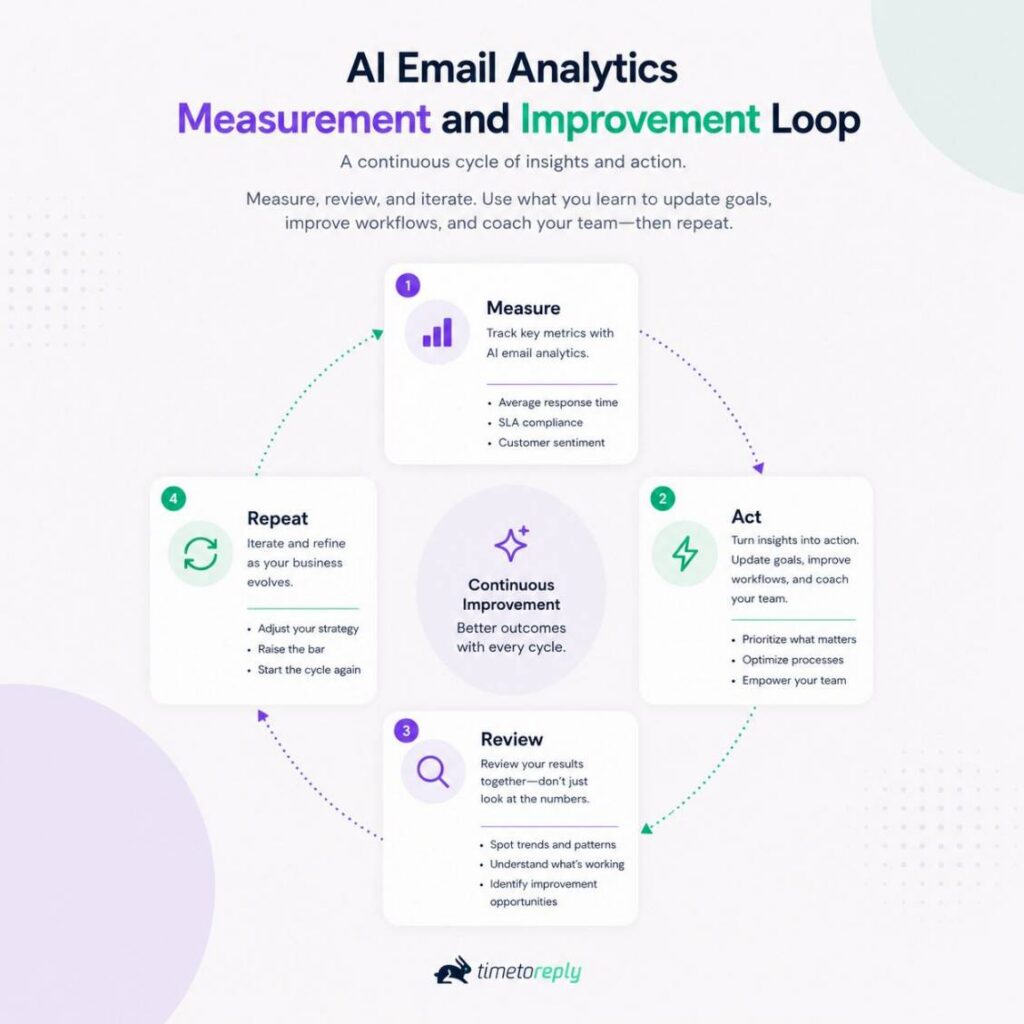
Image via timetoreply
Start with clear baselines, protect customer privacy, and let your team make the final decisions. Evaluating your results regularly helps you improve performance over time.
Also Read:
1. What is AI in email analytics?
It’s technology that uses machine learning to analyze how your team handles customer emails. It reads operational signals like reply time and workload. AI also tracks relationship signals like sentiment and urgency. The goal is to help customer-facing teams respond faster and serve customers better.
2. How can AI analyze my emails?
AI in email analytics looks for patterns in your email activity. It can review reply times, email volume, conversation length, and response gaps. Some tools can also analyze tone and sentiment if you choose to enable those features.
The AI email tool then uses this information to identify trends and score conversations. It also offers predictive analytics that help you spot and fix issues before they grow.
3. What is the use of AI in email analytics?
AI in email analytics helps your team manage inbound emails more effectively. It identifies urgent messages, detects customer sentiment, and predicts SLA risks. This helps your team reply faster, spot problems early, and provide better customer service.
4. What is the difference between AI email analytics and email marketing analytics?
Email marketing analytics measures the performance of your email campaigns. It tracks open rates, click-through rates, engagement, and conversion rates. AI email analytics tracks how your teams handle inbound email. That covers reply times, SLAs, sentiment, and workload.
AI email marketing tools help you improve campaign performance. On the other hand, AI email analytics solutions give you insights to maximize customer communication efficiency.
5. Can AI analyze email sentiment?
Yes. AI in email analytics can evaluate the tone of an email. It identifies whether a customer sounds happy, frustrated, or concerned. This helps you prioritize sensitive conversations and respond with the right level of care.
Even so, your team should always review the conversation because AI can sometimes misunderstand tone or humor.
6. Does AI email analytics read the content of my emails?
It depends on the platform you choose. Some AI email analytics tools like timetoreply only review email headers and metadata, never your email content.
Its Smart Data relationship signals are opt-in and meet SOC 2 Type II, ISO 27001, HIPAA, and GDPR standards. Before you choose a solution, review its privacy policy and security standards.
7. What is predictive email analytics?
Predictive email analytics uses AI to forecast future email performance. It can predict email volume, identify possible staffing shortages, and warn you about upcoming SLA risks. This gives your team time to act before small issues snowball into bigger problems.
8. Is AI email analytics accurate and reliable?
AI is good at using historical data to spot patterns and trends, but it’s not perfect. It can misread sarcasm, jokes, or unusual situations. Use AI signals as a guide, then let your team make the final decision.
AI in email analytics helps you understand how customer-facing teams handle emails in real time. It gives you clear insights into reply times, workloads, customer sentiment, and service performance.
With these AI insights, you can reply faster, catch at-risk customers early, and coach with real data. Reliable AI email analytics software connects with your existing tools like Gmail, Outlook, and CRM platforms.
For the best results, start by measuring your current performance. Track reply times, SLA compliance, and team workload before introducing AI. Then choose a platform that protects your customer data with strong security and privacy standards.
Want to see what this looks like inside your own inbox? Book a demo today and see how timetoreply can help your team respond faster and improve customer satisfaction.
Have a question about getting started? Drop it in the comments, and we’ll answer.
Get live inbox alerts and reply quickly to customer emails with timetoreply

Head of Customer Success @ timetoreply
Barry Blassoples is the Head of Customer Success at timetoreply, where he helps customer-facing teams boost revenue and protect brand reputation by providing actionable insights to improve their business email response times. He has over 15 years of leadership experience across customer success, sales, and marketing roles in high-growth tech companies.

Trusted by high-performing inbound sales teams and customer-facing teams globally.
Close more deals and delight more customers with the faster, smarter, deeper email analytics and performance optimization software that works straight from your team’s inbox.